Abstract
Abstract
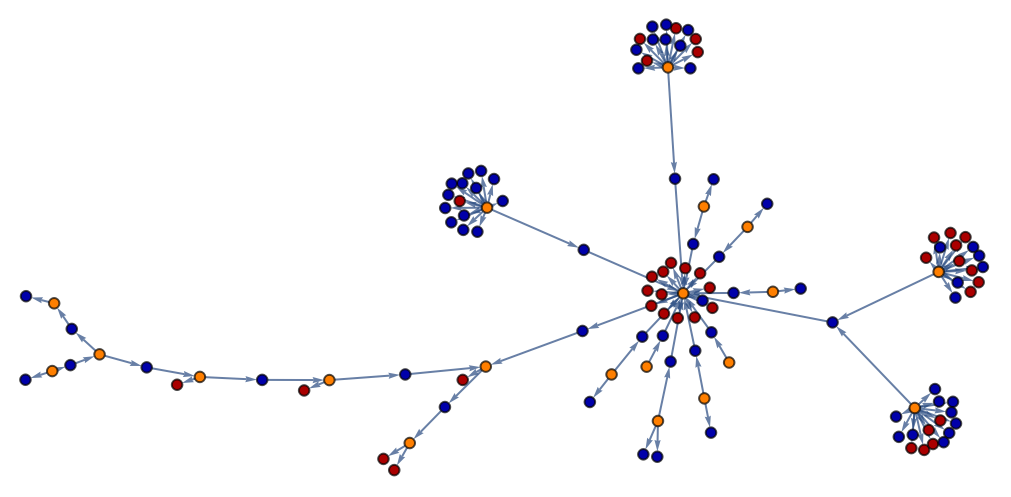
Bitcoin transactions transfer currency from a set of inputs to a set of outputs, recording the information into blockchain. In this project, my goal was to create a graph with Bitcoin inputs, outputs, and transactions as vertices, which is useful to analyze where the money came from and how they were spent.
Hashing transactions' inputs and outputs
Hashing transactions' inputs and outputs
In order to make transactions and outputs easily distinguishable, I wrote several functions that convert an output or an input into a unique id. Since an output later becomes an input for another transaction, this ID should be possible to get both from the input and from the output. The two parameters that are shared between an output and its later “reincarnation” as an input are transaction ID (where it was created) and input/output address, I concatenated them to create the hash of an input/output.
However, it’s important to specifically tackle the case when the output hasn’t been spent, because than there is no address. In this case, I concatenated transactionID and ScriptString, which is a unique parameter, to create a hash. We cannot use this way for all cases because ScriptString is available only for an output, so to use it we need to be sure that the output hasn’t been spent.
However, it’s important to specifically tackle the case when the output hasn’t been spent, because than there is no address. In this case, I concatenated transactionID and ScriptString, which is a unique parameter, to create a hash. We cannot use this way for all cases because ScriptString is available only for an output, so to use it we need to be sure that the output hasn’t been spent.
Get output hash from TransactionID and output:
In[]:=
getOutputHash[transaction_,output_]:=Block[{x},x=transaction<>output["Addresses"][[1]];If[output["SpentQ"]False,x=transaction<>output["ScriptString"]];x]
Get input hash from an input:
In[]:=
getInputHash[input_]:=Block[{x},x=input["TransactionID"]<>input["Addresses"][[1]];x]
Example:
In[]:=
tx="5487efb9dfac162ad14511d25dbefa6656e6876af1a78a1eb027bcb4f9fe0bc9";getOutputHash[tx,BlockchainTransactionData[tx]["Outputs"][[1]]]
Out[]=
5487efb9dfac162ad14511d25dbefa6656e6876af1a78a1eb027bcb4f9fe0bc91JbGsDHGT9JiPage5qdMWJE956rj2XfCub
Graph of a single transaction with outputs
Graph of a single transaction with outputs
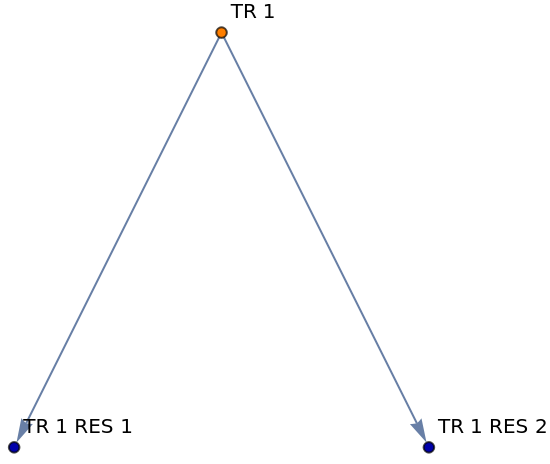
At first, I built a graph with a single transaction and its outputs. Orange vertex represents a transaction, and blue vertices represent its outputs.
Creating the graph:
In[]:=
buildTransactionForOneVertex[transaction_]:=Block[{inputs,outputs,names},inputs:=BlockchainTransactionData[transaction]["Inputs"];outputs:=BlockchainTransactionData[transaction]["Outputs"];names=<|transaction"TR 1 "|>; Table[{names[getOutputHash[transaction,outputs[[i]]]]=names[transaction]<>"RES "<>ToString[i];},{i,1,Length[outputs]}];g=Graph[DirectedEdge[names[transaction],names[getOutputHash[transaction,#]]]&/@outputs,VertexLabels"Name"];g=SetProperty[g,VertexStyle{names[transaction]Orange}];g=SetProperty[g,VertexStyle{names[getOutputHash[transaction,#]]Darker[Blue]}&/@outputs]]
One transaction and its outputs:
In[]:=
buildTransactionForOneVertex["5487efb9dfac162ad14511d25dbefa6656e6876af1a78a1eb027bcb4f9fe0bc9"]
Out[]=
Expanding to multiple transactions
Expanding to multiple transactions
To include multiple vertices into the graph, I start from a pack of transactions and then explore their surrounding using BFS (Breadth-first search) algorithm: when each transaction is processed (further the current processing transaction is mentioned as tx), transactions that were one step before tx (i.e. created its inputs) and transactions that were one step after tx (i.e. where its outputs were spent) are put in the queue, then outputs of tx are added to the graph (just like in the section for one transaction), and the process repeats for next transaction in the queue.
Some transactions may have extraordinary large amount of inputs/outputs, so due to the limited computational power they are cut only to 15 inputs/outputs maximum. However, this way some edges may be lost (e.g. if the 16s output leads to a transaction that is already in a graph, we may lost the edge to it). To deal with this problem I developed a specific function that goes through each input/output and checks whether this input/output is in graph and so the edge should be created.
Finally, total amount of processed transactions is limited too due to the limited computational power.
Some transactions may have extraordinary large amount of inputs/outputs, so due to the limited computational power they are cut only to 15 inputs/outputs maximum. However, this way some edges may be lost (e.g. if the 16s output leads to a transaction that is already in a graph, we may lost the edge to it). To deal with this problem I developed a specific function that goes through each input/output and checks whether this input/output is in graph and so the edge should be created.
Finally, total amount of processed transactions is limited too due to the limited computational power.
Building the graph (main function):
In[]:=
buildGraph[transaction_,verticesAmount_,showBitcoins_:True,showNames_:True,verticesSize_:Medium]:={ClearAllGlobalVariables[];InitializeVariables[];q["Push",{#,0}]&/@transaction;(*MainWhileloopforBFSalgorithm*)Block[{curTx,inputs,outputs,inputTransactionsToAdd},While[q["Length"]>0,curTx=q["Pop"];(*Restrcitionontheamountofnodesprocessed*)If[totalTxCounter>verticesAmount,Break[]];If[KeyExistsQ[names,curTx[[1]]],Continue[]];names[curTx[[1]]]="TX "<>ToString[totalTxCounter]<>" ";totalTxCounter+=1;getTransactionData[curTx[[1]]](*Ifthistransactionisn'tthefirstoneinqueue,addedgesfromitsinputs*);If[curTx[[2]]≠0,addInputEdges[curTx[[1]]]];addMissingEdges[];cutInputsAndOutputs[];outputs=buildTransaction[curTx[[1]],showBitcoins];inputTransactionsToAdd=addInputTransactions[curTx];If[Length[inputTransactionsToAdd]>15,Take[inputTransactionsToAdd,15]];q["Push",#]&/@inputTransactionsToAdd;addOutputsAndPushNextTransactions[];]];completeGraph[showNames,verticesSize];Print[g];}
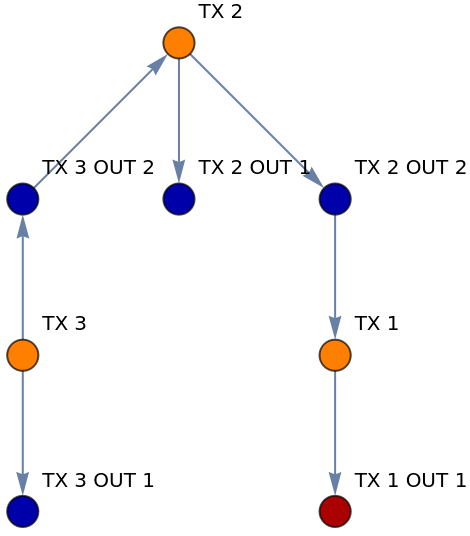
Creating a graph of a random transaction and its surroundings (blue node in the left down corner leads to another transaction, but it isn't depicted on the graph due to the total limit on the processed transactions):
In[]:=
buildGraph[{RandomChoice[BlockchainBlockData[-4]["TransactionList"]]},3,False,True]
Out[]=
{Null}
Examples
Examples
Graph of a single transaction without labels:
Graph of surrounding of two random transactions from one block. Since the graph has two components, these transactions are not connected in this part of the blockchain (probably they are connected in another part that is not depicted in the graph):
Graph of three transactions with labels and Bitcoin amount:
Graph with 10 transactions without labeling vertices and depicting Bitcoin amount:
Graph with 20 transactions without labeling vertices and depicting Bitcoin amount (last parameter means the size of vertices):
Graph with 40 transactions without labeling vertices and depicting Bitcoin amount (last parameter means size of vertices):
Future Work
Future Work
Wolfram Resource Function Multiway Function System may be useful in building even more detailed graphs that are easy to analyze. However, it may be difficult to implement it for Bitcoin Transaction because of the specific nature of Bitcoin transaction data, but I think exploring this direction may be interesting.
There are numerous opportunities in Bitcoin graph visualization that may be used to make transaction graphs easier to understand and more informational. For example, sizes of vertices or color brightness may be used to show the amount of Bitcoins in each output.
There are numerous opportunities in Bitcoin graph visualization that may be used to make transaction graphs easier to understand and more informational. For example, sizes of vertices or color brightness may be used to show the amount of Bitcoins in each output.
Keywords
Keywords
◼
Bitcoin
◼
Graph theory
◼
Cryptocurrency
◼
Blockchain