This paper aims to create an efficient and flexible algorithm that creates a running route, starting and ending in a given spot, of a given length around the city. I used Open Street Map (OSM)’s Import to get road information about a city and set the foundations for the task. In the process, I created algorithms that used OSM information on road intersections and Geo distances to create a weighted undirected graph that simplifies the problem-solving process. I first created an algorithm that randomly finds fixed-length paths (with Wolfram’s in-built path finding function) on sample graphs, and explored different ways of visualizing the path back on the map. I then explored different ways to simplify the graph for more efficient use, created a system for evaluating the “closeness” a cycle was to the expected length, and then created an algorithm that randomly finds fixed-length cycles with Wolfram’s in-built cycle finding function. Later, I introduced two heuristic algorithms that aimed to optimize the run-time of a cycle-finding algorithm and allow for more possible user demands. Last, I included some more additional parameters and variations to the running route for the runner to tweak.
Introduction
Introduction
Many runners all around the world workout and train on runs along the sidewalks of city roads. Due to timing issues and other expectations, many of the runners all around the world may only desire a run of a select mileage. Traditionally, the best way to accomplish a fixed length run would be running on a track, but this can be boring and in many cases unideal. However, accomplishing this task on cities often requires many parameters to satisfy not only a certain mileage but a requirement to return back to the starting point and to repeat as few roads as possible (for the run to be more interesting). Popular services like Google Maps do not yet support fixed-length round trip routing, and randomly looking for a path is also not ideal.
In this computational essay, I decided to start by simplifying the complex map problem into a computational graph problem. We can treat city intersections as the nodes / points of the graph, the roads as connecting these intersections as edges on the graph, and the distances between the intersections as the edge weights. Thus, the problem can be equated to finding a cycle on the weighted, undirected graph as close as possible to a certain fixed-length.
In this computational essay, I decided to start by simplifying the complex map problem into a computational graph problem. We can treat city intersections as the nodes / points of the graph, the roads as connecting these intersections as edges on the graph, and the distances between the intersections as the edge weights. Thus, the problem can be equated to finding a cycle on the weighted, undirected graph as close as possible to a certain fixed-length.
Grid Graphs
Grid Graphs
One of the most common graphs in cities are grids, which can be represented by a square, grid graph.
A square graph of 6 x 6 nodes:
In[]:=
squareGraph[n_Integer]:=Graph[Flatten[{Table[Table[i*n+ji*n+j+1,{j,1,n-1}],{i,0,n-1}],Table[Table[i*n+ji*n+j+n,{j,1,n}],{i,0,n-2}]}],VertexLabels->Placed[Automatic,Center],VertexSize->.35,EdgeWeight->{_->1}];sqGraph=squareGraph[6]
Out[]=
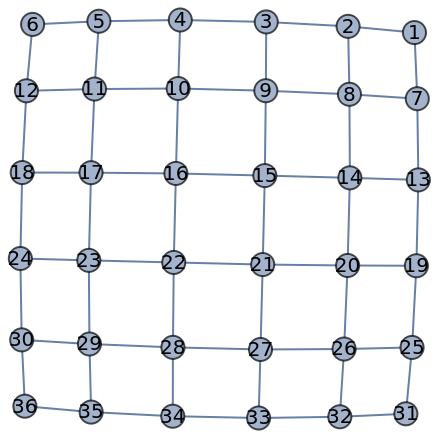
Due to the strong connectivity of grid graphs, we can find numerous different paths of the same length that can extend to cycles. This allows for lots of variation in paths of equal length. While this creates lots of opportunity for variation in running paths, this also makes exhaustive searches for cycles and paths on cities to be time-consuming.
Here, I implemented a function to generate a random path of length k. It uses the in-built function FindPath that allows for an input of a starting node, ending node, and a path length range. Since no ending node was designated, the algorithm runs through all the possible ending nodes and randomly chooses one that satisfies the error range. In the case of grid graphs, we did not consider any error, but error will play an important role in the later sections.
Here, I implemented a function to generate a random path of length k. It uses the in-built function FindPath that allows for an input of a starting node, ending node, and a path length range. Since no ending node was designated, the algorithm runs through all the possible ending nodes and randomly chooses one that satisfies the error range. In the case of grid graphs, we did not consider any error, but error will play an important role in the later sections.
Function that finds a path of length k within an error:
In[]:=
findLengthKPath[k_,st_,g_,err_:5]:=Module[{candidatePaths,rando:=RandomSample[Range[VertexCount[g]]]},candidatePaths=Table[FindPath[g,st,VertexList[g][[rando[[i]]]],{k-err,k+err}],{i,1,VertexCount[g]}];Flatten[Select[candidatePaths,Length[#]>0&,1]]]
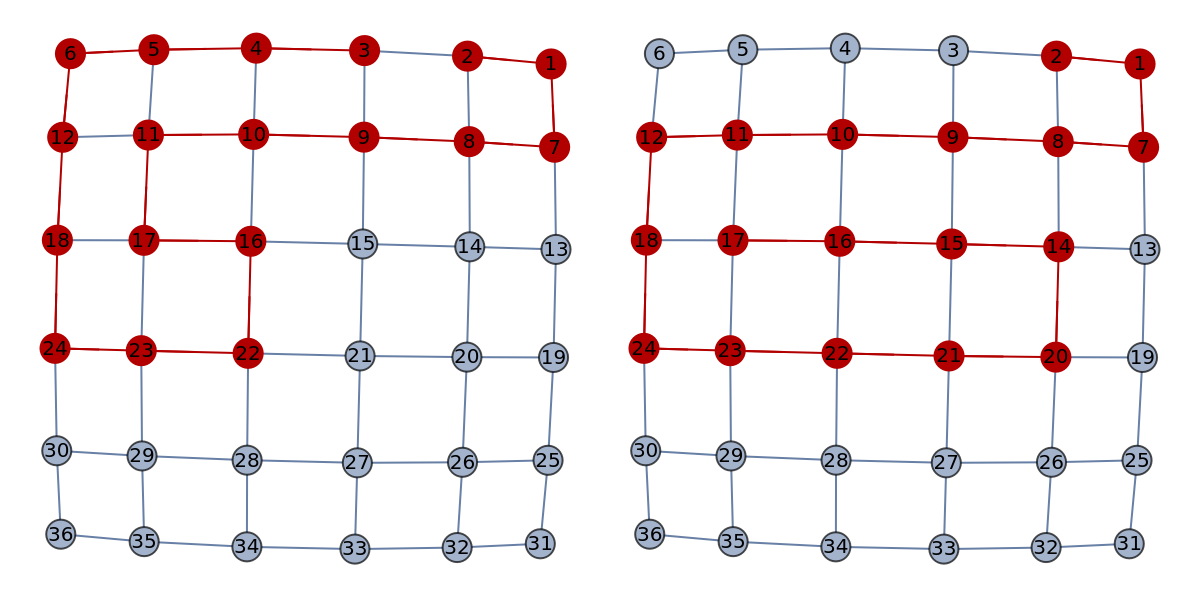
Gives two different example paths:
In[]:=
GraphicsRow[Table[GraphPlot[HighlightGraph[sqGraph,PathGraph[Flatten[findLengthKPath[17,2,sqGraph,0]]]]],2]]
Out[]=
Getting an Actual Map
Getting an Actual Map
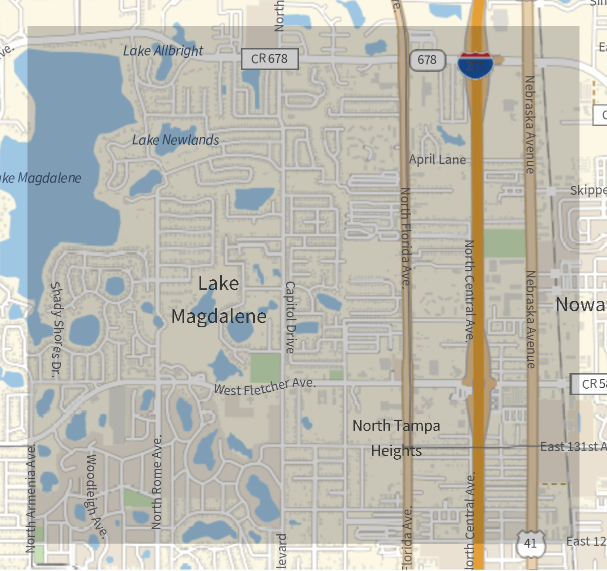
Grid graphs can generalize many city networks, but a way more generalized method considering actual cities would be needed. I will be using the region of Lake Magdalene in North Tampa to demonstrate the roads and the algorithms.
GeoBoundsRegion area bounded by coordinates:
In[]:=
tampa=GeoBoundsRegion[{{28.0600,28.0900},{-82.4843,-82.4481}}];
In[]:=
myRegion=GeoGraphics[tampa]
Out[]=
I then used the OSM (Open Street Map) resource function to import lots of different information about the region from coordinates of traffic lights to type of highway lane it is.
Store the OSM import as a list of Association:
In[]:=
(osm=ResourceFunction["OSMImport"][tampa])//Short
Out[]//Short=
Nodes97742963PositionGeoPosition[{28.0646,-82.4594}],Tags,51240,Ways1
I can visualize a vast network of roads with OSM. In particular, the main information I really care about are the “Ways,” or roads that connect intersections. Information about these roads are essential in making a running route generator.
Select and draw out the main OSM “Ways” in the region:
In[]:=
GeoGraphics[Values[Line[Values[osm[["Nodes",#Nodes,"Position"]]]]&/@Select[osm["Ways"],MatchQ[#[["Tags","highway"]],"primary"|"secondary"|"tertiary"|"residential"|"sidewalk"|"footway"|"path"|"crosswalk"]&]]]
Out[]=
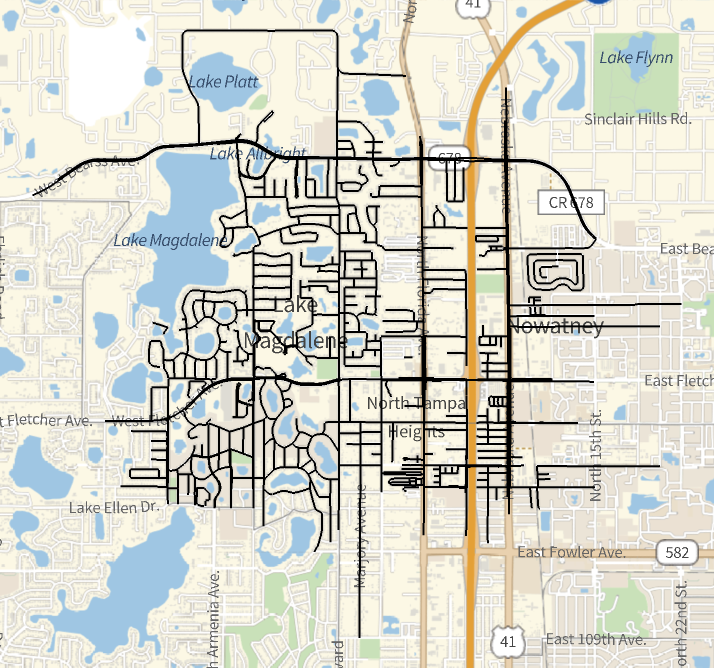
There are many roads under the association “Ways,” and each road includes a set of “Nodes” that represent many important Geo coordinates that make up the identity of the road.
Store the GeoPosition lists in a large table:
In[]:=
(allRoads=Table[osm["Nodes",#,"Position"]&/@osm["Ways"][[i]]["Nodes"],{i,Length[osm["Ways"]]}])//Short
Out[]//Short=
{{GeoPosition[{28.0884,-82.4553}],GeoPosition[{1}],GeoPosition[{28.0881,-82.4553}]},7671,{1}}
I can also access a particular road index’s Geo coordinate list by mapping the Node association’s Geo positions onto the list.
Function that returns the GeoPosition of a road index:
In[]:=
getPathNodeSet[id_]:=osm["Nodes",#,"Position"]&/@osm["Ways"][[id]]["Nodes"]
Some Graph Functions
Some Graph Functions
Because different in-built Wolfram graph functions may have different ways to represent paths, I will declare some functions that will serve as conversions.
Function that adds undirected edges between nodes in a list of nodes on a path:
In[]:=
makePath[lst_]:=Table[lst[[i]]lst[[i+1]],{i,1,Length[lst]-1}]
Function that “removes” undirected edges to form a list of nodes on a path:
In[]:=
flattenPath[lst_]:=Join[Table[lst[[i]][[1]],{i,1,Length[lst]}],{Last[lst][[2]]}]
Function that finds the sum of edge weights on a path:
In[]:=
pathLength[g_,path_]:=Sum[AnnotationValue[{g,path[[i]]},EdgeWeight],{i,1,Length[path]}]
Getting Graph from Map
Getting Graph from Map
One of the first steps of generating a graph from a map is to get the nodes. If I have all the roads as a set / list, I can generate the nodes by simply finding the pairwise set intersections between these maps. I also included the starting and final Geo positions of each road in the list, to get a list of the most important Geo positions that we can use as nodes.
Functions that finds the intersection points and finds the nodes:
In[]:=
findIntersections[st_]:=First/@Select[Gather[Flatten[getPathNodeSet/@st]],Length[#]>1&]findNodes[st_]:=DeleteDuplicates[Flatten[{findIntersections[st],First[getPathNodeSet[#]]&/@st,Last[getPathNodeSet[#]]&/@st}]]
After getting the nodes, I add unweighted edges (I will add weights later) to create a graph. These edges are generated by running through all the roads, and picking out the Geo positions in these roads that exists as nodes. I then linked this subset of nodes with its proper neighbor in order.
Function that generates the edges from a list of roads:
Working with Paths
Working with Paths
Visualizing the entire graph can be very hard because there are simply too many roads, and it will make the graph look too dense. Instead, one approach is to pick out a subset of roads.
Using road index range [26, 66] and use GeoGraphics to visualize some roads:
Visualizing intersections with GeoListPlot:
Finding the intersections of the roads is not extensive enough. I decided to also treat the endpoints of each road as nodes.
Generate nodes with findNodes, and visualize it with GeoListPlot:
Then I construct my edges to make my graph. To match my graph with the Geo positions of the intersection, I assigned vertex coordinates equal to their Geo position relative to the center of the map onto each node.
Generate myGraph and the graphic:
What the graph represents on a map.
Overlay the edge graphic on the edge graphic:
Apply findLengthKPath on this graph:
Highlight the path I found in green with HighlightGraph:
Showing the Path
Showing the Path
The next step was to draw out this path onto the actual map. There are two main ways to do this.
One of the ways is to use the TravelDirections function to trace out a line that denotes the path.
One of the ways is to use the TravelDirections function to trace out a line that denotes the path.
Show a thick purple path sketch with GeoGraphics:
Another way is to use GeoGraphPlot and use the “Walking” GraphLayout option to draw a walking path connecting the dots, represented by nodes on the path.
Show the route with GeoGraphPlot:
A Map of the Entire Region
A Map of the Entire Region
Now I can represent a large part of the North Tampa region as a big graph. Here, I assigned edge weights of each edge as the Geo distance between the two nodes, in feet.
Assign the entire road set (fullSet) to be from index 1 ~7673. Use findNodes, findEdges to generate the fullGraph and SimpleGraph to simplify the large graph:
From this huge array of roads.
Graph all the roads in the region (represented by the graph above):
Getting Cycles in a Nearby Subregion
Getting Cycles in a Nearby Subregion
Trying to find paths or cycles on the entire region can be too time consuming due to the number of nodes and edges. Generating a smaller graph by choosing a continuous subset of roads is also not ideal because the roads are too random and results in many disconnected graphs (as demonstrated by myGraph above). Instead, I decided to limit the range to roads within a particular radius to solve both problems.
Get the starting node somewhere around GeoPosition[{28.0779,-82.4661}], or fullNodes[[217]]:
I take all the intersections within the particular radius with Wolfram’s Nearest function. I then select all the roads that includes these intersections and use this as my set to generate my graph.
Find the road indices that contains nodes within a 0.265 mi radius:
This is what the roads look like. It includes a smaller collection of connected roads around a particular region, but there are still some flaws. Some of the roads seem to include disjointed property roads around people’s houses that are not open for public running.
Visualizing this subset of roads:
First, I still needed to generate the graph with the intersections as the nodes and the roads connecting the intersections as edges. The graph is also undirected, weighted, with the weights as the GeoDistance.
Create the graph tmpGraph:
To address the issue presented before, I deleted nodes that are disconnected from the main graph, because OSM also imports individual house roads, and these normally are in small connected components of small size, mostly less than six. I also deleted edges that are self-cycles. Ideally, we do not want to be running on these routes.
Delete small, disconnected components and simplify the graph:
Reassign the nodes with the nodes of the new graph, and the edges with the edges of the new graph:
Getting the Cycle
Let’s first define a function that randomly finds a length k cycle within some error in feet. In fact, Wolfram actually has an in-built function FindCycle that allows for an input of the starting node, and a range for the cycle length. FindCycle finds all such cycles, so I randomly chose one with RandomSample.
Make a function that finds a length k cycle within an error:
There will be a penalty system for a random path to evaluate the “correctness” of a path / cycle. It will be evaluated as the difference between the total length of the cycle and the expected length of the cycle (as an input), in feet, plus a constant * the number of repeated edges.
Implement the penalty as a function:
The next step is to randomly generate some k-length cycles. In this case, I want to generate a 5280 feet = 1 mile cycle. In the end, I found a close enough 5215.31 ft cycle.
Generate 10 random cycles within a 100 ft buffer, and pick and show the cycle that has the smallest penalty:
Optimizations with Heuristics
Optimizations with Heuristics
I found that the cycle-finding with the in-built Wolfram cycle finding functions were often very slow, which makes sense, as fixed-length cycle-finding algorithms on graphs are inherently very difficult to do efficiently since it is NP-Hard. As a result, such deterministic algorithms would use exponential time solutions that make the algorithm very slow when the number of nodes in the graph network becomes larger. In this section, I provided two heuristics that are most fitting for some different purposes and goals for the runner. These heuristics in theory would be faster than the more brute-force algorithms above, but may result in “cycles” that may not actually be cycles, or cycle lengths that stray from the user’s expected cycle length.
Optimization: Using Two Paths
Optimization: Using Two Paths
One heuristic is thinking about cycles as the union of two disjoint paths. As a result, I can designate and enumerate a node that will be the two paths’ other endpoint and find two paths of length around k/2 that I will join together. The algorithm depends on the fact that the algorithm for finding k-length paths are simpler and quicker, so enumerating two paths would be faster than enumerating a cycle at once. Since the chance that the union of the two paths would look bad is quite high, I gave an option to add how many times I run this method, and the function will return the cycle that has the smallest penalty.
Implement and visualize an example input of the two-path heuristic function:
Beyond being a quicker and more flexible algorithm, this heuristic also allows a runner to set up a half-way-point in their cycle that can be useful in many applications like tracking speed and progress.
Optimization: Using Shortest Paths in Between
Optimization: Using Shortest Paths in Between
Another heuristic that also serves to optimize time is based on the concept that a cycle is a union of several disjoint shortest paths. I designed a heuristic that aims to simulate this by enumerating all subsets that has some number of intermediary nodes. I would then choose the cycle that has the smallest penalty. I made it so that the number of intermediary nodes is an input of my function to add more freedom between balancing accuracy and speed. Since this algorithm is only using shortest paths and enumeration, the time complexity of this heuristic would be in polynomial time, which would be faster than other exponential, deterministic algorithms.
It can be proven that doing finding all-pair-shortest-path can be done in polynomial time, with algorithms like Floyd-Warshall.
It can be proven that doing finding all-pair-shortest-path can be done in polynomial time, with algorithms like Floyd-Warshall.
Create an all-pair-shortest-path matrix that stores a shortest path list in each of its elements:
Since I found that running this heuristic on graphs that are quite larger can still be time consuming, I decided to simplify the graph even more by only considering the connected component that my starting node is on.
Implement and visualize an example input of the shortest-path heuristic function:
This heuristic may also assist runners that want to set up checkpoints, which have a variety of applications like tracking their progress or resting.
More Parameters
More Parameters
Some runners may want to run only in a restricted radius, to not stray too far from their origin and perhaps get lost. Since my code can generate roads of a given radius, in miles, this parameter can be added.
Runners may also not want to define an error of +/- some number of feet for their runs, but instead hope to find a route that is as close as possible to their expected route mileage. This can be done by adding binary search to find the smallest route length larger than the expected length, and the longest route length smaller than the expected length. We can use whether or not findLengthKCycle returns a non-empty set as the binary search check function. However, this would result in an extra log in the time complexity, which slows the algorithm a bit.
Runners may also not want to define an error of +/- some number of feet for their runs, but instead hope to find a route that is as close as possible to their expected route mileage. This can be done by adding binary search to find the smallest route length larger than the expected length, and the longest route length smaller than the expected length. We can use whether or not findLengthKCycle returns a non-empty set as the binary search check function. However, this would result in an extra log in the time complexity, which slows the algorithm a bit.
Run binary search 30 times, and print the upper bound length:
Run binary search 30 times, and print the lower bound length:
Conclusion
Conclusion
Overall, I was able to successfully generate and visualize a running route that includes intersections within a particular radius from a starting point. I was also able to clean-up the convoluted graph network from complicated city maps to make routes more ideal in real-life. I was also able to generate heuristics that should optimize the slow run-time of the cycle-finding algorithm, and I was also able to briefly offer additional parameters for the cycles that aim to satisfy more demands of runners.
Future Directions and Implications
Future Directions and Implications
In future works, I would like to be able to utilize more of the OSM information that includes different types of roads. This can perhaps include more parameters for the cycles like elevation, traffic lights, and filtering less favorable roads. A sensible extension of this project would also be to create a more user-friendly interface that may include buttons and text inputs and uses the cycle-finding algorithms in this paper.
It would also be useful to explore more on the optimization aspect of this algorithm. It would be intriguing to see what optimizations can be applied to reduce the time and space complexity of the road network graph. It would also be interesting to statistically compare the two heuristics and the in-built functions in terms of run-time and accuracy when evaluated with more real world city networks.
It would also be useful to explore more on the optimization aspect of this algorithm. It would be intriguing to see what optimizations can be applied to reduce the time and space complexity of the road network graph. It would also be interesting to statistically compare the two heuristics and the in-built functions in terms of run-time and accuracy when evaluated with more real world city networks.
Acknowledgments
Acknowledgments
I would like to thank my mentor Drake Hayes, TAs Zoya and Sophie, and my mentor group for providing valuable suggestions and support throughout the project. I would also thank all the camp directors and Stephen Wolfram for providing me with the opportunity to do projects with Wolfram Language, and for creating a valuable environment.
Bibliography
Bibliography
◼
Alon, N., Yuster, R., & Zwick, U. (1997). Finding and counting given length cycles. 17(3), 209–223. https://doi.org/10.1007/bf02523189
◼
Floyd-Warshall Algorithm | Brilliant Math & Science Wiki. (n.d.). Brilliant.org. https://brilliant.org/wiki/floyd-warshall-algorithm/
◼
Google Maps. (n.d.). Google Maps. https://google.com/maps
◼
Lewis, R., & Corcoran, P. (2022). Finding fixed-length circuits and cycles in undirected edge-weighted graphs: an application with street networks. Journal of Heuristics, 28(3), 259–285. https://doi.org/10.1007/s10732-022-09493-5
◼
OpenStreetMap Wiki. (2018). Openstreetmap.org. https://wiki.openstreetmap.org/wiki/Main_Page
◼
6.3: Euler Circuits. (2019, August 2). Mathematics LibreTexts. https://math.libretexts.org/Bookshelves/Applied_Mathematics/Book%3A_College_Mathematics_for_Everyday_Life_(Inigo_et_al)/06%3A_Graph_Theory/6.03%3A_Euler_Circuits
CITE THIS NOTEBOOK
CITE THIS NOTEBOOK
Generating running routes with cycle algorithms
by Isaiah Liu
Wolfram Community, STAFF PICKS, July 12, 2024
https://community.wolfram.com/groups/-/m/t/3216366
by Isaiah Liu
Wolfram Community, STAFF PICKS, July 12, 2024
https://community.wolfram.com/groups/-/m/t/3216366