This computational essay explores the complexity of column addition by formalizing it into a set of rules that can be programmatically created. It introduces an algorithm that mimics the common mistakes humans make during column addition, transforming these errors into rules for a multiway system. The states in this system represent different configurations of number grids arranged for column addition. The essay identifies pairs that have the most vertices in the multiway systems as the hardest problems, essentially the ones that cause the most confusion. It also leverages the power of multiway systems to trace back any endpoint to the initial state, providing a tool to identify mistakes at any step when solving the sum. The algorithm also reveals fascinating fractal patterns when plotting pairs of numbers by difficulty, suggesting that getting the precise number of incorrect solutions for a problem might be a computationally irreducible operation.
Introduction
Introduction
The challenge of crunching numbers is a shared human experience. We all recall those early days of arithmetic in primary school - trying to perform column addition without making mistakes. Some sums were harder than others, and sometimes you'd find yourself in a tangle of carries and digits. But have you ever wondered what makes some sums harder than others?
In this project, I'll attempt to create a set of rules for column addition, formalising a procedure that can be programmatically created. I'll also identify the modifications to the addition algorithm that mimic the common mistakes we humans make when we perform column addition. The correct and incorrect steps will serve as rules for a multiway system where the states are different configurations of the grids of numbers arranged for column addition. I'm looking at pairs that have the most number of vertices in the multiway systems as being the hardest problems - essentially, the ones that get us most muddled up.
Previous work has been done to recognise the common errors young students make when learning column addition. Work by Mukunthan (2021) establishes several common addition errors made by students that can be turned into rules that are slight modifications of the correct addition procedure, including forgetting to carry digits over, swapping the carried digits and going one over or one under when adding digits in a column.
In this project, I'll attempt to create a set of rules for column addition, formalising a procedure that can be programmatically created. I'll also identify the modifications to the addition algorithm that mimic the common mistakes we humans make when we perform column addition. The correct and incorrect steps will serve as rules for a multiway system where the states are different configurations of the grids of numbers arranged for column addition. I'm looking at pairs that have the most number of vertices in the multiway systems as being the hardest problems - essentially, the ones that get us most muddled up.
Previous work has been done to recognise the common errors young students make when learning column addition. Work by Mukunthan (2021) establishes several common addition errors made by students that can be turned into rules that are slight modifications of the correct addition procedure, including forgetting to carry digits over, swapping the carried digits and going one over or one under when adding digits in a column.
A Recreation of Column Addition
A Recreation of Column Addition
The first requirement to recreate column addition is to arrange numbers in, well, columns. We can do this by creating a 4x4 2D list where the second and third rows are the digits of the numbers and the first and last are for the carried digits and the answer. This creates a grid that we can use for column addition.
Take the lists of digits of two numbers and pad them with zeros to make them 4 elements long, then add the top and bottom rows of zeros.
In[]:=
columnAddition[{a_, b_}]:=Partition[Flatten@{Table[0,4], PadLeft[IntegerDigits[#], 4]&/@{a, b}, Table[0, 4]}, 4]
Now that we have a grid for column addition, we can implement a simple algorithm that adds these numbers similar to how humans do: start by adding the digits in the ones column, carry digits over if necessary, then move to the tens column and so on.
Add the numbers in the column col of the given grid. If the digits add up to 10, carry over a 1 to the previous column and add only the ones digit to the bottom element in col.
In[]:=
addCol[{grid_, col_Integer}] := IfTotal[grid[[All, col]]]>=10, ReplacePartgrid, {4, col}->Total[grid[[All, col]]]-10, {1, col-1}->1 , ReplacePart[grid, {4, col}->Total[grid[[All, col]]]], col-1;
We can nest the function to neatly recreate column addition as follows:
In[]:=
Grid/@NestList[addCol,{columnAddition[{456,987}],4},4][[All,1]]
Out[]=
,
,
,
,
0 | 0 | 0 | 0 |
0 | 4 | 5 | 6 |
0 | 9 | 8 | 7 |
0 | 0 | 0 | 0 |
0 | 0 | 1 | 0 |
0 | 4 | 5 | 6 |
0 | 9 | 8 | 7 |
0 | 0 | 0 | 3 |
0 | 1 | 1 | 0 |
0 | 4 | 5 | 6 |
0 | 9 | 8 | 7 |
0 | 0 | 4 | 3 |
1 | 1 | 1 | 0 |
0 | 4 | 5 | 6 |
0 | 9 | 8 | 7 |
0 | 4 | 4 | 3 |
1 | 1 | 1 | 0 |
0 | 4 | 5 | 6 |
0 | 9 | 8 | 7 |
1 | 4 | 4 | 3 |
Now we need to create modified rules that represent incorrect steps for adding columns. This can be done by creating multiple definitions for the function addCol, each representing a slightly modified version of the original function. They can be separated by an extra string argument that specifies the type of error that the new definition represents. Running all of these functions for a given state will give us all possible states that emerge when the next step of addition is carried out.
All error functions:
In[]:=
Forgetting to carry over a digit results in there not being a one at the top of the previous column
In[]:=
addCol[{grid_, col_Integer}, "carryAddError"] := If[Total[grid[[All, col]]]>=10, ReplacePart[grid, {4, col}->Total[grid[[All, col]]]-10], ReplacePart[grid, {4, col}->Total[grid[[All, col]]]]], col-1;
In[]:=
Swapping the carried digit with the written digit: the student writes the tens digit in the answer row while carrying over the ones digit
In[]:=
addCol[{grid_, col_Integer}, "carrySwapError"] := If[Total[grid[[All, col]]]>=10, ReplacePart[grid, {4, col}->1, {1, col-1}->Total[grid[[All, col]]]-10 ], ReplacePart[grid, {4, col}->Total[grid[[All, col]]]]], col-1;
In[]:=
The student writes the sum of the digits in the column regardless of size and doesn't carry over even if the sum is more than 9
In[]:=
addCol[{grid_, col_Integer}, "carryFormatError"] := If[Total[grid[[All, col]]]>=10, ReplacePart[grid, {4, col}->Total[grid[[All, col]]] ], ReplacePart[grid, {4, col}->Total[grid[[All, col]]]]], col-1;
In[]:=
When numbers add up to over a thousand, the student doesn't add the new thousands digit in the answer
In[]:=
addCol[{grid_, col_Integer}, "newDigitError"] := addCol[{ReplacePart[grid, {1, 1}->0], col}];
In[]:=
Accidentally calculating a sum to be one higher than it is
In[]:=
addCol[{grid_, col_Integer}, "plusOneError"] := Which[ Total[grid[[All, col]]]>=10, ReplacePart[grid, {4, col}->Total[grid[[All, col]]]-9, {1, col-1}->1 ], Total[grid[[All, col]]]>=1, ReplacePart[grid, {4, col}->Total[grid[[All, col]]]+1], True, ReplacePart[grid, {4, col}->Total[grid[[All, col]]]]], col-1;
In[]:=
Accidentally calculating a sum to be one lower than it is
In[]:=
addCol[{grid_, col_Integer}, "minusOneError"] := Which[ Total[grid[[All, col]]]>=11, ReplacePart[grid, {4, col}->Total[grid[[All, col]]]-11, {1, col-1}->1 ], Total[grid[[All, col]]]>=1, ReplacePart[grid, {4, col}->Total[grid[[All, col]]]-1], True, ReplacePart[grid, {4, col}->Total[grid[[All, col]]]]], col-1;
In[]:=
Applies addCol and all of its different variations to generate a list of possible states after one step of calculation for a given grid
In[]:=
getStates[grid_List] := Join[{addCol[grid]}, addCol[grid, #<>"Error"]&/@ {"carryAdd", "carrySwap", "carryFormat", "newDigit", "minusOne", "plusOne"}]
An example of how getState produces multiple outputs:
The different steps students might take when adding 999 and 998:
In[]:=
Grid/@getStates[{columnAddition[{999,998}],4}][[All,1]]
Out[]=
,
,
,
,
,
,
0 | 0 | 1 | 0 |
0 | 9 | 9 | 9 |
0 | 9 | 9 | 8 |
0 | 0 | 0 | 7 |
0 | 0 | 0 | 0 |
0 | 9 | 9 | 9 |
0 | 9 | 9 | 8 |
0 | 0 | 0 | 7 |
0 | 0 | 7 | 0 |
0 | 9 | 9 | 9 |
0 | 9 | 9 | 8 |
0 | 0 | 0 | 1 |
0 | 0 | 0 | 0 |
0 | 9 | 9 | 9 |
0 | 9 | 9 | 8 |
0 | 0 | 0 | 17 |
0 | 0 | 1 | 0 |
0 | 9 | 9 | 9 |
0 | 9 | 9 | 8 |
0 | 0 | 0 | 7 |
0 | 0 | 1 | 0 |
0 | 9 | 9 | 9 |
0 | 9 | 9 | 8 |
0 | 0 | 0 | 6 |
0 | 0 | 1 | 0 |
0 | 9 | 9 | 9 |
0 | 9 | 9 | 8 |
0 | 0 | 0 | 8 |
Now that we have a way to represent the states of addition grids and a rules that can transform these answers, we can use multiway systems to examine the different paths that a student can (probably) take while adding numbers.
Using Multiway Systems
Using Multiway Systems
Creating the multiway systems
Creating the multiway systems
In order to create a multiway system, we must have an initial state and a set of rules to apply to the initial and subsequent states. Our initial state is the initial arrangement of the addends in a grid. For example, the initial state of the sum 456+987 can be written as follows:
0 | 0 | 0 | 0 |
0 | 4 | 5 | 6 |
0 | 9 | 8 | 7 |
0 | 0 | 0 | 0 |
This state might be transformed differently based on different rules. The following might be the result of the different states that come out of one step of column addition:
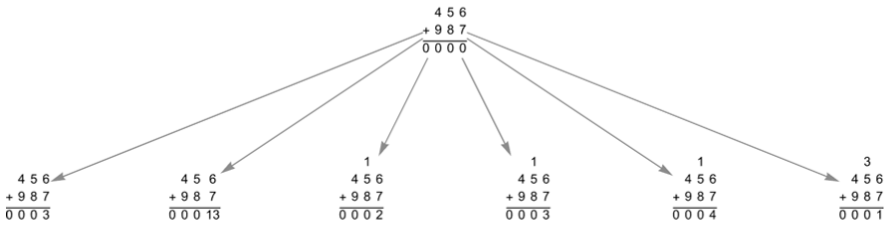
Each of these states will produce more states, and this will continue until the digits in every column are added.
Using the different versions of addCol to represent the different paths a student could take when solving these problems, we can make a multiway system using the function MultiwaySystem from the function repository:
This takes in numbers x and y and makes a Multiway System for 4 steps of column addition. Additional arguments to this function include StatesGraphStructure, StateRenderingFunction, and StateEvolutionFunction, which tell the function how to display the graph and evolve states across different steps.
In[]:=
makeErrorGraph[x_, y_] := ResourceFunction["MultiwaySystem"] <|"StateEvolutionFunction"->getStates,"StateEquivalenceFunction"->SameQ,|>, {{columnAddition[{x, y}], 4}}, 4, "StatesGraphStructure","StateRenderingFunction"->(Inset[Grid[First[#2]],#1]&) ;
Running this code for the addends 456 and 987, we get the following graph as output:
In[]:=
Rasterize[makeErrorGraph[456,987]]
Out[]=
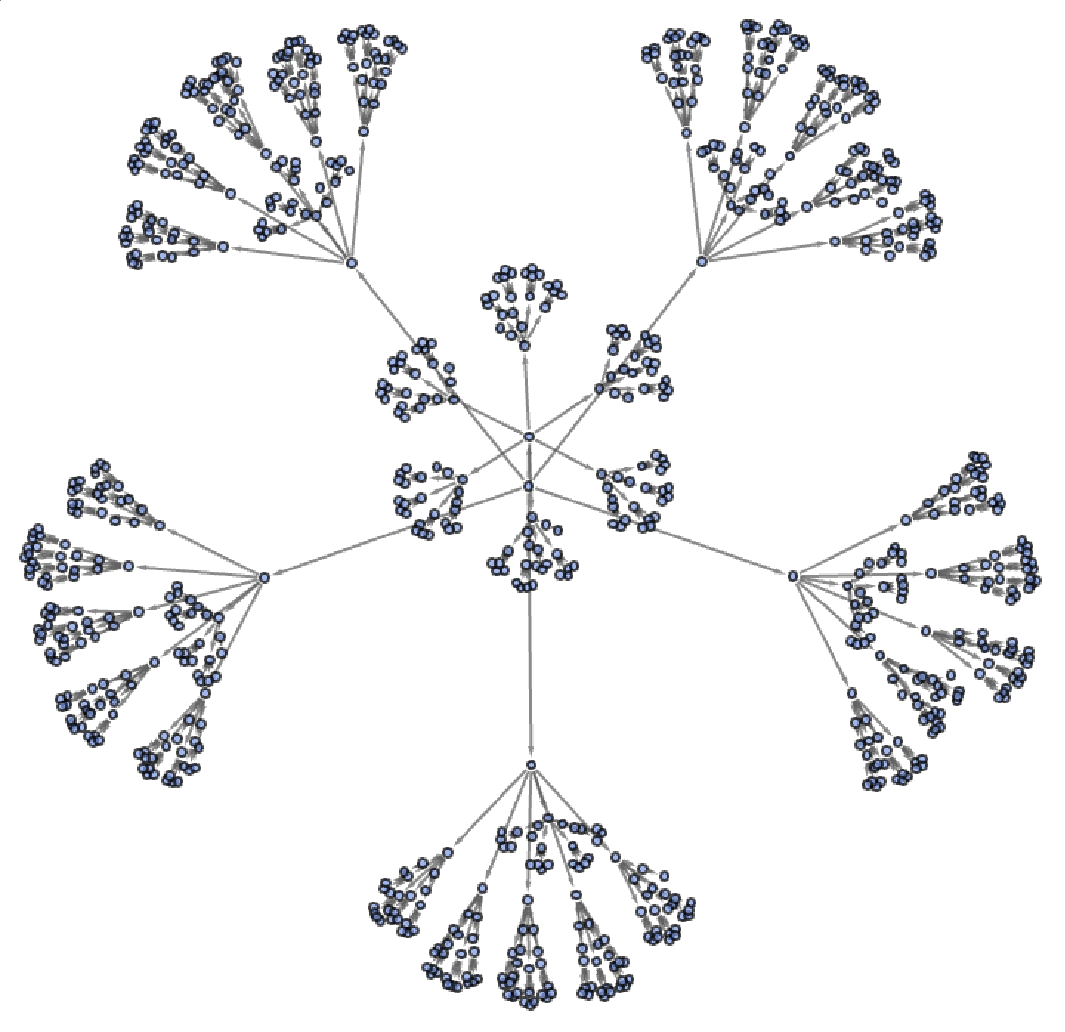
Here, the different nodes represent all the states the grid could reach (the nodes have been reduced to points to decrease clutter) . All the "leafs" or end points of the graph represent different possible solutions to the addition problem, since the grid can't evolve past them. We can display the exhaustive list of all possible errors by showing the endpoints of this graph, which are vertices that don' t have edges leading out of them :
getNumber is a helper function that takes in a list of integers and returns the integer formed from the digits of the list, regardless of the size of the number.
solutionGrids is a list of vertices of the graph that aren't the first item in an edge: vertices that don't have edges leading out of them. These are the endpoints of the graph.
solutionGrids is a list of vertices of the graph that aren't the first item in an edge: vertices that don't have edges leading out of them. These are the endpoints of the graph.
Here, the problem 456+987 is shown to have 358 possible solutions including the correct solution (which is about what you'd expect from a class of primary school students).
Just to make sure that our method is actually useful in determining difficulty, we can test the fact that certain problems produce more errors than others by inputting pairs of numbers that we can intuitively tell are easier to add, for example (101, 100):
According to our rules, there are much fewer incorrect solutions for 101+100 than 456+987, which is to be expected since the latter is a much more complex addition problem. Here's the graph structure for (101, 100):
Finding the hardest problems
Finding the hardest problems
Now that we can find the number of incorrect solutions generated, it's time to find the "hardest" addition problem. In order to find the hardest sums, we need to count the number of incorrect solutions, or “end points” each pair of 3 digit numbers produces, using the multiway systems approach. To automate this process, we can create a function that combines MultiwaySystem with our procedure of finding possible solutions from the end points of a graph:
This function accepts a pair of numbers x and y, and outputs the number of unique solutions we can obtain from applying our rules.
Applying this function for our previous addition problems:
These are the number of solutions we counted in our lists earlier, which shows that countWrongAnswers works correctly.
Now, we need to apply this function over all pairs of numbers up to 3 digits. In order to get all unique pairs of numbers up to 3 digits, we can use the tuples function and apply countWrong answers over the result.
Get all 2-tuples of numbers up to 999, sort each tuple in ascending order so that tuples with the same numbers can be deleted using DeleteDuplicates. Then, associate each tuple (or pair) to the result of countWrong errors. This operation was parallelized to reduce running time, since it is a very intensive operation (there are 500k unique items for which the map occurs), and an iconized version of the output has been provided to avoid running the code again. A random sample has been taken to show the format of the output.
This set of key-value pairs is in the form {x, y} (number of possible unique solutions for x+y)
From this list of key-value pairs, we can find the maximum number from the values in the list, then filter the keys that have a value equal to the maximum to finally get the pairs that produce the most errors.
Select from threeDigitErrorCounts where the value is the highest among the list.
Now we have a list of the hardest addition problems, according to our ruleset. Well, it seems like there's a 44-way tie between the pairs in the above list. But, certain numbers appear more frequently in these pairs than others. Taking the 5 most frequently occurring numbers in these pairs:
Use counts to associate numbers with frequency among the pairs, then
We have a single winner! Since 898 appears in the most number of pairs, according to our rules, it is the hardest 3 digit number to add to any other number up to 999 using column addition.
We can run the same code for all pairs of 2 digit numbers:
Since 99 appears in the most number of pairs, according to our rules, it is the hardest 2 digit number to add to any other number up to 99 using column addition.
Plotting pairs of numbers by difficulty
Plotting pairs of numbers by difficulty
Another interesting exploration that can arise from looking into the concept of difficulty might be to search for patterns within these numbers. Is there a mathematical formula or model that can tell us the "difficulty" of a problem without us having to take this computationally expensive approach, or is this method of calculation irreducible, making it nearly impossible to find the hardest problems for sums of higher order of magnitude (or sums involving ore than 2 numbers) due to a lack of hardware to compute the results for each case?
The most obvious approach here was for me to plot pairs of number on the plane with the number of possible solutions they produce. Since our lists (threeDigitErrorCounts and twoDigitErrorCounts) are already in the form of ({x, y}->number of solutions to x+y), we don't have to do much data processing to be able to plot these points on a plane.
In[]:=
The number of solutions to a problem ranges from 3 to 378. To reduce this range to between 0 and 1, we can subtract 3 from each value, then divide it by (378-375)
In[]:=
since our original list only had unique pairs of numbers, we have to add additional cases for reversed x and y coordinates: the point (a, b) must be identical to the point (b, a), which is added to the list.
In[]:=
Create a Graphics object containing points representing difficulty as a gradient of white to black
This code produces an interesting fractal pattern, that seems to be repeated when the same procedure is carried out for numbers up to 99:
In Fig1, the pair (0, 0) is on the bottom left, while the pair (999, 999) is on the top right. Each point is colored by the number of possible solutions to the sum of the x and y coordinates: the more solutions, the darker the color. This results in an image that resembles a fractal pattern, where the repeating pattern is the darkening of the image from the bottom left to the top right corner. This pattern is also seen in Fig2 that only plots pairs of numbers up to 2 digits.
A possible explanation for this pattern might be that as the hundreds digit of a number increases, numbers get harder to add, therefore the color of the diagram gets darker from bottom left to top right. This trend repeats for tens and ones digits, therefore creating smaller squares with the diagram that also grow darker from the bottom left to top right corners.
Along with being really cool to look at, these fractal patterns also hint to us that finding the precise number of incorrect solutions for a problem might be a computationally irreducible operation, though a mathematical model that gives an approximate difficulty (whether a given point might be brighter or darker) might be quite easy to create, considering that it would be heavily based on the face value of the digits of the numbers in the sum.
A possible explanation for this pattern might be that as the hundreds digit of a number increases, numbers get harder to add, therefore the color of the diagram gets darker from bottom left to top right. This trend repeats for tens and ones digits, therefore creating smaller squares with the diagram that also grow darker from the bottom left to top right corners.
Along with being really cool to look at, these fractal patterns also hint to us that finding the precise number of incorrect solutions for a problem might be a computationally irreducible operation, though a mathematical model that gives an approximate difficulty (whether a given point might be brighter or darker) might be quite easy to create, considering that it would be heavily based on the face value of the digits of the numbers in the sum.
Backtracking From Wrong Answers With Multiway Systems
Backtracking From Wrong Answers With Multiway Systems
Our multiway system approach also has other benefits, including the availability of all common graph algorithms. Using FindPath, we can trace back any endpoint (or final state of the grid) back to the initial state. This can allow a user to enter a wrong answer and generate paths from the initial state of the board to that the final state they reached. This can be used to identify mistakes that they made at any step when solving the sum.
To generate wrong answers, we must find a list of the possible candidates for the final state of the board, given a final answer that the user arrived at:
Find a list of vertices where the last row of the state (or the grid) has the digits of the answer. The "0" is part of the state that indicates that there are 0 steps of column addition left to execute.
Running this code for the graph of solutions to 456+987, we get:
There are three possible unique final states (or endpoints) where the final answer is 1443. The difference in each of them may be in the way errors were made: one of them must be the correct route, while the two others involve errors that cancel each other out, still giving the correct answer . We can now use FindPath to get the precise path that led to each of these outputs:
Generate the initial state given a pair of numbers, then run findPath on the multiway system for the initial state and each of the endpoints of the graph found using findLastStep.
Running this for 456 and 987 with the correct answer of 1443:
While this gives us the correct paths, we need to format this output into a more readable grid-like format. We can achieve this using pattern replacements and the builtin Grid function:
createAdditionGrid accepts a 2D array representing a state of the column addition grid, and replaces all zeros that are not normally seen in column addition with empty strings, then arranges the elements in a grid with a divider above the 4th row representing the line between addends and sum.
visualizeAdditionErrors generates output from backTrace and applies createAdditionErrors onto each state of the graph after structuring it into 2D grids.
visualizeAdditionErrors generates output from backTrace and applies createAdditionErrors onto each state of the graph after structuring it into 2D grids.
Applying the function to 456 and 987 with the correct answer 1443:
This also applies for incorrect solutions, like 1342 :
And for 2 digit numbers:
Thus, using graph algorithms on multiway systems, we have also created a way to predict the path students may have taken to arrive at a answer to an addition problem of up to 3 digits.
Future Work
Future Work
A very useful extension to this project might be to generalizable version of the program that applies to numbers of any length. While evaluating this over pairs of larger numbers might be too computationally expensive, the back tracking algorithm can be very helpful for academic purposes.
Similar explorations with subtraction, multiplication and division might also produce insightful results.
Similar explorations with subtraction, multiplication and division might also produce insightful results.
Acknowledgements
Acknowledgements
I want to thank my mentor, Annemarie, for her help throughout the process of discovering the correct approach to the problem and both coding and writing my essay. I would also like to thank the staff at WSRP, along with Stephen Wolfram, for giving me the opportunity to work on this creative and fun project.
References
References
◼
Mukunthan, T. (2021). Primary school children’s errors in addition. Asian Journal of Multidimensional Research (AJMR), 10(3), 15–25. https://doi.org/10.5958/2278-4853.2021.00131.2
◼
Rowland, Todd. "Multiway System." From MathWorld--A Wolfram Web Resource, created by Eric W. Weisstein. https://mathworld.wolfram.com/MultiwaySystem.html
CITE THIS NOTEBOOK
CITE THIS NOTEBOOK
Using multiway systems to determine the hardest two and three-digit addition sums
by Parth Bhardwaj
Wolfram Community, STAFF PICKS, July 13, 2023
https://community.wolfram.com/groups/-/m/t/2964739
by Parth Bhardwaj
Wolfram Community, STAFF PICKS, July 13, 2023
https://community.wolfram.com/groups/-/m/t/2964739