In a previous post, I explored some quantum aspects of the International Year of Quantum (IQY2025) logo. Here, I expand on that by incorporating effects such as geometric phases, e.g., Aharonov-Bohm (AB) to further emphasize the logo’s topological properties. Comparing it to an unfolded version reveals these topological features more clearly. The shift in the statistics of spacing between energy levels due to AB effect was expected, but interestingly the logo (twisted knot) showed stronger shift. The unexpected effect, at least for me, was the localization of eigenstates due to AB effect for the logo eigenmodes.
Special thanks to Michael Trott and John McNally, for their suggestions and helps.
The case without AB effect
The case without AB effect
AB effect
AB effect
First, we want to find the vector potential for an ideal, “long” solenoid (or flux tube) whose axis is the line joining two points in space. Although the magnetic field is confined to the interior of the solenoid, the vector potential outside is nonzero and has a nontrivial topology (this is the basis for the Aharonov–Bohm effect). For simplicity, we assume that the solenoid is ideal (infinitely long with uniform interior field and zero field outside)
Find the centroid of the logo and another point, such that they are the two two points for the solenoid axis:
In[]:=
center=RegionCentroid[DiscretizeGraphics@tube];p1={0.725,0.731,0};solenoid=Tube[{TranslationTransform[p1-center][p1],InverseFunction[TranslationTransform[2(p1-center)]][center]},.03];
Visualize the solenoid (rotate the below image to see it from different angles; note solenoid passes through the logo and the ring without touching them):
Graphics3D[{{ring,tube},{Green,solenoid}},Boxed->False,AxesLabel->{"x","y","z"}]
Out[]=

The solenoid is centered at “center” with its axis along “n”. Any point “vec” is decomposed into a part parallel and perpendicular to the axis:
$Assumptions={x,y,z,nx,ny,nz}∈Reals;n=center-p1//Normalize;vec={x,y,z};rP=(vec-center)-((vec-center).n)n;
The vector potential in a coordinate-independent form:
Axyz=Cross[n,rP]/Norm[Cross[n,rP]]^2//FullSimplify
Out[]=
(0.679486-0.929529y-0.255777z)(++),(-0.673909+0.929529x+0.26562z)(++),(0.0087296+0.255777x-0.26562y)(++)
2
(0.0087296+0.255777x-0.26562y)
2
(0.673909-0.929529x-0.26562z)
2
(0.679486-0.929529y-0.255777z)
2
(0.0087296+0.255777x-0.26562y)
2
(0.673909-0.929529x-0.26562z)
2
(0.679486-0.929529y-0.255777z)
2
(0.0087296+0.255777x-0.26562y)
2
(0.673909-0.929529x-0.26562z)
2
(0.679486-0.929529y-0.255777z)
Now I want to visualize the vector potential. To do so, I will need some functions that I simply create them using NotebookAssitant.
A function that taking a point, and moves/translate it along a vector with a magnitude (that determines the amount of displacement):
In[]:=
translatePoint[point_,vector_,magnitude_]:=Module[{unitVector,translationVector},unitVector=Normalize[vector];translationVector=magnitude*unitVector;point+translationVector]
A function that takes a given normal vector, and finds the plan perpendicular to that, at a given point:
In[]:=
perpendicularPlaneEquation[normalVector_,point_]:=Module[{a,b,c,x0,y0,z0},{a,b,c}=normalVector;{x0,y0,z0}=point;(*Equationoftheplane*)a(x-x0)+b(y-y0)+c(z-z0)==0]
Note that vector potential has the same features along different planes perpendicular to the solenoid axis. Now we visualize the vector potential.
Move along solenoid axis, and generates a vector plot of the vector potential for different perpendicular planes:
In[]:=
imgsVectorPotential=Tablereg=BoundingRegion[pnt,r,n],"FastBall";Show[Graphics3D[{{ring,tube},{Green,solenoid}},Boxed->False,AxesLabel->{"x","y","z"}],SliceVectorPlot3D[Axyz,{perpendicularPlaneEquation[n,pnt]},{x,y,z}∈reg,VectorScalingAutomatic,VectorPoints->Fine],PlotRange->{{-.7,1.7},{-.7,1.7},{-.7,1.7}}],{pnt,Table[translatePoint[center,n,i],{i,-.7,1,.1}]};
Turn them into a GIF:
In[]:=
Export[NotebookDirectory[]<>"imgsVectorPotential.GIF",imgsVectorPotential]
Show them:
Out[]=
Set the Hamiltonian:
In[]:=
ℋ=SchrodingerPDEComponent[{u[x,y,z],{x,y,z}},<|"ReducedPlanckConstant"->1,"Mass"->1/2,"MagneticVectorPotential"->100.Axyz|>]//Chop;
Find the eigensystem in the logo:
In[]:=
{valsLogoAB,funsLogoAB}=NDEigensystem[ℋ,u,{x,y,z}∈filledTube,500,Method{"Eigensystem"{"Arnoldi","MaxIterations"∞},"PDEDiscretization"{"FiniteElement",{"MeshOptions"{"MaxCellMeasure"0.0001}}}}];
Find the eigensystem in the ring:
In[]:=
{valsRingAB,funsRingAB}=NDEigensystem[ℋ,u,{x,y,z}∈ring,500,Method{"Eigensystem"{"Arnoldi","MaxIterations"∞},"PDEDiscretization"{"FiniteElement",{"MeshOptions"{"MaxCellMeasure"0.0001}}}}];
Plot eigen-energy of ring and logo:
In[]:=
ListLinePlot[Chop@{valsLogo,valsRing,valsLogoAB,valsRingAB},PlotLegends->Placed[{"Logo","Ring","Logo+AB","Ring+AB"},{Right,Bottom}],Frame->True,FrameLabel->{"Energy level","Eigenenergy"},ImageSize->400,AspectRatio->1/2,ScalingFunctions->"Log"]
Out[]=
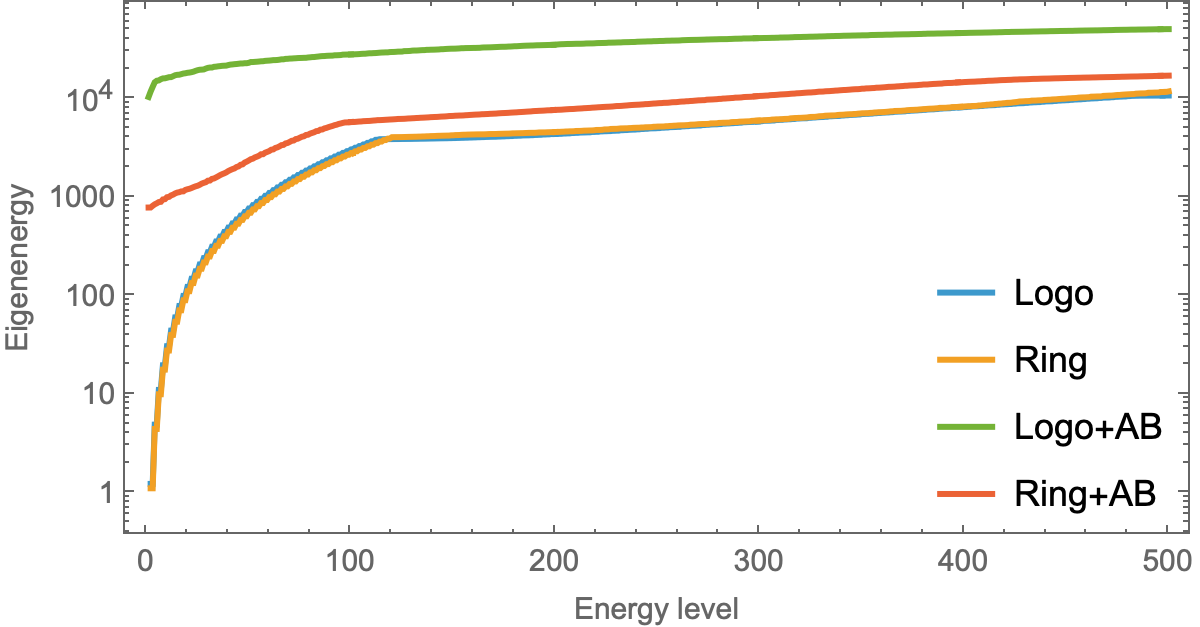
A simple energy-level statistic is the probability distribution of the spacings between neighbouring levels:
As expected, AB shifts the Compare spacing between energy levels:
Visualize eigenstates:
Turn them into a GIF:
Visualize them:
Pick the level 160:
Rotate it from different view points:
Make a GIF:
Visualize them:
Compare eigenmodes of no-AB with those including AB effect (pay attention to AB cases that look more localized):
Make a GIF:
Visualize them:
CITE THIS NOTEBOOK
CITE THIS NOTEBOOK
Logo of International Year of Quantum Science and Technology: Aharonov-Bohm effect
by Mohammad Bahrami
Wolfram Community, STAFF PICKS, February 23, 2025
https://community.wolfram.com/groups/-/m/t/3399498
by Mohammad Bahrami
Wolfram Community, STAFF PICKS, February 23, 2025
https://community.wolfram.com/groups/-/m/t/3399498