Even a simple polyhedron can have a staggering number of distinct flat nets it can be folded from and unfolded to. Dodecahedron, a small Platonic solid composed of just 12 pentagonal faces has astounding number of 43380 distinct nets. Finding all nets for an arbitrary polyhedron is generally a daunting task. To appreciate this simple fact I though of creating an art project. This notebook goes over design and generation of a video that takes viewer inside and outside of Jabulani Polyhedron while background displays numerous distinct nets that can be folded up to get the polyhedron. Various simulated camera tricks are used to create an immersive experience, such as camera drift, camera flight & zoom, and so on.
Outline of the video design
Outline of the video design
◼
Each frame of the video will consist of two parts: foreground and background
◼
To make video “pop” in 3D the CHROMOSTEREOPSIS illusion will be used, coloring background blue and foreground red
◼
The foreground will display the single polyhedron from various view points
◼
The background will be multiple distinct flat folding nets of the polyhedron -- folding each results in one and same polyhedron in the foreground view
◼
To increase the 3D effect both foreground and background will be in constant irregular motion
Design of the foreground
Design of the foreground
I chosen Jabulani Polyhedron, because probably the number of its distinct nets is not known and the nets looks nice visually, as well as the polyhedron itself. “Jabulani polyhedron is a term ... to refer to the polyhedron ... which underlies the shape of the soccer ball used in the 2010 World Cup in South Africa. It can be constructed by truncation of a truncated tetrahedron by cutting the corners of its hexagons with oblique planes to form regular nonagons and the corners of its triangles to form regular hexagons.” PolyhedronData give access to various polyhedra in the Wolfram Language.
In[]:=
PolyhedronData["JabulaniPolyhedron"]
Out[]=

Here is the beautiful net of Jabulani Polyhedron:
In[]:=
PolyhedronData["JabulaniPolyhedron","Net","Colored"]
Out[]=
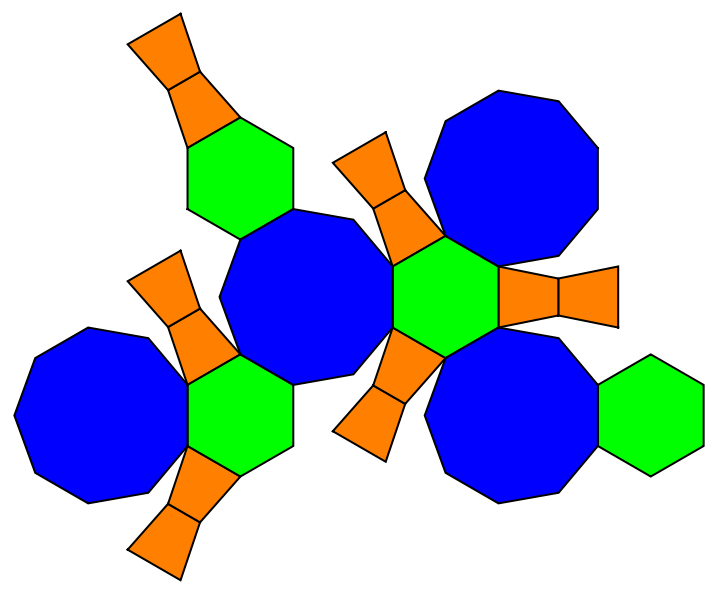
Equivalently, the Entity framework can be used to access polyhedra data as shown below. This code removes faces living the only the stylized wireframe (see wonderful OutlinePolygons), because in the video we need to see through the polyhedron:
In[]:=
fore=Graphics3DRed,["Polygons"],Boxed->False,ImageSize->1000{1,1},SphericalRegion->True,.9,1.1;Show[fore,ImageSize->400]
Out[]=

Our simulated camera will cover high range of distances from the polyhedron center. The furthest is 20 units. FOr this ViewAngle needs to be adjusted so the polyhedron fills the full view of the video.
In[]:=
SeedRandom[1];Show[fore,ImageSize->120,ViewVector->{RandomPoint[Sphere[{0,0,0},20]],{0,.1,0}},ViewAngle->#,ViewVertical->{0,0,1}]&/@Range[.3,1.5,.4]
Out[]=
 ,
, ,
, ,
,
Here, camera drift effect is when it slowly ans seemingly aimlessly moves drifts around an object. To simulate it I will use a random spline on a surface of a sphere. I will have 2 sphere -- one inside and one outside the polyhedron so the camera will switch between these 2 different views. It will feel like observer is gloating in and out of the polyhedron spending sometime drifting inside and outside it. Select random points on the spheres of radii 2 and 20 (note I am fixing the samples with SeedRandom so I can easily return to the configuration I liked):
In[]:=
SeedRandom[7];sphrPTSin=RandomPoint[sphRin=Sphere[{0,0,0},2],130];sphrPTSout=RandomPoint[sphRout=Sphere[{0,0,0},20],130];
Here is how sphere with radius 2 and its spline look like relative to the polyhedron -- this is the surface and path the camera will drift along:
In[]:=
With[{bsf=BSplineFunction[FindShortestTour[sphrPTSin->"Elements",PerformanceGoal->"Quality"],SplineClosed->True]},Show[Graphics3D[{{Opacity[.2],sphRin},{PointSize[.01],Opacity[.5],Point[sphrPTSin]},},SphericalRegion->True,Boxed->False],ParametricPlot3D[bsf[t],{t,0,1}],fore]]
Out[]=

To simulate motion of the camera between 2 spheres I connect them by sampling random points along 3 coordinate axes -- in the intervals between the 2 spheres:
In[]:=
reg=RegionUnion@@Map[Line,Transpose[DiagonalMatrix/@{-20{1,1,1},20{1,1,1}}]];linePTS=RandomPoint[reg,50];
Join all points together in single set: points from 2 spheres and axes:
In[]:=
allPTS=Join[sphrPTSout,sphrPTSin,linePTS];allPTS=allPTS[[Last[FindShortestTour[allPTS,PerformanceGoal->"Quality"]]]];
Use splines to design a smooth looped path through all the points:
In[]:=
bsf=BSplineFunction[allPTS,SplineClosed->True]
Out[]=
BSplineFunction


This is how the complete spline path looks together with spheres and the polyhedron:
In[]:=
Show[Graphics3D[{{Opacity[.2],sphRin,sphRout},},SphericalRegion->True,Boxed->False],ParametricPlot3D[bsf[t],{t,0,1}],fore]
There is a bit subtle question of ViewAngle. Not only camera path needs to be a function (via ViewVector), but also the ViewAngle. When the camera is far outside then the sphere might seem too small and ViewAngle needs to be also small (zoom-in effect) to fill the screen with larger object. When the camera is inside then the polyhedron seems too large and ViewAngle needs to be larger (zoom-out effect) to grasp wider field of view and more parts of the object. By experimenting with different settings of ViewAngle I found that I’d like to have 0.38 at the outer sphere point and 1.5 at the inner sphere. And when the camera is in between it can follow a linear connecting equation:
This completes the part of the video concerning the foreground object. To test things out we can design a simple Manipulate to get a sense how the camera will move:
For a better test we can actually generate a small-size video. Note the use of Parallelize that is really helpful on computers with multiple CPU cores speeding things up.
By default, AnimationVideo places the new video under the “Video” directory in $WolframDocumentsDirectory.
Design of the video's background
Design of the video's background
I will use neat function RandomPolyhedralNet to get a set of distinct nets and arrange them in a grid with an aspect ration close to YouTube recommended 16:9.
I’d like the nets to move uniformly and together vertically. This might improve artistic and 3D effects. THis is easily achieved by shifting the array of ImageData with looped boundary conditions using RotateLeft:
I also would like the nets to rotate. This can be easily achieved with GeometricTransformation and RotationTransform:
Moreover I’d like frequencies and directions of rotation for each net to be different. Lets choose a random set of frequencies and directions:
The following function combines both: the shifting of nets all together and their independent rotation:
We can check how a frame of the video will look like a t a specific moment of time:
Now we ready to generate the full video. The option DefaultDuration120 makes video to last 2 minutes while the parametric variable t runs full span form 0 to 1. It took ~ 2.5 hours on my regular MacBook Pro with 6 CPU cores. Parallel computing with Parallelize was great as all my CPU cores were almost fully loaded:
Again, by default, AnimationVideo places the new video under the “Video” directory in $WolframDocumentsDirectory.
CITE THIS NOTEBOOK
CITE THIS NOTEBOOK
One small polyhedron unfolds in a myriad of distinct nets: a art-video tribute
by Vitaliy Kaurov
Wolfram Community, STAFF PICKS, December 20, 2023
https://community.wolfram.com/groups/-/m/t/3087724
by Vitaliy Kaurov
Wolfram Community, STAFF PICKS, December 20, 2023
https://community.wolfram.com/groups/-/m/t/3087724