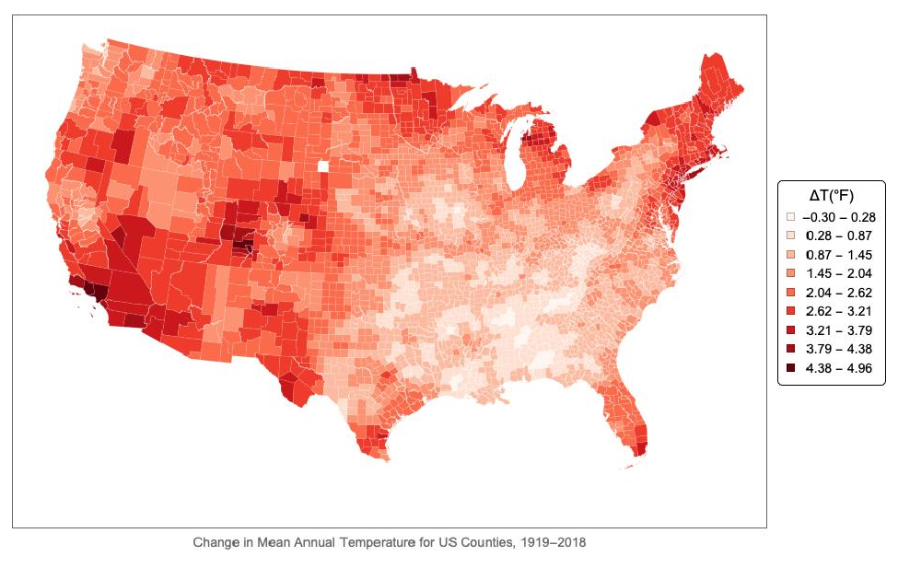
(Edited 4/29/2019) Continuing my efforts to visualize climate change in the US, I found that the US National Oceanic and Atmospheric Administration (NOAA) maintains a dataset of monthly average temperatures for every county in the 48 contiguous US States from 1895 to the present. To avoid burdening the server during testing, I downloaded the file to my computer, but it is available here. On the NOAA ftp site the file will have the name climdiv-tmpccy-v1.0.0-YYYYMMDD, where YYYY, MM and DD correspond to the year, month and date when the file was updated. When I downloaded the file its name was climdiv-tmpccy-v1.0.0-20190408.
It takes some time to read in all 388,375 lines of this file:
It takes some time to read in all 388,375 lines of this file:
In[]:=
cdata=SemanticImport["climdiv-tmpccy-v1.0.0-20190408.txt",PadRight[{"String"},13,"Real"]];
The dataset consists of 13 columns: the first is a string of digits encoding the year and something that is almost -- but not quite -- the FIPS code for the county. The next 12 are the monthly average temperatures in degrees Fahrenheit in that county for January through December of that year. For clarity, I like to add column headers first:
In[]:=
cdata=cdata[All,AssociationThread[Prepend[Table[DateString[d,"MonthNameShort"],{d,DateRange[{0,1},{0,12},"Month"]}],"Code"],Range[13]]];
To correct the FIPS codes, we require the FIPS codes for the 48 contiguous States:
In[]:=
stateFIPS=EntityValue[EntityList[EntityClass["AdministrativeDivision","ContinentalUSStates"]],"FIPSCode"];
Now we can add a column containing the correct FIPS code for each county. While we’re at it we add a column for the year:
In[]:=
cdata=cdata[All,<|"FIPS"stateFIPS[[ToExpression[StringTake[#Code,2]]]]<>StringTake[#Code,{3,5}],"Year"ToExpression[StringTake[#Code,-4]],#|>&];
Then I build an association of FIPS codes and entity values for the corresponding counties:
In[]:=
counties=EntityList;massoc=AssociationThread[EntityValue[counties,"FIPSCode"],counties];

With this association, we can add a column to the dataset corresponding to the entity value of each county. In the same statement I also add a column for the average annual temperature:
In[]:=
cdata=cdata[All,<|"County"massoc[#FIPS],#,"Tavg"Mean[WeightedData[{#Jan,#Feb,#Mar,#Apr,#May,#Jun,#Jul,#Aug,#Sep,#Oct,#Nov,#Dec},{31,28+Boole[LeapYearQ[#Year]],31,30,31,30,31,31,30,31,30,31}]]|>&];
The file includes data for the first couple of months of 2019, so I strip that out:
In[]:=
cdata=cdata[Select[#Year<=2018&]];
I tried several different ways of smoothing the temperatures and decided on moving average of the past 10 years:
In[]:=
s=cdata[GroupBy["County"],With[{ma=MovingAverage[#,10]},Last[ma]-ma[[-100]]]&,"Tavg"];
I experimented with the color functions available in Mathematica, but decided to build my own using a color pallette from the ColorBrewer website.
In[]:=
col1=RGBColor[{255,245,240}/255];col2=RGBColor[{254,224,210}/255];col3=RGBColor[{252,187,161}/255];col4=RGBColor[{252,146,114}/255];col5=RGBColor[{251,106,74}/255];col6=RGBColor[{239,59,44}/255];col7=RGBColor[{203,24,29}/255];col8=RGBColor[{165,15,21}/255];col9=RGBColor[{103,0,13}/255];
In[]:=
qq=Values[s];zz=Table[Min[qq]+i*(Max[qq]-Min[qq])/9,{i,9}];cfunc[x_?NumericQ]:=Which[x<=zz[[1]],col1,x<=zz[[2]],col2,x<=zz[[3]],col3,x<=zz[[4]],col4,x<=zz[[5]],col5,x<=zz[[6]],col6,x<=zz[[7]],col7,x<=zz[[8]],col8,x<=zz[[9]],col9]
Then it’s just a matter of building the legend and displaying the map:
In[]:=
legend=SwatchLegend[{col1,col2,col3,col4,col5,col6,col7,col8,col9},{"-0.30 - 0.28"," 0.28 - 0.87"," 0.87 - 1.45"," 1.45 - 2.04"," 2.04 - 2.62"," 2.62 - 3.21"," 3.21 - 3.79"," 3.79 - 4.38"," 4.38 - 4.96"},LegendMarkersGraphics[{EdgeForm[Black],Opacity[1],Rectangle[]}],LegendLabel"ΔT(°F)",LegendFunction(Framed[#,RoundingRadius5]&),LegendMargins5];
In[]:=
climvis=GeoRegionValuePlot[s,FrameTrue,FrameTicksNone,FrameLabel{"Change in Mean Annual Temperature for US Counties, 1919-2018"},LabelStyleLarger,PlotLegendsPlaced[legend,Right],ColorFunctioncfunc,ColorFunctionScalingFalse,PlotStyleDirective[EdgeForm[{Thin,White}]],GeoBackgroundNone,GeoProjection{"LambertAzimuthal","Centering"GeoPosition[{30,-195/2}]},PlotRange{{-0.37,0.38},{-0.13,0.38}},ImageSize800,PlotLegendsPlaced[legend,Right]]
And finally here is the result. This is of course just a “proof of concept” exercise. There are any number of ways to analyze this dataset and visualize the results.