This a guide on how to use clustered networks (graph communities) to highlight key ideas in a text. Clusters highlight ideas that are used together more frequently. This also can be used for comparative analysis. Here I consider text data from two articles of Stanford Encyclopedia of Philosophy on Jean-Paul Sartre and Albert Camus. Both are giants in foundation of existentialism and are an excellent study semantic analysis of similarities and differences. My main tool is KeywordsGraph from the Wolfram Function Repository that I designed specifically for this type of tasks. I use it to concisely visualize and summarize or “compress” roughly 10,000-words of encyclopedic philosophical article with just a set of 24 most frequently used non-generic words.
From 1D text to multi-dimensional visual summaries
From 1D text to multi-dimensional visual summaries
In any text or speech the data have a particular structure - being delivered not all at once but continuously with time. Usually one must listen to or read everything before a specific moment, to completely comprehend and appreciate what is being said at that moment. KeywordsGraph transforms that into a time-independent visualization that can be grasped at a glance. It also allows to observe structure and relations in the text that are hard to notice while reading or listening due to being constantly at a particular moving moment and due to limitations of memory and mind having difficulties to process massiveness of data in the raw time-line format. The algorithm of KeywordsGraph transforms such data structure into a weighted graph connecting frequently used keywords of a text that are sequential neighbors and thus visualizing the flow and clustering of ideas in the text. Because such keywords and their clustering are unique for a specific text, such visualization and network data structure behind it can be considered as a fingerprint of the text. It is not my intent to simplify or reduce the speech, but to highlight and stress the key ideas via at-a-glance view.
What is even more interesting is taking two text quite similar in subjects and ideas and trying to make a comparison of differences and similarities. This is such attempt that considers philosophies of Jean-Paul Sartre and Albert Camus.
Jean-Paul Sartre and Albert Camus: historical note
Jean-Paul Sartre and Albert Camus: historical note
Jean-Paul Sartre and Albert Camus, prominent French philosophers and writers, had a complex and turbulent relationship that began as a close friendship but eventually turned into a bitter feud. They met during the Nazi occupation of France and gained fame for their contributions to existentialist philosophy and literature. Collaborating in the resistance movement, they both shared political views against colonialism and fascism. However, their friendship soured over disagreements on revolutionary violence in the 1950s. Sartre defended the Soviet Union and the Algerian rebels, while Camus denounced totalitarianism and advocated for peaceful solutions. These personal and philosophical differences were irreconcilable, and they never mended their relationship before Camus’ death in 1960.
Their falling-out in the summer of 1952, which was publicly observed, became a political watershed during the Cold War era. Despite their disputes, both Sartre and Camus made significant contributions to existentialism and literature, and their works continue to be studied and debated today. They initially bonded in the 1940s, collaborating on various projects and sharing a commitment to existentialism. However, their differing views on communism strained their friendship, with Sartre being a strong advocate of Marxism and Camus critical of communism, emphasizing individual freedom and the recognition of human limits.
The publication of Camus' book "The Rebel" in the 1950s further fueled their disagreements. The work criticized Sartre and other intellectuals for endorsing violent revolutionary methods and called for a more moral and measured approach. The public fallout resulted in strained relations, and Sartre belittled Camus, damaging their remaining warmth. Despite their intellectual rivalry, they maintained a level of respect for each other's work.
Camus' untimely death in a car accident in 1960 marked the end of their troubled relationship. Sartre delivered a eulogy for Camus, acknowledging his contributions and emphasizing their shared existentialist roots. The complex nature of their bond, marked by both friendship and rivalry, is why they are often referred to as both friends and foes. While their disagreements strained their relationship, their influence on existentialism and 20th-century thought remains significant.
Getting the raw and filtered data
Getting the raw and filtered data
From the following sources:
import the the raw data as plain text or string:
In[]:=
sartre=Import["https://plato.stanford.edu/entries/sartre"];camus=Import["https://plato.stanford.edu/entries/camus"];
We are importing from a website so the raw data has non-relevant text noise, coming from footer, header, hyperlinks, etc. The useful part can be easily identified by some typical start-end strings. Using the positions of the start-end strings in text it is easy to extract the useful text (plus-minus a few characters, which are statistically negligent in our processing):
In[]:=
sartre=StringTake[sartre,#1;;#2]&@@(StringPosition[sartre,#][[1,2]]&/@{"Mar 26, 2022","action today"});camus=StringTake[camus,#1;;#2]&@@(StringPosition[camus,#][[1,2]]&/@{"Oct 27, 2011","common decency"});
There are a bit more than 10,000 words in each article:
In[]:=
Length@*TextWords/@{sartre,camus}
Out[]=
{12364,11816}
Setting up styles for visualization
Setting up styles for visualization
First I define a typical set style options I use wile working with this type of graphs:
In[]:=
styles={VertexLabelStyleDirective[White,25,Bold,Opacity[.9]],EdgeStyleOpacity[.5],VertexStyleOpacity[.8],GraphStyle"Prototype",BackgroundBlack,AspectRatio->1,ImageSize->1100};
Experimenting with key ideas in the text
Experimenting with key ideas in the text
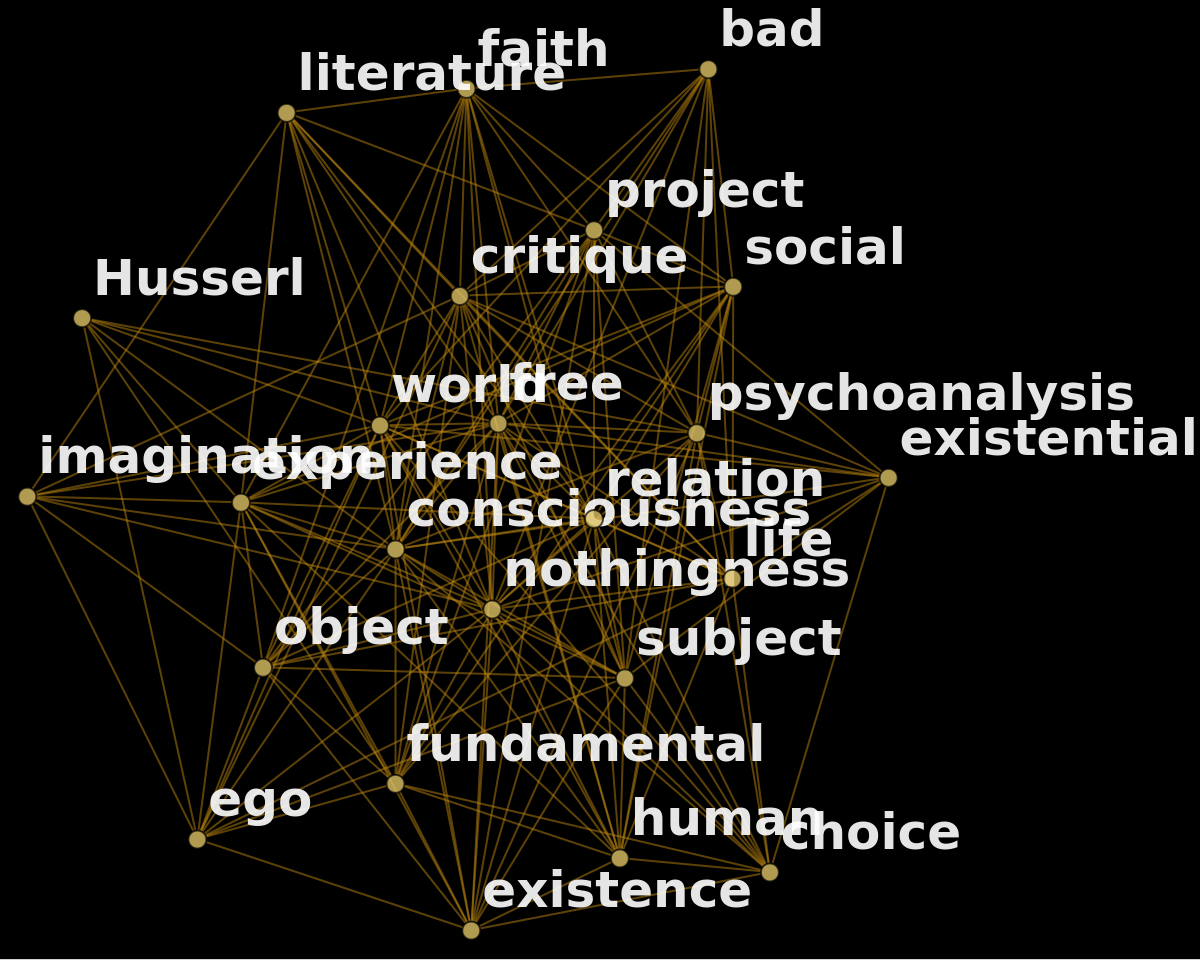
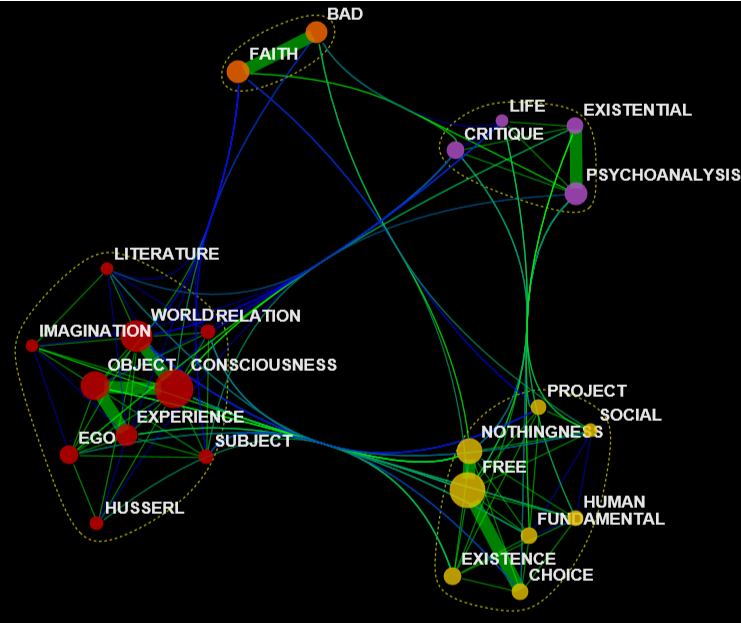
The function KeywordsGraph is published at the Wolfram Function Repository. The function by default removes the stopwords. Yet the text will still have many words that are generic and do not carry high meaning, such as obvious specific “Sartre” or frequent but insignificant “way” or “work” and so on. By playing with a few evaluations of the KeywordsGraph one can easily find such generic words and build a list of them to be removed from the text. Also looking at and playing with a few evaluations / outputs of KeywordsGraph we can easily see words that will have a very similar meaning and can be consolidated in a single term, e.g. singular and plural forms of the same word (also one can use such list to “rename”, for example, capitalize some terms). Then I can finally build the graph (after a few trials I liked the output with 24 keywords, but the choice is pretty arbitrary). I also like to style the vertices and edges a bit differently from the default procedure. To find clusters in the graph and generate the final visualization we use CommunityGraphPlot.
Sartre
Sartre
STPE 1: experiment and find words to remove or merge
STPE 1: experiment and find words to remove or merge
In[]:=
similar={"freedom"->"free","husserl’s"->"Husserl","subjects"->"subject"};generic={"sartre","sartre’s","2004","’s","given","way","french","1943","just","like","1940","towards","philosophical","particular","work"};
STPE 2: build new graph data structure keeping 24 most frequent keywords
STPE 2: build new graph data structure keeping 24 most frequent keywords
In[]:=
sartreG=[sartre,24,generic,similar,styles];Show[sartreG,ImageSize->600]
Out[]=
STPE 3: compute its EdgeWeight and VertexWeight
STPE 3: compute its EdgeWeight and VertexWeight
In[]:=
ew=Rescale[AnnotationValue[sartreG,EdgeWeight]];vw=Rescale[AnnotationValue[sartreG,VertexWeight]];
STPE 4: style vertices and edges
STPE 4: style vertices and edges
◼
The larger the vertex the more frequent is the word. Actual size is scale to make all verities visible.
◼
If edge weight is less than median weight it is blue, otherwise it is green
◼
If edge weight is more than 4 times the mean weight it appears much thicker. I call them “spines”. Each community will have its spine as this is what vertexes are custering around within each community.
In[]:=
sartreG=Annotate[sartreG,{VertexSize->Thread[VertexList[sartreG]->.3+vw^.8/1.5],EdgeStyle->Thread[EdgeList[sartreG]->(Directive[If[#<Mean[4ew],Thickness[.002],Thickness[.02]],If[#<Median[ew],Blue,Green]]&/@ew)]}];
STPE 5: use CommunityGraphPlot to find and visualize clusters of related words
STPE 5: use CommunityGraphPlot to find and visualize clusters of related words
In[]:=
sartreNet=CommunityGraphPlot[sartreG,CommunityBoundaryStyleDirective[Yellow,Dashed,Thickness[.002],Opacity[.7]]]/.x_String:>ToUpperCase[x];Magnify[sartreNet,.5]
Out[]=
Camus (same steps as in Sartre)
Camus (same steps as in Sartre)
STPE 1: experiment and find words to remove or merge
STPE 1: experiment and find words to remove or merge
In[]:=
generic={"philosophical","ms","camus","camus’s","r"};similar={"living"->"life","idea"->"ideas","limit"->"limits","sartre"->"Sartre","rebellion"->"revolt"};
STPE 2: build new graph data structure keeping 24 most frequent keywords
STPE 2: build new graph data structure keeping 24 most frequent keywords
In[]:=
camusG=[camus,24,generic,similar,styles];Show[camusG,ImageSize->600]
STPE 3: compute its EdgeWeight and VertexWeight
STPE 3: compute its EdgeWeight and VertexWeight
STPE 4: style vertices and edges
STPE 4: style vertices and edges
◼
The larger the vertex the more frequent is the word. Actual size is scale to make all verities visible.
◼
If edge weight is less than median weight it is blue, otherwise it is green
◼
If edge weight is more than 4 times the mean weight it appears much thicker. I call them “spines”. Each community will have its spine as this is what vertexes are custering around within each community.
STPE 5: use CommunityGraphPlot to find and visualize clusters of related words
STPE 5: use CommunityGraphPlot to find and visualize clusters of related words
Final visual: combining two plots
Final visual: combining two plots
At last the code below annotates and makes the final visualization:
Some key properties of the resulting graph data structures
Some key properties of the resulting graph data structures
Because graphs are data structures they are computable -- we can find various properties. First define a convenient visualization function
Now let's see what actual counts in the text we have for our 24 keywords and also their various graph centralities such as “Counts”, ”Degree”, ”Closeness”, ”PageRank”:
Sartre
Sartre
Camus
Camus
CITE THIS NOTEBOOK
CITE THIS NOTEBOOK
Sartre vs Camus in 24 words: idea-clusters analysis
by Vitaliy Kaurov
Wolfram Community, STAFF PICKS, May 8 2023
https://community.wolfram.com/groups/-/m/t/2915891
by Vitaliy Kaurov
Wolfram Community, STAFF PICKS, May 8 2023
https://community.wolfram.com/groups/-/m/t/2915891