The field of cellular automata has long fascinated researchers with its ability to generate complex behaviors from simple rules. Among these, Code 20 cellular automata have emerged as a particularly intriguing subject due to their unique properties and the persistent structures they produce. This project delves into the intricate world of Code 20, focusing on the classification and analysis of interactions between its persistent structures. By leveraging advanced computational techniques and pattern recognition algorithms, we aim to uncover the underlying principles governing these interactions. Our research not only contributes to the fundamental understanding of cellular automata dynamics but also has potential applications in fields ranging from computational biology to artificial life systems. This study bridges the gap between theoretical cellular automata research and practical applications, offering new insights into the emergence of complexity from simple rule-based systems.
Background and Motivation
Background and Motivation
Cellular automata (CA) have been a subject of fascination in the field of complex systems since their introduction by John von Neumann and Stanislaw Ulam in the 1940s. These discrete models consist of a grid of cells, each of which can exist in a finite number of states, evolving over time according to a set of rules based on the states of neighboring cells. Among the myriad of CA rules, Code 20 has emerged as a particularly intriguing subject due to its unique properties and behaviors.
An overview of what Code 20 is:
Out[]=
This is a totalistic cellular automaton with 4-cell neighborhood.
The rules for this Code 20 are described in the following table:
Out[]=
The table says, that after the calculation of 4 neighbors for the central cell that we are in consideration, if the result is a multiple of 2, it will take value of 1, otherwise 0.
A visual summary is simpler:
Out[]=

Code 20 is interesting for its unique properties and behaviours because it presents persistent structures, which are structures that start from one sequence and as they develop with the rules, they form structures that will repeat itself after a period of steps.
Here below I show you the first 10 persistent structures:
Out[]=
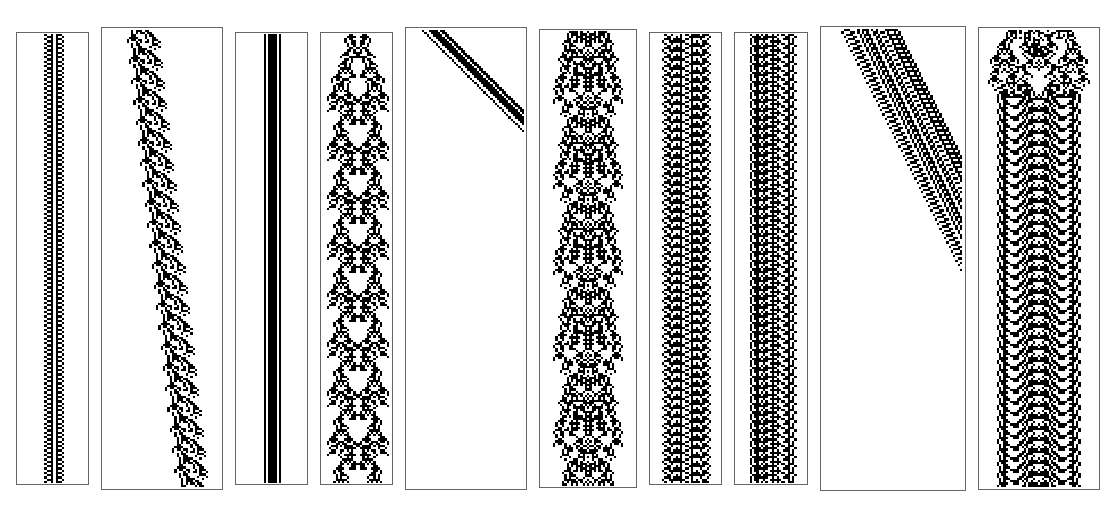
In the table with all known persistent structures you can find:
◼
the number, which is the base 10 representation of the binary sequence of the starting cells;
◼
the period, which gives after how many steps the persistent structure repeat itself;
◼
the shift, which gives the direction of the structure, -1 for left, 0 for straight down, +1 for right;
◼
the cells, which is the first binary sequence for which the persistent structure starts.
Out[]=
Why are we doing a project on these persistent structures? When we collide two or more of them, at different distance from each other, they will sometimes annihilate, sometimes generate one or two new structures, or sometime one of the structures survives. The phenomenon is similar to collisions in particle physics: if we collide two particles in a collider, sometimes they annihilate, sometimes produce new particles, or sometimes one of the particle survive with more energy.
The aim is to determine and classify the interactions between persistent structures in the Code 20 Cellular Automaton, focusing on the outcomes of colliding two persistent structures. Exploring these interactions we seek to uncover underlying patterns and logic that govern the behavior of Cellular Automata in Code 20.
Methods
Methods
1. Dataset of Persistent Structures
1. Dataset of Persistent Structures
Sequences (structures) of different structure numbers
Sequences (structures) of different structure numbers
Data for the persistent structures:
Out[]=
We define a function that can generate the periodical sequence that will be later used to help us store the sequences into a new dataset “structureDataset”:
In[]:=
GenerateStructure[number_,period_]:=Module[{rawOutput,uniqueSequences,sequence},rawOutput=CellularAutomaton[{20,{2,1},2},CenterArray[IntegerDigits[number,2],200],100+period];uniqueSequences={};Do[sequence=First@SequenceCases[rawOutput[[i]],{1,___,1}];If[MemberQ[uniqueSequences,sequence],(*Ifwe'veseenthissequencebefore,we'vefoundtheperiod*)Return[uniqueSequences],AppendTo[uniqueSequences,sequence]],{i,1,Length[rawOutput]}(*Startfromthefirstrow*)];(*Ifwedidn'tfindarepeat,returnalluniquesequences*)uniqueSequences]
Save sequences to dataset “structureDataset”
Save sequences to dataset “structureDataset”
We save the structures sequences in the dataset. This dataset will be our repository to compare to find matching sequences and therefore structure numbers:
You will notice, for example that for 195, the period is 22, but we have stored 48 unique sequences of them.
This is because at the beginning of the structure we have a “crown” that is different from the rest periodic sequences:
2. Identify Surviving Structures
2. Identify Surviving Structures
To create a function that can identify surviving structures, we need to divide the work into smaller pieces, each of these doing a specific task, so we can have a clear way of doing things right.
First of all, we need to think of a method that needs to be efficient and robust to identify surviving structure. There are many methods that we can use to achieve our goal, but some take longer and some run faster but don’t give the full picture of possible cases. After several attempts—and a proposal of one of my mentors, Eric Parfitt—here is the “range method”, the most efficient and understandable method, taking into account most edge cases.
This method is as follows:
1. Create “SurvivingStructures” dataset
1. Create “SurvivingStructures” dataset
We create firstly an empty dataset called “SurvivingStructures” that will store all combinations that give as output surviving structures after the collision. The structure of it will be defined in later functions, now it will be just empty:
2. Function to find matching structures
2. Function to find matching structures
Secondly, we create a function that can find matching structures (sequences) within a step:
Let’s see what structures we can find inside a structure number 125231 at step 20.
We first generate the structure for 100 steps:
We then choose the 20th step and put it into the FindMatchingStructures function:
As you can see, in step 20, it identifies 3 structures. This is a problem because we actually have only 125231 at the 20th step, but the fact that it finds 195 at two positions, this is because in 20th step, there are two ranges of the step that match with a sequence of 195 stored in the structureDataset.
3. Function to filter out smaller ranges inside larger ones
3. Function to filter out smaller ranges inside larger ones
The next function filters out these smaller structures that have ranges inside a larger one, and return only the large one—which is where the name “range method” comes from:
For example, for that step 20, using this function, we’ll have 125231 as the largest range:
4. Function to identify the surviving structures
4. Function to identify the surviving structures
Now we are ready to analyze the collision and identify the surviving structures. We analyze the last step to see which structures are coming out, and after filtering out smaller ranges, we can have three cases, with each one a different dealing.
◼
If there were only one range in which is present a sequence that match with one structure number’s sequence in the dataset, we return back the corresponding structure number and save it to the dataset surviving structures.
◼
If there were two ranges, we return back the two corresponding structure numbers. Even if they were the same, we return both numbers and we write twice if they were the same. Then we compare with the two initial structure numbers, and if they were the same, we skip them. Otherwise, we save to the dataset
◼
If there were three or more ranges, we directly save them to the dataset.
Below is the code for analyzing the collision and identify the surviving structures that take as argument, two initial structures and the distance between them:
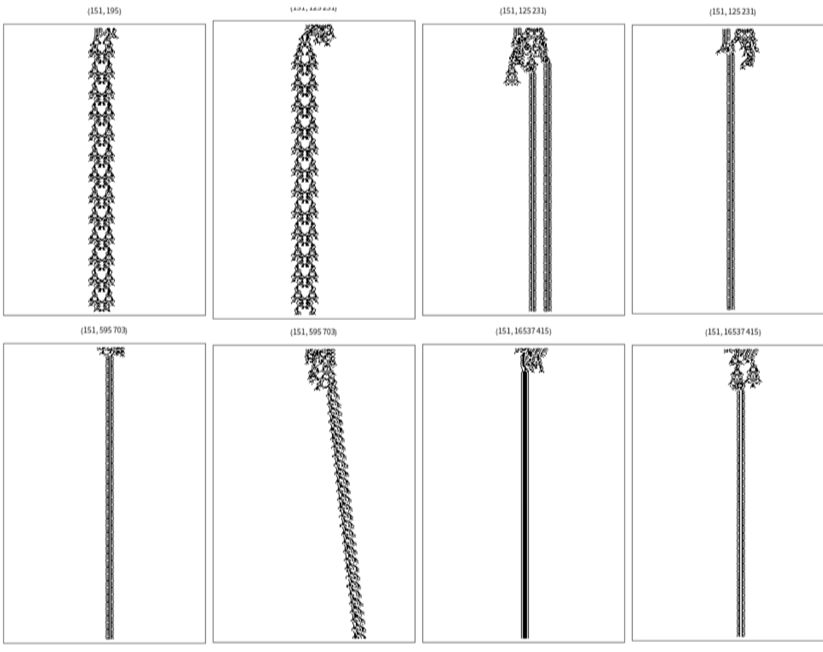
Let’s see what happens for a combination that we know there are two surviving structures:
Here below is a more definite image of the collision:
5. Function to iterate over all possible combinations
5. Function to iterate over all possible combinations
Now the last step is to iterate the AnalyzeCollision function over every combinations and distances. To do it, we have defined some rules to make the entire analysis quicker.
◼
sameStructureCounter: if we encounter the same surviving structures for more than 10 steps in a row, we directly skip the rest distances for that combination;
◼
emptyCounter: if we have empty last rows for more than 38 steps, we skip the rest distances for that combination (possible because the maximum period of Collision is 38, you will see why in the next section General Rule).
Therefore the following is the code:
Let’s run the function:
In the SurvivingStructures dataset, we have all the collisions that give one or more surviving structures. In particular, we have
◼
Combination, which is the two initial structures that we collide.
◼
SurvivingStructures, which are the structures that come out after collision.
◼
Count, which is how many surviving structures are there.
◼
Distance, which is how far were the initial structures separate at the beginning.
◼
Ranges, which is the range of in the last step where we found the surviving structures.
In the table you will see that there are some collision that give rise to 3 surviving structures, but they are really just false positive cases. I have investigated one by one, and all of them are just two structures.
The problem is because in our function FilterOverlappingStructures, we just try to find the non-overlapping ones. But, for example, if we take 189-189 at distance 6, it identifies two 189 at separate ranges, but there is one sequence in a range that have starting and ending point inside the 189’s ranges, which for the function FilterOverlappingStructures is fine.
After checking all the combinations which gives count = 3, none of them are positive collisions that give three surviving structures.
So in the next table, I have neglected all cases where count is greater than or equal to 3.
I will be considering this dataset for next sections.
I will be considering this dataset for next sections.
6. Dataset of surviving structures
6. Dataset of surviving structures
Now we want to have read clear and easier a dataset that shows only the combinations that gives surviving structures, and how many distances of that combination show the surviving structures.
To do this, we need to process the dataset:
Let’s display the summary:
View details for a specific combination—here the third one—by its position:
7. Grid of Plots of All Surviving Collisions
7. Grid of Plots of All Surviving Collisions
Here below I have made a grid where you can slide to see the plots of our surviving collisions (with title the combination, the bottom the distance):
3. Information on Surviving Structures
3. Information on Surviving Structures
The goal was to develop a function that by putting in inputs the two initial structures as argument and their distance to each other, giving as output surviving structures. The logic is:
Input: two initial structure numbers and their distance
Outputs:
◼
what surviving structure it is (structure number)
◼
distance (n)
◼
step of collision (CollisionStep)
◼
after how many steps it is generated (generationSteps)
◼
the offset of the structure generated from the middle point between to initial structures (initialOffset)
◼
The boundaries of the structures’ collision as a plot (BoundaryPlot)
We want to develop functions for each kind of outputs that are then put inside a large AnalyzeStructureCollision function that is the final function.
Generate Collision Steps
Generate Collision Steps
Generate structures’ collision steps:
Find Collisions
Find Collisions
Find the first point where we cannot find a matching sequence:
Identify Surviving Structures
Identify Surviving Structures
This is the function defined in the previous section that analyze the surviving structures by the last step:
Generation Steps for Surviving structures
Generation Steps for Surviving structures
This function calculates after how many steps after the collision, the surviving structure is generated :
Find the Offsets
Find the Offsets
This function tells us how much is the surviving structure shifted from the center:
Find Collision Boundaries
Find Collision Boundaries
This function finds the boundaries of a collision plot so it will be helpful for future research of 3 or more structures collision:
Display Boundaries
Display Boundaries
This function displays the boundaries found in the previous step in a plot.
The Main Function
The Main Function
AnalyzeCollision is the main function:
Example
Example
Run the following code to find interesting outputs:
Here is the plot of the collision above:
As you can see, the structure 125231 is generated straight after the collision (GenerationSteps = 1) and 189 after 20 steps after the collision (GenerationSteps = 20).
P.S. Please do not consider the second number, as that is a problem with my previously defined function FindGenerationSteps.
Interesting Findings
Interesting Findings
General Rule for Periodicity of Collision Outcomes
General Rule for Periodicity of Collision Outcomes
For example, consider the collision of 187 and 151.
Period and shift of 187 and 151:
According to the general rule, the period of collision outcomes is
Previously, we have said that the maximum period of collision between combinations of two persistent structures is 38, this is because the maximum period number between structures is 123 231 that has period number 38. It has be multiplied to shift non-zero and be not divided by GCD larger than 1. Therefore, the maximum period of collision is 38.
In fact, after distance = 20, the structures 195 and 125231 separate and no longer collide with each other and they did not present any periodic outcomes:
A Common Structure
A Common Structure
One structure that is not persistent appears very often:
Whenever it appears no continuation is possible.
Examples of terminating structures are saved as bookmarks, which you can see by clicking on the plus icon:
Play around with other combinations and you will see it yourself.
Concluding Remarks
Concluding Remarks
This study on the classification of interactions between persistent structures in Code 20 Cellular Automata has yielded several significant findings and opened avenues for further research. Our methodical approach, involving the creation of a comprehensive dataset, development of functions to identify surviving structures, and analysis of collision outcomes, has provided valuable insights into the complex dynamics of these systems.
Future Directions
Future Directions
The functions developed in this project are tools that will help us to discover more in depth for future research in Code 20 CA systems. These functions, even though already working, may need refinement in order to make the entire process more efficient.
These functions and findings have several implications:
1
.Predictive Modeling: The periodicity rule allows for more accurate predictions of long-term behavior in Code 20 CA systems, potentially enabling better modeling of complex systems in various fields. Also, develop a function that can skip steps is beneficial as this would accelerate the process of calculation much more.
2
.Particle physics: The collision between structures resonates with collisions between particles, and further research in the collisions might probably unveil some deep nature of behaviors in particle physics.
3
.Potential Applications: The insights gained could inform the development of novel computational paradigms, cryptographic systems, or models for self-organizing biological systems.
Future work could explore the mathematical foundations of the periodicity rule, investigate the properties of the frequently occurring structure, formulate the rule for when surviving structures occur, and extend the analysis to other cellular automata rules. Additionally, applying these findings to practical problems in fields such as computational biology, artificial life, or particle physics could yield exciting new applications.
In conclusion, this project has not only advanced our understanding of Code 20 Cellular Automata but has also laid the groundwork for future explorations into the fascinating world of complex systems and emergent behaviors.
Acknowledgments
Acknowledgments
I’d like to thank firstly my mentors, Paul Abbott and Eric Parfitt, for their help in sharing ideas for designing and executing this project, especially as I am new to the Wolfram Language.
Secondly, it has been a great honor to study at Wolfram summer school, so I would like to thanks all the staff for coordinating lectures and giving us appropriate help.
Lastly, I’d like to thank Stephen Wolfram for giving me this topic and project, which has been, in these 3 weeks, an experience of discoveries and developing in a completely untouched field, undoubtedly for me a “new kind of science”.
References
References
1
.Stephen Wolfram, “A New Kind of Science”, https://www.wolframscience.com/nks/
Cite This Notebook
Cite This Notebook