Update — Pure-Wolfram Live Acquisition (libusb) for the RadiaCode Toolkit
Update — Pure-Wolfram Live Acquisition (libusb) for the RadiaCode Toolkit
A follow-up to "Gamma Spectroscopy with the RadiaCode Detector in Mathematica"
This is a short amendment to the original post. Two things were added:
• A pure-Wolfram path for live device acquisition. The original post's §10 dashboard worked, but under the hood it depended on Python (the upstream `radiacode` package + `rcmultispg.py`). This update walks through compiling a tiny LibraryLink + libusb shim that talks to the device directly, with no Python at runtime. The new bundle then auto-selects the backend and prints which one it picked, so existing notebook cells keep working unchanged.
• One sample data file (`K40.rcspg`) could not be attached to the original post because Wolfram Community does not permit `.rcspg` as an upload extension. A direct GitHub link is provided below; download once and drop into the post's `data/` subfolder so §9 (the K-40 spectrogram heatmap) evaluates cleanly.
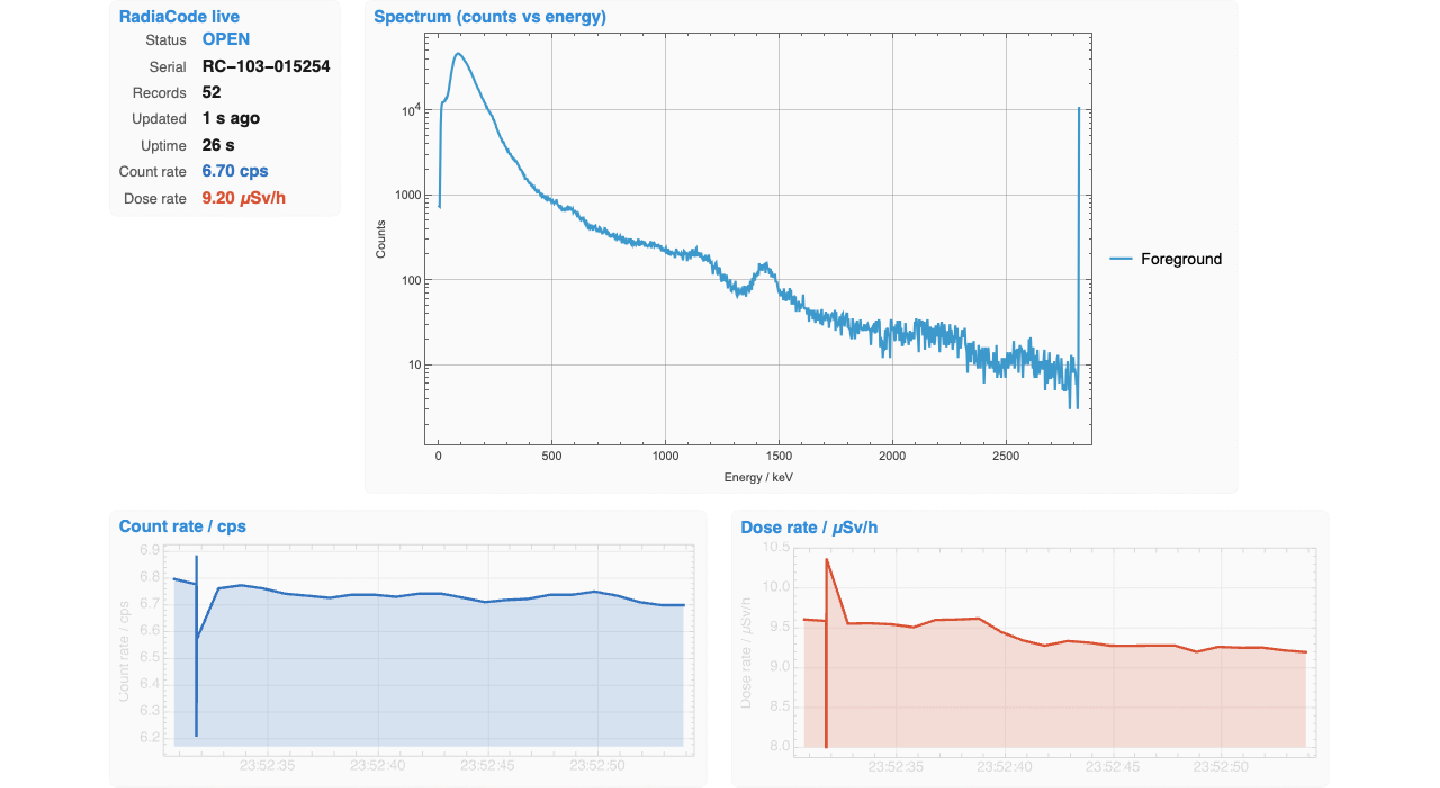
Hero animation again, for context: a screen recording of the live dashboard captured from a connected RadiaCode-103 (serial RC-103-015254). After the steps below, this runs Python-free.
Part 1 — pure-Wolfram live acquisition via libusb
Part 1 — pure-Wolfram live acquisition via libusb
The RadiaCode is a vendor-class USB device with bulk endpoints (0x01 / 0x81), not a HID device, so `hid_enumerate` returns nothing for it. Both the upstream Python `radiacode` package and our LibraryLink shim use libusb-1.0 to speak the device's custom command set. After the one-time setup below, no Python is needed for live acquisition; the original post's §10 cells then auto-select the libusb backend.
Step 1 — install libusb
Step 1 — install libusb
macOS (Homebrew):
In[]:=
(* in a shell *)
(* brew install libusb *)
(* brew install libusb *)
Linux: `sudo apt install libusb-1.0-0-dev` / `sudo dnf install libusbx-devel` / similar for your package manager.
Step 2 — download the C source + build script
Step 2 — download the C source + build script
Two files, served as plain text from the project's GitHub repo. Drop them into a fresh folder (anywhere; the build will pick its own output location). Right-click Save Link As, or paste the URL into `curl`:
Or browse the folder on GitHub:
Or, from a kernel that has internet access, fetch them in one go:
In[]:=
$dest = FileNameJoin[{$HomeDirectory, "radiacode_clib"}];
If[!DirectoryQ[$dest], CreateDirectory[$dest]];
URLDownload[
"https://raw.githubusercontent.com/mthiel74/radiacode-wolfram/main/Wolfram/RadiaCodeTools/clib/radiacode_link.c",
FileNameJoin[{$dest, "radiacode_link.c"}]];
URLDownload[
"https://raw.githubusercontent.com/mthiel74/radiacode-wolfram/main/Wolfram/RadiaCodeTools/clib/build.wls",
FileNameJoin[{$dest, "build.wls"}]];
If[!DirectoryQ[$dest], CreateDirectory[$dest]];
URLDownload[
"https://raw.githubusercontent.com/mthiel74/radiacode-wolfram/main/Wolfram/RadiaCodeTools/clib/radiacode_link.c",
FileNameJoin[{$dest, "radiacode_link.c"}]];
URLDownload[
"https://raw.githubusercontent.com/mthiel74/radiacode-wolfram/main/Wolfram/RadiaCodeTools/clib/build.wls",
FileNameJoin[{$dest, "build.wls"}]];
Step 3 — compile the .dylib
Step 3 — compile the .dylib
Run the build script under wolframscript. It uses Wolfram's `CCompilerDriver` to invoke clang against the LibraryLink + libusb headers and writes `radiacode_link.dylib` (or `.so` on Linux) into the same folder as the C source:
In[]:=
(* in a shell, from the folder where you put the two files *)
(* wolframscript -file build.wls *)
(* wolframscript -file build.wls *)
Build output is verbose; look for the line that ends with `radiacode_link.dylib` (or `.so` / `.dll`). If clang can't find `libusb.h`, double-check Step 1; on Apple-Silicon Macs Homebrew puts the headers in `/opt/homebrew/include/` which the build script picks up automatically.
Step 4 — place the .dylib so the bundle finds it
Step 4 — place the .dylib so the bundle finds it
The updated bundle (attached to this post) probes six locations for `radiacode_link.dylib` in priority order. The simplest layout that works:
• Drop both `RadiaCodeToolsBundle.wl` and the sample data files into a folder, say `~/RadiaCodeFromCommunity/`.
• Inside that folder make a sub-folder `RadiaCodeTools/clib/` and put the freshly built `radiacode_link.dylib` there.
The bundle's `DeviceNative.wl` resolver looks for `<bundle>/RadiaCodeTools/clib/radiacode_link.dylib` as one of its candidates and finds the file.
• Inside that folder make a sub-folder `RadiaCodeTools/clib/` and put the freshly built `radiacode_link.dylib` there.
The bundle's `DeviceNative.wl` resolver looks for `<bundle>/RadiaCodeTools/clib/radiacode_link.dylib` as one of its candidates and finds the file.
Alternatively, set the path explicitly before loading the bundle:
In[]:=
RadiaCodeTools`DeviceNative`$RadiaCodeNativeLibrary =
"/full/path/to/radiacode_link.dylib";
$bundle = NotebookDirectory[] <> "RadiaCodeToolsBundle.wl";
Get[ExpandFileName[$bundle]]
"/full/path/to/radiacode_link.dylib";
$bundle = NotebookDirectory[] <> "RadiaCodeToolsBundle.wl";
Get[ExpandFileName[$bundle]]
Step 5 — verify
Step 5 — verify
After a fresh kernel restart and bundle Get, this should be True:
In[]:=
RadiaCodeTools`DeviceNative`RadiaCodeNativeAvailableQ[]
Out[]=
True
And this should list your attached devices via libusb (no Python invoked):
In[]:=
RadiaCodeTools`DeviceNative`RadiaCodeNativeDevices[]
Out[]=
{RC-103-015254}
Step 6 — use the original post's §10 cells, now Python-free
Step 6 — use the original post's §10 cells, now Python-free
The original post's §10 "Open the stream" cell calls `RadiaCodeTools`Device`RadiaCodeAutoStream[…]`. That helper auto-selects: with the .dylib in place it uses libusb directly; without it falls back to the Python bridge. On the very first poll it prints a one-liner telling you which backend it picked. With the steps above completed you will see:
RadiaCodeAutoStream: using libusb LibraryLink (no Python).
Re-evaluating the original post's §10 cells top-to-bottom now drives the device through the LibraryLink path; the dashboard, state snapshot, and Quantile cell all behave identically.
Part 2 — missing K-40 spectrogram file
Part 2 — missing K-40 spectrogram file
Wolfram Community's attachment policy did not accept the `.rcspg` extension when the original post was uploaded, so `K40.rcspg` (one of the four sample data files referenced by §9 of the post) had to be left out of the attachments. The file is plain ASCII text — tab-separated header line, hex-encoded historical spectrum, and one row per sample — so the only obstacle is the extension.
Where to download it
Where to download it
Direct GitHub raw link (∼1.3 MB; downloads as `K40.rcspg` already — no rename needed):
Drop the downloaded file into the original post's `data/` subfolder alongside `data_am241.xml`, `data_th232_plus_background.xml`, and `trinitite.xml`. After that, the original post's §9 cells ("Time-frequency view: the K-40 spectrogram" / `RCSpectroPlot[k40]` / the integrated-spectrum + 1461 keV peak fit) all evaluate.
Or import it directly from the cloud
Or import it directly from the cloud
If you do not want a local copy, you can also import the file straight into Wolfram from the GitHub raw URL. This works for `.rcspg` because it is text:
In[]:=
k40 = RadiaCodeTools`Formats`ImportRCSpectrogram[
"https://raw.githubusercontent.com/mthiel74/radiacode-wolfram/main/Wolfram/community/data/K40.rcspg"];
k40["NumberOfChannels"]
"https://raw.githubusercontent.com/mthiel74/radiacode-wolfram/main/Wolfram/community/data/K40.rcspg"];
k40["NumberOfChannels"]
Out[]=
1024
What is attached to this update post
What is attached to this update post
• This notebook (`RadiaCodeSpectroscopy_Update.nb`).
• The updated single-file bundle (`RadiaCodeToolsBundle.wl`) with the new `RadiaCodeAutoStream` helper, the libusb path resolver, and the `RadiaCodeNativeStream` streaming wrapper. Drop alongside this notebook.
The C source for the libusb shim and the build script live on Wolfram Cloud and on GitHub (links above) rather than as Community attachments — they are tiny and only needed if you want the no-Python path.
• The updated single-file bundle (`RadiaCodeToolsBundle.wl`) with the new `RadiaCodeAutoStream` helper, the libusb path resolver, and the `RadiaCodeNativeStream` streaming wrapper. Drop alongside this notebook.
The C source for the libusb shim and the build script live on Wolfram Cloud and on GitHub (links above) rather than as Community attachments — they are tiny and only needed if you want the no-Python path.
PS
PS
Both the original post and this update assume you have the `RadiaCode-100` series device. The protocol is the same on the `RadiaCode-101`, `-102`, and `-103`; the only thing that differs across the family is the scintillator volume and a couple of firmware quirks. The toolkit picks them up by USB serial number prefix (`RC-10x-…`) automatically.
If you build the libusb shim and find an undocumented firmware record type or run into a `RadiaCodeNativeReadRealtime::unknownTag` warning, please open an issue at github.com/mthiel74/radiacode-wolfram with the offending `{eid, gid}` pair — adding new tags is a one-line change in `DeviceNative.wl`.