We validate performance and safety requirements in a model of a group of 5 planes performing aerobatic maneuvers. To do this we use the new validation functionality in the Wolfram Language on a model inspired by this community post. We test a design requirement for a plane with autopilot, we validate a pilot safety requirement in these high-G dynamics that limits the load factor, and a performance requirement in a plane that performs a Q-loop maneuver. Further analysis of the requirement validation failures easily lets us adjust our model to comply with the specified constraints. A parameter sweep for a controller parameter and the engine throttle commands is automatically performed to account for uncertainty in our validation results.
Lets make use of the newly introduced validation functionality in a model of aerobatic maneuvers inspired by this community post. First we perform a general exploration of the model to see the general behavior of a few variables of interest, and later we explicitly tackle 3 requirements, analyse the results and adjust the model parameters to improve our system. We conclude with a validation of these requirements introducing uncertainty in a couple of key parameters.
The validation functionality in the Wolfram Language allows us to verify system behaviors, such as safety, performance, physical requirements or design constraints. We now have a powerful temporal statement language and can easily introduce uncertainty in parameters, initial values and inputs to match statistical validation standards. We can query information on requirement validation failures, analyse it, and easily find potential causes and fixes to accelerate our modeling workflow. Lets see this in action.
Exploration
Exploration
In[]:=
ImportString,"MO";
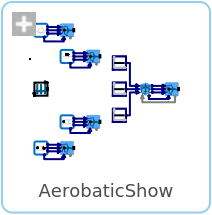
Use the model of an aerobatic show:
In[]:=
aeroModel=SystemModel["Aerobatics.AerobaticShow"]
Out[]=
Simulate the model:
In[]:=
aeroSim=SystemModelSimulate[aeroModel]
Out[]=
SystemModelSimulationData


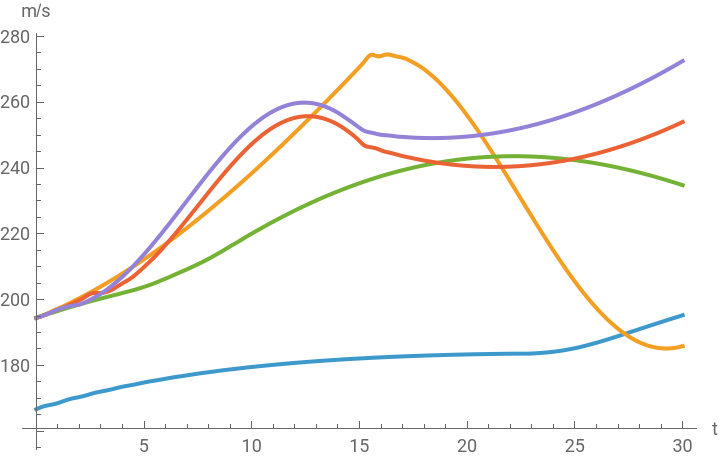
Plot the velocities for the 5 planes:
In[]:=
vels={"autopilotPlane.flightData.vTot","qLoopPlane.flightData.vTot","rollPlane.flightData.vTot","splitSPlane.flightData.vTot","englishBluntPlane.flightData.vTot"};
In[]:=
SystemModelPlot[aeroSim,vels,PlotLegends->StringDrop[vels,-16]]
Out[]=


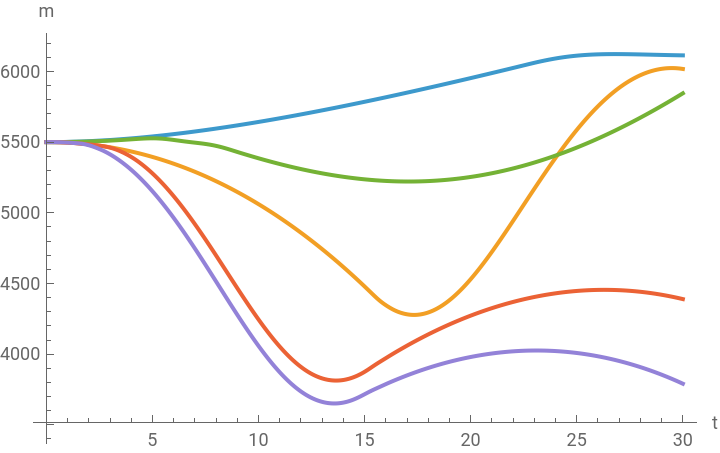
Plot the altitudes:
In[]:=
alts={"autopilotPlane.flightData.alt","qLoopPlane.flightData.alt","rollPlane.flightData.alt","splitSPlane.flightData.alt","englishBluntPlane.flightData.alt"};
In[]:=
SystemModelPlot[aeroSim,alts,PlotLegends->StringDrop[alts,-15]]
Out[]=
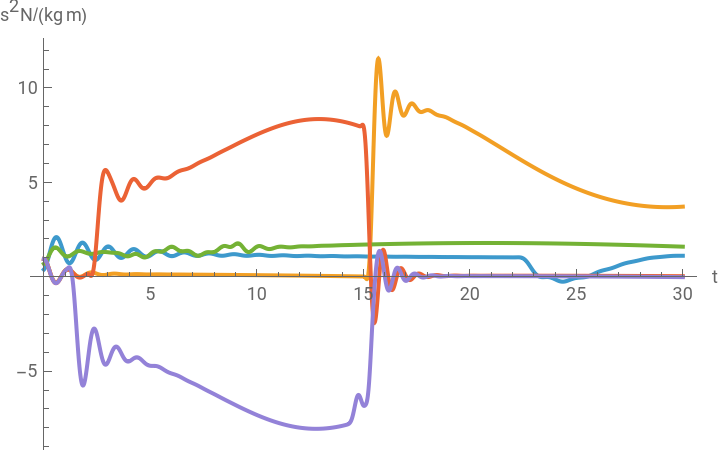
Plot the load factor in gs:
In[]:=
gs={"autopilotPlane.flightData.loadFactor","qLoopPlane.flightData.loadFactor","rollPlane.flightData.loadFactor","splitSPlane.flightData.loadFactor","englishBluntPlane.flightData.loadFactor"};
In[]:=
SystemModelPlot[aeroSim,gs,PlotLegends->StringDrop[gs,-22]]
Out[]=
Extract the position as a vector and stop time:
In[]:=
planePositions[t_]=(aeroSim[{#<>"Plane.flightData.positionAC[1]",#<>"Plane.flightData.positionAC[2]",#<>"Plane.flightData.alt"},t]&/@{"autopilot","qLoop","roll","splitS","englishBlunt"});stopTime=Last[aeroSim["SimulationInterval"]];
Plot the trajectories:
In[]:=
Manipulate[Show[{ParametricPlot3D[Evaluate@planePositions[t],{t,0,stopTime},ViewVertical->{0,0,1},BoxRatios->{1,0.2,1},AspectRatio->1,AxesLabel->{"x [ft]","y [ft]","z [ft]"}],Graphics3D[{LightDarkSwitched[Black],PointSize[Medium],Point/@planePositions[tm]}]}],{{tm,0,"t"},0,stopTime}]
See the full animation in Wolfram System Modeler:
In[]:=
SystemModeler[aeroModel,"Animation"]
Validation
Validation
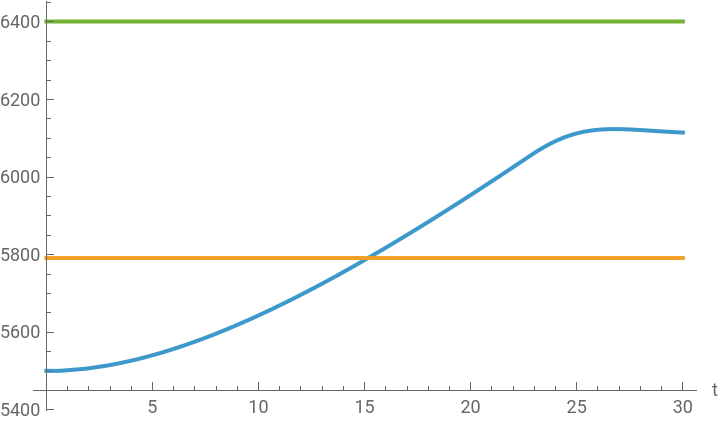
After 10 s the altitude in the plane with autopilot must be at most 5% away from 6096 m
After 10 s the altitude in the plane with autopilot must be at most 5% away from 6096 m
Validate the requirement “After 10 s the altitude in the plane with autopilot must be at most 5% away from 6096 m”:
In[]:=
reqAlt=SystemModelAlways[t,10<t,6096*0.95<="autopilotPlane.flightData.alt"[t]<=6096*1.05];
In[]:=
valAutoAlt=SystemModelValidate[aeroSim,reqAlt]
Out[]=
SystemModelValidationData

Show the failure plot:
In[]:=
valAutoAlt["FailurePlot",1]
Out[]=

Plot the altitude with the bounds:
In[]:=
SystemModelPlot[aeroSim,{"autopilotPlane.flightData.alt",6096*0.95,6096*1.05},PlotLegends->{"altitud"}]
Out[]=
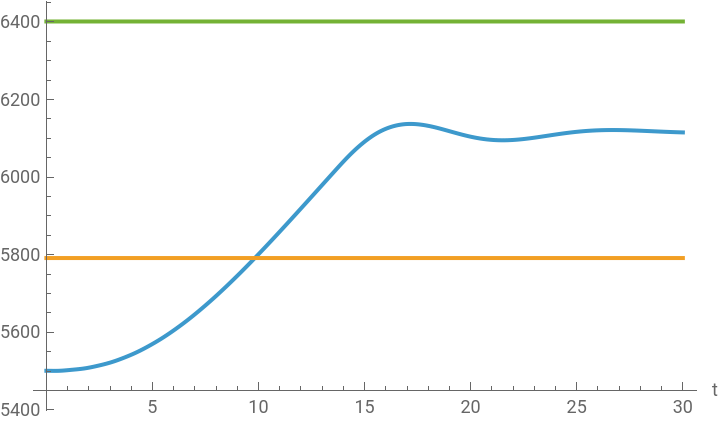
Adjust the integrator constant in the PID controller of the pitch angle and simulate:
In[]:=
aeroSimPID=SystemModelSimulate[aeroModel,<|"ParameterValues"->{"autopilot.thetaPIDTi"->4}|>]
Out[]=
SystemModelSimulationData

Validate the altitude requirement:
In[]:=
SystemModelValidate[aeroSimPID,reqAlt]
Out[]=
SystemModelValidationData

Plot the altitude with the bounds:
In[]:=
SystemModelPlot[aeroSimPID,{"autopilotPlane.flightData.alt",6096*0.95,6096*1.05},PlotLegends->{"altitud"}]
Out[]=
The load factor must be between -4 and 8 gs for the plane performing the split S maneuver
The load factor must be between -4 and 8 gs for the plane performing the split S maneuver
Validate the requirement “The load factor must be between -4 and 8 gs for the plane performing the split S maneuver”:
Show the failure plot:
Plot the load factor with the bounds:
Adjust the engine throttle command and simulate:
Validate the load factor requirement:
Plot the load factor with the bounds:
Validate the requirement “The velocity and load factor for the plane performing the split S maneuver must stay within the velocity vs. load factor diagram allowed region”:
The original simulation fails the requirement while the one with the adjusted throttle command succeeds:
Extract the velocity and load factor curves for each configuration:
Plot them over the validity region:
Whenever the altitude of the Q-loop plane is above 4500 m until the velocity of the plane is above 250 m/s, the load factor must be below 1
Whenever the altitude of the Q-loop plane is above 4500 m until the velocity of the plane is above 250 m/s, the load factor must be below 1
Validate the requirement “Whenever the altitude of the Q-loop plane is above 4500 m until the velocity of the plane is above 250 m/s, the load factor must be below 1”:
Validate with uncertainty
Validate with uncertainty
Perform several simulations with a range of values for the controller parameter and engine throttle commands:
Validate the same requirements for all the simulations:
Getting started
Getting started
◼
SystemModelValidate documentation page
Related talks
Related talks
◼
Wolfram Technology Conference 2024: Validating System Models
◼
Wolfram U Webinar 2024: Simulating High-G Jet Aerobatics with Aircraft Library 2.0
Download
Download
References
References
CITE THIS NOTEBOOK
CITE THIS NOTEBOOK
Validating high-G aerobatics with System Modeler and Wolfram language
by Sergio Vargas
Wolfram Community, STAFF PICKS, August 5, 2025
https://community.wolfram.com/groups/-/m/t/3524847
by Sergio Vargas
Wolfram Community, STAFF PICKS, August 5, 2025
https://community.wolfram.com/groups/-/m/t/3524847