System Modeler 12.2 released: thank you from the System Modeler team
System Modeler improved thanks to you
System Modeler 12.2 has just been released and contains a bunch of new features as well as bug fixes. We, the System Modeler development team, can thank you, the users, for many of the ideas and bug reports that have helped us improve the product. Therefore I wanted to highlight some of the updates that you’re behind and take the opportunity to thank you all.
A growing part of our users are using the Wolfram Language to prototype new system models, automatically generate the corresponding Modelica code. Therefore it comes as no surprise that a few requests relate to this. One of those is the ability to generate Modelica functions, which has been requested by one of our community stars, Neil Singer, among others. Suppose that you want to include a function to calculates the volume of a sphere, you can now generate the Modelica function in a single line of code:
In[]:=
model=CreateSystemModel"sphereVolume",Functionr,π;
4
3
3
r
This now generates the following Modelica code.
In[]:=
model["ModelicaDisplay"]
functionsphereVolume |
inputRealr; |
outputRealy; |
algorithm |
y:=4/3*Modelica.Constants.pi*r^3; |
»; |
endsphereVolume; |
Other related things that have been added are generation of record models, creation of enumeration types and generation of models from regions as illustrated in this blog simulating the Dzhanibekov effect and other surprising physics models.
While we are proud of our testing, every now and then bugs slip through. Sometimes they are rather easy to identify, sometimes they might be quite obscure and require a very specific setup to trigger, while on other occasions they can be hard to spot.
A good example of the latter was reported by a team at JPL about a month before the release of 12.2. We are equally impressed and thankful that they detected that the derivate annotation was not used as it should in one of the functions. They used the equation browser to identify which variable and function incidences were linear, non-linear and unknown, as shown below (note this is not from the example sent by the them, but it shows the principle):
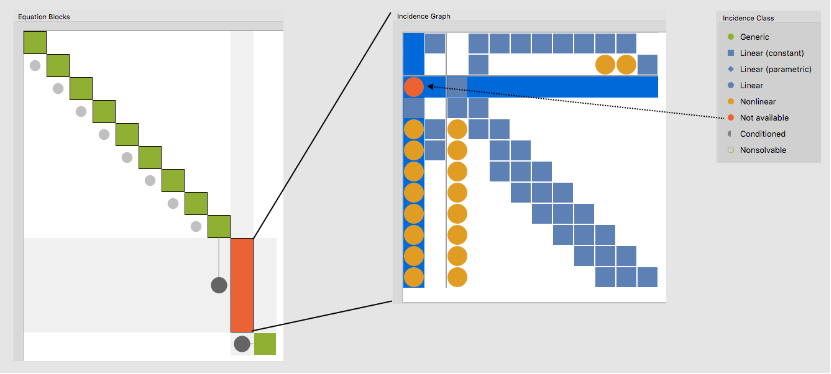
While the incidence class for variables might be unknown in some cases, they knew that it should not be in this case. This led them to the conclusion that a function call was not differentiated correctly. Thus, the incidence class should have been known. Impressive! Luckily, once identified and reported the bug was easy to fix, so we managed to do that without needing to delay the 12.2 release.
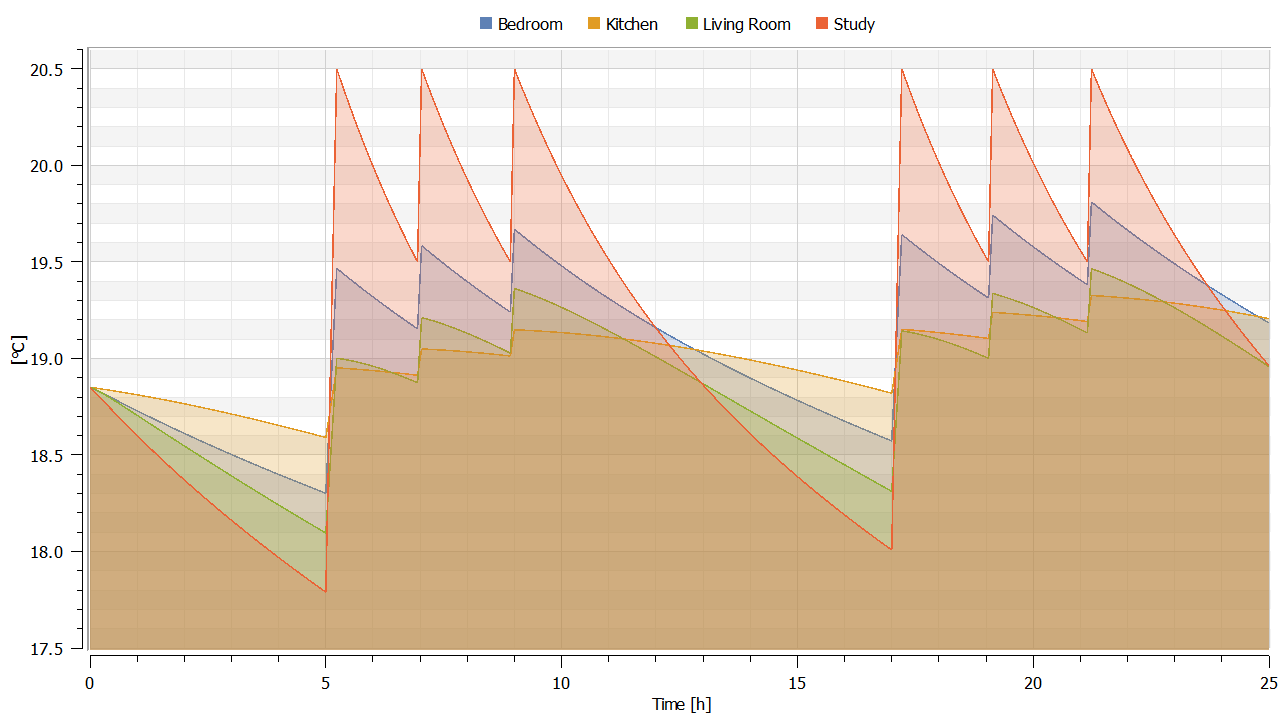
While some suggestions get implemented quickly, others take longer time even though they might be really useful. Typically because they might be trickier to implement then one would imagine at first sight. A very good example of that is the ability to use custom simulation time units. This is something that many of you have requested. While some have fast dynamics, so they only need to simulate a few microseconds, other need to simulate days.
In those cases having simulation times and plots in seconds is far from convenient. With 12.2 you finally have the option to customize simulation time, so thanks to everyone that has kept pushing us so we finally implemented this in Simulation Center. Thanks to this you can get plots like this from the built-in room temperature example, which is obviously easier to understand when using hours rather than seconds:
Back in 2016 we introduced model plots (even though we called them stored plots back then) and these became highly popular. As a consequence we also got a lot of related user requests. Hence, the functionality has been continuously updated and in 12.2 we added the possibility of inclduing captions, as illustrated in this example of a SIR-model.
This also gave us the opportunity to solve another issue reported by several customers, including JPL. When plotting simulations with huge result files it could take quite a bit of time to plot due to the amount of data. Therefore, in 12.2 results for model plots are cached as you simulate, making these plots substantially faster.
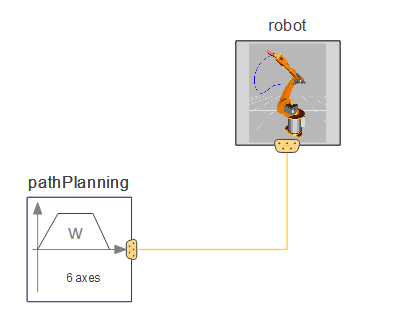
My final example comes from Dr. Guido Wolf Reichert. In a few days we plan to release his new library, the Business Simulation Library (more on that soon). While developing the library, he has been excellent at coming up with ideas and finding bugs (always reported in a great way). Probably the major impact is his influence on the added functionality relating to expanded connectors or buses. The expandable connectors allows you to create buses containing as many signals as you like. The benefit of a bus as such is, that rather than needing several connections you can replace them with one, making the model easier to read:
However, expandable connectors allow more than that. They can be seen as a universal connection/bus to which you can connect anything if you like. This is also the key reason that Guido uses it. Consider this example of a simple production chain:
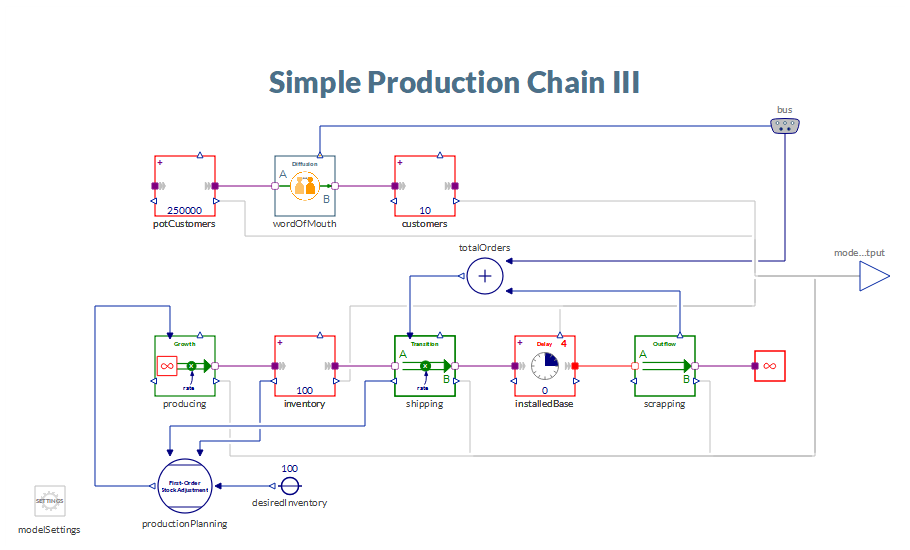
Notice that the wordOfMouth and totalOrders components are connected to a bus. So, why are we not connecting the two directly to each other? The reason is that the two connections are actually not compatible. While the totalOrders has a standard single input the wordOfMouth output actually contains three different signals, adoptionRate, conversationRate, and totalAdoptionRate. When connecting from the bus to totalOrders you are asked which one of these (or any other variables) you want to connect to as shown below:
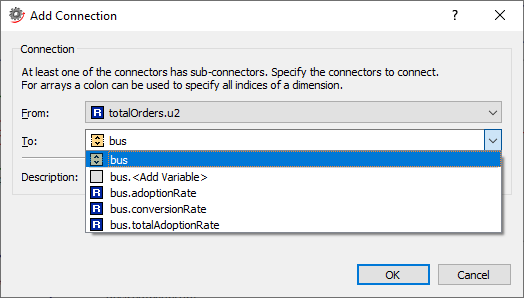
This gives the flexibility of connecting and using components in several different ways, without the need of having multiple outputs ready-made or re-designing a new version of the component.
As soon as the Business Simulation Library has been released you will be able to run this example for yourself. For now though, feel free to download the latest version of System Modeler from the What's New page and try it for free.
These were just a few out of many examples on how our users have helped us in improving System Modeler. Thanks to everyone of that has provided us with valuable feedback!