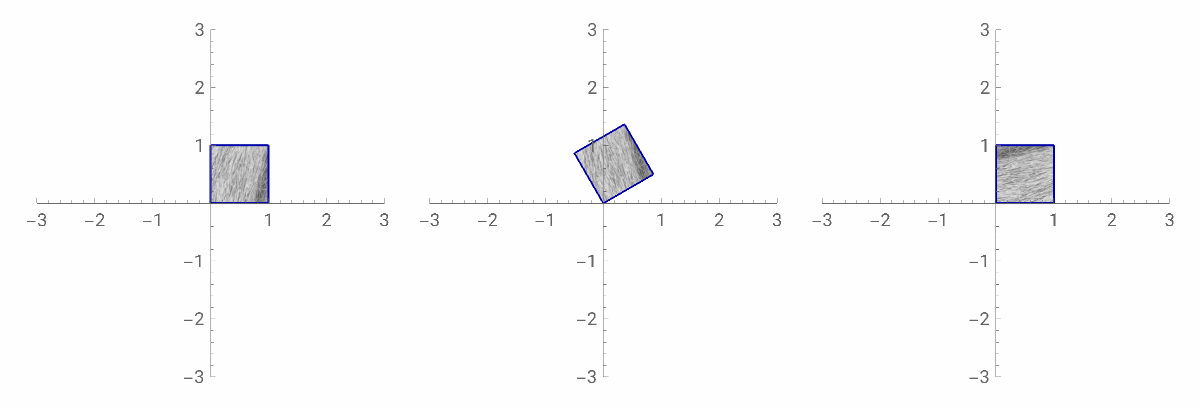
It seems Parallelogram[] does not have VertexColors or VertexTextureCoordinates options, and can only be styled by solid colors. You can convert the Parallelogram[] to a Polygon[] via CanonicalizePolygon[], but it sorts the vertices starting from the bottom left and going around. It messes up VertexColors or VertexTextureCoordinates as the Parallelogram[] is rotated.
I’d recommend just using a Polygon[].
Here’s a function that makes a parallelogram in terms of Polygon[]:
In[]:=
mySquare[t_:IdentityMatrix[2]]:=GraphicsComplex[Transpose[t.{{0.`,1.`,1.`,0.`},{0.`,0.`,1.`,1.`}}],{Polygon[{{1,2,3,4}}]},VertexTextureCoordinates{{0,0},{1,0},{1,1},{0,1}}]
In[]:=
Graphics[{{Texture@ExampleData[{"Texture","Straw3"}],mySquare[RotationMatrix[0Pi/2]]}},PlotRange->3,Axes->True]
myParallelogram//ClearAll;myParallelogram[pt_,vecs_:IdentityMatrix[2]]:=GraphicsComplex[{pt,pt+First@vecs,pt+Total@vecs,pt+Last@vecs},{Polygon[{{1,2,3,4}}]},VertexTextureCoordinates{{0,0},{1,0},{1,1},{0,1}}];
In[]:=
Graphics[{{EdgeForm[Darker@Blue],Texture@ExampleData[{"Texture","Straw3"}],myParallelogram[{0,0},IdentityMatrix[2]]}},PlotRange->3,Axes->True]
Graphics[{{EdgeForm[Darker@Blue],Texture@ExampleData[{"Texture","Straw3"}],myParallelogram[{0,0},RotationMatrix[Pi/6]]}},PlotRange->3,Axes->True]
In[]:=
Graphics[{{EdgeForm[Darker@Blue],Texture@ExampleData[{"Texture","Straw3"}],myParallelogram[{0,0},Reverse[IdentityMatrix@2]]}},PlotRange->3,Axes->True]
Out[]=