Abstract
Abstract
Rarely do we get the opportunity to take a good look at our own solar system — the first and last probe to complete the ‘Grand Tour’ (visiting all the outer planets) was Voyager 2, launched in 1977. But while we may not live to see a second 'Grand Tour', we may be able to simulate one using Mathematica. My project aims to create a dynamic interface which allows the user to simulate a spacecraft launch and customize a variety of launch parameters. (launch direction, date, velocity, and spacecraft mass) Upon confirmation, this program then generates a visualization of the spacecraft's trajectory as it travels through the solar system.
Working with Solar System Data
Working with Solar System Data
Accessing and Formatting Data
Accessing and Formatting Data
We start by defining two functions - the first to call a planet's heliocentric coordinates at a given time from the built-in Wolfram PlanetData, and the second to set up association states which can be input into the N-Body Function. For the second function, each body’s state contains its mass, position, and velocity, which we can all pull from PlanetData:
In[]:=
bodypos[body_String,date_]:=PlanetData[body,Dated["HelioCoordinates",date]];bodystate[body_String]:=<|Thread[{"Mass","Position","Velocity"}{PlanetData[body,"Mass"],bodypos[body,d],PlanetData[body,"VelocityAroundSun"]}]|>;
In[]:=
bodystate["Earth"]
Out[]=
Mass,PositionPlanetData[Earth,Dated[HelioCoordinates,d]],Velocity
The variable d in the bodystate function represents the date 07/14/2020, which we will use as a reference time for all time-dependent computations.
The variable d in the bodystate function represents the date 07/14/2020, which we will use as a reference time for all time-dependent computations.
In[]:=
d=;
Going back to the functions, we immediately note an issue — "VelocityAroundSun" outputs a scalar (speed), while NBodySimulation input-states require a vector for velocity. Thus, we must redefine our function to take the two heliocentric coordinates of the same body, one day apart, find their difference, and then divide by the day to get a reasonably precise estimate for the velocity vector:
Going back to the functions, we immediately note an issue — "VelocityAroundSun" outputs a scalar (speed), while NBodySimulation input-states require a vector for velocity. Thus, we must redefine our function to take the two heliocentric coordinates of the same body, one day apart, find their difference, and then divide by the day to get a reasonably precise estimate for the velocity vector:
In[]:=
PlanetData["Earth","VelocityAroundSun"]
Out[]=
In[]:=
bodystate[body_String]:=<|Thread[{"Mass","Position","Velocity"}{PlanetData[body,"Mass"],bodypos[body,d],(bodypos[body,DatePlus[d,Quantity[1,"day"]]]-bodypos[body,d])/Quantity[1,"day"]}]|>;bodystate["Earth"]
Out[]=
Mass,Position,,,Velocity,,
Now we can map this corrected function over the planets and add our sun separately, to get a solar system state we can input into the N-Body function:
In[]:=
planets={"Mercury","Venus","Earth","Mars","Jupiter","Saturn","Uranus","Neptune"};planetstate=bodystate[#]&/@planets;sunstate={<|"Mass"->AstronomicalData["Sun","Mass"],"Position"->{0,0,0}*Quantity[1,"Meters"],"Velocity"->{0,0,0}*Quantity[1,"Meters"]/Quantity[1,"Seconds"]|>};sysstate=Join[sunstate,planetstate]
Out[]=
Mass,Position,,,Velocity,,,Mass,Position,,,Velocity,,,Mass,Position,,,Velocity,,,Mass,Position,,,Velocity,,,Mass,Position,,,Velocity,,,Mass,Position,,,Velocity,,,Mass,Position,,,Velocity,,,Mass,Position,,,Velocity,,,Mass,Position,,,Velocity,,
Here, we extract some extra planetary info for future computations:
Here, we extract some extra planetary info for future computations:
In[]:=
periods=Round/@UnitConvert[PlanetData[#,"OrbitPeriod"]&/@planets,"Days"]/Quantity[1,"Day"]masses=#[[1]]&/@sysstatecolors={RGBColor["#FCD440"],Gray,CMYKColor[0,0.021,0.085,0.266],RGBColor["#006eff"],RGBColor["#c1440e"],RGBColor["#A3492E"],RGBColor["#C5AB6E"],RGBColor["#93cdf1"],RGBColor["#77a9b8"]}
Out[]=
{88,225,365,687,4333,10756,30687,60190}
Out[]=
,,,,,,,,
Out[]=
,,,,,,,,


Fitting Orbit Equations
Fitting Orbit Equations
If we don't want our program to call position data for every update in time, we will need to create a new function to calculate the planets' heliocentric coordinates as a function of time. One way of doing this is by fitting equations to the position data.
Thus, for each planet, we generate samples of positions at 100 times evenly spaced across its orbital period:
Thus, for each planet, we generate samples of positions at 100 times evenly spaced across its orbital period:
planetpos=(Table[bodypos[#,i],{i,d,DatePlus[d,PlanetData[#,"OrbitPeriod"]],PlanetData[#,"OrbitPeriod"]/100}]&/@planets)/Quantity[1,"AstronomicalUnit"];
Let's plot these orbits:
Let's plot these orbits:
In[]:=
(ListPlot3D[planetpos[[#]]]&)/@Range[1,8]
Out[]=
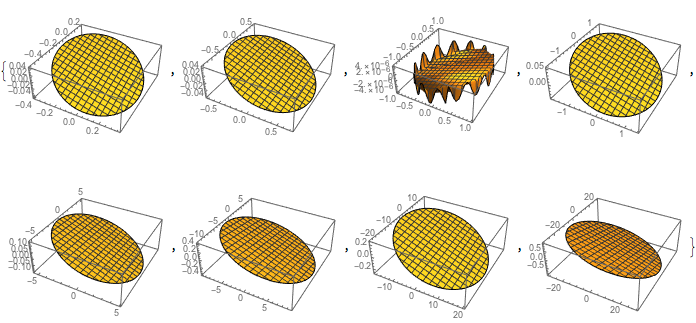
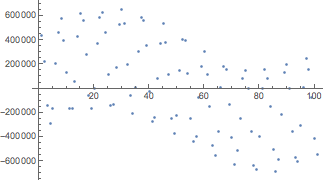
Oddly enough, there seems to be an error with the z-data for our very own planet, and unless our path around the sun really is in the shape of a distorted bottle cap, we'll need to substitute in some correct data:
Oddly enough, there seems to be an error with the z-data for our very own planet, and unless our path around the sun really is in the shape of a distorted bottle cap, we'll need to substitute in some correct data:
In[]:=
ListPlot[Transpose[Table[AstronomicalData["Earth",{"Position",i}],{i,d,DatePlus[d,Quantity[1,"Year"]],Quantity[0.01,"Year"]}]][[3]]]
Out[]=
In[]:=
planetpos=ReplacePart[planetpos,3(Entity["Planet","Earth"]["OrbitPath"][[1]])];
Now that our data is corrected, we can run a trigonometric fit for each 3-D dimension as a function of time to get our final set of equations. Note that the updated data for Earth only has 50 positions, so the fit includes a conditional:
Now that our data is corrected, we can run a trigonometric fit for each 3-D dimension as a function of time to get our final set of equations. Note that the updated data for Earth only has 50 positions, so the fit includes a conditional:
In[]:=
fits=Table[NonlinearModelFit[(Transpose[#]&/@planetpos)[[m]][[n]],a*Sin[x*Pi/If[m3,25,50]+b]+c,{a,b,c,r},x],{m,1,8},{n,1,3}];Table[Show[ListPlot[(Transpose[#]&/@planetpos)[[m]][[n]]],ParametricPlot[{t,fits[[m]][[n]][t]},{t,0,100},PlotStyleRed]],{m,1,8},{n,1,3}]
Visualizations
Visualizations
Solar System Visualization
Solar System Visualization
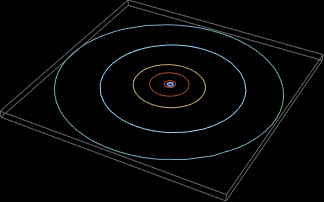
Let's generate a 3-D plot of the orbit paths:
In[]:=
orbitplots=Show[Table[Graphics3D[{colors[[n+1]],EntityValue["Planet","OrbitPath"][[n]]},BackgroundBlack],{n,1,8}]]
Out[]=
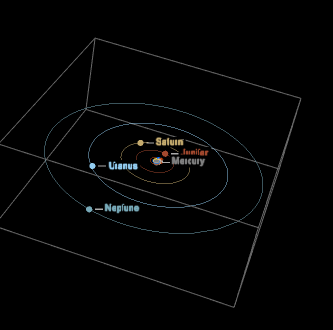
Next let's add the sun and the planets. We can do this using the fits we've created:
Next let's add the sun and the planets. We can do this using the fits we've created:
In[]:=
plotsys[year_,month_,day_]:=Show[Join[Table[ListPointPlot3D[Callout[{Table[If[n1,0,fits[[n-1]][[i]][If[n3,50,100]*(Mod[(DateDifference[d,DateObject[{year,month,day}],"Days"]/Quantity[1,"Day"]),periods[[n-1]]]/periods[[n-1]])]],{i,1,3}]},Join[{"Sun"},planets][[n]],LabelStylecolors[[n]]],PlotRange{{-32,32},{-32,32},{-32/2,32/2}},BackgroundBlack,PlotStyleDirective[colors[[n]]],AxesFalse],{n,1,9}],{orbitplots}]];
In[]:=
plotsys[1977,8,20]
Out[]=
Adding Date Selector
Adding Date Selector
This 3D solar system is fine and dandy, but let's say we want to add a date selector. And no, not your boring old popup menu date selector, but a sharp, clean-looking calendar view with clickable days and everything. Well, for that we'll need to use a dynamic module:
Combining this with our solar system model, we get a nice adjustable solar system display:
Combining this with our solar system model, we get a nice adjustable solar system display:
N-Body Simulation
N-Body Simulation
Now let's shift gears and take a look at the actual N-Body simulation. We can make an function that takes in a spacecraft's mass in kg, x, y, and z-component velocities in m/s, and then output an initial state. The function should also place this theoretical spacecraft in a position corresponding to a parking orbit 10,000km above Earth from which the spacecraft would actually launch into interplanetary space. Let's try and visualize this:
Conclusions, Future Work, and Acknowledgements
Conclusions, Future Work, and Acknowledgements
Conclusions
Conclusions
Future Work
Future Work
Acknowledgements
Acknowledgements
I would like to thank all the wonderful staff and TAs that made Wolfram Summer Camp 2020 possible. I would also like to thank my mentor, Mae Jennings, for guiding me throughout my project and giving me helpful tips and feedback, as well as all of the helpful, supportive, and downright hilarious camp-mates in my mentor group who I enjoyed b̶e̶a̶t̶i̶n̶g̶ playing with in skribbl.io.