Marine plastic pollution is a critical environmental issue driven by both human activity and ocean circulation. As plastic waste enters the ocean, especially from densely populated coastal regions, it is carried across vast distances by surface currents. In this project, I explore how marine debris travels by using real-world ocean current data and global population maps. I built an interactive particle-tracking simulation that models debris drift from any location on a world map. By combining vector data from NASA’s OSCAR dataset with population visualizations, I examine how plastic waste spreads through ocean systems, and how its origins may be linked to human geography.
Introduction
Introduction
Ocean pollution and circulation of trash is an issue I’ve seen firsthand as a scuba diver. From floating debris on the surface to plastic tangled in coral reefs, this issue is widespread. This project combines that personal experience with data science to better understand how ocean currents carry marine debris across the globe. I used real-world surface current data from NASA’s OSCAR dataset and global population maps to build an interactive particle-tracking simulation. Users can select the point they would like to drop virtual plastic into the ocean from any location and watch the path it takes over time. By linking population density with ocean current patterns, I explored how human activity and geography shape the flow of plastic through marine ecosystems, something I’ve observed up close, and now modeled on a global scale.
Defining Data
Defining Data
I started by importing real ocean current data from NASA's OSCAR dataset to build the foundation for tracking marine debris movement. The NetCDF file contains global ocean surface velocity measurements at 0.25 degree resolution. The import process extracts key variables, including longitude/latitude coordinates and u/v velocity components, which represent eastward and northward current flow. I then filtered the data to remove invalid measurements and unrealistic velocity values above 3 m/s.
Import vector current data from a Wolfram Cloud object using CloudGet:
In[]:=
Extract key oceanographic variables from the imported dataset including longitude, latitude, time, and velocity components:
In[]:=
lon=dataI["/lon"];lat=dataI["/lat"];time=dataI["/time"];u=dataI["/u"];ug=dataI["/ug"];v=dataI["/v"];vg=dataI["/vg"];
The raw OSCAR dataset required much preprocessing to extract usable current vectors. I sampled about every 10th longitude point and every 5th latitude point to reduce computational load while maintaining global coverage. Later, this changed to every single longitude and latitude point to further enhance the accuracy of my data. Coordinate validation was critical since GeoPosition objects reject invalid latitudes outside the -90° to 90° range. I filtered the dataset to ensure all coordinate pairs represented valid geographic locations before constructing the vector field. The final processed dataset contains approximately 150 vectors per time step, distributed globally to capture major oceanic circulation patterns while remaining computationally manageable for real time visualization.
Generate a table of coordinates and their corresponding eastward and northward current velocities from the first time index of the dataset:
In[]:=
data=Table[{lon[[i]],lat[[j]],u[[1,i,j]],v[[1,i,j]]},{i,1,Length[lon],1},{j,1,Length[lat],1}];
Flatten the data and remove any entries with missing values to ensure the dataset is clean by filtering out any vector entries with invalid placeholders (-999., -999.):
In[]:=
dataClean=Select[DeleteMissing[Flatten[data,1]],{#[[3]],#[[4]]}!={-999.,-999}&];
I then reorganized my data into data and dataClean, each containing a different amount of the one million vector data points present in the imported NASA data. The raw ocean current data needed preprocessing to remove invalid measurements and organize it for analysis. I used DeleteMissing to filter out data points containing missing values, which appear as -999 placeholders in the original dataset. After cleaning, the data maintains its four component structure with valid longitude, latitude, and velocity (u/v) measurements ready for the tracking algorithms.
Retrieve all recognized countries and their respective populations using Wolfram’s built in entity framework.
In[]:=
countries=EntityValue,EntityFunction[e,{e,e["Population"]}];

Vector Maps
Vector Maps
This line generates a population density map using GeoRegionValuePlot. It visualizes the population of different countries as shaded regions on a global map. This serves as the background for identifying high density coastal areas that may contribute to ocean plastic pollution.
Generate a world map where countries are shaded based on their population values.
In[]:=
popMap=GeoRegionValuePlot[countries,ImageSize->Large];
This part of the code creates two key components of the simulation. First, the population map is generated using GeoRegionValuePlot to show global population distribution by country. This helps identify/suggest which coastal areas are likely to contribute more to ocean plastic pollution. Next, the cleaned ocean current data is converted into an association where each coordinate pair is linked to its velocity vector. This makes it easy to look up the current direction at any location and is essential for simulating how particles move through the ocean.
Create an association that maps each coordinate pair to its corresponding ocean current velocity vector.
In[]:=
dataVectors=Association[{#[[2]],#[[1]]}->{#[[3]],#[[4]]}&/@dataClean];
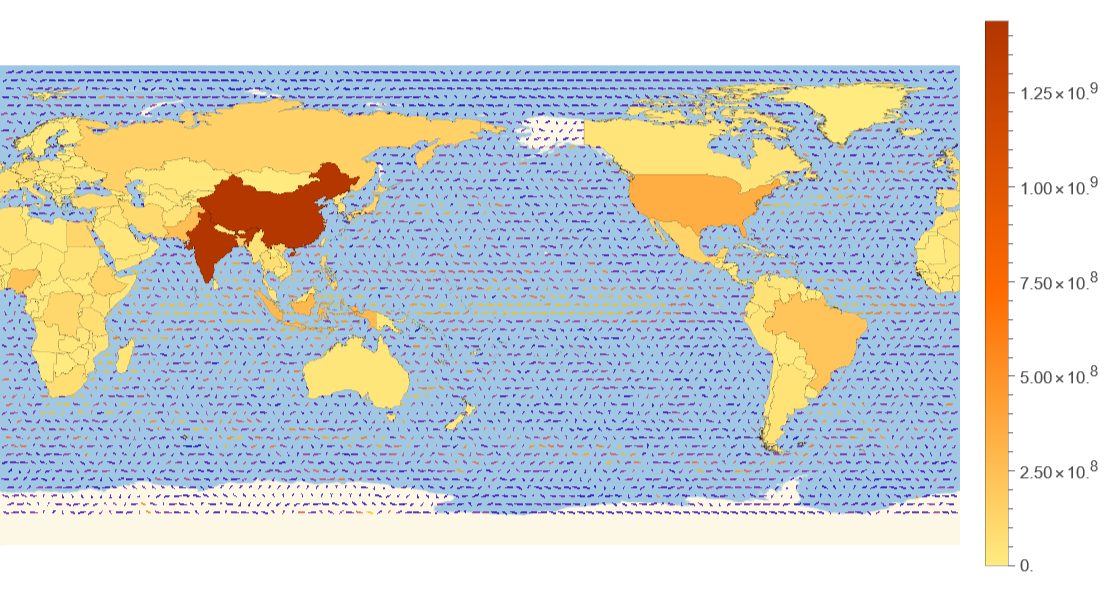
To understand the origin of marine debris, I mapped global population distribution using Wolfram’s built in country data. The EntityValue function pulls population figures for all countries, which GeoRegionValuePlot then visualizes as color coded regions. The resulting map clearly shows population hotspots. For example, China and India appear in dark red. At the same time, countries like the US, Brazil, and Indonesia are represented in orange tones. This population data becomes crucial for the trash tracking model since coastal cities with higher populations generate proportionally more plastic waste that eventually reaches the ocean.
Overlay the ocean current vector field on top of the global population density map for combined geographic and flow visualization.
In[]:=
vectorPopMap=Show[GeoVectorPlot[GeoPosition[{#[[2]],#[[1]]}]->{#[[3]],#[[4]]}&/@dataClean,VectorPoints->100],popMap]
Out[]=
Interactive Particle Tracking Visualization
Interactive Particle Tracking Visualization
Now, when I add the defined popMap function to my GeoVectorPlot, the map where my vector points are plotted changes into a population density diagram, this map on which the vector field is graphed, is comprehensive in detailing the effect of population and ocean currents on where the most dense dumping of trash will most likely occur. To make the map interactive, I used a DynamicModule with ClickPane so users can click anywhere on the world map and instantly drop a point. The clicked location is saved as pt, and a blue dot appears there. The coordinates update in real time and are displayed in GeoPosition format, so users can see exactly where they clicked in terms of latitude and longitude.
Convert the population and vector overlay map into a raster image for pixel based interaction and plotting.
In[]:=
mapImg=Rasterize[vectorPopMap[[1]]];
Create an interactive map where clicking sets a point, displays its geographic coordinates, and marks it with a blue disk.
In[]:=
DynamicModule[{pt={0,0},path={},running=False,hasRun=False},Dynamic[ClickPane[Framed[Show[mapImg,Graphics[{Text[Style[Dynamic[{pt[[1]],pt[[2]]}],FontSize->30],{600,100}],Blue,PointSize[0.01],Point[pt]}],ImageSize->ImageDimensions[mapImg]]],(pt=#;hasRun=False;path={})&]],SaveDefinitions->True]
Out[]=
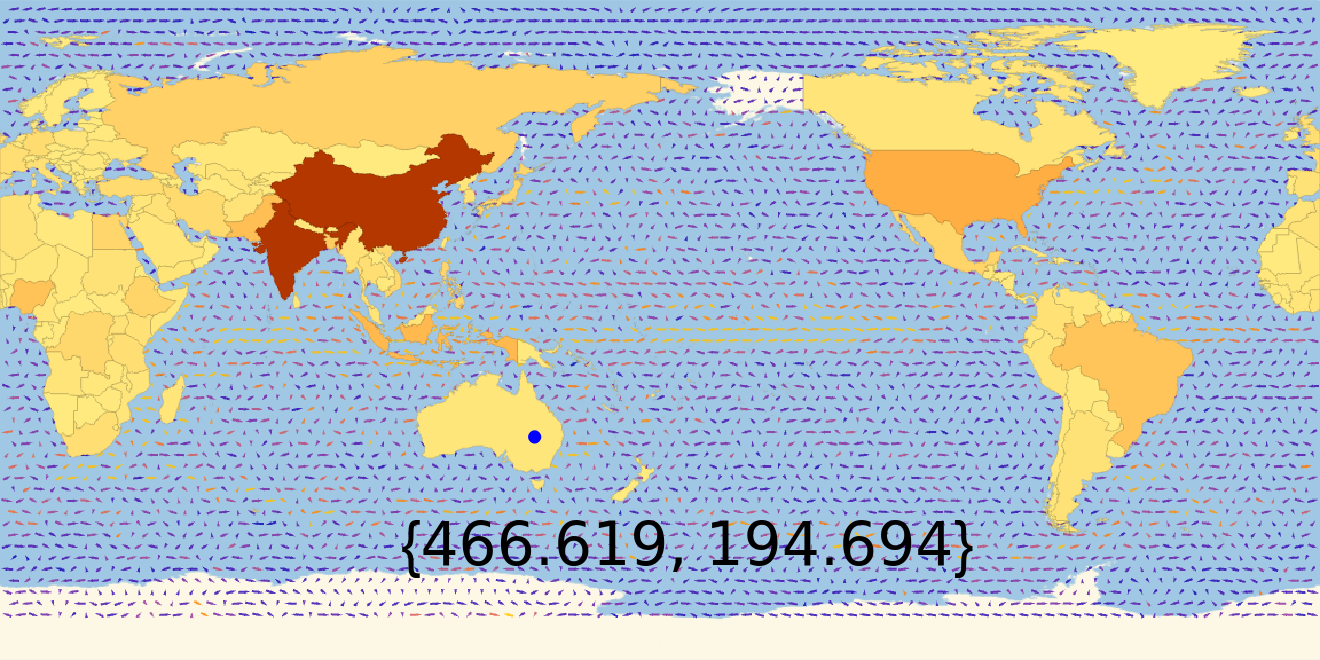
I then created a function to simulate how a trash particle moves through ocean currents from a given starting point. It’s called pathFunc and takes in startP_ (starting point), which is the starting coordinate in {x, y} form. Inside the function, currentPos is set to the starting point, and pathTaken stores the full trail of the particle. We also define velocity, which will update at each step. We begin by adding the starting point to pathTaken. Then a Table runs for a number of steps; in each one, the function finds the closest velocity vector using Nearest, grabbing the u and v ocean current values (the flow direction) from the cleaned dataset. These values are scaled up by 50 to make the movement more noticeable on the image. The particle’s position is updated by moving one unit in the direction of the current using Normalize, and the new point is added to pathTaken.
Define a function that simulates particle drift by repeatedly finding the nearest velocity vector, moving in that direction, and storing each new position to build a complete path.
In[]:=
pathFunc[startP_]:=Module[{currentPos=startP,pathTaken,velocity},pathTaken={currentPos};Table[velocity=Nearest[Thread[dataClean[[All,{1,2}]]->dataClean],currentPos][[1]][[3;;4]]*50;currentPos=currentPos+Normalize[velocity];pathTaken=Join[pathTaken,{currentPos}];,{steps}];pathTaken];
Sets the initial pixel coordinate for particle drift, marks the manually defined end point, and defines how many steps the particle will move during simulation.
In[]:=
start={500,280};end={230,220};steps=100;
Example of finding the closest cleaned data point (with velocity info) to the given coordinate by using the key for tracking the correct current.
In[]:=
Nearest[Thread[dataClean[[All,{1,2}]]->dataClean],{629.9921875`,323.2343750000001`}]
Out[]=
{{359.75,88.25,-0.00661036,-0.0553111}}
Reference Path Plotted
Reference Path Plotted
I set path as the raw output from my pathFunc[start], which simulates how a particle drifts through ocean currents over time. Each {x, y} coordinate represents one step, and you can see the gradual change in position as the particle moves. Because the current direction is normalized and scaled, the path looks smooth and curved, reflecting the ocean flow. This list is what drives the automated path visualization in my simulation.
Generate the full drift path from the starting point using the path simulation function.
In[]:=
path=pathFunc[start];
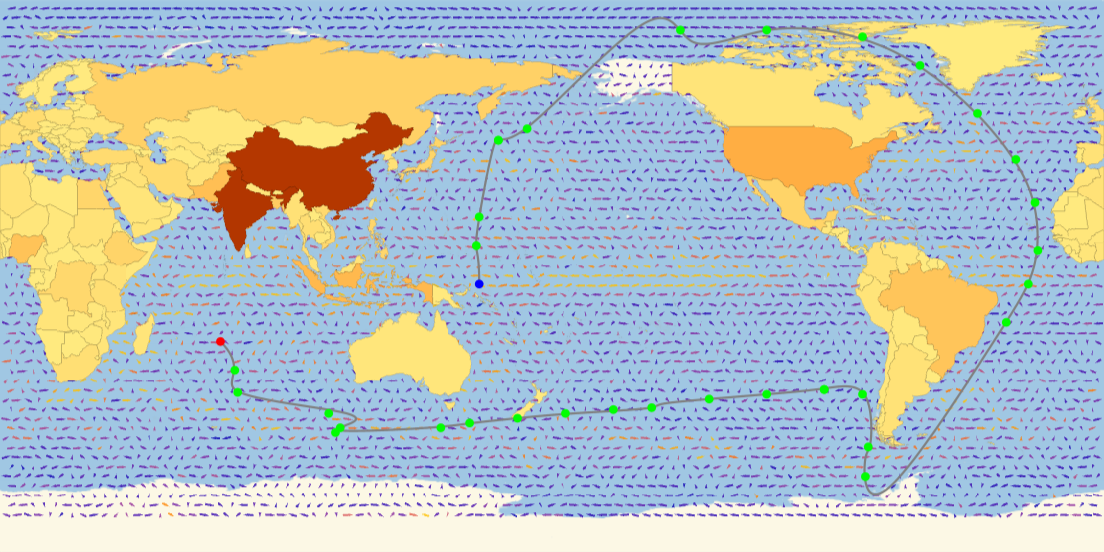
To visualize what I wanted my final output to look like, I manually graphed a list of points (pathCoords) onto my interactive particle tracking simulation. This helped me sketch the ideal path I expected debris to follow. I used these coordinates as a visual reference to test and fine tune my vector driven outputs against a target trajectory.
Manually define a list of coordinates representing a target drift path for comparison or reference in visualization.
In[]:=
pathCoords={{500,280},{500,320},{490,300},{520,460},{520,400},{700,600},{710,510},{800,555},{900,540},{960,510},{1020,460},{1060,410},{1080,370},{1085,320},{1075,280},{1050,240},{904,14},{900,110},{910,100},{910,180},{860,170},{800,165},{740,160},{680,155},{690,150},{590,145},{540,140},{490,135},{460,130},{350,125},{350,130},{400,145},{200,165},{260,190},{230,220}};
This is the final list of pathCoords (now referred to as pointList) that I manually adjusted so that the BSplineCurve would follow the correct trajectory. Since Bsplines smooth and average the points, I tweaked the coordinates slightly to make sure the curve visually matched the intended path without cutting through land or drifting too far off course.
Store manually adjusted points to better align the BSpline curve with the intended visual path on the raster map.
In[]:=
pointList={{497,320},{500,350},{520,430},{520,430},{550,442},{700,600},{710,545},{800,545},{900,538},{960,508},{1020,458},{1060,410},{1080,365},{1083,315},{1073,280},{1050,240},{903,79},{906,110},{900,165},{860,170},{860,170},{800,165},{740,160},{680,151},{640,149},{590,145},{540,140},{490,135},{460,130},{350,125},{355,130},{343,145},{248,167},{245,190}};
This Show command overlays everything onto the base map. It draws the main particle path using a smooth BSplineCurve in gray. The starting point is marked in blue, the endpoint in red, and all manually placed points from pointList are also plotted (green). The green dots specifically highlights where the vector direction noticeably changes, helping me analyze where debris behavior shifts mid path.
Display the background map with the smoothed reference path, start and end points, and key directional changes highlighted using color coded markers.
In[]:=
Show[mapImg,Graphics[{Gray,Thickness[0.002],BSplineCurve[pathCoords],Blue,PointSize[0.008],Point[start],Red,PointSize[0.008],Point[end],Green,PointSize[0.008],Point[pointList]}],ImageSize->ImageDimensions[mapImg]]
Out[]=
Vector Based Particle Model
Vector Based Particle Model
This module simulates how a particle moves through ocean currents starting at {500, 280}. It initializes an empty list path1 to store the particle’s trajectory and sets the current position. Inside a loop, it finds the nearest ocean current vector to the current location using Nearest, extracts the velocity components, and updates the position by directly adding the velocity. If both components are valid numbers, it appends the new position to the path. However, since the velocity isn’t scaled or normalized, the particle moves with increasing magnitude each step, which causes the path to shoot offscreen and produce extremely large negative values. This showed me the importance of controlling vector magnitude when simulating movement.
Simulate particle drift by updating position based on raw velocity vectors at intervals, appending each step to build a basic path without normalization or scaling.
Example of first ten simulated points after point (500, 280).
After determining the desired end product, I then focused on accurately appending the location of the dropped “trash” to the nearest vector without creating a linear graph (which occurred because the vector coordinates were only slightly off). The pathPointGenerator function takes starting coordinates and a time duration to simulate particle drift through ocean currents. The core process finds the nearest ocean current data point using Nearest[Thread[data2...]], extracts the velocity components from that current, and moves the particle one step forward with newPos = currentPos + Normalize[velocity]. Each new position gets added to the growing path list, creating a realistic trajectory as the particle follows the flow of ocean currents. The function returns every 20th point from the complete path to keep the visualization clean while still showing the overall drift pattern. This way, the decimal places apart from each subsequent vector coordinate didn’t affect the accuracy of the path output.
Generate a simplified debris path by stepping through ocean currents from a starting point, normalizing velocity at each step, and returning every 20th point for clean visualization.
Visualize a full particle path from a given start point and duration, highlighting the start in blue, the end in red, and the full drift path in green on the ocean current map.
This startEnd function takes in a starting coordinate and a time duration, then visualizes the particle’s drift based on real ocean current vectors. It calls pathPointGenerator to generate the path using the vector data, and then plots the trajectory using a BSplineCurve. The blue dot marks the start, green shows the first step, and red marks the final position. This graph proves that the path now reacts dynamically to the clicked starting point and underlying current data, which is exactly what I aimed for in the earlier manually drawn path.
Run the path visualization from the coordinate {800, 300} over 400 time steps, displaying its simulated drift through ocean currents.
Conclusion
Conclusion
Through this project, I developed an interactive system that simulates marine debris drift using real ocean current data. I built functions to map population density, visualize current vectors, and generate debris paths from any clicked point on the map. By combining manual mapping with automated path generation, I demonstrated how population centers and ocean flow patterns intersect, laying the groundwork for future plastic/garbage tracking models. The project showed that debris released near high-density coastal regions tends to follow large scale gyre patterns and can remain circulating for extended periods. This suggests that prevention efforts should focus on upstream waste management in these regions to reduce long-term accumulation in open ocean zones.
Future Directions
Future Directions
Future work on this project could focus on making the simulation fully interactive—where clicking a point on the map directly runs the drift path without needing to press “Run.” Another extension could involve adding a slider to control current strength or particle speed. It would also be valuable to include land detection to stop particles when they hit a coastline, improving realism and better modeling coastal plastic accumulation.
Acknowledgements
Acknowledgements
Thank you to my mentor Jenny Wang and to William Choi-Kim for helping me through my project!
References
References
1. Ocean Surface Current Analyses Real-time (OSCAR) Surface Currents - Interim 0.25 Degree (Version 2.0). (2020). Physical Oceanography Distributed Active Archive Center (PO.DAAC). https://doi.org/10.5067/OSCAR-25I20
CITE THIS NOTEBOOK
CITE THIS NOTEBOOK
Vector Field Analysis of Trash Spread Through Oceans
by Divya Thota
Wolfram Community, STAFF PICKS, July 10, 2025
https://community.wolfram.com/groups/-/m/t/3498902
by Divya Thota
Wolfram Community, STAFF PICKS, July 10, 2025
https://community.wolfram.com/groups/-/m/t/3498902