My project begins with analyzing the structure of river tributaries in 2D through polygon clustering, satellite imaging, and various cleaning protocols; then I developed their respective tributary tree graphs, morphological graphs, and nodes to create a comprehensive tree and 3D model. Afterwards, I examined the morphology of flood plains in 3D space, implementing the rational method (Q=CiA) framework with curated relief plots to predict, model, and visualize flooding elevation. Finally, I simplified the foundation my project and created a few extensions for my project to be more applicable to users.
Merit for Analyzing Properties of River Tributaries
Merit for Analyzing Properties of River Tributaries
Current methods of analyzing river tributaries are limited to "notable" rivers and streams. As rivers are not GeoEntities, river data extraction is extremely limited, and the database for "notable" rivers do not identify tributary points, connectedness, nor stream order identification. This section focuses on the methodology of a novel extraction of river polygons, the labeling of tributary "split-points", the identification of these split points, the creation of tree graphs & morphological graphs, and the establishment and implementation of stream order identification for rivers and their tributaries.
Isolating Rivers from Maps
Isolating Rivers from Maps
This first step of this section is to find a way to isolate rivers from a Map; we can do this through polygon clusters and color recognition. VectorMinimal allows us to convert individual components on the map into manipulable polygons. GeoBoundingBox gives the coordinates of the bounding rectangle enclosing the extracted polygon. GeoGraphics simply gives the map of all said polygons in the region.
Let's take Paris, France; we'll name the variable parisMap:
Let's take Paris, France; we'll name the variable parisMap:
In[]:=
parisMap = ImageResize[GeoGraphics[GeoBoundingBox[Entity["City",{"Paris","IleDeFrance","France"}]], GeoBackground -> "VectorMinimal"],500]
Out[]=
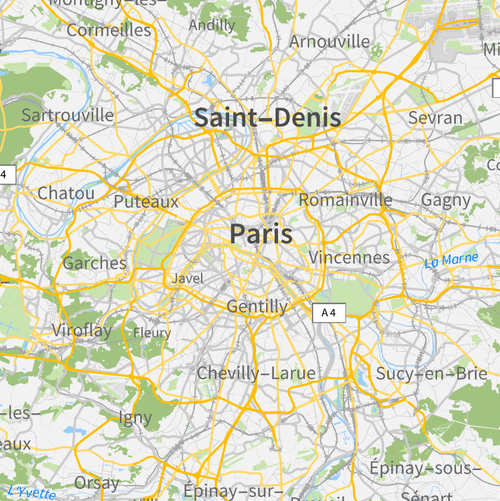
Then we can take the color of the river on parisMap, RGBColor[0.6, 0.807843137254902, 1.0] { }, and extract all polygons that match the criteria of that color. Specifically, we will employ Cases and Select to parse through the objects with color with the condition Not @ * FreeQ[Polygon] to iterate through parisMap until there are no more "Free" polygons.

{}
{}
Let' s visualize river extraction in Paris through parisRiver :
In[]:=
parisRiver=Graphics[Select[Cases[parisMap,{Directive[{___,RGBColor[0.6,0.807843137254902`,1.],___}],___},Infinity],Not@*FreeQ[Polygon]]]
Out[]=
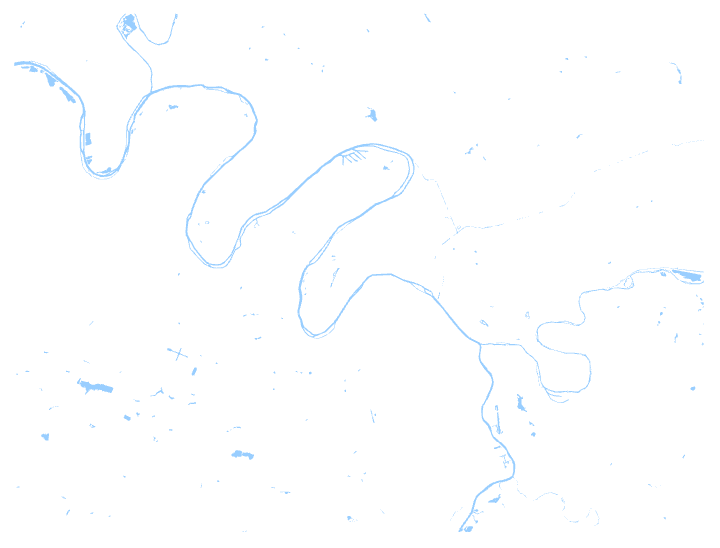
However, this function extracts all the blue polygons in the map --- this includes the extraneous water structures separate from the main river and its tributaries. We can fix this through cleaning functions like Dilation (to enlarge all components to connect river polygons), DeleteSmallComponents (to delete all the unconnected, small components), and Thinning (to return the river back to a manageable size).
Applied to parisRiver, we get parisOutline:
In[]:=
parisOutline=Thinning[DeleteSmallComponents[Dilation[ColorNegate[Binarize[Graphics[Flatten[Cases[GeoGraphics[GeoBoundingBox[Entity["City",{"Paris","IleDeFrance","France"}]],GeoBackground->"VectorMinimal"],water:{Directive[{___,RGBColor[0.6,0.807843137254902`,1.],___}],___}:>water[[2]],Infinity]]]]],3]]]
Out[]=
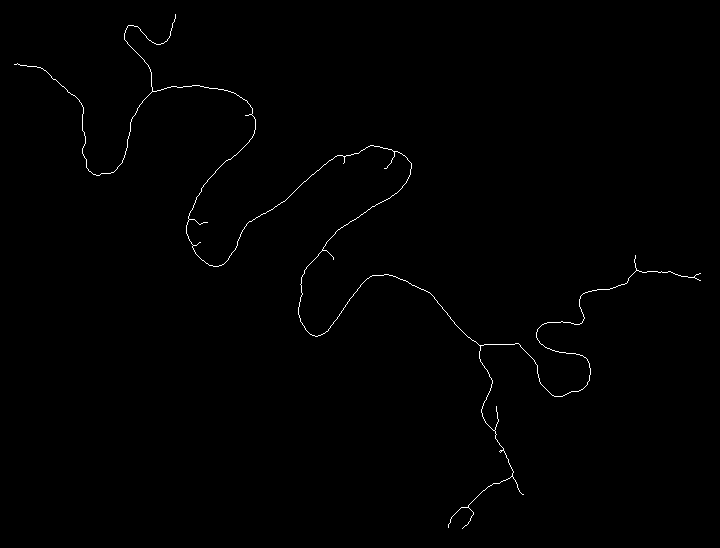
Using parisOutline, we can now move on to creating morphological graphs and tree graphs.
Creating Morphological Graphs and Tree Graphs
Creating Morphological Graphs and Tree Graphs
We can apply MorphologicalGraph to parisOutline to give an undirected graph that represents the connectivity of the morphological branch points and endpoints.
Here is MorphologicalGraph applied to parisOutline to get parisMorphologicalGraph:
In[]:=
parisMorphologicalGraph=MorphologicalGraph[parisOutline]
Out[]=
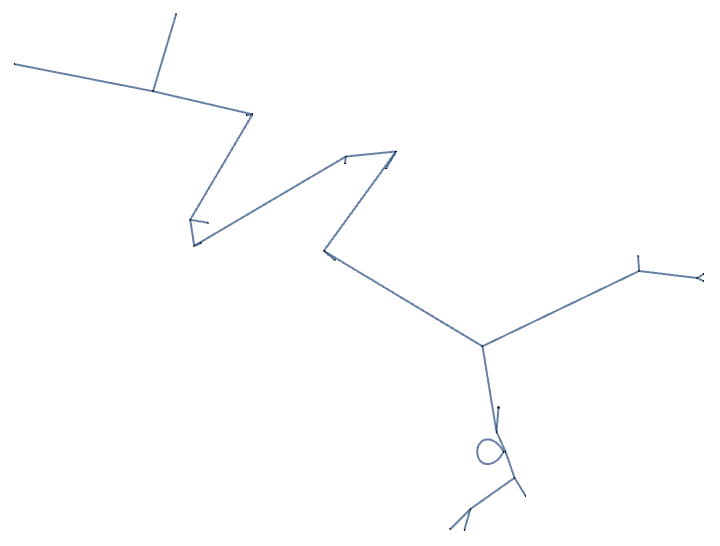
There are a few major flaws in the parisMorphologicalGraph, however. To overcome this limitation and make the morphological graph acyclic, we can employ the TransitiveReductionGraph function. The TransitiveReductionGraph function works by iteratively eliminating edges that contribute to cycles while preserving the graph's reachability properties; it identifies and removes edges that are transitively implied by other edges in the graph, effectively reducing the number of edges and transforming cyclic components into acyclic ones.
Here it is being applied to parisMorphologicalGraph to get parisReduction3DGraph:
In[]:=
parisReduction3DGraph=TransitiveReductionGraph[parisMorphologicalGraph]
Out[]=
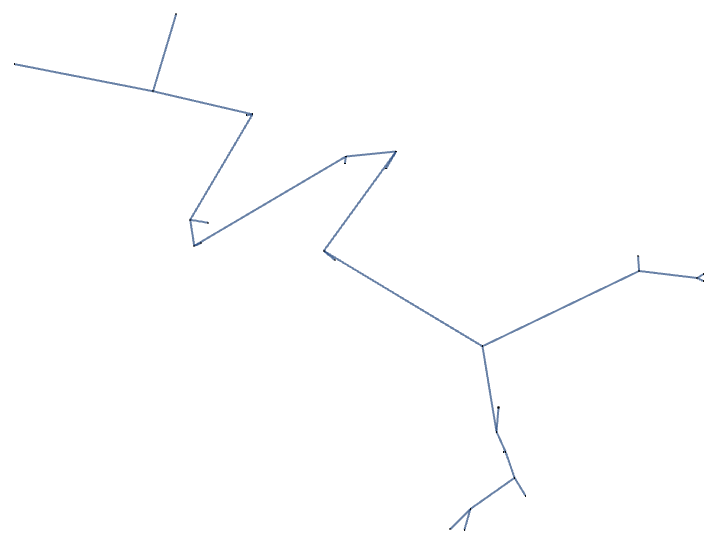
Afterwards, we can apply the function GraphTree to convert the morphological graph into a tree graph (this subsequent step allows us to convert morphological graphs into tree graphs while specifying the desired nodes).
Applied to parisReduction3DGraph, we get parisTreeGraph:
In[]:=
parisTreeGraph=GraphTree[TransitiveReductionGraph[parisMorphologicalGraph]]
Out[]=
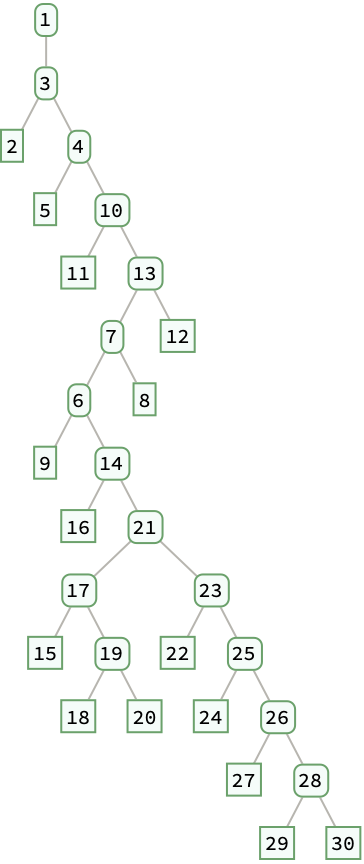
Now that we have trees, we can find stream splits. Let's see how we can tackle this problem.
Finding Stream Splits on Morphological Graphs
Finding Stream Splits on Morphological Graphs
Finding stream splits through morphological graphs can easily be done using MorphologicalBranchPoints and various data cleaning mechanism. First, we extract the river polygons (this time using pattern matching as it reduces the time complexity); next we Binarize the image and subject it to ColorNegate to turn the river white and the background black. Afterwards, we apply the Dilation function to connect all the river polygons together and use the function DeleteSmallComponents to remove extraneous water sources. We apply Thinning to return the river to the original size before using the function MorphologicalBranchPoints to point out the pixels that form river splits. Lastly, we dilate the points and make them into circles using Dilatation (once more) and DiskMatrix[5].
Here is an example from Paris once more, let’s call this function branchIdentification:
We successfully found the branches in which the river breaks off. Let's clean up branchIdentification using ColorNegate, ColorReplace, and RemoveBackground. These functions make the branch points more noticeable when plotted in relation with riverParis.
Applied to branchIdenitification, we get branchPoints:
The final step is to match the points with the river polygons in riverParis (using the same extraction methods as detailed above). Using ImageCompose, we are able to overlay the points with the river tributary splits.
Applied to riverParis and branchPoints, we get layoverImage:
Now let's try to map the river polygons with their tributary points on a geographic map and generalize it for all locations.
Mapping River Branches on Maps
Mapping River Branches on Maps
Although the process for evaluating polygons on maps is known, extracting the polygons across a multitude of different maps (with different coloring schemes) is not trivial. Therefore, we first define variables that extract raw data from the map and stores them for them to be manipulated later. We used the functions Nearest and ColorReplace to make the association from the river's blue to our desired blue.
GeoToGraphicsLayer helps with the syntax of the extraction of graphics layers from a map using functions like Flatten and Cases. The rest of the riverBranchMap pure anonymous function is written so that the code can be applied to other river systems; x_, y_, and z_ variables indicate the city, state/province, and country, respectively, and the f_ variable changes the GeoRange the map takes in. The process involves the same polygon extraction and cleaning protocols detailed above (for both the red nodes along the river tributary splits and the river tributaries themselves) and alignment onto the map.
GeoToGraphicsLayer helps with the syntax of the extraction of graphics layers from a map using functions like Flatten and Cases. The rest of the riverBranchMap pure anonymous function is written so that the code can be applied to other river systems; x_, y_, and z_ variables indicate the city, state/province, and country, respectively, and the f_ variable changes the GeoRange the map takes in. The process involves the same polygon extraction and cleaning protocols detailed above (for both the red nodes along the river tributary splits and the river tributaries themselves) and alignment onto the map.
Here it is, applied to Paris:
Now that we have generalized the stream labeling and creation process, let's move on to the applications of this to simple and complex rivers.
Application to Simple River Systems
Application to Simple River Systems
Application of this code to simple river systems can present us with overlooked overcomplexity. Tributaries may be over counted, small bodies of water may be presented as a multiple tributary, and tree graphs may be inaccurate. Note that this example was created in a pure anonymous function for the purpose that this code can be applied to other locations.
Here is an example from Jackson, Mississippi, with everything analyzed, evaluated, extracted, mapped, and displayed with the same functions shown above:
Immediately, we see small amount of tributaries and identify one main river (the Pearl River).
Let’s separate the river polygons (polygonComponents) using Select and Cases:
Then, we'll apply Binarize through the polygonBinarization function to polygonComponents to prepare it for cleaning:
After, we'll apply Dilation, DeleteSmallComponents, and Thinning through the polygonCleaning function to clean all unconnected, small components:
We'll turn the image into a morphological graph using the threeDFullfunction through MorphologicalGraph and Graph3D:
We'll separate the cyclic components using the threeDReducedFunction through TransitiveReductionGraph:
Lastly, we'll create the tree graph using treeFunction and specifically GraphTree:
Some common flaws with small river systems is that minute tributaries may be counted towards the total calculation of river leaves and large bodies of water may be separated into multiple tributaries. Let's investigate complex river systems now.
Application to Complex River Systems
Application to Complex River Systems
Application of this code to more complex river systems may present even more challenges. Tributaries may be uncounted, large bodies of water may be presented as a single tributary, and tree graphs may be inaccurate. Note that this example was created in a pure anonymous function for the purpose that this code can be applied to other locations.
Here is an example from Anchorage, Alaska, with everything analyzed, evaluated, extracted, mapped, and displayed with the same functions shown above:
Immediately, we see an influx of connected and separate bodies of water with varying tributary sizes.
Let’s separate the river polygons (polygonComponents) using Select and Cases:
Out[]=
Then, we'll apply Binarize through the polygonBinarization function to polygonComponents to prepare it for cleaning:
Out[]=
After, we'll apply Dilation, DeleteSmallComponents, and Thinning through the polygonCleaning function to clean all unconnected, small components:
Out[]=
We'll turn the image into a morphological graph using the threeDFullfunction through MorphologicalGraph and Graph3D:
Out[]=
We'll separate the cyclic components using the threeDReducedFunction through TransitiveReductionGraph:
Out[]=
Lastly, we'll create the tree graph using treeFunction and specifically GraphTree:
We have seen that the code works for both simple cases and complex cases for all types of river systems; we also see that it is able to generate components for both types of rivers. Now, we'll move on to the second part of my project: terrain-based flood analysis.
2-D Satellite Mapping onto 3-D Model
2-D Satellite Mapping onto 3-D Model
The first step of this section is to find a way to take satellite imagery of a geographic location using GeoImage; afterwards, we will extract the river basin using imaging processing (using Color Matching once more) and layer both the satellite image and the river (using ImageCompose) to create a texture that could be mapped onto ListPlot3D to create a chunk of the specified geographic location.
Let’s see an example in Juneau, Alaska, we name it satelliteImage:
Afterwards, we can extract the river information from a street map through GeoImage. Then, we can clean the data using ColorNegate, Binarize, and ImageRecolor. ColorNegate and Binarize makes its so that only the river component of satelliteImage is present. ImageRecolor recolors the black (from ColorNegate) into a more desirable blue color for the river. StreeMapNoLabels takes away the labels from the street map to foster a more fluid transition from map to river image.
Here are these functions applied, resulting in riverImage:
In[]:=
Then, we will overlay satelliteImage and riverImage through the ImageCompose function.
Applied on Juneau we get fullSatelliteImage:
Applied on Juneau we get fullSatelliteImage:
In[]:=
Finally, we can set the overlay as a texture scope and create a ListPlot3D for the entire satellite image.
And, Juneau will look something like this:
And, Juneau will look something like this:
Now that we have basic satellite imaging, we can move into more complex satellite imaging with relief plots and the rational method.
Relief Plot for Flood Plain
Relief Plot for Flood Plain
Here it is in Juneau, we’ll call it juneauData, juneauLevelPlot, and juneauReliefPlot respectively:
We can also plot this data if we set the manipulate to an image.
Here is an example of Juneau's flood plain and relief plot using Setting; we'll name it reliefTrue:
Here is an example of Juneau's flood plain and relief plot using Setting; we'll name it reliefTrue:
Out[]=
Finally, we can set the overlay as a texture scope and create a ListPlot3D for the entire relief plot.
And, Juneau's flood plain will look something like this:
And, Juneau's flood plain will look something like this:
Now that we have knowledge on both basic satellite imaging and satellite imaging with relief plots, we can focus on the rational method.
Rational Method (Q = CiA) Introduction and Usage
Rational Method (Q = CiA) Introduction and Usage
The rational method is used for determining peak discharges; this method is traditionally used to size storm sewers, channels, and other stormwater structures.
The rational method formula is expressed as Q = CiA where: Q = Peak rate of runoff in cubic feet per second; C = Runoff coefficient, an empirical coefficient representing a relationship between rainfall and runoff; i = Average intensity of rainfall in inches per hour for the time of concentration for a selected frequency of occurrence or return period; A = The watershed area in acre. In this section, we will be calculating each of these variables and parameterizing them for any geographic location.
The rational method formula is expressed as Q = CiA where: Q = Peak rate of runoff in cubic feet per second; C = Runoff coefficient, an empirical coefficient representing a relationship between rainfall and runoff; i = Average intensity of rainfall in inches per hour for the time of concentration for a selected frequency of occurrence or return period; A = The watershed area in acre. In this section, we will be calculating each of these variables and parameterizing them for any geographic location.
Q = CiA (C Calculation)
Q = CiA (C Calculation)
As C is the runoff coefficient, we conducted a weighted average for all the colors present in the map with their coefficients taken from this table:
As colors from different regions may differ, we have to build an algorithm that converts the closest color to the colors in our key. Using Nearest and ReplaceAll we are able to associate the correct colors with the correct weights. Afterwards we can see the color coverage of all the regions in the map using "Color" and "Coverage" as the option for the DominantColors function and apply the weight to get our final C value.
Here is an example from Juneau, we’ll name it juneauGeo:
Q = CiA (i Calculation)
Q = CiA (i Calculation)
i is the intensity of the rainfall. Previous literature found that the intensity of rainfall for flash floods is usually around 4-6 inches; by taking the rainfall data using WeatherData for the past 20+ years, we are able to find an average annual rainfall measured in centimeters (which we converted to inches by dividing by 2.54). Next we mapped the intensity of rainfall (if it were to flood) and set it proportional to how high the annual rainfall is using a Which function.
Here is it being applied to Juneau and name it intensityCalibrated:
Q = CiA (A Calculation)
Q = CiA (A Calculation)
A is the area of the flood plain in acres; current data was in miles. To convert miles to acres, we have to square the region boundaries (the return result will be in square miles), then multiply by 640.
Represented in Juneau, named acres:
Q = CiA (Q Calculation) & River Runoff Calculation
Q = CiA (Q Calculation) & River Runoff Calculation
Multiplying the permeability, intensity, and acres values, we are able to derive the peakRunoff rate for Juneau, Alaska (or the Q value):
In[]:=
Firstly, we want to multiply the peakRunoff calculation (Q) by the inverse to model the factor in which the river will increase with respect to time. Then, we'll convert 400 square mile to 11,151,360,000 square feet and multiply 3600 to convert seconds to hours (the original measurement of Q is cubic feet/second). This measurement will give us the units measurement of feet/hour, in which we can manipulate the amount of hours the flood occurs to give the totalRiverIncrease.
Relief Calculation Integration and Flood Analysis
Relief Calculation Integration and Flood Analysis
Using our newly found Q = CiA river elevation increase (1422.29 feet increase if it rained for 750 hours straight in Juneau, Alaska), we can create both relief plots and flood plain graphs using this data.
Taking our previous ReliefPlot techniques, here is the plot for Juneau for the environment specifications, named juneauElevation:
We can then map both the alaskaElevation relief plot and use the totalRiverIncrease data to create a 3D flood plain using ListPlot3D. We used the function Show to overlay the flood plain with the created ListPlot3D of Juneau, Alaska; the first argument created the terrain and the second argument created the rising flood plain with respect to the totalRiverIncrease. Then, we added some minor formatting to the plot (Filling, FillingStyle, PlotStyle) for visualization purposes.
Here it is applied to Juneau:
Application to Simple River Systems
Application to Simple River Systems
Simple river systems may present challenges to the flood plain analysis: rural landscapes may erroneously increase the complexity the mapping process, providing wrong measurements of rainfall and flooding elevation. These problems may cause the prediction to be inaccurate, hence our motivation to apply the code generally to all locations through better cleaning algorithms. Note that we added the parameter cityDimensions to make the plot ranging inclusive of all points in the 20 by 20 mile area.
Let’s explore an example in Jackson, Mississippi, using the measurements taken from dominantColorsCity, canonicalColorValueMap, cleanupRules, cityColorCoverage, cityWeightedByColor, permeability, intensity, intensityCalibrated, acres, peakRunoff, totalRiverIncrease:
In the jacksonGeo model, we simulated 152.786 feet of heavy rainfall over 200 hours in Jackson, Mississippi. Then, we evaluated the ReliefPlot and ListPlot3D using the peakRunoff data and we were able to determine using the rational method (Q = CiA).
Here are Jackson’s relief and 3D plots, using the variables jacksonData, levelPlot, reliefMap, cityDimensions, and floodPlot:
Application to Complex River Systems
Application to Complex River Systems
Complex river systems may present challenges to the flood plain analysis: urban landscapes have varying ranges of elevation, diverse river tributaries, and sporadic weather. These problems may cause the prediction to be inaccurate, hence our motivation to apply the code generally to all locations through better cleaning algorithms. Note that we added the parameter cityDimensions to make the plot ranging inclusive of all points in the 20 by 20 mile area.
Let’s explore an example in Anchorage, Alaska, using the measurements taken from dominantColorsCity, canonicalColorValueMap, cleanupRules, cityColorCoverage, cityWeightedByColor, permeability, intensity, intensityCalibrated, acres, peakRunoff, totalRiverIncrease:
In the anchorageGeo model, we simulated 1527.86 feet of heavy rainfall over 2000 hours in Anchorage, Alaska. Then, we evaluated the ReliefPlot and ListPlot3D using the peakRunoff data we were able to determine using the rational method (Q = CiA).
Here are Jackson’s relief and 3D plots, using the variables anchorageData, levelPlot, reliefMap, cityDimensions, and floodPlot:
Tying Everything Together
Tying Everything Together
Just for fun, here is a model that ties together both aspects of my project. Note that parisRiverIncrease = 250 for simplicity's sake.
Taken from parisData, parisLevelPlot, parisReliefMap, parisCityDimensions, parisFloodPlot, parisGraph, and parisElevated:
When modeling a MorphologicalGraph on top of a ListPlot3D, we have to introduce an elevate function: parisElevated. What parisElevated does is that it take each individual vertex coordinate and maps its 1000 feet above the model, so we can better visualize the river tributary patterns alongside the flood prediction model.
And that's about all! Now onwards to my extensions.
And that's about all! Now onwards to my extensions.
Extension: 2D & 3D Population Density Model
Extension: 2D & 3D Population Density Model
Calculating population density can tell us how "at-risk" an area is at risk for flooding, hence an important metric to measure. While there are some built-in functions (GeoRegionValuePlot), the functional range is too limited and small.
Take this example from New York:
To fix this, we simply used available population and landmass data to perform the population density calculation and project density through ListPlot3D. populationOverArea creates the ratio between the population and area of the specified area and textureDensity assigns the color based on the classifications of population density. Afterwards, we combine and overlay them using the same methods shown above.
Here is the population density map of New York City, New York using the variables populationOverArea, textureDensity, newYorkImage, riverImage, combinedNewYorkImage, and newYorkPopulation:
Extension: Large Scale Modeling of River Width
Extension: Large Scale Modeling of River Width
We can model the river width of a certain river and its contributing tributaries through determining the length of notable bridges that cross the river from its origin to its delta. Specifically, we will use the functions FilteredEntityClass and GeoRegionValuePlot to create our river width weights.
Here is an example from the Missouri River, let’s name it bridgeMissouri:
A more comprehensive example that incorporates the river delta in relation with the origin is the Mississippi River
Here, we can see the gradual increase of river width as it moves towards the river delta, let's name it bridgeMississippi:
Here, we can see the gradual increase of river width as it moves towards the river delta, let's name it bridgeMississippi:
Creating Stream Order from Tree Graphs
Creating Stream Order from Tree Graphs
Conclusion
Conclusion
In my project, we first established the elementary framework for detecting river tributaries based on geographic location, establishing nodes for river tributary branches, and creating trees for river tributaries. Then, we implemented the stream order and generalized the code to be inclusive of all geographic locations. Secondly, we created the frameworks for flood plain analysis through geographic elevation data and applying the rational method framework (Q = CiA). Further, we analyzed population density and created pure anonymous functions to generalize for all geographic locations. Finally, we combined our 2 findings to create a comprehensive 3D model that models both river tributary splits and flood plains.
Future Direction
Future Direction
In the future, we would like to pursue a more in-depth examination of river tributaries: river turbidity, river velocity, water elevation level. We would also like to create a more accurate representation of overflowing rivers rather using differential equations rather than a simple linear function. Once the incorporation of river tributaries as GeoEntities is implemented, we hope to update our model with more accurate and relevant data, otherwise, we hope to continue to work on additional features and develop an application for ease-of-access.
Acknowledgements
Acknowledgements
First, I would like to thank the entire Wolfram Summer Research Program team and Stephen Wolfram for the amazing opportunity to work on this project. I would also like to thank Eric Rimbey, my mentor, for his continual support and suggestion throughout my project. To Navvye Anand, Tyler Rose, and Daniel Kagan: thank you so much for the invaluable technical advice and discussions. And to my grandparents and others around the world: I hope you find this useful.
Citations
Citations
◼
◼
Maine Department of Environmental Protection. (1992). Stormwater Best Management Practices: Volume 3 - Appendix A. Retrieved from https://www.maine.gov/dep/land/stormwater/stormwaterbmps/vol3/appendixa.pdf.
◼
◼
Wolfram Community. (2021). Mapping Urban Boundaries onto Satellite Images of Cities. Retrieved from https://community.wolfram.com/groups/-/m/t/2317532.
◼
Wolfram Community. (2022). Do Planes Near Airports Tend to Fly Over Greenspace? Retrieved from https://community.wolfram.com/groups/-/m/t/2581113.
CITE THIS NOTEBOOK
CITE THIS NOTEBOOK
Morphological Analysis of River Tributaries and Flood Plains: A Multi-Dimensional Approach
by George Cheng
Wolfram Community, STAFF PICKS, July 13, 2023
https://community.wolfram.com/groups/-/m/t/2964526
by George Cheng
Wolfram Community, STAFF PICKS, July 13, 2023
https://community.wolfram.com/groups/-/m/t/2964526