ABSTRACT: Mathematica provides unique symbolic and machine learning tools for developing and solving mathematical models that make it attractive for engineering applications. Chemical engineers frequently have a need to update process design software with custom unit operation models. This contribution includes the code for a functional model for countercurrent membrane cascade that could be used for this purpose. Two methods are then demonstrated to connect the Mathematica code to the design software, including a local PC-based connection and a cloud-based connection. Both methods require deployment of the Mathematica model to Excel, and both methods are demonstrated with the cascade function. We also use the function to generate training data for a rudimentary machine-learning model, develop and train the model, and deploy it to Excel. The original article goes into the specifics of how to connect the code to the chemical process software. CITATION (original article): Cowart, S.V., Yuk, S.F., James, C.M., Nagelli, E.A. and Biaglow, A.I. (2025), Augmented and Cloud Computing With Chemical Process Simulators. Softw: Pract Exper, 55: 791-808. https://doi.org/10.1002/spe.3397
I. Introduction
I. Introduction
This is the third posting in this series on machine learning models. The first posting [1] demonstrates the use of a discrete-stage model of a co-current membrane cascade as a simulation to generate training data for a machine learning model [1]. The second posting describes the application of the same general methods to co-current and countercurrent tubular heat exchangers [2]. In this posting, we extend the procedure to a countercurrent membrane cascade. The primary difference from the cocurrent cascade is that the counter-current flow pattern results in unknown internal stream variables which must be iterated to a solution. The iterative approach takes significant computational time, and the resulting algorithm is slower than the co-current model. However, once trained, the machine learning model is very fast.
As before, the starting point is the single-stage perfectly-mixed model (SPM). A detailed description of the SPM can be found in the references [1,3-5], and the model is implemented in English units [4]. A diagram of the SPM process is shown below.
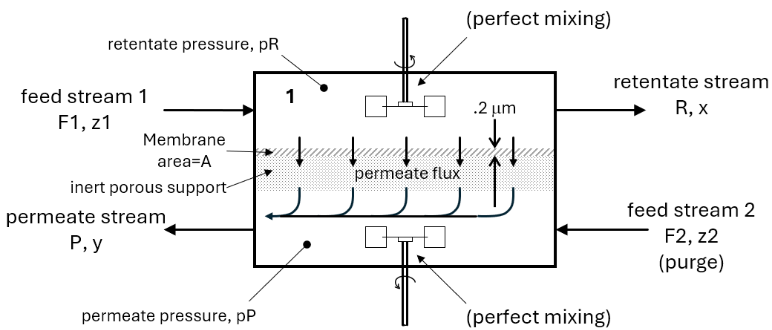
The diagram shows two feed streams to the process, “feed stream 1” and “feed stream 2.” Feed stream 1 is the main feed containing a mixture of nitrogen and oxygen in concentrations close to that of air. Feed stream 2 is a purge stream containing the same two components . The feed molar flow rates are given by F1 and F2 and respective mole fractions by z1 and z2. The feed mole fractions z1 and z2 are lists containing the mole fractions of and, assumed to be 0.79 and 0.21, respectively. Feed streams 1 and 2 can be any mixture of gases, but in this example we use and to simulate air in both streams and to simplify the calculations. Other species normally found in air, such as water, and trace gases, are assumed zero.
(and)
N
2
O
2
N
2
O
2
N
2
O
2
CO
2
In the countercurrent configuration, the two feeds enter on opposite sides of the unit and move in opposite directions through the stage. This contrasts with the co-current configuration, where the two feeds enter on the same side of the unit and move in the same direction through the stage. For the SPM model, this really does not matter because of the assumption of perfect mixing. However, the flow direction is very important when the stages are linked in a cascade.
The membrane itself is shown in the diagram by the cross-hatching, in this case it is a 0.2 μm thick low-density polyethylene film. An inert porous support is shown by the dotted zone underneath the membrane. The support is necessary to enable the membrane to withstand the moderately high pressures that are applied to the feed, but is considered to be inert with respect to the separation. That is, the support provides no resistance to diffusion and both molecules pass through easily and at equal rates. The gas that goes through the membrane is referred to as the “permeate,” and the gas that does not go through is the “retentate.”
Two mole balances and two molar flux equations describe the transport of and in the membrane (Section II, eq12-eq15). These four equations form a system of four solvable algebraic equations. The approach used here to solve the equations employs a unique feature of Mathematica, namely, the ability to embed an unsolved system of equations into a function and then allow the symbolic or numeric engine to solve the system of equations each time the function is called. In other words, the solution to the system of equations does not need to be found explicitly, and the function can be called over and over again, with the solver embedded into the function code. Furthermore, the function can be called directly from Excel or deployed to the cloud for execution in Excel. The disadvantage of this approach is that it is operationally slow, but it is very simple to implement.
N
2
O
2
The SPM itself is very useful because it can be used to build networks of single discrete stages that model more advanced flow configurations such as co-current, cross-current, and countercurrent cascades. Co-current cascades are discussed in Reference 1. An example of a two-stage countercurrent cascade is illustrated below, where the countercurrent flow pattern refers to the movement of the input and output streams in opposite directions in the cascade.
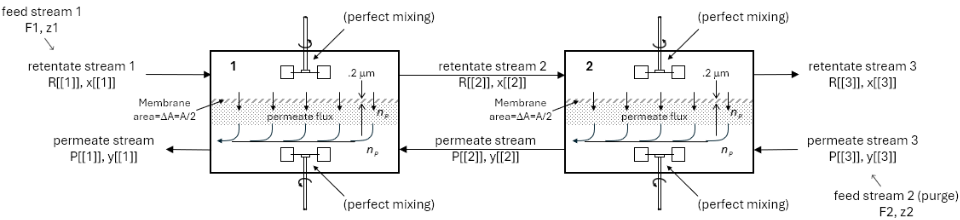
In the cascade, the individual stages are connected with streams that contain flow rate and composition information. The definition of the single stage as a function allows the function to receive the intermediate stream information, return the output values, and then get re-used in subsequent stages in the cascade, with stream information passed into and out of the single stage function as the solution progresses through the cascade. This document illustrates the use of the SPM to construct this type of model.
The rest of this document is organized as follows: Section II shows the code for the SPM and for embedding the model into a function. Section III contains the code for the SPM embedded into a countercurrent cascade. As the size of the cascade is increased, the calculations can take significant time to run. Data-based models can be much faster, although requiring training data and with somewhat less accuracy. Accordingly, Sections IV-VII show the development of a data-based model for the countercurrent cascade. In Section IV, an input dataset is created using gaussian distributions to describe each of the input variables. In Section V, the input dataset is used to generate an output dataset using the cascade code from Section III as a simulation to generate the output data. Section V also defines the associations between the input and output datasets. In Section VI, a simple neural net is used to model the process and the results are compared to the original function model. In Section VII, the neural net model is then exported for use in other programs. Finally, Section VIII shows the deployment of the various models to Excel for use in CHEMCAD calculations.
II. Program Code for Single Stage
II. Program Code for Single Stage
This section contains the code for converting theSPM into a function. The inputs to the function include flow rates and compositions from the two input streams that feed the stage. The inputs also include the membrane area and pressures on both sides of the membrane. The function outputs include flow rates and compositions of the retentate and permeate streams leaving the stage.
The function is built as a Mathematica Module. Modules behave like subroutines that can be called from within larger programs and they have two important attributes . First, Modules allows passage of functional inputs as parameters. Second, Modules allow definition of local variables. These attributes facilitate use of the SPM function in the cascade calculations in the next section. If we were to stop with the single stage, the Module structure would not be necessary [1,2].
The calculation begins with the usual definition of the permeabilities and permeances of and . These properties are calculated from Henry’s Law solubility constants and diffusion coefficients, which are available in the literature [3]. Permeance is the permeability divided by the membrane thickness, in this case 0.2 μm or . Details of this calculation are shown in Reference 2.
N
2
O
2
andandand,whereA=andB=
P
M
B
P
M
A
P
M
B
P
M
A
N
2
O
2
6.6×ft
-7
10
Two molar flux and two mole balance equations for and are defined next. These four equations (eq12 to eq15) form a system of solvable algebraic equations. A numeric solution using Mathematica’s NSolveValues was used to obtain the solution, but SolveValues could have also been used. While NSolveValues produces an approximate solution, the accuracy is very high and is more than adequate. Furthermore, the numerical method saves a little time in the solution compared to using SolveValues.
N
2
O
2
In[]:=
Clear["Global`*"]
(*FunctionDefinitionofSingleStageWell-MixedModel*)(*A-Oxygen;B-Nitrogen*)f2:=Module{A=#1,F1=#2,F2=#3,z1=#4,z2=#5,pR=#6,pP=#7,x,y,eq12,eq13,eq14,eq15,eq16,R,P,eqns,vars},=(.472*)*(.46*)*(*PermeabilityofAfromRef.5*);=(.228*)*(.32*)*(*PermeabilityofBfromRef.5*);=(0.66*)(*PermeanceofA*);=(0.66*)(*PermeanceofB*);eq12=y*(F1-R)==A**(x*pR-y*pP)(*molarfluxofA*);eq13=(1-y)*(F1-R)==A**((1-x)*pR-(1-y)*pP)(*molarfluxofB*);eq14=F1+F2==R+P(*Totalmolebalance*);eq15=z1*F1+z2*F2==x*R+y*P(*Speciesmolebalanceon*);eq16=0<=y<=1(*constraintonmolefractionofinpermeate*);eqns={eq12,eq13,eq14,eq15,eq16};vars={x,y,P,R};NSolveValues[eqns,vars,Reals][[1]]&
P
M
A
-6
10
-6
10
P
M
B
-6
10
-6
10
P
M
A
P
M
A
-6
10
P
M
B
P
M
B
-6
10
P
M
A
P
M
B
O
2
O
2
Functions to be used in the staging model are derived from f2 as shown below:
In[]:=
x1:=(f2@@{#1,#2,#3,#4,#5,#6,#7})[[1]]&y1:=(f2@@{#1,#2,#3,#4,#5,#6,#7})[[2]]&P1:=(f2@@{#1,#2,#3,#4,#5,#6,#7})[[3]]&R1:=(f2@@{#1,#2,#3,#4,#5,#6,#7})[[4]]&
The function developed in this section is used in the staging model of the next section. As the code steps through each stage, membrane area, stream information, and operating pressures are passed into the function f2 . The output of f2 is a list defined by “vars” and produced by solving the list of equations “eqns” using NSolveValues, producing the outlet stream flow rates and mole fractions for the retentate and permeate.
III. Program Code for Countercurrent Staging
III. Program Code for Countercurrent Staging
Introduction
Introduction
Because of the concentration gradients in an actual membrane unit, the SPM model is not truly representative of the actual system unless the membrane area is differentially small. However, as explained in the Introduction, two or more SPM models can be networked into a cascade, making cascades useful for modeling larger membrane units where the SPM model does not adequately describe the system.
In such a case, the membrane is divided into a number of sections, each representing a discrete stage in a cascade. The number of sections is assumed, and the total membrane area can divided by the number of sections to obtain the membrane area per section, with each section modeled with the SPM. The following diagram illustrates the situation that arises when a single membrane unit is conceptually divided into ten equal sections:
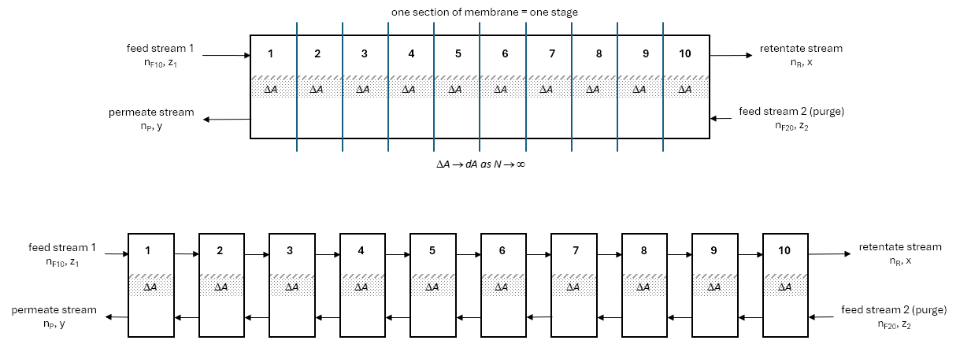
Clearly, the membrane area of each section in such a system, ΔA, will get smaller if the number of sections is increased. Presumably, if more sections are defined and ΔA is further reduced, any concentration gradients across ΔA will also be reduced. In the limit as the number of sections approaches infinity, ΔA approaches zero, the concentration gradients across ΔA will also approach zero, and the resulting differentially small sections would then be exactly described with the perfect mixing model (SPM).
In the development that follows, the number of sections (stages) is set to 100 so the area per stage is the total area divided by 100. There is nothing special about the number 100. The number of stages could be increased, but this will increase the calculation time. Likewise, to decrease calculation time, the number of stages can be reduced to a minimum of two, which is useful for testing or proof-of-concept experiments. Or, the differential mole balance and molar flux equations could be integrated. We do not do that here because we have a working SPM model for the discrete stage, the SPM model is simple to encode, and we seek to demonstrate the usefulness of that model. The function f2 from the previous section, which incorporates the SPM model, is used to calculate the flow rates and compositions of the streams leaving each stage, and these outputs then form the inputs for the next stage.
The entire cascade is modeled as a single function f4, built with Module, which takes as inputs the molar flow rate of the air feed, the permeate and retentate pressures, and the total membrane area. These four variables are passed as parameters into the Module. All other streams internal to the cascade are internal to the Module. Also, as with the single stage, the purge feed can be any desired value but is set to zero inside the Module with local variable nF20int.
Program Code
Program Code
In[]:=
(*FunctionDefinitionforCountercurrentStagingoftheWell-MixedModel*)f4:=Module[{F1=#1,pR=#2,pP=#3,area=#4,ΔA,i,delta,epsilon,size,x,y,P,R,xt,yt,Pt,Rt},size=100;(*numberofstages*)ΔA=area/size;(*membraneareaineachstage*)(*Initializelistsforstorageofstage-by-stageresults*)x=NestList[#+1&,Range[1],size];(*retenatemolefractions*)R=NestList[#+1&,Range[1],size];(*retenatemolarlowrates*)y=NestList[#+1&,Range[1],size];(*permeatemolefractions*)P=NestList[#+1&,Range[1],size];(*permeatemolarflowrates*)(*Initializelistsfortemporarystorageofstage-by-stageresults*)xt=NestList[#+1&,Range[1],size];(*retenatemolefractions*)Rt=NestList[#+1&,Range[1],size];(*retenatemolarlowrates*)yt=NestList[#+1&,Range[1],size];(*permeatemolefractions*)Pt=NestList[#+1&,Range[1],size];(*permeatemolarflowrates*)(*Initialprofilesfortheentirecascadeforfirstiteration*)For[i=1,i<size+2,i++,xt[[i]]=0.21;(*airfeedmolefractionof*)Rt[[i]]=F1;(*airfeedflow*)yt[[i]]=0.21;(*purgefeedmolefrationof*)Pt[[i]]=10;];(*purgefeedflow*)(*Assignvaluestothetwofeedlocationsintheoutputlists*)x[[1]]=0.21;(*airfeedmolefractionof*)R[[1]]=F1;(*airfeedflow*)y[[size+1]]=.21;(*purgefeedmolefractionof*)P[[size+1]]=10;(*purgefeedflowF2*)(*Convergencecriteria*)delta=200;(*Initialvalueofconvergencecriterion*)epsilon=0.00001;(*Finalvalueforconvergencecriterion*)While[delta>epsilon,(*Calculatethemolefractionandflowprofilesforthecascade*)For[i=1,i<size+1,i++,x[[i+1]]=x1[ΔA,Rt[[i]],Pt[[i+1]],xt[[i]],yt[[i+1]],pR,pP];R[[i+1]]=R1[ΔA,Rt[[i]],Pt[[i+1]],xt[[i]],yt[[i+1]],pR,pP];y[[i]]=y1[ΔA,Rt[[i]],Pt[[i+1]],xt[[i]],yt[[i+1]],pR,pP];P[[i]]=P1[ΔA,Rt[[i]],Pt[[i+1]],xt[[i]],yt[[i+1]],pR,pP];];(*Definedeltaasthedifferenceintheprofilelistsfromoneitereationtothenext*)(*Re-calculatetheconvergencecriterion*)delta=Plus@@Abs[xt-x]+Plus@@Abs[Rt-R]+Plus@@Abs[yt-y]+Plus@@Abs[Pt-P];(*Re-assignlistsforpassingtonextiteration*)For[i=1,i<size+2,i++,xt[[i]]=x[[i]];Rt[[i]]=R[[i]];yt[[i]]=y[[i]];Pt[[i]]=P[[i]];];];(*functionoutputs*){(1-(R[[size+1]]/F1)),x[[size+1]],y[[1]],P[[1]],R[[size+1]]}]&
O
2
O
2
O
2
O
2
Tests
Tests
This calculation took 1002.80 seconds for 100 elements and epsilon=0.001. Other calculation times for different number of stages and different values of epsilon are shown in the table below.
IV. Generation of Normally Distributed Input Variables
IV. Generation of Normally Distributed Input Variables
This section produces input data which is then fed to the functions from the previous section to generate training data for the neural net model. The four input variables include the feed flow rate (nF), the retentate pressure (PR) , the permeate pressure (PP), and the membrane area (A), and these are assigned distributions d1 to d4, respectively. The data for each input variable are randomly generated from a normal distribution having a mean and standard deviation. The distributions in the data are “narrow,” having a relative standard deviations of about 1% of the mean. The standard deviation can be increased as desired, but increasing the standard deviation will increase the error in the final neural net model, since it is using a single linear layer.
V. Generation of Output Data and Associations for Training
V. Generation of Output Data and Associations for Training
Once the individual input data lists are created, associated output data lists must be generated. Then, in the structured machine learning paradigm, the associations needed for training the neural net need to be defined. This is done in four steps in the code below. In step 1 the lists are initialized. In step 2, input dataset ds12 is created in a For loop by generating a list of d1 to d4. This is done for each set of four numbers in d1 through d4. So ds12 is a list of lists, where ds12[i]={d1[i], d2[i], d3[i], d4[i]}. Next, in the same For loop, the ds12 values are fed to the model function f4 to generate a list of lists of output data, ds22. Third, the input and output datasets are scaled using appropriate factors to create lists ds13 and ds23. Fourth and finally, the individual lists in ds13 are associated with the corresponding outputs in ds23 and the resulting data are placed into dataset ds30.
This calculation took 2597.97 seconds for 10 stages (epsilon=0.001), 2542.66 seconds for 50 stages (epsilon=0.001), 3111.30 seconds for 10 stages (epsilon=0.00001) and 34115.26 seconds for 50 stages on Andy’s desktop. For 50 stages and epsilon=0.001, the calculation took 25,594.06 second (7.11 hours). For 100 stages and epsilon=0.001, the calculation took 101,273.33 second (28.13 hours).
The dataset ds30 which is subsequently used for training is viewed below for verification purposes.
This particular calculation only uses 100 of the 10,000 available training sets from the original distributions. This number can be increased up to 10,000, but this takes more time. The 100-row training set took about 10 minutes, while the 10,000-row training set took 5.4 hours, although these times are highly dependent on the computer hardware.
VI. Building, Training, and Results of Neural Net Model
VI. Building, Training, and Results of Neural Net Model
This section builds and trains the neural net model using the training data in ds30. The neural net in this example consists of a single linear layer. The neural net model is defined first using NetChain, followed by training with NetTrain.
The results of the neural net model are then visually compared to the outputs generated by f4. Five different randomly selected input rows from the ds13 input dataset are displayed first. The results from the corresponding output rows from the ds23 output dataset (obtained from function f4) are displayed next. Then the neural net function net is applied to the same five inputs, and the results displayed for point-by-point inspection.
Point-by-point comparison of the last two matrices shows that the results are reasonably close. The next calculations shows the sum-of-squares error and the average sum-of-squares error for the limited results. Accuracy is also calculated using the SSQ error on the same five outputs and then again on the complete dataset, with SSQ being divided by the length of the dataset. The NetTrain command was incorporated in a recursive fashion so that the training can be run multiple times. To obtain these results, the training was conducted three times in succession. SSQ stops decreasing after 3 training runs, and then starts to increase with more training.
Finally, the data are compared using histograms of the calculated output and training output data. The amber-colored bars represent the outputs from f4, the blue-colored bars are the outputs from the neural net, and the gray color represents the overlap.
VII. Saving the Trained Neural Net
VII. Saving the Trained Neural Net
Creating the data set and training the neural net can take significant time, especially when large data sets are used. However, the training information will be lost when the Mathematica kernel is closed, so the trained neural net needs to be exported. Exporting allows the trained neural net function to be imported into this or other files. The file can be exported in either wmlf or wlnet formats, both demonstrated below.
VIII. Deployment to Excel
VIII. Deployment to Excel
Function-Based Model with Mathematica Link for Excel
Function-Based Model with Mathematica Link for Excel
Mathematica Link for Excel is a Wolfram application that allows sharing of the Mathematica kernel in Excel. Thus any function, either native to Mathematica or user-defined, can be called from Excel. Deployment of Mathematica functions to Excel allows functions f2 and f4 to be used in Excel-based data maps to other software. For example, Reference 2 shows that once the functions are active in Excel, they can be called from chemical processing software such as Aspen Plus or CHEMCAD.
The code below shows the procedure for calling the co-current membrane cascade function f4 from Excel. The Link application is started first, followed by a command to share the kernel:
The function f4 produces five outputs, including the permeate to retentate split ratio, the retentate and permeate mole fractions, and the retentate and permeate molar flow rates. While we could call f4 directly in Excel, splitting the output using the Part function [[...]] makes it easier to use the results in excel. The five different outputs are defined as individual functions below.
For testing purposes, the following function calls are made to compare the results to Excel:
A screenshot of the Excel worksheet with calls to Mathematica-linked functions is shown below.
Neural Net Model with Mathematica Link for Excel
Neural Net Model with Mathematica Link for Excel
Calling the function f4 in Mathematica takes about five seconds on the computer used in this document. Calling the function five times as shown above takes five times longer, or about 25 seconds. A similar time is observed when the functions are called from Excel. This time is significantly reduced by using the trained neural net function. The execution time for the five-function-call cell below is less than 10 msec. The five outputs from f4 are first each defined as separate functions, tested, then called from Excel.
A screenshot of the Excel worksheet with calls to Mathematica-linked neural net functions is shown below.
Neural Net Model with Wolfram Cloud Connector
Neural Net Model with Wolfram Cloud Connector
Wolfram Cloud Connector is another Wolfram application that allows sharing of the Mathematica kernel in Excel. Any function deployed to the Wolfram cloud can be called from Excel and used in Excel-based data maps to other software. The advantage of this method of deployment is that an active Mathematica kernel on the local PC is not required.
The code below shows the procedure for calling the co-current membrane cascade function f4 from Excel. The Wolfram CloudBase is set first, followed by a command to connect and allow access to the specific user base.
As before, there are five outputs and the five functions for each of the outputs were defined in the previous section (splitnet2, xnet2, ynet2, nPnet2, and nRnet2). Those five functions were used here to define the API functions for cloud deployment.
Here are some function tests to make sure the API functions are working correctly before deployment.
The functions are then deployed and called from Excel as shown in the screenshot below.
A screenshot of the Excel worksheet with calls to Cloud-deployed neural net functions is shown below.
IX. References
IX. References
1. Samuel V. Cowart, Simuck F. Yuk, Corey M. James, Enoch A. Nagelli, and Andrew I. Biaglow, “Functional and Machine Learning Models for Single Stage Membrane and Co-Current Membrane Cascade,” Wolfram Community, STAFF PICKS, January 7, 2025. https://community.wolfram.com/groups/-/m/t/3352664
2. Andrew I. Biaglow, “Data-based Tubular Heat Exchanger Modeling: ML & Symbolic ODSs for Counter/Co-Current Flows,” Wolfram Community, STAFF PICKS, March 27, 2025. https://community.wolfram.com/groups/-/m/t/3433863
3. Andrew Biaglow, Sam Cowart, Simuck Yuk, Enoch Nagelli, and Corey James, 2024, “3. Improved Membrane Unit in Mathematica Linked to CHEMCAD”, Mendeley Data, Ver. 2, https://doi.org/10.17632/nz7p8bhhs3.2.
4. S.V. Cowart, S.F. Yuk, C.M. James, E.A. Nagelli, A.I. Biaglow, 2024, “Augmented and Cloud Computing With Chemical Process Simulators,” Software: Practice and Experience, https://doi.org/10.1002/spe.3397
5. J.D. Seader, E.J. Henley, and D.K. Roper, Separation Process Principles, New York: Wiley, 2011, pp. 518-519.
CITE THIS NOTEBOOK
CITE THIS NOTEBOOK
Functional and machine learning models for single stage membrane and countercurrent membrane cascade
by Andrew I. Biaglow
Wolfram Community, STAFF PICKS, August 10, 2026
https://community.wolfram.com/groups/-/m/t/3778393
by Andrew I. Biaglow
Wolfram Community, STAFF PICKS, August 10, 2026
https://community.wolfram.com/groups/-/m/t/3778393