Abstract: The main idea of this project is to approach Lagrangian Mechanics in a way people with basic knowledge can understand it and visualize it better using the Wolfram Language. The goal is to make an interactive game in which one can discover the minimum of the action, which is the integral of the Lagrangian, simply by changing parameters in trial solutions to the problem.
What is Lagrangian Mechanics and the Principal of Least Action?
What is Lagrangian Mechanics and the Principal of Least Action?
The Lagrangian is the difference between the kinetic energy and the potential energy . In general depends upon position, velocity, and time.
LT-V
T
V
L
Example: Lagrangian for a mass-spring system
Example: Lagrangian for a mass-spring system
The Lagrangian for a mass attached to a spring is given by
L
Lm-k.
1
2
2
x
1
2
2
x
Action
Action
What is the action? It is just integrated over time:
L
S=Lt.
t
2
∫
t
1
(
1
)Example: action for a mass-spring system
Example: action for a mass-spring system
The action for a mass attached to a spring is given by
S=m-kt.
t
2
∫
t
1
1
2
2
x
1
2
2
x
Principle of Least Action
Principle of Least Action
The principle of least action was introduced by Maupertuis around 1750, though his definition of action was imprecise. He hoped that the principle might unify the laws of physics and support his proof of the existence of God.
Hamilton's variational principle—or the action principle—is an assertion about the nature of motion, from which the trajectory of an object subject to forces can be determined. The path of an object is the one that yields a stationary value for the action
δSδLt0,
t
2
∫
t
1
(
2
)where denotes the variation in .
δS
S
Example: a simple variation
Example: a simple variation
Here are two (smooth) curves joining the points and , and . In this example the variation is controlled by the parameters , , and :
P
Q
y
y+αη
η
c
d
e
Out[]=


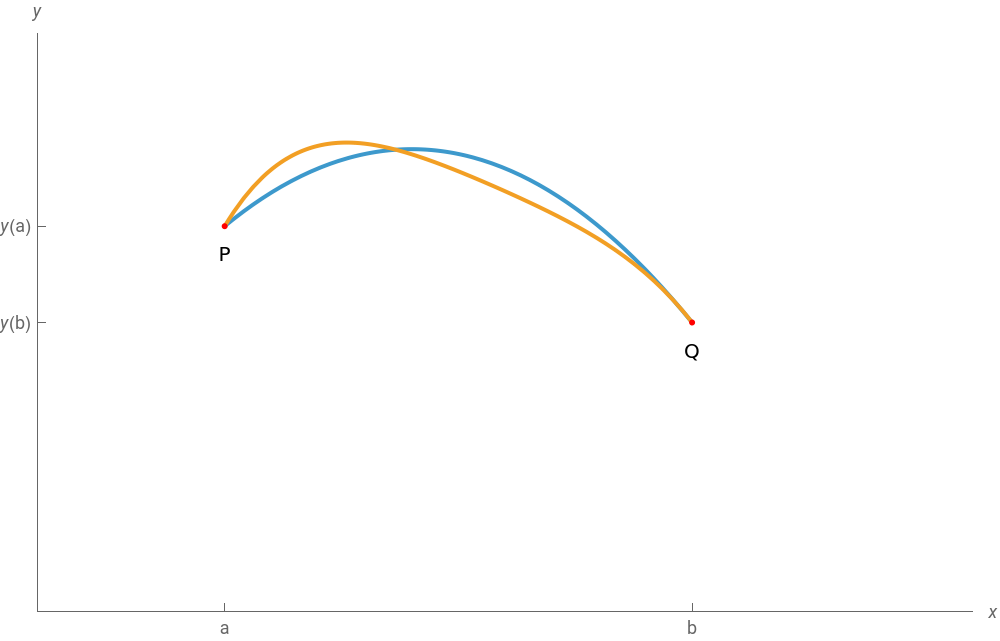
Instead of thinking about an object accelerating in response to applied forces, you can think of them picking out the path with a stationary action.
Here is a definition of the Least-Action Principle in the Macmillan Encyclopedia of Physics by Moore (1996):
The least-action principle is an assertion about the nature of motion that provides an alternative approach to mechanics completely independent of Newton's laws. Not only does the least-action principle offer a means of formulating classical mechanics that is more flexible and powerful than Newtonian mechanics, [but also] variations on the least-action principle have proved useful in general relativity theory, quantum field theory, and particle physics. As a result, this principle lies at the core of much of contemporary theoretical physics.
The principle of least action has wide applicability in physics, from mechanics, through electricity and magnetism, quantum mechanics, special and general relativity—and it provides a deep foundation for advanced subjects and current research.
Part 1. Naming and defining variables
Part 1. Naming and defining variables
Since I wanted to create an interactive demonstration of Lagrangian mechanics, I needed to think of a way to implement this in the Wolfram Language. As I explained before, I was going to demonstrate it with a basketball shot. Thus, it would be a good idea to have an interface with the function that would allow one to change the trajectory of the ball depending on some variables and see which option had the least action.
A good approach was to use the option to have some points that someone could move. This would change the trajectory of the ball; therefore, it was necessary to name the variable of the starting point and some other variables that we were going to use in the process:
In[]:=
point={{distance/2,0}},h,m=0.2,g=9.8,s,v=
distance
time
I started by naming and defining the point variable as “point” and setting the coordinate on the x-axis to be at the “distance” (this is a variable that will contain the position of the person throwing the ball) divided by 2. This is because I want the point to be at the middle of the axis every time, regardless of the distance also the y-axis coordinate is set to 0. Additionally, I named “h” because I am going to use it later, “m” which will represent the mass of the ball, “g” which will represent the acceleration the ball experiences due to the Earth’s gravitational field, “s” which will represent the action, and “v” which will represent the velocity.
After naming those variables, I began defining some of them. The first one was the height, denoted as “h”, which depends on the interpolation order that in turn depends on “n”. The variable “n” will be changeable in the manipulate options, and the height will also depend on the points the person is moving on the interface. I also defined “s” to represent the action of the ball. I used the NIntegrate function for this, as this value will be calculated with the integral of the Lagrangian, as I explained earlier. Within the function, the kinetic energy is subtracted from the potential energy of the ball. Additionally, we have a new variable called “t” that will be proportional to the “time” variable; this is just to make the equation cleaner and easier to understand.
In[]:=
h=Evaluate[Interpolation[Join[point,{{0,0},{distance,0}}],InterpolationOrdern]];s=NIntegratem([vt]+)-mgh[vt],{t,0,time},PrecisionGoal3,AccuracyGoal3;
1
2
2
v
2
′
h
2
v
Part 2. Creating the main part of the interface
Part 2. Creating the main part of the interface
Now I wanted to create the main part of the interface, which was going to consist of two parts. The first part was to create a mechanism that would let users know that they were getting closer to the least-action trajectory. I accomplished this using the function, along with and , to create a sound every time someone moved the points in the interface.
To achieve this, I used the function to obtain a whole number representing the action divided by the square of the time. This approach worked because every time someone moved the points, the action changed, and thus so did the sound. I also set the sound duration to be only 0.1 seconds and created the “instrument” variable, which would be changeable in the interface.
The second part involved creating all the plots. I initially used the “Plot” function, but after several attempts, I realized it wasn’t working, so I switched to the “ParametricPlot” function, which did work. First, I defined the height vs. position, , then energy vs. position, , and finally acceleration vs. position, . I also redefined the variable, which is proportional to “time”.
{vt,h[vt]}
vt,m([vt]+)+mgh[vt]
1
2
2
v
2
′
h
2
v
{vt,[vt]}
2
v
″
h
t
After that, I simply used some options to make the plot easier to understand and more visually appealing. For example, I labeled the x-axis as “Position”, made the plot range of the positive x-axis proportional to the distance, and the positive y-axis proportional to the time. I activated the gridlines, made the ticks proportional to the time and distance, and even added gravity to allow users to compare their acceleration to gravity and see if they were getting closer to the least-action trajectory. Finally, I adjusted the size of the image, added some legends, etc.
In[]:=
EmitSoundSound@SoundNoteRound,0.1,instrument;ParametricPlot{vt,h[vt]},vt,m([vt]+)+mgh[vt],{vt,[vt]},{t,0,time},AxesLabel{Position,""},PlotRange{{-0.1,1.1distance},{-1.5g,3}},GridLines->Automatic,Ticks->{Automatic,Join[Range[0,3,2distance],{-g}]},ImageSize450,AspectRatio12,PlotLegends->{"Height","Energy","Acceleration"},Epilog{AbsolutePointSize[10],Point/@{{0,0},{distance,0}}}
s
2
time
1
2
2
v
2
′
h
2
v
2
v
″
h
2
time
2
time
Then, I thought that it might be a good idea to animate the trajectory of the ball. This way, if someone achieves the least action and wants to see how the ball moves in that specific configuration, they can do so. I thought a good way of accomplishing this would be to include a button in the interface that allows users to choose whether they want to see only the animation of the trajectory or return to the original plotting.
To create this, I first needed to generate the plot when someone wanted to see the trajectory only. To do that, I used the function and included only the height equation, as that was all I needed. I also introduced a new variable called “progress”, which users can modify using a slider in the interface. Additionally, I added other options to enhance the plot’s aesthetics and comprehensibility, such as the color of the plot, the size of the image, and the inclusion of gridlines, ticks, and plot range.
In[]:=
Plot[h[x],{x,0,progress},PlotStyle->Red,ImageSize450,GridLines->Automatic,Ticks->{Automatic,Join[Range[0,3,2distance],{-g}]},PlotRange{{-0.1,1.1distance},{-1.5g,3}}]
2
time
2
time
After all of that, I used the function to create the “full” option for the normal interface. With this function, if someone clicks “full”, the system will stop displaying the normal interface and start showing the trajectory animation instead. I also added the function to create points that can be moved with the cursor, and the option to generate new points whenever someone clicks anywhere within the plot.
In[]:=
GridLocatorPaneDynamic[point],Dynamich=Evaluate[Interpolation[Join[point,{{0,0},{distance,0}}],InterpolationOrdern]];s=NIntegratem([vt]+)-mgh[vt],{t,0,time},PrecisionGoal3,AccuracyGoal3;ShowIffull,EmitSoundSound@SoundNoteRound,0.1,instrument;ParametricPlot{vt,h[vt]},vt,m([vt]+)+mgh[vt],{vt,[vt]},{t,0,time},AxesLabel{Position,""},PlotRange{{-0.1,1.1distance},{-1.5g,3}},GridLines->Automatic,Ticks->{Automatic,Join[Range[0,3,2distance],{-g}]},ImageSize450,AspectRatio12,PlotLegends->{"Height","Energy","Acceleration"},Epilog{AbsolutePointSize[10],Point/@{{0,0},{distance,0}}},Plot[h[x],{x,0,progress},PlotStyle->Red,ImageSize450,GridLines->Automatic,Ticks->{Automatic,Join[Range[0,3,2distance],{-g}]},PlotRange{{-0.1,1.1distance},{-1.5g,3}}],LocatorAutoCreateAll
1
2
2
v
2
′
h
2
v
s
2
time
1
2
2
v
2
′
h
2
v
2
v
″
h
2
time
2
time
2
time
2
time
Part 3. Making the action graphic and adding final details
Part 3. Making the action graphic and adding final details
Acknowledgment
Acknowledgment
Thanks to my mentors, Eric James Parfitt and Paul Abbott, for their substantial assistance in this process of learning the language. I had no prior experience, and you both were instrumental in helping me implement this idea and guiding me on how to do it properly.
CITE THIS NOTEBOOK
CITE THIS NOTEBOOK
Interactive demonstration of Lagrangian mechanics
by Isaías Martín Muñoz Cubero
Wolfram Community, STAFF PICKS, July 12, 2023
https://community.wolfram.com/groups/-/m/t/2959079
by Isaías Martín Muñoz Cubero
Wolfram Community, STAFF PICKS, July 12, 2023
https://community.wolfram.com/groups/-/m/t/2959079