screenRes=Lookup[SystemInformation["Devices","ScreenInformation"],"Resolution"]〚1〛;lithograph=Import["escher - cubic division.jpg"]//ColorConvert[#,"Grayscale"]&//Image[#,ImageResolution->screenRes]&
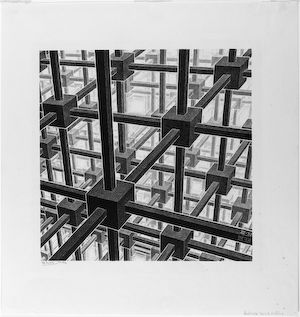
(The image is taken from https://www.artic.edu/artworks/118142/cubic-space-division-cube-space-filling .)
Specifically, Frederick asked a question: For an arbitrary perspective drawing, given its (up to) 3 vanishing points, how can the original view point in 3D space be found out?
So I think that is an interesting question, also during exploring it we also found a bit surprise on Escher’s choice.
As usual some helper functions:
ClearAll[pipe,branch,branchSeq]pipe=RightComposition;branch=Through@*{##}&;branchSeq=pipe[branch[##],Apply[Sequence]]&;
Firstly I marked the boundary of the lithograph, which will be used later as the canvas polygon in 3D space:
lithographPxSize=ImageDimensions[lithograph];lithographSize=lithographPxSize;lithographCanvas=Tuples[{{0,0},lithographSize}]〚{1,3,4,2}〛;
72
screenRes
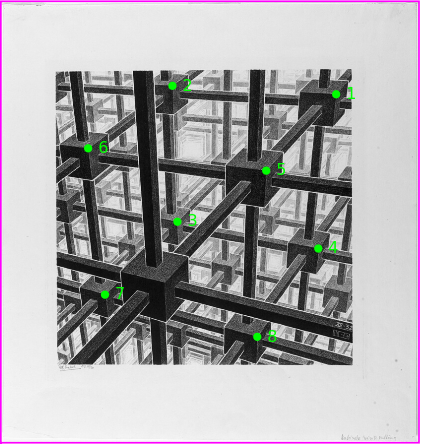
With the nice tool in FrontEnd, I then marked 8 cuboidMarkers which in theory should form a cuboid:
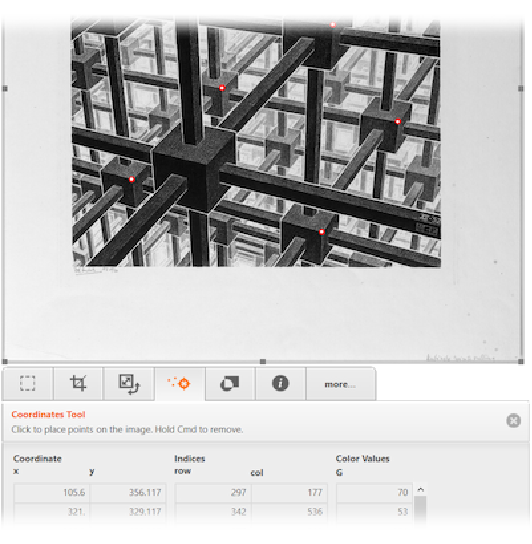
cuboidMarkers=;
Let me show the markers with the original image. Note since 13.1, Image can be used as a graphics primitive directly:
Graphics[{lithograph,Green,AbsolutePointSize[5],Point[cuboidMarkers],Green,MapIndexed[Text[#2〚1〛,#1,{-3,0}]&,cuboidMarkers,1],FaceForm[],EdgeForm[Magenta],Polygon[lithographCanvas]},PlotRangePadding->None]
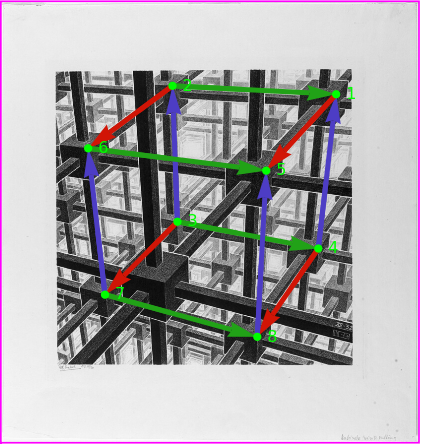
Then I manually grouped the markers along 3 orthographic axes:
cuboidEdges=AssociationThread[Characters@"xyz",{{{1,5},{2,6},{3,7},{4,8}},{{2,1},{3,4},{6,5},{7,8}},{{3,2},{4,1},{7,6},{8,5}}}]
x{{1,5},{2,6},{3,7},{4,8}},y{{2,1},{3,4},{6,5},{7,8}},z{{3,2},{4,1},{7,6},{8,5}}
Again, show the markers with the original image:
axesColors="x","y","z";Graphicslithograph,Arrowheads[.07],AbsoluteThickness[3],Normal@GraphicsComplexcuboidMarkers,{axesColors@#,Arrow/@cuboidEdges@#}&/@Characters@"xyz"//,{Green,AbsolutePointSize[5],Point[cuboidMarkers]},{Green,MapIndexed[Text[Style[#2〚1〛],#1,{-3,0}]&,cuboidMarkers,1]},{FaceForm[],EdgeForm[Magenta],Polygon[lithographCanvas]},PlotRangePadding->None

I would like to save the rasterized version for latter use:
lithographMarked=
;
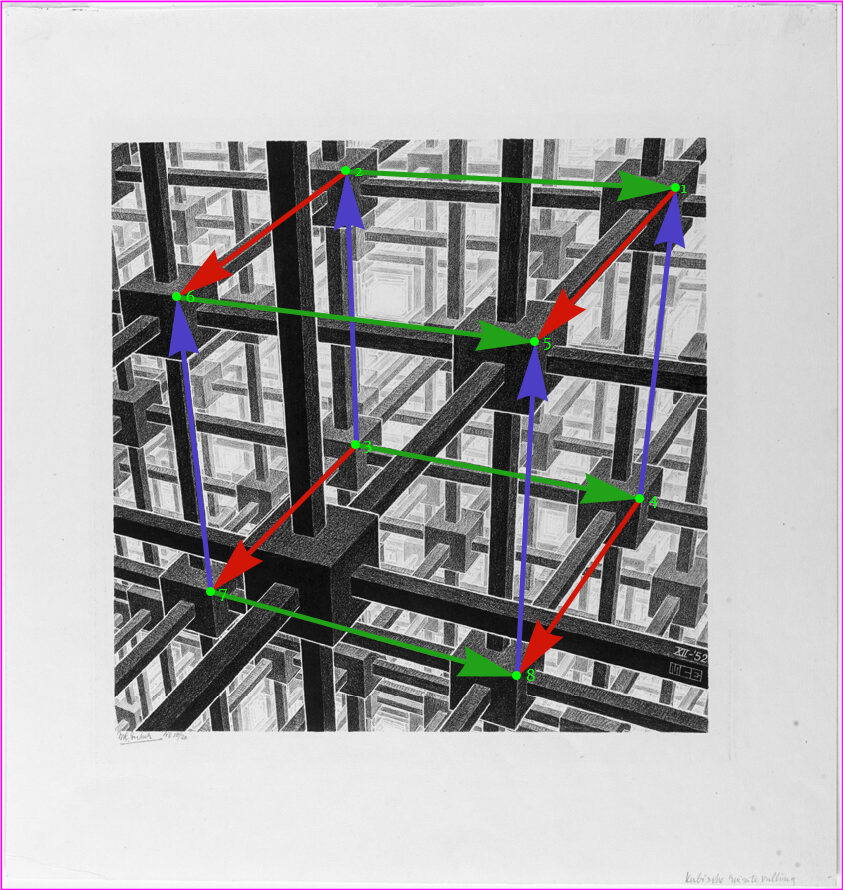
To actually find out the 3 vanishing points corresponding to 3 orthographic axes, for example for direction (the red arrows’ group), I tried to look for the point with minimal average distance (in the 2D image space) to all infinite lines extended from each red arrow. I really appreciate how the "PrincipalAxis" method helped a lot here, as my loss function is not readily differentiable.
x
vanishingPoints=Module[{lines=#,init,rdf,loss,parallelTest=Abs[Det[{#1〚2〛,#2〚2〛}]]<&},lines=lines//DeleteDuplicates[#,parallelTest]&;If[Length[lines]==1,DirectedInfinity[lines〚1,2〛.{1,I}],rdf=RegionDistance/@lines;init=RegionIntersection@@lines〚;;2〛//First;loss[x_?NumericQ,y_?NumericQ]:=Total[#[{x,y}]&/@rdf];{x,y}/.FindMinimum[loss[x,y],{{x,y},init},Method->"PrincipalAxis"]〚2〛]]&/@Apply[pipe[cuboidMarkers〚{##}〛&,Apply[InfiniteLine[#1,Normalize[#2-#1]]&]],cuboidEdges,{2}]
-6
10
x{849.145,907.215},y{-1025.25,497.867},z{255.346,-892.784}
The found vanishing points indeed looks right:
Graphics[{lithographMarked,{Thin,AbsolutePointSize[5],Function[ax,Module[{vp=vanishingPoints@ax,vpInfQ,vtxs=cuboidMarkers〚cuboidEdges[ax]〚;;,1〛〛},vpInfQ=MatchQ[vp,_DirectedInfinity];{axesColors@ax,InfiniteLine[#,If[vpInfQ,ReIm@vp〚1〛,vp-#]]&/@vtxs,If[!vpInfQ,Point@vp]}]]/@Characters@"xyz"},{Green,AbsolutePointSize[5],Point[cuboidMarkers]},{Green,MapIndexed[Text[Style[#2〚1〛],#1,{-3,0}]&,cuboidMarkers,1]},{FaceForm[],EdgeForm[Magenta],Polygon[lithographCanvas]}},PlotRange->CoordinateBoundingBox[Join[vanishingPoints//Values//DeleteCases[_DirectedInfinity],lithographCanvas]],PlotRangePadding->Scaled[.01]]
To “lift” the result back to 3D space, it’s important to understand how perspective drawing works.
For our case here, consider the image canvas as a 3D plane, assuming origin is where Escher is sitting and taking the view, then the vanishing points on his (infinite) canvas are merely the points of intersection between the plane and three axes:
Thus the normal direction of canvas plane must be:
which is also the direction the painter is facing. And the point being look at, i.e. the view center, would be:
To reduce the number of parameters, I’d like to regulate the canvas to plane with unit distance to the artist, so a global scaling factor should be used:
Putting them all together:
Now I need to figure out how to map pixels on lithograph image to the 3D canvas plane. It should be as simple as a combination of certain translation and rotation:
To actually solve the transform, I would just register vanishing points on original image with their 3D counterparts:
So lithographCanvas, the corners of original image, is mapped to 3D as lithographCanvas3D:
Conversely the view center of the canvas locates at canvasCenter on the original image:
With some helper functions to transform between actual coordinate system and scaled coordinate systems Graphics3D uses, it can be shown the re-constructed view point is consistent with the image:
Here we noticed an interesting fact, that the view center (the orange point) is not at the center of Escher’s work, in fact it’s not even in the picture! That is a view one won’t get with a point-and-shoot camera, at least not without post editing. How interesting the artist has made a choice!
Of course in Wolfram Language we have means to move the wanted part to the center of the plotting region, all that needs is a suitable ViewCenter.
For that, I would compute where the view center should be on the final graphic (the second parameter of ViewCenter), so that the center of the original photo (finalViewCenter) would appear at the center of the final graphic:
Obviously I can move the image around by changing finalViewCenter. For example:
With a good understanding of the view settings, now I can try to reconstruct all the beams and blocks:
From the computed point of view, the frame matched Escher’s work nicely, reminding me again what a master he was:
To finally mimic the texture and feeling of lithograph, I used a PointLight to get the fading-with-distance effect:
Then I rasterized it, followed by a bit of image processing:
The key idea here includes ColorNegate, Gaussian noise varying with content and a final touch of HistogramTransform:
(About gamma correction functions imgGammaDecode and imgGammaEncode, please see my previous post [GIF] Color notes: alpha-blending done properly.)
Another one rendered with different light: