ABSTRACT: The unique symbolic and machine learning tools in Mathematica make it very useful and attractive for many engineering applications. Mathematica can be used to create equation- and data-based models that can be deployed to other applications such as Excel. From Excel, the models can be accessed in process design software such as CHEMCAD or Aspen Plus [1]. In a previous contribution to this forum, a method for creating a data-based model for a membrane cascade separator was presented [2]. In this contribution, a similar approach is applied to tubular heat exchangers. Experimental data from a laboratory heat exchanger is first used to derive accurate models of the temperature profiles within the exchanger. The equation-based models are then used to simulate the exchanger under a wider ranger of operating conditions. The simulation data is used to train machine-learning models for both countercurrent and co-current tubular heat exchangers. The resulting machine-learning models are then accessed in Excel using Mathematica Link for Excel and Cloud Connector. CITATION (original article): Cowart, S.V., Yuk, S.F., James, C.M., Nagelli, E.A. and Biaglow, A.I. (2025), Augmented and Cloud Computing With Chemical Process Simulators. Softw: Pract Exper. https://doi.org/10.1002/spe.3397
Introduction
Introduction
I. Layout and Geometry
I. Layout and Geometry
Heat exchangers are devices for manipulating the temperatures of process streams. In a typical heat exchanger, two or more flowing fluids are in thermal contact through a conductive wall that allows heat transfer without mixing the fluids. There are many different designs, and some of the more common types include double-pipe, shell-and-tube, plate, spiral, and jacketed vessel configurations. The double-pipe design is often the starting point for studying heat exchangers because of its relative simplicity.
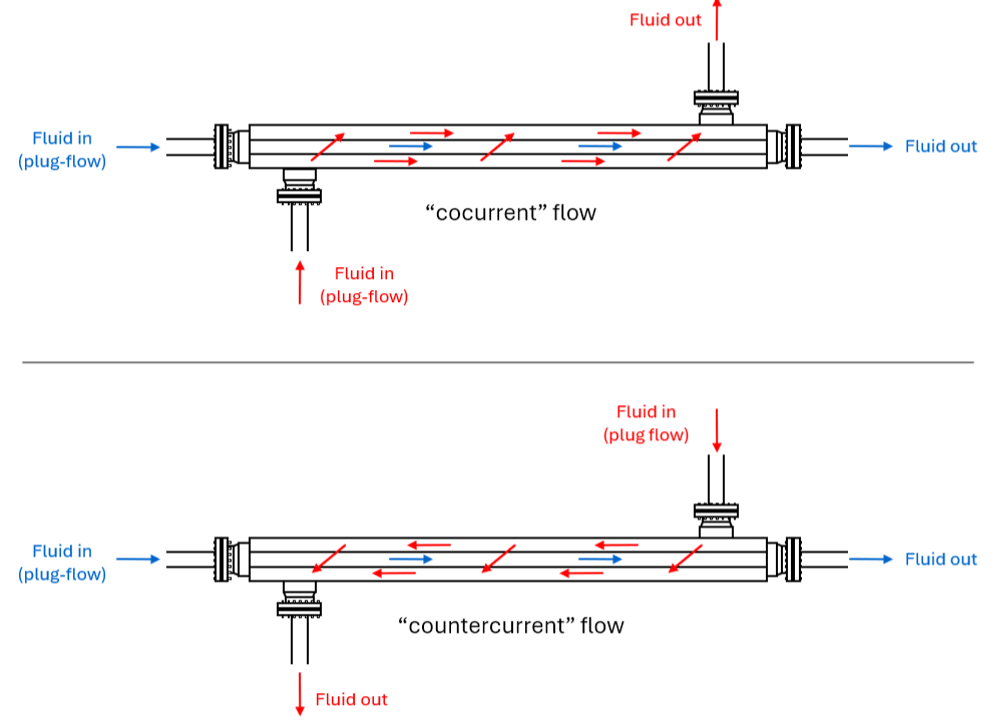
The double-pipe heat exchanger consists of a tube within a tube, with a fluid flowing inside the inner tube and another fluid flowing in the space between the tubes. Fluid flow through the exchanger can be co-current or countercurrent, illustrated in the drawing below. In co-current flow, the two fluids are flowing in the same direction through the exchanger, left-to-right in the drawing. In countercurrent flow, the fluids are flowing in opposite directions. In the drawing, the tube-side fluid is flowing left-to-right and the countercurrent fluid right-to-left. A third flow arrangement is possible, cross-flow, in which the flow directions are perpendicular, although this flow arrangement is not as common with tubular heat exchangers and is not considered here.
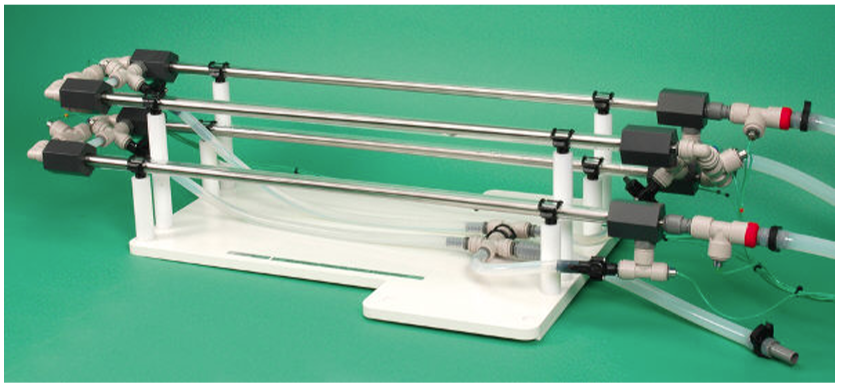
Since they are relatively simple, double-pipe heat exchangers are commonly studied in student laboratories. One common lab model is the Armfield HT36 [3], shown in the photograph below. The photograph shows that the unit consists of four double-pipe sections in series. Each section has a length of 0.69 m. The outside tube is made out of clear acrylic with an outside diameter of 16 mm and an inside diameter of 14 mm. The inner tube is stainless steel with an outside diameter of 9.5 mm and inside diameter 8.3 mm. This gives an inner tube wall thickness of 0.6 mm, and the average of the inside and outside diameters is 8.9 mm.
Additional details of the HT36 are shown in the drawing below. The drawing indicates the direction of fluid flow in the countercurrent configuration, with warm water shown in red entering at the upper right and flowing in the inside tube, referred to as the tube-side of the exchanger. Five equally spaced sensors through indicate and record the temperature of the fluid as a function of position as it moves through the tube. Similarly, cold water shown in blue enters at the lower right and flows in the space between the tubes, referred to as the shell side, with sensors to indicating and measuring the temperature of this fluid at different positions along the flow path. In the co-current configuration, the flow direction of the warm fluid is reversed, so that measures the warm inlet temperature and the outlet.
T
1
T
5
T
6
T
10
T
5
T
1
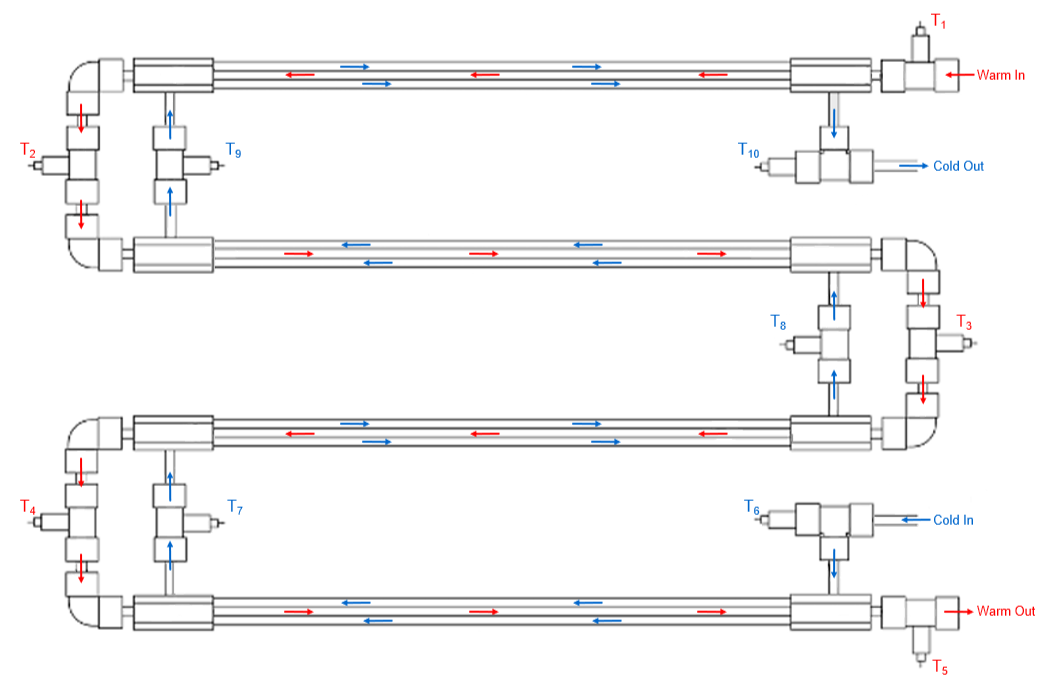
From the drawing, it should be apparent that the data structure resulting from the experiment is a list of five positions and the associated warm and cold fluid temperatures, displayed in grid form below. Thus, the first position at 0 m is associated with temperatures and , the position at 0.69 m with and , and so on. Two additional sensors not shown in the diagram indicate and record the flow rates of the warm and cold water.
T
1
T
10
T
2
T
9
Out[]=
z(m) | warm fluid T1 (°C) | cold fluid T2 (°C) |
0.00 | T 1 | T 10 |
0.69 | T 2 | T 9 |
1.38 | T 3 | T 8 |
2.07 | T 4 | T 7 |
2.76 | T 5 | T 6 |
Some sample data are shown below. The actual experiment in counter-current mode, with warm and cold water flow rates of 3.00±0.06 and 2.03±0.04 L/min, respectively, produced the following data:
Out[]=
z(m) | warm fluid T1 (°C) | cold fluid T2 (°C) |
0.00 | T 1 | T 10 |
0.69 | T 2 | T 9 |
1.38 | T 3 | T 8 |
2.07 | T 4 | T 7 |
2.76 | T 5 | T 6 |
averages | 35.0 | 20.1 |
An uncertainty of less than 0.2 °C in the temperature measurements was observed in the experiment. The uncertainties in the temperatures and flow rates were obtained by setting a fast acquisition time in the Armfield software, acquiring 30 samples, then taking the averages and standard deviations of those measurements.
The actual experiment in co-current mode, with warm and cold water flow rates of 2.99±0.06 and 1.98±0.08 L/min, respectively, produced the following data:
Out[]=
z(m) | warm fluid T1 (°C) | cold fluid T2 (°C) |
0.00 | T 5 | T 6 |
0.69 | T 4 | T 9 |
1.38 | T 3 | T 8 |
2.07 | T 4 | T 7 |
2.76 | T 5 | T 6 |
averages | 36.9 | 22.1 |
Later in this document, we will use this information to build the associations for the machine learning model. In engineering applications, it is frequently desirable to construct a relationship between inputs and outputs. In the present context, the inputs are the two flow rates and the two feed temperatures for the warm and cold fluids. Other inputs could also be chosen. For example, the heat transfer coefficient and heat exchanger area could also be used as inputs for engineering design, but this is not done here. The outputs are the warm and cold outlet temperatures. Designating the warm and cold fluid flow rate as q1 and q2, the warm and cold feed temperature as T1f and T2f, and with warm and cold outlet temperatures and , the input-output associations are of the form
T
5
T
10
{q1,q2,T1f,T2f}->{,}
T
5
T
10
This is important for the work that follows.
In this document, the position-temperature data is used to generate predictive models of the heat exchanger outlet temperatures. Equation-based models are derived and refined using regression techniques to accurately represent the experimental data. The equation-based models are then used to simulate data under many different operating conditions. The resulting data and data associations are used to generate and train data-based models that are deployed to Excel for use in other programs such as CHEMCAD. The methods are repeated in both counter- and co-current modes.
II. Differential Volume Definitions
II. Differential Volume Definitions
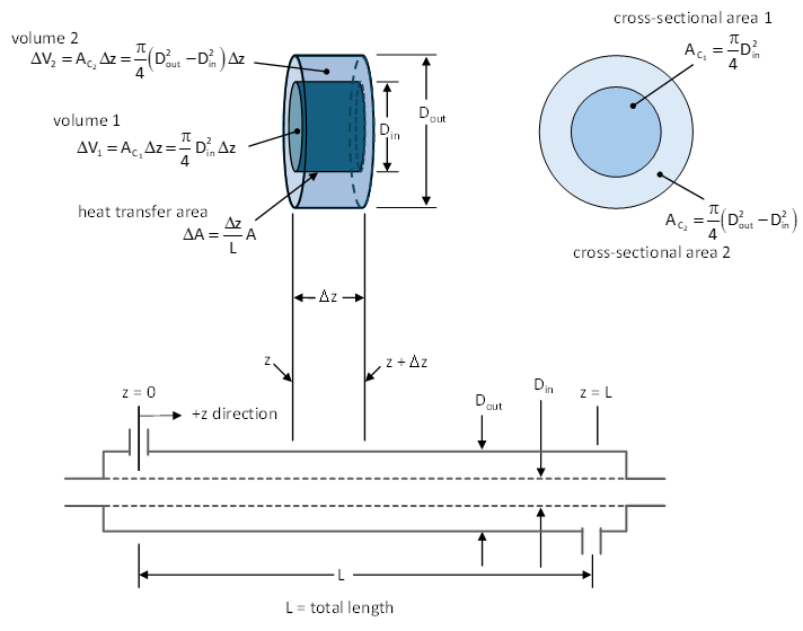
The derivation of the equation-based model proceeds from enthalpy balances [4]. To construct the balances, the region of space over which the enthalpy is balanced must be defined. The enthalpy is balanced on a small section of the heat exchanger. As it turns out, the volumes associated with this section disappear in the steady-state enthalpy balances, as shown in the derivations below. However, they are included because it is important to understand the geometry of the problem. The heat exchanger section is further subdivided into two additional volumes, inside the tube, and describing the volume between the two tubes. The total tube length is L, and the coordinate system is defined such that z=0 at the origin and increases to z=L at the total tube length, meaning that Δz represents the width of the heat exchanger section in the axial direction. Further subdivision of the volumes in the radial direction is assumed to be unnecessary because of turbulent mixing. The two control volumes are constructed as shown in the drawing below. The area ΔA is the area through which heat is transferred between and . We further assume that the exchanger is sufficiently insulated so that heat transfer to the surroundings is negligible, and that the only heat transfer occurring is between the fluids in the two tubes.
ΔV
1
ΔV
2
ΔV
1
ΔV
2
III. Enthalpy Flow Terms
III. Enthalpy Flow Terms
The enthalpy balance equations for countercurrent flow are constructed next. For illustrative purposes, the enthalpy flows are written in word form first. Warm fluid flows from left to right inside the inner tube. Cold fluid flows from right to left in the space between the two tubes.
IV. Enthalpy Balance on Volume 1
IV. Enthalpy Balance on Volume 1
V. Enthalpy Balance on Volume 2
V. Enthalpy Balance on Volume 2
The co-current derivations proceed in a similar fashion and can be found in Appendix 1 at the end of this document.
Counter-Current Mode
Counter-Current Mode
Differential Equations and Solution
Differential Equations and Solution
The two enthalpy balances highlighted in yellow in Sections IV and V of the Introduction form a system of coupled ordinary differential equations, coded as eq1 and eq2 below. These equations are solved with boundary conditions eq3 and eq4, specified from the feed temperatures of the warm and cold feeds T1f and T2f, respectively.
Armfield Experimental Data and Comparison Plots
Armfield Experimental Data and Comparison Plots
The temperature data in lists “data1” and “data2” were acquired with the Armfield HT36, with a warm water flow rate of 2.91 L/min and a cold water flow rate of 2.08 L/min.
Color palette for PlotStyle Directives above
SSQ Error Analysis to Find U
SSQ Error Analysis to Find U
Clear U and Check Plots
In the symbolic solution, the heat transfer coefficient U was assigned a value in the properties and boundary conditions section. Clearing U causes the value to be unspecified in the solution equations so it can be used as a parameter. This allows the value of U to be adjusted while comparing the resulting plots to the experimental data.
Just as a check, the temperature profiles are re-plotted to make sure that the functions are unaffected by the re-parameterization.
Sum-of-Squares Regression to Refine the U Value
Armfield Experimental Data and Comparison Plots
Armfield Experimental Data and Comparison Plots
The plot below was constructed to verify that the sum-of-squares function can find a minimum. The plot can take some time to complete. It took about 29 seconds on the Dell Inspiron 3470 with 16,384 MB of RAM.
The next step is to take the derivative of the sum-of-squares function and find a U value that gives a zero derivative.
III. Generation of Uniformly Distributed Input Variables
III. Generation of Uniformly Distributed Input Variables
The operations in this section generate input data to be used in the next section, where the data will be input to the functions from the previous section to generate output data for training the neural net model. The four input variables include the warm feed flow rate (mh), cold feed flow rate (mc), warm feed temperature (T1f), and cold feed temperature (T1c), and these are assigned distributions d1 to d4, respectively. The data for each input variable are randomly generated from a uniform distribution having a minimum and a maximum. The distributions in the data are ±10% of the mean, where the mean values were set to the experimental values. For example, the warm feed flow rate was 3.00 L/min, so distribution d1 was set to 3.00 ± 10% or 3.00 ± 0.30. The width of the distribution can be increased as desired, but increasing the standard deviation will increase the error in the final neural net model, since it is using a single linear layer.
V. Building, Training, and Results of Neural Net Model
V. Building, Training, and Results of Neural Net Model
Training three times takes 87 seconds on AIB’s desktop, 92 seconds on AIB’s laptop GPU, 62 seconds on TJB’s desktop CPU, 84 seconds on TJB’s desktop GPU, and 91 seconds on AIB’s Latitude E5470.
Point-by-point comparison of the last two matrices shows that the results are reasonably close.
The next set of calculations generate the sum-of-squares error and the average sum-of-squares error on the same five outputs displayed above and again on the complete dataset. The average SSQ is calculated in each case by dividing by the length of the dataset.
The accuracy can be improved somewhat with more training. The NetTrain command was incorporated in a recursive fashion so that the training can be run multiple times. To obtain the results shown here, the training was conducted three times in succession. SSQ stops decreasing after 3 training runs, and then starts to increase with more training.
Finally, the data are compared using histograms of the calculated output and training output data. The amber-colored bars represent the outputs from f4, the blue-colored bars are the outputs from the neural net function f4, and the gray color represents the overlap.
VI. Saving the Trained Neural Net
VI. Saving the Trained Neural Net
Creating the data set and training the neural net can take significant time, especially when large data sets are used. However, the training information will be lost when the Mathematica kernel is closed, so the trained neural net needs to be exported. Exporting allows the trained neural net function to be imported into this or other files. The file can be exported in either wmlf or wlnet formats, the former demonstrated below.
VII. Deployment to Excel
VII. Deployment to Excel
Function-Based Model with Mathematica Link for Excel
Function-Based Model with Mathematica Link for Excel
The code below shows the procedure for calling the co-current heat exchanger function f4 from Excel. The Link application is started first, followed by a command to share the kernel:
The function f4 produces two outputs, including the outlet temperatures of the warm and cool streams. While we could call f4 directly in Excel, splitting the output using the Part function [[...]] makes it easier to use the results in excel. The two different outputs are defined as individual functions below.
For testing purposes, the following function calls are made to compare the results to Excel:
A screenshot of the Excel worksheet with calls to Mathematica-linked functions excelT1 and excelT2, both created from f4, is shown below.
References
References
1. S.V. Cowart, S.F. Yuk, C.M. James, E.A. Nagelli, and A.I. Biaglow (2024), “Augmented and Cloud Computing With Chemical Process Simulators,” Software Practice & Experience, https://doi.org/10.1002/spe.3397
2. S.V. Cowart, S.F. Yuk, C.M. James, E.A. Nagelli, and A.I. Biaglow, “Functional and Machine Learning Models for Single Stage Membrane and Co-current Membrane Cascade,” Wolfram Community, STAFF PICKS, January 7, 2025, https://community.wolfram.com/groups/-/m/t/3352664
3. HT36X – Extended Tubular Heat Exchanger, Armfield, Inc., https://armfield.co.uk/product/ht36x-extended-tubular-heat-exchanger/
4. T.W.F. Russel, A.S. Robinson, and N.J. Wagner, Mass and Heat Transfer, New York: Cambridge University Press, 2008, pages 81-94.
5. Design Institute for Physical Properties, 1996. DIPPR Project 801 DIPPR/AIChE; density - equation 105; specific heat - equation 100; viscosity - equation 101; thermal conductivity - equation 100.
6. Plastics - Thermal Conductivity Coefficients, Engineering Toolbox, https://www.engineeringtoolbox.com/thermal-conductivity-plastics-d_1786.html.
7. M.S. Peters, K.D. Timmerhaus, and R.E. West, Pland Design and Economics for Chemical Engineers, 5th Edition, New York: McGraw-Hill, 2003, pages 698-702.
CITE THIS NOTEBOOK
CITE THIS NOTEBOOK
Data-based tubular heat exchanger modeling: ML & symbolic ODEs for counter/co-current flows
by Andrew Biaglow
Wolfram Community, STAFF PICKS, March 27, 2025
https://community.wolfram.com/groups/-/m/t/3433863
by Andrew Biaglow
Wolfram Community, STAFF PICKS, March 27, 2025
https://community.wolfram.com/groups/-/m/t/3433863