Mostly Claude by Anthropic with a feature wish list by me— github.com/mthiel74/Contiguous-Cartograms
Abstract
Abstract
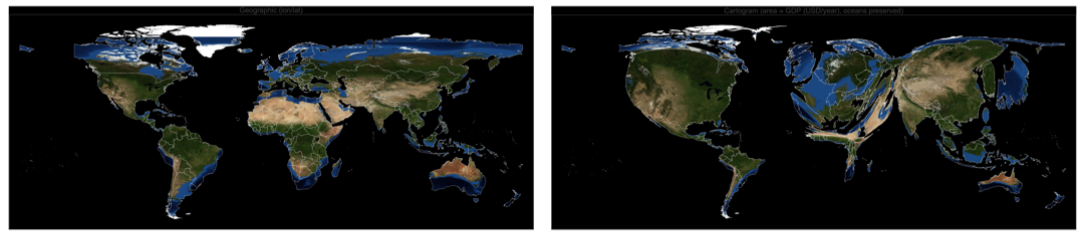
Cartograms are maps in which the area of each region is deformed to be proportional to a statistical quantity — population, GDP, number of COVID cases, votes cast, and so on — while the topology (who is next to whom) is preserved. Gastner and Newman (2004) showed how to produce such maps by interpreting the quantity as a density and letting it diffuse to uniformity; every point of the map is advected by the resulting velocity field . This notebook presents a compact, pure-Wolfram-Language port of that algorithm. It ships as a paclet-style package CartogramWL exposing both low-level primitives (DiffusionSolver, Cartogram, CartogramTransform) and a one-liner WorldCartogram[metric] that pulls country polygons and statistical values from the built-in CountryData and returns a ready-to-publish figure. It supports any ColorData gradient, a GeoBackground -> "Satellite" mode that textures each country with deformed satellite imagery, user-supplied Association input, visualisation of the underlying space deformation via a distortion grid, and a PerformanceGoal -> "Speed" default that runs the full world pipeline in under a minute.I fully “vibe-coded” this with Claude CLI - while travelling and only from my phone. My home machine has wolframscript installed and Claude uses it via the command line. The first implementation was in Python and I asked Claude to produce Wolfram Language code from that. I added a couple of feature requests, and ways to increase the generation speed. I am more and more giving various AI agents access to the Wolfram Language - which is changing my production workflow completely. This is changing all the time and Wolfram have great initiatives, e.g. via their APIs (https://www.wolfram.com/apis/documentation/) and their Notebook Assistant and LLM kit (https://www.wolfram.com/notebook-assistant-llm-kit/). Also note, that the GitHub repo will have updates. E.g. the images for this post do not (yet) display Alaska as part of the United States when we compute the cartogram, which has already been corrected in the GitHub repo. All suggestions are welcome.
v=-
∇ρ
ρ
This was only a test of my Claude-GitHub-Wolfram workflow. I hope that it still might be useful to some Wolfram Community members.
1. What is a cartogram?
1. What is a cartogram?
A geographic map of the world devotes enormous screen area to Russia, Canada, and the Sahara, and a few pixels each to Bangladesh, South Korea, or the Netherlands. If the question being asked is "where do people live?" or "where is the economy?", this is the opposite of what we want. Density-equalising cartograms solve this by reshaping each region so that its area tells the story of a variable of interest.
Gastner & Newman's elegant insight (PNAS 2004) is that a map in which density is uniform is exactly what we want, and diffusion is the natural process that takes any non-uniform density to a uniform one. We therefore simulate the heat equation
ρ(r)
∂
t
2
∇
on a rectangular domain with Neumann boundary conditions (no flux through the box edge, so mass is conserved), and flow each geographic point through the instantaneous velocity
dr
dt
∇ρ(r,t)
ρ(r,t)
As the density relaxes to its spatial mean and the advected points settle into their cartogram positions. Regions of high initial density draw space inwards and therefore expand; regions of low density are pushed outwards.
t∞
2. The algorithm, step by step
2. The algorithm, step by step
2.1 Rasterise polygons to a density grid
2.1 Rasterise polygons to a density grid
Given a collection of country polygons and a per-country metric (population, GDP, …), we set the density inside polygon to
M
c
c
ρ
0
M
c
A
c
where is the geographic area of . Integrated over we recover the metric . Ocean cells are filled with the mean land density so the spatial mean is uniform across the domain and oceans retain their size; only the relative sizes of countries change.
A
c
c
c
M
c
The rasterisation uses a RegionMember-based subpixel test for anti-aliasing on thin/small countries.
2.2 Solve the diffusion equation
2.2 Solve the diffusion equation
The Laplacian on a rectangle with Neumann boundary conditions is diagonalised by the cosine basis. Wolfram's built-in FourierDCT[⋯, 2] and FourierDCT[⋯, 3] implement the DCT-II and its inverse in any number of dimensions with an orthonormal convention, so the full 2D spectrum is one call each. Expanding
ρ(r,t)=coscos
∑
m,n
ρ
mn
-t
λ
mn
e
πmx
L
x
πny
L
y
with eigenvalues =+, the density at any time is evaluated in from the cached cosine coefficients .
λ
mn
2
π
2
m
2
L
x
2
n
2
L
y
t
O(NLogN)
ρ
mn
2.3 Advect points through the velocity field
2.3 Advect points through the velocity field
The velocity on the grid is computed by central differences on the current diffused grid and interpolated bilinearly at any query point. Each geographic point is integrated from to using an explicit Runge–Kutta scheme (NDSolveValue[⋯, Method -> "ExplicitRungeKutta"]) with a 5th-order stepper, where is chosen from the decay constant of the slowest non-constant Fourier mode.
t=0
⋆
t
⋆
t
2.4 Pre-smoothing
2.4 Pre-smoothing
Because polygon-rasterisation produces step functions, the initial velocity field is very stiff. We pre-smooth the density with a small Gaussian filter ( cell), which is mathematically equivalent to starting the diffusion at =ΔxΔy2. A small background floor (MeanFloor) is added to avoid division by zero inside zero-density cells.
σ≈1
t
0
2
σ
2.5 Snapshot-cached advection (the default Speed mode)
2.5 Snapshot-cached advection (the default Speed mode)
A naive implementation recomputes the full inverse DCT of at every RK sub-step of the advection ODE. With ~100+ sub-steps on a 192×384 grid this dominates wall-clock at ~320 s for a single world map. The package avoids it: at construction time we pre-compute a small (default 60) set of geometrically-spaced snapshots of , spanning through with more samples packed near where the fast Fourier modes collapse. During integration the RHS linearly interpolates between the two bracketing snapshots instead of doing a fresh inverse DCT. Median per-point agreement with the Quality solver is sub-pixel at rendering resolution and the full world pipeline drops from ~5min to ~45 s (~7× faster). Pass PerformanceGoal -> "Quality" to any function that integrates points (AdvectPoints, CartogramRun, WorldCartogram) for the slower, bit-exact variant.
ρ(r,t)
(ρ,ρ,ρ)
∂
x
∂
y
t=0
⋆
t
t=0
3. The CartogramWL package
3. The CartogramWL package
3.1 Loading
3.1 Loading
Clone the repository from GitHub and load the package directly from the CartogramWL/ directory. The package has zero external dependencies.
Get["/path/to/wolfram/CartogramWL/CartogramWL.wl"]
All public symbols are then available in the CartogramWL` context:
Names["CartogramWL`*"]
3.2 Low-level primitives
3.2 Low-level primitives
The algorithm is exposed as a handful of composable functions that all operate on a density array rho[[i, j]] with row index , column index (NumPy convention) and a bounding box {xmin, ymin, xmax, ymax}:
i↔y
j↔x
solver=DiffusionSolver[rho,{xmin,ymin,xmax,ymax}];rhoAtT=DensityAt[solver,t];newPts=AdvectPoints[solver,{{x1,y1},{x2,y2},...}];
One level up, Cartogram bundles the pre-smoothing, mean floor, and ocean-preservation settings; CartogramRun precomputes the deformed cell-centre grid (Speed mode by default, ~7× faster than Quality); CartogramTransform maps arbitrary points through the deformation; CartogramTransformPolygon additionally densifies long edges before the transform.
cart=Cartogram[rho,bbox,"MeanFloor"->0.02,"BlurSigma"->1.5,"SeaDensity"->"auto"];cart=CartogramRun[cart,PerformanceGoal->"Speed"];newPoly=CartogramTransformPolygon[cart,polyRing];
3.3 The one-liner: WorldCartogram
3.3 The one-liner: WorldCartogram
Most end users want "given a metric, draw the world". WorldCartogram wraps the whole pipeline, reads polygons and values from CountryData, and returns a two-panel GraphicsRow (geographic + cartogram).
WorldCartogram["Population"](*or"GDP","GDPPerCapita",...*)WorldCartogram["GDP","ColorFunction"->ColorData["TemperatureMap"]]WorldCartogram["GDP","Background"->"Satellite"]WorldCartogram[{"my metric",<|"Germany"->83.,...|>}]
A complete option list is available via ?WorldCartogram. The most useful options are "ColorFunction" (any ColorData[…] gradient or a raw function on ), "Background" ("Flat" or "Satellite"), "MissingCountries" ("Hide" or "ShowGrey"), "BoundingBox" (useful for continent-scale maps), and PerformanceGoal ("Speed" default, or "Quality" for bit-exact output).
[0,1]
4. Built-in metrics
4. Built-in metrics
The four strings "Population", "GDP", "GDPPerCapita" and "PopulationDensity" are recognised directly and come with sensible defaults for the floor/ceiling that tame heavy-tailed outliers (Monaco on population density, Luxembourg on GDP per capita). The sections below show each of them in turn; every image on this page is produced by the literal one-line call shown next to it.
4.1 Population
4.1 Population
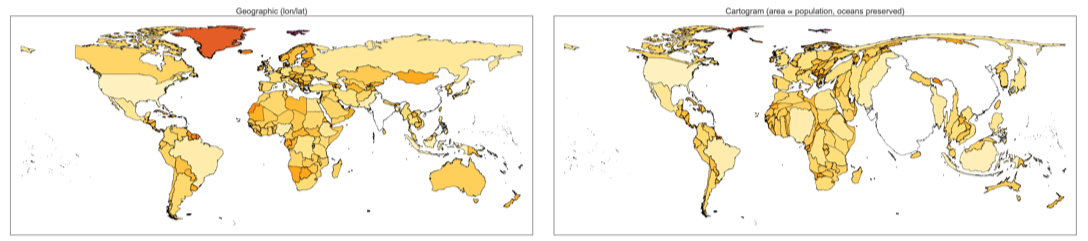
The canonical cartogram: each country's area is made proportional to how many people live there. India and China together house ~36 % of humanity, so they swell enormously. Nigeria, Indonesia, Pakistan and Bangladesh together host nearly a billion more people across land areas that look small on a Mercator projection — all four bulge substantially. Russia (11 % of global land but 2 % of humanity), Canada, Australia, Mongolia and the Nordic countries collapse.
WorldCartogram["Population"]
4.2 GDP
4.2 GDP
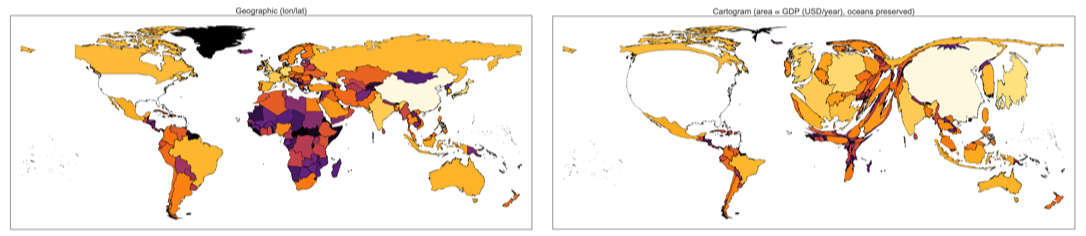
Switching to gross domestic product (total value of goods and services produced in a year) rewards economic output rather than headcount. The United States, China, Japan, and the major western European economies dominate; sub-Saharan Africa and much of South Asia — densely populated but far poorer per head — shrink dramatically. This is the mirror image of the population cartogram wherever the two quantities diverge most: Japan (5th largest economy, 11th most populous) expands here but stays modestly sized in 4.1, while the Democratic Republic of the Congo does the opposite.
WorldCartogram["GDP"]
4.3 GDP per capita
4.3 GDP per capita
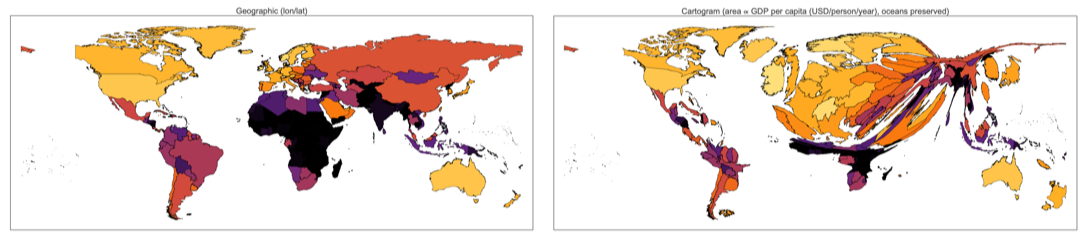
GDP per capita ( = country GDP divided by country population) rewards wealth density rather than raw wealth. Luxembourg, Switzerland, Singapore, the Gulf petro-states, and the Scandinavian countries visibly bulge; sub-Saharan Africa, Central America, and parts of South Asia contract. Comparing this to the plain GDP cartogram in 4.2: China and India shrink here — they are large economies but not rich per head — while small high-income jurisdictions grow.
M
c
WorldCartogram["GDPPerCapita"]
4.4 Population density
4.4 Population density
5. Colour schemes & satellite background
5. Colour schemes & satellite background
Pass any ColorData gradient as "ColorFunction":
Set "Background" -> "Satellite" and each country is textured with the corresponding patch of Wolfram's GeoBackground -> "Satellite" imagery. On the cartogram side the imagery is deformed along with the country geometry, giving an effect similar to a shaded-relief globe being inflated or deflated locally.
6. Visualising the distortion itself
6. Visualising the distortion itself
A clean way to see the geometry of the transformation is to overlay a regular 15° lat/lon grid on both panels. On the left the grid is undistorted; on the right the 325 grid intersections are pushed into the cartogram by the same velocity field that reshaped the countries. The grid therefore encodes the local stretching/compression factor at every point of the domain.
CartogramDistortionGrid[cart] returns the Line primitives for the warped grid; wrap in Graphics to draw, overlay on a WorldCartogram result to annotate a cartogram with its own distortion field.
7. Bringing your own data
7. Bringing your own data
Any Association of country-identifier → value works in place of a metric string. Keys may be CountryData identifiers (e.g. "UnitedStates") or display names ("United States").
8. Implementation notes
8. Implementation notes
9. Related work in the Wolfram ecosystem
9. Related work in the Wolfram ecosystem
This is not the first Wolfram-Language treatment of cartograms. Two earlier resources are worth reading alongside this one:
• The 2019 Wolfram Community post Creating a contiguous cartogram for the US by George Varnavides presents a Manipulate-driven US-state cartogram with an interactive colour legend, originally written for the 2019 Wolfram Summer School. It focuses on a single country, uses an iterative scaling update rather than diffusion, and is a nice demonstration of how much can be done inside a notebook with no package at all.
• ResourceFunction["Cartogram"] — resources.wolframcloud.com/FunctionRepository/resources/Cartogram — is a function-repository entry that produces a contiguous cartogram directly from an EntityClass plus a property. It is a single-call convenience similar in spirit to WorldCartogram, runs inside the Wolfram Cloud with no installation, and is the right tool when you need a quick cartogram without thinking about parameters.
Relative to those two, the contribution of the present package is (a) a pure-Wolfram port of the full Gastner–Newman diffusion algorithm exposed as a handful of composable primitives (DiffusionSolver, AdvectPoints, RasterizePolygons, …) that can be used on any rectangular domain, not just a country set; (b) built-in support for ocean-area preservation, user-supplied Association input, and satellite-textured rendering; and (c) a default PerformanceGoal -> "Speed" mode that cuts a full world cartogram from ~5 minutes to under a minute while staying sub-pixel-accurate.
10. References
10. References
• M. T. Gastner & M. E. J. Newman, "Diffusion-based method for producing density-equalizing maps", PNAS 101(20), 7499–7504 (2004). doi:10.1073/pnas.0400280101.
• Source code and the Python twin:
github.com/mthiel74/Contiguous-Cartograms.
• Relies on Wolfram's CountryData, GeoGraphics, FourierDCT, and NDSolveValue.
• Source code and the Python twin:
github.com/mthiel74/Contiguous-Cartograms.
• Relies on Wolfram's CountryData, GeoGraphics, FourierDCT, and NDSolveValue.
CITE THIS NOTEBOOK
CITE THIS NOTEBOOK
Diffusion Cartograms: implementation of the Gastner–Newman density-equalising map algorithm
by Marco Thiel
Wolfram Community, STAFF PICKS, April 20, 2026
https://community.wolfram.com/groups/-/m/t/3696836
by Marco Thiel
Wolfram Community, STAFF PICKS, April 20, 2026
https://community.wolfram.com/groups/-/m/t/3696836