Abstract
Abstract
My lifelong goal was to visualize ideas. In this series of animations the starting point was a surface or several curves mostly in parametric form. A first step was finding the surface/curves via natural language input or entering their definition from an external source. Then a 3D-visualization was created. If it peeked my interest the curves/surface were/was exported as objects or their parametric form converted to Python. After a transfer into Blender the aim was to create animations, that spoke for themselves.
Thanks
Thanks
(1) To my wife and son,
(2) To Hans Auinger and Guenter Huber (constant feedback),
(3) To Shadi Ashnai and Markus van Almsick for giving me the final nudge to use audio,
(4) To the teams at Wolfram Research and Blender,
(5) To the very active communities for Mathematica and Blender
(2) To Hans Auinger and Guenter Huber (constant feedback),
(3) To Shadi Ashnai and Markus van Almsick for giving me the final nudge to use audio,
(4) To the teams at Wolfram Research and Blender,
(5) To the very active communities for Mathematica and Blender
Usage of Mathematica
Usage of Mathematica
Example 1: Parametric_Surfaces (Export)
Example 1: Parametric_Surfaces (Export)
Out[]=
In[]:=
ToPython[term_]:=Block{term2,term3,term4,term5,a,b,c,d,u,v},term2=term[[2,2]]/.a.->a,b.->b,c.->c,u.->u,v.->v;term3=InputForm[term2];term4=ToLowerCase[ToString[term3]];term5=StringReplace[term4,{"["->"(","]"->")","{"->"[","}"->"]"}];Column[{term2,term5}]
In[]:=
term1=SurfaceData,"ParametricEquations";term2=ToPython[term1]
Out[]=
{aCos[u],bCos[v]+aSin[u],cSin[v]} |
[a*cos(u), b*cos(v) + a*sin(u), c*sin(v)] |
First transfer possibility:
Copy the three coordinate expressions to a mesh constructed via Add - Mesh - Math Function - XYZ Math Surface (Mesh extras addon in Blender) to create a parametric surface. Overwrite the last input.
Copy the three coordinate expressions to a mesh constructed via Add - Mesh - Math Function - XYZ Math Surface (Mesh extras addon in Blender) to create a parametric surface. Overwrite the last input.
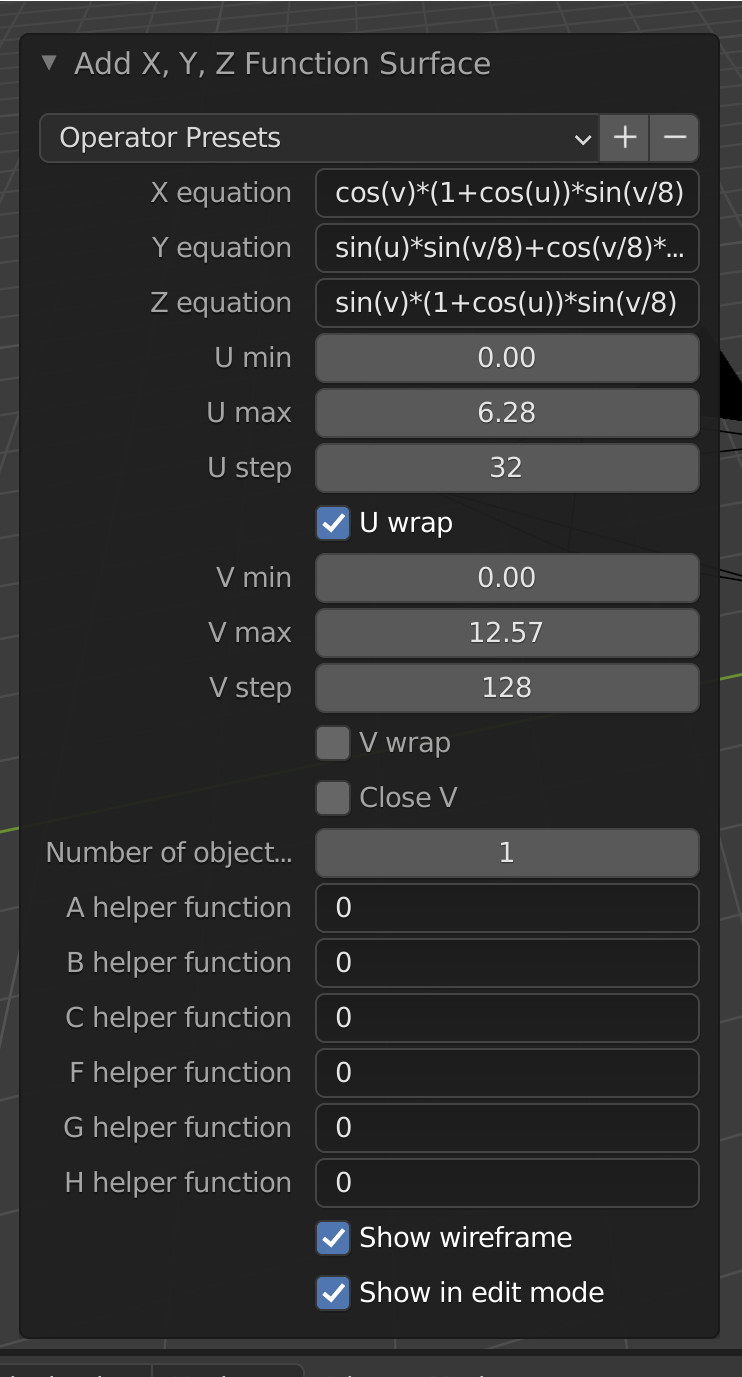
Screenshot 1: Blender Node
In[]:=
WolframAlpha["bohemian dome",{{"PlotPod:Surface",1},"Content"}]
Out[]=
 |
Recreate surface from Wolfram Alpha:
In[]:=
term3=term2[[1,1]]/.{a->1,b->1,c->1}
Out[]=
{Cos[u],Cos[v]+Sin[u],Sin[v]}
In[]:=
gr3=ParametricPlot3D[term2[[1,1]]/.{a->1,b->1,c->1},{u,0,2Pi},{v,0,2Pi},Axes->False,Boxed->False]
Out[]=

In[]:=
term4=term2[[1,2]]/.{a->1,b->1,c->1}
Out[]=
[a*cos(u), b*cos(v) + a*sin(u), c*sin(v)]
Second transfer possibility:
Copy the three coordinate expressions to the “Surface Formula” node to create parametric surfaces from Sverchok addon to Blender. Overwrite any existing input.
Copy the three coordinate expressions to the “Surface Formula” node to create parametric surfaces from Sverchok addon to Blender. Overwrite any existing input.
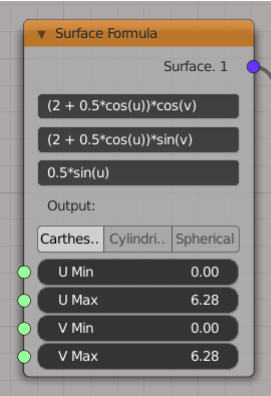
Screenshot 2: Sverchok Documentation
Third transfer possibility:
Copy the three coordinate expressions to an exported Sverchok-layout in json-format. The according node is called "Surface Formula" (SvExSurfaceFormulaNode).
Copy the three coordinate expressions to an exported Sverchok-layout in json-format. The according node is called "Surface Formula" (SvExSurfaceFormulaNode).
...
“Surface Formula”: {
“bl_idname”: “SvExSurfaceFormulaNode”,
“custom_socket_props”: {},
“height”: 100.0,
“hide”: false,
“label”: “”,
“location”: [
26.20700454711914,
124.2540054321289
],
“params”: {
“formula1”: “A * (1 + v/2 * cos(u/2))*cos(u)”,
“formula2”: “A * (1 + v/2 * cos(u/2)) * sin(u)”,
“formula3”: “A * v/2 * sin(u/2)”,
“v_max”: 1.0,
“v_min”: -1.0
},
“width”: 217.093505859375
},
...
“Surface Formula”: {
“bl_idname”: “SvExSurfaceFormulaNode”,
“custom_socket_props”: {},
“height”: 100.0,
“hide”: false,
“label”: “”,
“location”: [
26.20700454711914,
124.2540054321289
],
“params”: {
“formula1”: “A * (1 + v/2 * cos(u/2))*cos(u)”,
“formula2”: “A * (1 + v/2 * cos(u/2)) * sin(u)”,
“formula3”: “A * v/2 * sin(u/2)”,
“v_max”: 1.0,
“v_min”: -1.0
},
“width”: 217.093505859375
},
...
Fourth transfer possibility:
Export the surface e.g. in obj-format and import it into Blender.
Export the surface e.g. in obj-format and import it into Blender.
In[]:=
gr3=ParametricPlot3D[term2[[1,1]]/.{a->1,b->1,c->1},{u,0,2Pi},{v,0,2Pi},Axes->False,Boxed->False]
Out[]=
In[]:=
Export["bohem.obj",gr3]
Example 2: Cassini (Export)
Example 2: Cassini (Export)
In the animation OneToMany the Cassini surface was extracted via Wolfram Alpha and exported in stl-format.
Example 3: OneTwoMany (Import/Export)
Example 3: OneTwoMany (Import/Export)
In the animation Linked (part 3) and MolePano a modified molecule is used. It was imported in xyz-format and exported in wrl-format.
Example 4: Cheers (Export Curve)
Example 4: Cheers (Export Curve)
Fifth transfer possibility:
Export curve in dxf-format and import it into Blender.
Export curve in dxf-format and import it into Blender.
Parabola in generic position
Glass 1
In Blender the curve was revolved around the z-axis with the screw-modifier.
Example 5: Pavilion II (Nurbs)
Example 5: Pavilion II (Nurbs)
In animation Pavilion II a basis structure was created.
From the pavilion a series of curves was exported.
Example 6: Celtic Spiral (Video)
Example 6: Celtic Spiral (Video)
The Spiral animation contains two reverse parts.
To minimize the file-size a torus-animation in black&white is used.
With FrameListVideo the rendered images in folder “torus” form video v1. The reversed list of rendered images form v2. v1 and v2 are combined via VideoJoin.
To minimize the file-size a torus-animation in black&white is used.
With FrameListVideo the rendered images in folder “torus” form video v1. The reversed list of rendered images form v2. v1 and v2 are combined via VideoJoin.
Usage of Blender
Usage of Blender
This report was shortened (for non-Blender users).
Example: Looped
Example: Looped
Part 1:
The curves for torus-, figure eight-, Solomon-seal-knot were exported as dxf-files from Mathematica.
In Blender, the torus mesh was added and the curve for the torus-knot imported. Furthermore a subdivided plane was included in the scene.
The curves for torus-, figure eight-, Solomon-seal-knot were exported as dxf-files from Mathematica.
In Blender, the torus mesh was added and the curve for the torus-knot imported. Furthermore a subdivided plane was included in the scene.
To animate the torus-knot development, a round bevel was added to the curve. Keying the end parameter for beveling in the timeline makes this possible.
The shading of the background was done via the sky-texture. The plane had been given a medium shiny checkerboard texture. The torus structure was displaced via a Musgrave texture.
The beveled curve was colorized via a color-ramp connected to a metallic principled bsdf material.
The animation was rendered as a sequence of png’s with 4k resolution.
Part 2:
To the scene were added: checkerboard-plane, finalized torus knot and same background as in part 1.
To the scene were added: checkerboard-plane, finalized torus knot and same background as in part 1.
The three other knots were animated, each with a small delay, again through keying the according bevel end.
The second animation again was rendered as a sequence of png’s with 4k resolution.
Part 3:
Both sequences were added in the video editing timeline within Blender. Additionally an audio-file was imported as sound. A video was rendered as nearly lossless mp4-file with the h264-codec.
Both sequences were added in the video editing timeline within Blender. Additionally an audio-file was imported as sound. A video was rendered as nearly lossless mp4-file with the h264-codec.
Part 4:
Via ffmpeg a watermark was included.
Via ffmpeg a watermark was included.
References
References
List of animations
List of animations
Cheers (B1, A8)
Hulls (B1, A30)
Deformed (B1, A11)
Flower (W18, A33)
Looped (W40, W42, A20)
MolePano (W7) (360° video, not converted to gif)
Linked (W7, W17, A36)
Pasta (W5, A37)
Eight Towers (W4, W1, W24, A15)
Spinner (W16, A16)
One2Many (W21, W9)
Together (W14, A25)
Pavilion II (W3, A26)
Pavilion I (W3, A5)
RoundTrip (W2, A24)
Spin (W12, A29)
Dual (W10, A21)
Owl (W15, A10)
Hope (W13, A1, A4)
Knots (W31, A31)
Interlocked (W40, A12)
Transfer (A18)
Symbol (W11, A32)
Sparkle (A2)
Around (W33, W29, A34)
Parametric_Surfaces (W39, A38)
Morphing (W36, A13)
Shells (W20, A14)
Spiral (A28)
Wheel (W19, A17)
Consumed (W22, A6)
Blades (W34, A27)
Rondo (W32, A23)
Egg/Basket (W37, A35)
Change (W27, A7)
Revealed (W42, A22)
Un-Tamed (A3)
Hulls (B1, A30)
Deformed (B1, A11)
Flower (W18, A33)
Looped (W40, W42, A20)
MolePano (W7) (360° video, not converted to gif)
Linked (W7, W17, A36)
Pasta (W5, A37)
Eight Towers (W4, W1, W24, A15)
Spinner (W16, A16)
One2Many (W21, W9)
Together (W14, A25)
Pavilion II (W3, A26)
Pavilion I (W3, A5)
RoundTrip (W2, A24)
Spin (W12, A29)
Dual (W10, A21)
Owl (W15, A10)
Hope (W13, A1, A4)
Knots (W31, A31)
Interlocked (W40, A12)
Transfer (A18)
Symbol (W11, A32)
Sparkle (A2)
Around (W33, W29, A34)
Parametric_Surfaces (W39, A38)
Morphing (W36, A13)
Shells (W20, A14)
Spiral (A28)
Wheel (W19, A17)
Consumed (W22, A6)
Blades (W34, A27)
Rondo (W32, A23)
Egg/Basket (W37, A35)
Change (W27, A7)
Revealed (W42, A22)
Un-Tamed (A3)
References
References
Web:
(1) bobthechemist. plotting - How to make a 3D topographic globe? https://mathematica.stackexchange.com/questions/60427/how-to-make-a-3d-topographic-globe (accessed 2021 -06 -06).
(2) Gsaller, G. Wolfram Demonstrations Project http://demonstrations.wolfram.com/VisualizingAtomicOrbitals/ (accessed 2021 -06 -05).
(3) Gsaller, G. Wolfram Demonstrations Project https://demonstrations.wolfram.com/3DTransformationsAppliedToANURBSPavilion/ (accessed 2021 -06 -05).
(4) same as (3)
(5) Gsaller, G. Wolfram Demonstrations Project http://demonstrations.wolfram.com/PastaShapesDesignsColorsOriginsAndNutritionalDataForVariousT/ (accessed 2021 -06 -06).
(6) Gsaller, G. Wolfram Demonstrations Project https://demonstrations.wolfram.com/VerticalWorldCircuit2015/ (accessed 2021 -06 -06).
(7) Gsaller, G. Wolfram Demonstrations Project http://demonstrations.wolfram.com/TopologicallyInterestingMolecules/ (accessed 2021 -06 -06).
(8) Krivoshapko, S. N.; Ivanov, V. N. Encyclopedia of Analytical Surfaces https://www.springerprofessional.de/en/encyclopedia-of-analytical-surfaces/2288526?tocPage=1 (accessed 2021 -06 -05).
(9) Meier, J. Parametrische Flächen und Körper http://www.3d-meier.de/tut3/Seite303.html (accessed 2021 -06 -05).
(10) Meier, J. Parametrische Flächen und Körper http://www.3d-meier.de/tut3/Seite20.html (accessed 2021 -06 -06).
(11) Meier, J. Parametrische Flächen und Körper http://www.3d-meier.de/tut3/Seite49.html (accessed 2021 -06 -06).
(12) Meier, J. Parametrische Flächen und Körper http://www.3d-meier.de/tut3/Seite235.html (accessed 2021 -06 -06).
(13) Meier, J. Parametrische Flächen und Körper http://www.3d-meier.de/tut3/Seite45.html (accessed 2021 -06 -06).
(14) Meier, J. Parametrische Flächen und Körper http://www.3d-meier.de/tut3/Seite185.html (accessed 2021 -06 -06).
(15) Meier, J. Parametrische Flächen und Körper http://www.3d-meier.de/tut3/Seite35.html (accessed 2021 -06 -06).
(16) Meier, J. Parametrische Flächen und Körper http://www.3d-meier.de/tut3/Seite28.html (accessed 2021 -06 -06).
(17) Meier, J. Parametrische Flächen und Körper http://www.3d-meier.de/tut3/Seite160.html (accessed 2021 -06 -06).
(18) Meier, J. Parametrische Flächen und Körper http://www.3d-meier.de/tut3/Seite227.html (accessed 2021 -06 -06).
(19) Clifford torus https://en.wikipedia.org/w/index.php?title=Clifford_torus&oldid=997950192 (accessed 2021 -06 -06).
(20) Bohemian Dome - Wolfram|Alpha https://www.wolframalpha.com (accessed 2021 -06 -06).
(21) Cassini Surface - Wolfram|Alpha https://www.wolframalpha.com (accessed 2021 -06 -06).
(22) Corcscrew Surface - Wolfram|Alpha https://www.wolframalpha.com (accessed 2021 -06 -05).
(23) Front End - Resolution problems with 12.3 version https://mathematica.stackexchange.com/questions/249207/resolution-problems-with-12-3-version (accessed 2021 -06 -05).
(24) Google Maps https://www.google.at/maps/place/Empire+State+Building,+New+York,+NY+10001,+USA/@40.7485452,-73.9879522,17z/data=!3m1!4b1!4m5!3m4!1s0x89c259a9aeb1c6b5:0x35b1cfbc89a6097f!8m2!3d40.7485452!4d-73.9857635 (accessed 2021 -06 -06).
(25) Homepage Jürgen Meier http://www.3d-meier.de/ (accessed 2021 -06 -05).
(26) same as (25).
(27) Icosahedron - Wolfram|Alpha https://www.wolframalpha.com (accessed 2021 -06 -05).
(28) Icosahedron-Wolfram Language Documentation https://reference.wolfram.com/language/ref/Icosahedron.html (accessed 2021 -06 -05).
(29) JANPA / Wiki / clpoExample https://sourceforge.net/p/janpa/wiki/clpoExample/ (accessed 2021 -06 -06).
(30) same as 29.
(31) Knots - Wolfram|Alpha https://www.wolframalpha.com (accessed 2021 -06 -05).
(32) Plucker's Conoid - Wolfram|Alpha https://www.wolframalpha.com (accessed 2021 -06 -05).
(33) PSI4: Open-Source Quantum Chemistry https://psicode.org/psi4manual/master/index.html (accessed 2021 -06 -06).
(34) Roman Surface - Wolfram|Alpha https://www.wolframalpha.com (accessed 2021 -06 -05).
(35) Stock Music & Sound Effects - Royalty Free Audio - Storyblocks https://www.storyblocks.com/audio (accessed 2021 -06 -05).
(36) Superellipse - Wolfram|Alpha https://www.wolframalpha.com (accessed 2021 -06 -05).
(37) Surface—Wolfram Language Documentation https://reference.wolfram.com/language/ref/entity/Surface.html (accessed 2021 -06 -05).
(38) SurfaceData—Wolfram Language Documentation https://reference.wolfram.com/language/ref/SurfaceData.html (accessed 2021 -06 -05).
(39) Surfaces - Wolfram|Alpha https://www.wolframalpha.com (accessed 2021 -06 -05).
(40) Torus - Wolfram|Alpha https://www.wolframalpha.com (accessed 2021 -06 -05).
(41) same as (40)
(42) Torus Knots - Wolfram|Alpha https://www.wolframalpha.com (accessed 2021 -06 -05).
(43) Wolfram Language & System Documentation Center https://reference.wolfram.com/language/ (accessed 2021 -06 -05).
(1) bobthechemist. plotting - How to make a 3D topographic globe? https://mathematica.stackexchange.com/questions/60427/how-to-make-a-3d-topographic-globe (accessed 2021 -06 -06).
(2) Gsaller, G. Wolfram Demonstrations Project http://demonstrations.wolfram.com/VisualizingAtomicOrbitals/ (accessed 2021 -06 -05).
(3) Gsaller, G. Wolfram Demonstrations Project https://demonstrations.wolfram.com/3DTransformationsAppliedToANURBSPavilion/ (accessed 2021 -06 -05).
(4) same as (3)
(5) Gsaller, G. Wolfram Demonstrations Project http://demonstrations.wolfram.com/PastaShapesDesignsColorsOriginsAndNutritionalDataForVariousT/ (accessed 2021 -06 -06).
(6) Gsaller, G. Wolfram Demonstrations Project https://demonstrations.wolfram.com/VerticalWorldCircuit2015/ (accessed 2021 -06 -06).
(7) Gsaller, G. Wolfram Demonstrations Project http://demonstrations.wolfram.com/TopologicallyInterestingMolecules/ (accessed 2021 -06 -06).
(8) Krivoshapko, S. N.; Ivanov, V. N. Encyclopedia of Analytical Surfaces https://www.springerprofessional.de/en/encyclopedia-of-analytical-surfaces/2288526?tocPage=1 (accessed 2021 -06 -05).
(9) Meier, J. Parametrische Flächen und Körper http://www.3d-meier.de/tut3/Seite303.html (accessed 2021 -06 -05).
(10) Meier, J. Parametrische Flächen und Körper http://www.3d-meier.de/tut3/Seite20.html (accessed 2021 -06 -06).
(11) Meier, J. Parametrische Flächen und Körper http://www.3d-meier.de/tut3/Seite49.html (accessed 2021 -06 -06).
(12) Meier, J. Parametrische Flächen und Körper http://www.3d-meier.de/tut3/Seite235.html (accessed 2021 -06 -06).
(13) Meier, J. Parametrische Flächen und Körper http://www.3d-meier.de/tut3/Seite45.html (accessed 2021 -06 -06).
(14) Meier, J. Parametrische Flächen und Körper http://www.3d-meier.de/tut3/Seite185.html (accessed 2021 -06 -06).
(15) Meier, J. Parametrische Flächen und Körper http://www.3d-meier.de/tut3/Seite35.html (accessed 2021 -06 -06).
(16) Meier, J. Parametrische Flächen und Körper http://www.3d-meier.de/tut3/Seite28.html (accessed 2021 -06 -06).
(17) Meier, J. Parametrische Flächen und Körper http://www.3d-meier.de/tut3/Seite160.html (accessed 2021 -06 -06).
(18) Meier, J. Parametrische Flächen und Körper http://www.3d-meier.de/tut3/Seite227.html (accessed 2021 -06 -06).
(19) Clifford torus https://en.wikipedia.org/w/index.php?title=Clifford_torus&oldid=997950192 (accessed 2021 -06 -06).
(20) Bohemian Dome - Wolfram|Alpha https://www.wolframalpha.com (accessed 2021 -06 -06).
(21) Cassini Surface - Wolfram|Alpha https://www.wolframalpha.com (accessed 2021 -06 -06).
(22) Corcscrew Surface - Wolfram|Alpha https://www.wolframalpha.com (accessed 2021 -06 -05).
(23) Front End - Resolution problems with 12.3 version https://mathematica.stackexchange.com/questions/249207/resolution-problems-with-12-3-version (accessed 2021 -06 -05).
(24) Google Maps https://www.google.at/maps/place/Empire+State+Building,+New+York,+NY+10001,+USA/@40.7485452,-73.9879522,17z/data=!3m1!4b1!4m5!3m4!1s0x89c259a9aeb1c6b5:0x35b1cfbc89a6097f!8m2!3d40.7485452!4d-73.9857635 (accessed 2021 -06 -06).
(25) Homepage Jürgen Meier http://www.3d-meier.de/ (accessed 2021 -06 -05).
(26) same as (25).
(27) Icosahedron - Wolfram|Alpha https://www.wolframalpha.com (accessed 2021 -06 -05).
(28) Icosahedron-Wolfram Language Documentation https://reference.wolfram.com/language/ref/Icosahedron.html (accessed 2021 -06 -05).
(29) JANPA / Wiki / clpoExample https://sourceforge.net/p/janpa/wiki/clpoExample/ (accessed 2021 -06 -06).
(30) same as 29.
(31) Knots - Wolfram|Alpha https://www.wolframalpha.com (accessed 2021 -06 -05).
(32) Plucker's Conoid - Wolfram|Alpha https://www.wolframalpha.com (accessed 2021 -06 -05).
(33) PSI4: Open-Source Quantum Chemistry https://psicode.org/psi4manual/master/index.html (accessed 2021 -06 -06).
(34) Roman Surface - Wolfram|Alpha https://www.wolframalpha.com (accessed 2021 -06 -05).
(35) Stock Music & Sound Effects - Royalty Free Audio - Storyblocks https://www.storyblocks.com/audio (accessed 2021 -06 -05).
(36) Superellipse - Wolfram|Alpha https://www.wolframalpha.com (accessed 2021 -06 -05).
(37) Surface—Wolfram Language Documentation https://reference.wolfram.com/language/ref/entity/Surface.html (accessed 2021 -06 -05).
(38) SurfaceData—Wolfram Language Documentation https://reference.wolfram.com/language/ref/SurfaceData.html (accessed 2021 -06 -05).
(39) Surfaces - Wolfram|Alpha https://www.wolframalpha.com (accessed 2021 -06 -05).
(40) Torus - Wolfram|Alpha https://www.wolframalpha.com (accessed 2021 -06 -05).
(41) same as (40)
(42) Torus Knots - Wolfram|Alpha https://www.wolframalpha.com (accessed 2021 -06 -05).
(43) Wolfram Language & System Documentation Center https://reference.wolfram.com/language/ (accessed 2021 -06 -05).
Book
(1) Krivoshapko, S.; Ivanov, V. N. Encyclopedia of Analytical Surfaces; Springer International Publishing, 2015. https://doi.org/10.1007/978-3-319-11773-7.
(1) Krivoshapko, S.; Ivanov, V. N. Encyclopedia of Analytical Surfaces; Springer International Publishing, 2015. https://doi.org/10.1007/978-3-319-11773-7.
Audio
Stock Music & Sound Effects - Royalty Free Audio - Storyblocks https://storyblocks.com/audio
(1) -. Cinematic Swooshy Blow.
(2) -. Level Complete Ring Magical Sparkle.
(3) -. Slow Throat Sub Rumbling Whoosh.
(4) -. Water Movement.
(5) Ben Ami, N. We20fifty - Not Enough (39sec).
(6) Cole, B. Digital Epic Warrior Stinger.
(7) Cole, B. Give Me Money Short Stinger Mix.
(8) Conrad, L. Limitless (Shorter Version).
(9) Corbett, Wilkie, M., Mike. Another Lifetime.
(10) Diana, R. Mystic Flute.
(11) Donelly, J. Oh No.
(12) Gribanova, V. Gust Of Wind.
(13) Gribanova, V. Last Seconds.
(14) Gribanova, V. Rain Drop.
(15) Gunnarsson, J. Ancient Fantasy.
(16) Kaleth, J. A World Away.
(17) Koltsov, O. Cosmic Piano Logo Reveal.
(18) Koltsov, O. Light Particle Logo.
(19) Krotov, V. Upbeat Ambient Music.
(20) Lepine, S. J. Timeless (30 Seconds).
(21) Martinez, D. Lucid Dream (Bumper).
(22) Nemo, C. Positive Meditation - Sting Version.
(23) Nemo, C. Positive Vibrations - 30 Sec Version.
(24) Neumann, L. Last Page Alt Percussion 2.
(25) Neumann, L. Piano Sting 2.
(26) Neumann, L. Velocity 90 Bpm Alt Percussion 4.
(27) Pearson, W. Fallen Leaves - Alt Mix.
(28) Piddubnyk, V. NEWS IDENT Breaking Financial Highlights Sport Broadcast [Intro V2 ].
(29) Smith, P. Across The Veld (V2).
(30) Smith, P. Arising.
(31) Smith, P. Bayou Meditation.
(32) Smith, P. Dramatic Trans 3.
(33) Smith, P. Good Friends (V2).
(34) Smith, P. Logo 34.
(35) Smith, P. Tension.
(36) Smith, P. We Care.
(37) Tencher Music. Dreamy Trumpet Soundscape #3.
(38) Vignola, M. Expand.
Stock Music & Sound Effects - Royalty Free Audio - Storyblocks https://storyblocks.com/audio
(1) -. Cinematic Swooshy Blow.
(2) -. Level Complete Ring Magical Sparkle.
(3) -. Slow Throat Sub Rumbling Whoosh.
(4) -. Water Movement.
(5) Ben Ami, N. We20fifty - Not Enough (39sec).
(6) Cole, B. Digital Epic Warrior Stinger.
(7) Cole, B. Give Me Money Short Stinger Mix.
(8) Conrad, L. Limitless (Shorter Version).
(9) Corbett, Wilkie, M., Mike. Another Lifetime.
(10) Diana, R. Mystic Flute.
(11) Donelly, J. Oh No.
(12) Gribanova, V. Gust Of Wind.
(13) Gribanova, V. Last Seconds.
(14) Gribanova, V. Rain Drop.
(15) Gunnarsson, J. Ancient Fantasy.
(16) Kaleth, J. A World Away.
(17) Koltsov, O. Cosmic Piano Logo Reveal.
(18) Koltsov, O. Light Particle Logo.
(19) Krotov, V. Upbeat Ambient Music.
(20) Lepine, S. J. Timeless (30 Seconds).
(21) Martinez, D. Lucid Dream (Bumper).
(22) Nemo, C. Positive Meditation - Sting Version.
(23) Nemo, C. Positive Vibrations - 30 Sec Version.
(24) Neumann, L. Last Page Alt Percussion 2.
(25) Neumann, L. Piano Sting 2.
(26) Neumann, L. Velocity 90 Bpm Alt Percussion 4.
(27) Pearson, W. Fallen Leaves - Alt Mix.
(28) Piddubnyk, V. NEWS IDENT Breaking Financial Highlights Sport Broadcast [Intro V2 ].
(29) Smith, P. Across The Veld (V2).
(30) Smith, P. Arising.
(31) Smith, P. Bayou Meditation.
(32) Smith, P. Dramatic Trans 3.
(33) Smith, P. Good Friends (V2).
(34) Smith, P. Logo 34.
(35) Smith, P. Tension.
(36) Smith, P. We Care.
(37) Tencher Music. Dreamy Trumpet Soundscape #3.
(38) Vignola, M. Expand.