A neural network/net is an artificial intelligence method inspired by how the human brain functions. Its structures are made up of nodes, layers, and edges---just like humans’ neural networks---that are activated at different intensities (weights). The goal of this project is to make observations on how the properties of neural networks change using data from the training process and plot visualizations. We will train separate neural nets for several different functions/function types. Through careful observation of the nets’ changes while they’re being trained, we can learn how these changes may create differences between separate functions. We will gain insight into the patterns that lay within neural nets and analyze their significance.
Introduction
Introduction
There are three kinds of layers within a neural network: an input layer, a hidden (middle) layers, and an output layer. Within each layer is a number of nodes, which parallel brain neurons. Let’s take the graphic below as an example. The singular top node is the input layer, and the singular bottommost node is the output layer. The three middle rows, made up of 5, 3, and 5 nodes from order top to bottom, are the hidden layers. Note that this is not the only configuration, and that it is possible for layers to have any number of nodes. The arrows connecting one node to another are called edges---each one has its own weight that adjusts as the model is being trained. These tweaks affect the final output of the net.
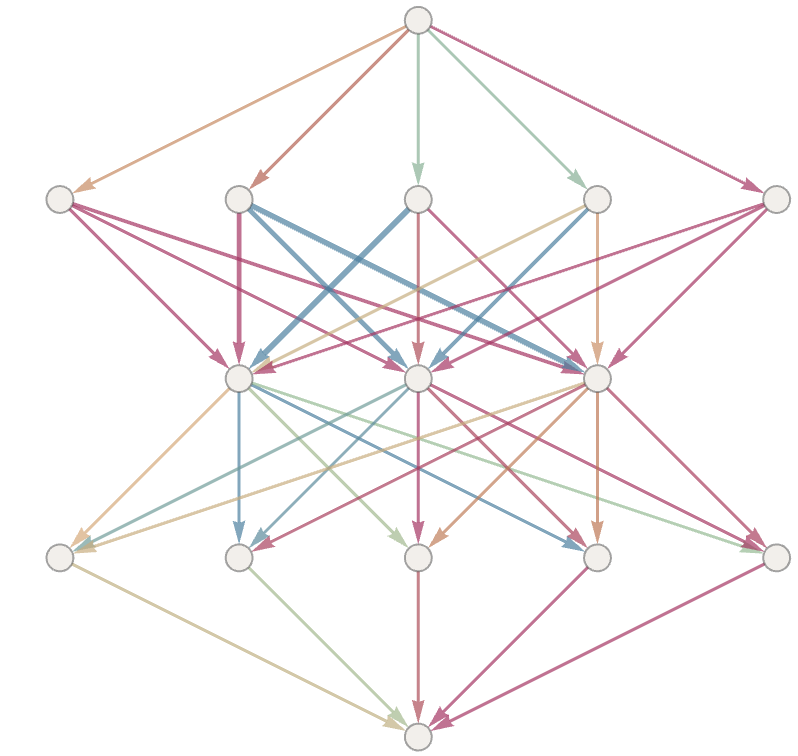
The exact reasonings of neural networks is difficult to explain and interpret; we are not entirely sure how the machine reaches its conclusions. For this project, we’ll start with the basics and use very simple, fully connected networks and two types of activation functions. We will manipulate different areas of the network to compare their results, using metrics such as loss values during this process. Over the course of our exploration, we will gain a better understanding of neural networks in general, as well as observing how our results change for different variables. We will build a solid foundation for further learning and research in the topic.
This project starts by generating some of the functions we will be using to help with visualization. Next, we’ll create some functions to utilize in our testing. Using labeled graphics outputs, we’ll discuss our results and look for further directions for the future.
Generating Functions
Generating Functions
The function types we will be testing in this project are sine/cosine, cubic, and piecewise. The sine/cosine function used in this analysis was generated randomly, and the piecewise is one I selected from Wikipedia that looked interesting. The generated functions are to be fitted into the training function later on, but for now, their plots and equations will simply help with understanding what the neural nets’ plots could look like.
Sine/Cosine Function
Sine/Cosine Function
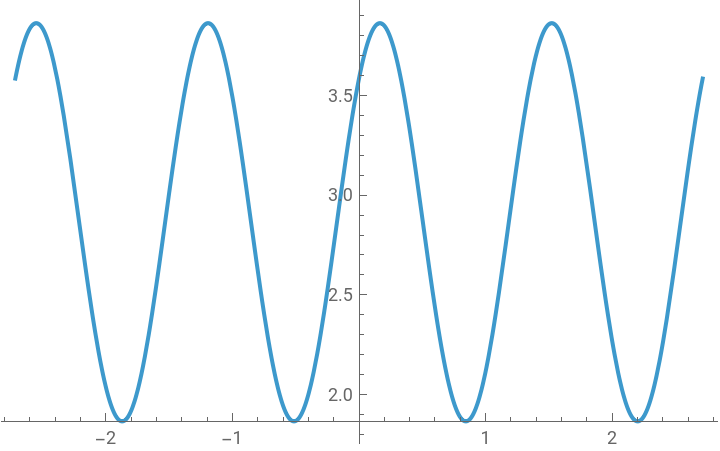
We generate a sine function and plot four periods of it:
In[]:=
GenerateSineFunction:=Module[{b=RandomChoice[{RandomReal[{-10,-0.1}],RandomReal[{0.1,10}]}]},Column[{sineFunction=Sin[b*(x+RandomReal[{-10,10}])]+RandomReal[{-10,10}],Plot[sineFunction,{x,-4Pi/b,4Pi/b}]}]]
This is what an output may look like after running the above function:
In[]:=
GenerateSineFunction
Out[]=
2.86413+Sin[4.62941(2.88855+x)] |
Cubic Function
Cubic Function
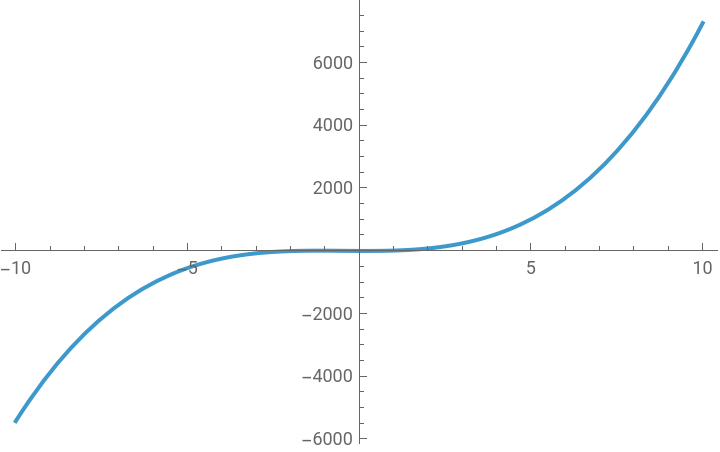
We generate a cubic function and plot it :
In[]:=
GenerateCubicFunction:=Module[{a=RandomChoice[{RandomReal[{-10,-0.1}],RandomReal[{0.1,10}]}]},Column[{cubicFunction=a*x^3+RandomReal[{-10,10}]*x^2+RandomReal[{-10,10}]*x+RandomReal[{-10,10}],Plot[cubicFunction,{x,-10,10}]}]]
Running the function and seeing a possible output:
In[]:=
GenerateCubicFunction
Out[]=
-8.44378-4.48971x+9.18992 2 x 3 x |
Piecewise Function
Piecewise Function
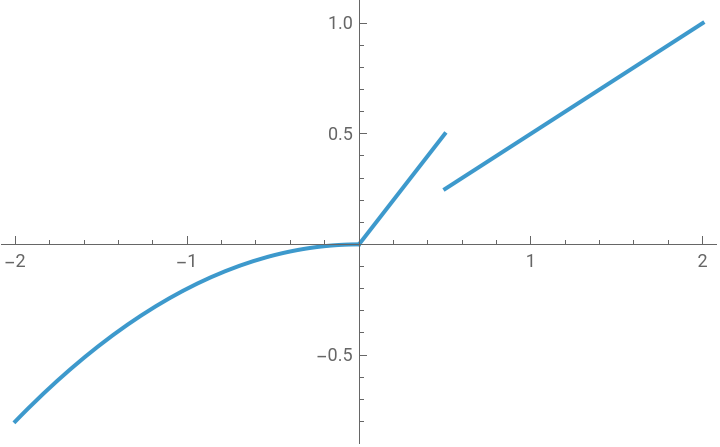
For the piecewise functions, I found them through examples on Wikipedia and chose two arbitrarily. We plot them:
In[]:=
Column[{piecewiseFunction1=Piecewise[{{x^2,0.2<=x<0},{x,0<=x<=0.5},{x/2,x>0.5},{3x^2-3.2x^2,x<0.2}}],Plot[piecewiseFunction1,{x,-2,2}]}]
Out[]=
| ||||||||||
In[]:=
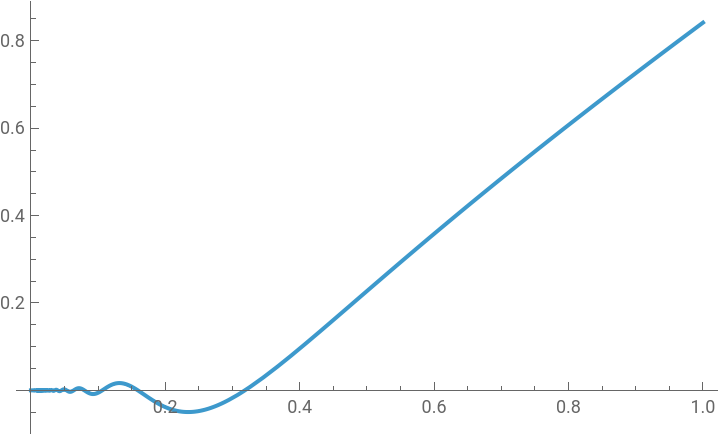
Column[{piecewiseFunction2=Piecewise[{{x^2*Sin[1/x],x>0}}],Plot[piecewiseFunction2,{x,0,1}]}]
Out[]=
| ||||||
Testing the Modified Sample Code
Testing the Modified Sample Code
Here, we will be defining the functions we’re working with. In terms of which variables to manipulate, we will be working with different...
◼
nodes and layer counts
◼
activation functions
◼
training round numbers
◼
function types
Much of the code in my notebook is the code from the article, “What’s Really Going On in Machine Learning? Some Minimal Models”. I added modifications for all functions types to run together, as well as more parameters, labels, functions, etc.
Now, let’s move on to preparing the notebook for the functions.
Now, let’s move on to preparing the notebook for the functions.
Clear all functions/variables:
In[]:=
ClearAll[colorWCP,trainNet,netReLU,netELU,allModels,checkpointsRR,nets,allWeights,weightChangesPlot,drawNetLayout,resultsObjs,finalNetTrainResults,lossValues,graphicsPlot,weightChangesPlotsList,runSteps,b,c,d,sineFunction,inputFunction,viewRange,trainingX,trainingY,graphicOutput,ReLUSineCase]
Setting the random seed:
In[]:=
SeedRandom[23049829048];
Functions Used Throughout This Section
Functions Used Throughout This Section
We define several functions, as these will be used multiple times throughout the entire testing process.
Color scheme for the weight changes plots:
In[]:=
colorWCP:=FunctionBlend{-1,},-,,{0,},,,{1,},#

1
2
1
2
A function that outputs a trained neural network:
trainNet[net_,maxTrainingRounds_,batchSize_]:=Module[ {trainedNet,checkpoints={}},trainedNet=NetTrain[net,trainingX->trainingY,All,(*describes the options returned by this function*)MaxTrainingRoundsmaxTrainingRounds,BatchSizebatchSize,TrainingProgressFunction{AppendTo[checkpoints,#Net]&,"Interval"Quantity[10,"Rounds"]}]; {trainedNet,Prepend[checkpoints,NetInitialize[net]]}]
Creating the 2 types of activation functions:
In[]:=
netReLU[lws_List,options___]:=NetChain[Join[Riffle[LinearLayer/@lws,Ramp],{Ramp,LinearLayer[]}],"Input"->"Real","Output"->"Real"]
In[]:=
netELU[lws_List,options___]:=NetChain[Join[Riffle[LinearLayer/@lws,ElementwiseLayer["ELU"]],{ElementwiseLayer["ELU"],LinearLayer[]}],"Input"->"Real","Output"->"Real"]
ReLU (Rectified Linear Unit) and ELU (Exponential Linear Unit ) are two kinds of activation functions. Activation functions are calculated for each node, and affect the outputs due to their varying properties. The ReLU activation function is a sharper shape, compared to the ELU, which is shaped in a more rounded manner. Here is each of the activation functions plotted:
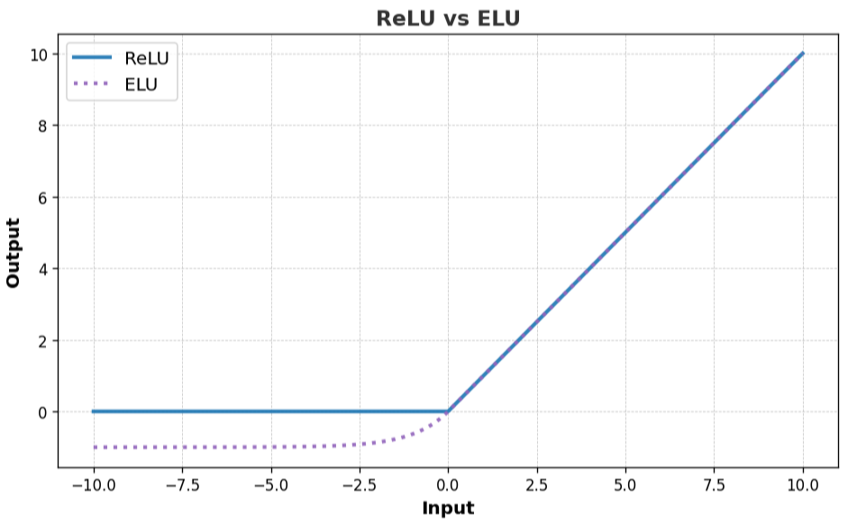
Image Credits: GeeksforGeeks
Activating neural net training and determining the number of nodes and layers of the neural nets:
The trainingNetStructuresList above is a list of the different neural net structures (also in the form of lists) I want to test. Each element represents one layer, while the number assigned to that element is the number of nodes in that layer. I arbitrarily chose a set of structures, but kept the sizes relatively small for ease of use. I then selected the one with the lowest loss rate and another structure to test my code.
Extracting the netChains from the trained neural nets:
Returns information on the value changes of the weights:
Graphic of weights changes:
This function draws out the representation of the each neural nets' structure:
Getting NetChains and loss value progression plots of the neural nets:
Loss values for each inputted net; helps show how well the network does at its job:
Graphic of neural nets’ plots and structures:
In the function above, I used a Resource Function from the Wolfram Cloud, called NetGraphPlot. Essentially, it plots the graphic visualization of my neural net.
An overall function that runs the above functions to receive a graphic output and information for the Loss Value Plot:
Function Type: Sine/Cosine
Function Type: Sine/Cosine
Functions/Variables Used Throughout This Type:
Functions/Variables Used Throughout This Type:
Here, we define functions that we will be using throughout the testing process for sine. This includes training data and the function we test with. The test function is randomly generated within a certain range, which is why the constants are so specific.
Defining our input function and the range of the plot we want to take (taken from a function i generated earlier, and rounded to two decimal places):
Extracting training data points from the desired function:
Activation Function Type: ReLU
Activation Function Type: ReLU
Our main separation criteria is by activation function. Under each activation function, we will also test by other factors. For each testing block (a graphicOutput), two images will be outputted: the structure of the net, and the graph the net plots.
Node Count Change
This section tests the effects of changing the number of nodes in a neural network.
graphicOutput contains our graphics and the netChains for our loss values plot:
As seen in the images above, we labeled each structure with their loss value, structure, and the number of training rounds. The lower the loss value is, the better the neural network is performing. Oftentimes, the more complex (that is, the more nodes/layers) a net has, the better its performance is.
Layer Count Change
This section tests the effects of changing the number of layers in a neural network.
We remove one layer from the original structure:
Here, we’ll try it out with nets where the layers have different numbers of nodes in their layers:
Training Round Counts Change
This section compares how different numbers of training rounds for the same neural network affects the output.
Comparing the same neural net with 1000 training rounds vs 10000:
Activation Function Type: ELU
Activation Function Type: ELU
The ELU activation produces a smoother, more curved plot.
Node Count Change
Comparing between ELU sine function where they differ by their node counts:
Layer Count Change
We remove one layer from the original structure:
Here, we’ll try it out with layers where there aren’t equal amounts of nodes:
Training Round Counts Change
Comparing the same nets except for their training round amounts:
Function Type: Cubic
Function Type: Cubic
We are moving on to the cubic function, and testing in the same format.
Functions/variables used throughout this type:
Functions/variables used throughout this type:
Input function:
We extract the training data points from our function:
Extracting training data points:
Activation Function Type: ReLU
Activation Function Type: ReLU
Comparing between ReLU cubic function where they differ by their node counts:
Node Count Change
Saving the cases data to use it for the weights change plot:
Layer Count Change
Removing one layer from the neural net:
Let’s try this again with a net of layers of the same number of nodes:
Training Round Counts Change
Testing the net with 1000 training rounds vs 10000:
Activation Function Type: ELU
Activation Function Type: ELU
Node Count Change
Comparing between ELU cubic function where they differ by their node counts:
So far, the cubic function is performing with more accuracy compared to the sine graphs.
Layer Count Change
Removing one layer from the original net:
Here, we’ll try it out with layers where there aren’t equal amounts of nodes:
Training Round Counts Change
Comparing the same net with differing training round counts:
Function Type: Piecewise
Function Type: Piecewise
For this function type, I will do the tests on two different functions. Since piecewise functions can be so different from each other, it is hard to give a definitive conclusion about their neural net behavior. I chose one “hard” and one “easy” piecewise function for my tests.
Functions/variables used throughout this type:
Functions/variables used throughout this type:
Input function:
Piecewise function 1:
Piecewise function 1:
We extract the training data points from our function:
Activation Function Type: ReLU
Activation Function Type: ReLU
We use the ReLU activation function now, which again generally produces a sharper graph.
Node Count Change
Comparing between ReLU piecewise function where they differ by their node counts:
Layer Count Change
Removing one layer from the original net:
Training Round Counts Change
Comparing a neural net using different training round counts, 1000 vs 10000:
Activation Function Type: ELU
Activation Function Type: ELU
Node Count Change
Comparing between ELU piecewise function where they differ by their node counts:
Layer Count Change
Removing one layer from the original net:
Let’s try this again with a net of layers of the same number of nodes:
Training Round Counts Change
Comparing a neural net using different training round counts, 1000 vs 10000:
The 10,000 training round network performs better than the 1,000 training round one. Despite it being an ELU activation function, its curves are far smaller and more defined to the original input function.
Piecewise function 2:
Piecewise function 2:
We are now trying another piecewise function; this time, it has a more curved shape, which could mean the ELU function is more suited towards it.
Activation Function Type: ReLU
Activation Function Type: ReLU
Node Count Change
Comparing between ReLU piecewise function where they differ by their node counts:
Both functions seem to be performing at around the same level, which is surprising considering the second net has far less nodes.
Layer Count Change
Removing one layer from the original net:
Training Round Counts Change
Comparing a neural net using different training round counts, 1000 vs 10000:
Activation Function Type: ELU
Activation Function Type: ELU
Node Count Change
Comparing between ELU piecewise function where they differ by their node counts:
The ELU activation function looks more adept at following the “tail” at the end of the plot, but it seems to be missing much of the specific points on the right side.
Layer Count Change
Removing one layer from the original net:
Next, we’ll try it out with layers where there aren’t equal amounts of nodes.
Training Round Counts Change
Comparing a neural net using different training round counts, 1000 vs 10000:
Weights Analysis
Weights Analysis
The graphs below plot the difference of the weights between rounds. As the function continues to train, the weights are adjusted to increase accuracy. While the net gets closer and closer to matching the function, the lines of this graph will typically also get closer to 0.
Getting the weight changes plots for a few samples:
This graph is made using the ReLU activation function, on our sine input function. We output two examples; with different node counts:
This graph is made using the ELU activation function, on our sine input function.
This graph is made using the ReLU activation function, on our cubic input function.
The graphs shown here are just a few out of the nets we trained. All of the graphs are of the activation function ReLU, except for the third, which is of ELU. Notice that the second graph seems to have a more sparse starting point; this is because its structure has less nodes, and in turn, there will be less plots of its weights filling the graph. At the end of some graphs, you also may notice that there are small rises in from 0. The neural net may be changing the weights, but the output isn’t necessarily affected by those small changes.
Extras-Images/Neural Net Graphics
Extras-Images/Neural Net Graphics
This is a much larger graphic of more neural net structures. Since it is not ideal to train this much data for each individual property, here is an example of a graphic for one type.
Conclusions
Conclusions
In conclusion, the function type with the best performance was the cubic function, while the worst performance was from the sine function types. This may be because the cubic function only has two large curves, while the sine function is a graph over four periods. The piecewise function, however, is more difficult to interpret, because they could be of a multitude of forms.
We also saw that a higher number of training rounds meant a greater accuracy. Surprisingly, a net with a higher number of nodes did not necessarily excel over one with less. In the Sine ReLU example, the structure of {12,15,12} outperformed the structure of {15,15,15}. Perhaps this difference is due to a more optimal shape of the graph, or that a certain structure favors a certain function.
Overall, it is difficult to draw complete, concrete conclusions at this point due to a restraint on time and sample size. Either way, we did gain more information on the internal side of neural networks, which is a valuable asset in future research.
We also saw that a higher number of training rounds meant a greater accuracy. Surprisingly, a net with a higher number of nodes did not necessarily excel over one with less. In the Sine ReLU example, the structure of {12,15,12} outperformed the structure of {15,15,15}. Perhaps this difference is due to a more optimal shape of the graph, or that a certain structure favors a certain function.
Overall, it is difficult to draw complete, concrete conclusions at this point due to a restraint on time and sample size. Either way, we did gain more information on the internal side of neural networks, which is a valuable asset in future research.
Future Directions
Future Directions
Since the time for this project was quite limited, there is definitely potential for future explorations. First, we may proceed with more comparisons---whether it is using more types of activation functions, input functions, other variable manipulations, and more. A larger set of trained nets allows us to draw out more specific conclusions and patterns. Another extension would be defining these patterns using clustering methods, such as k-means clustering. For example, we can visually see how “far” one net is from the other. Overall, there are many exciting future opportunities in exploration of neural networks.
References
References
◼
3Blue1Brown - But What Is a Neural Network? https://www.3blue1brown.com/lessons/3blue1brown.com. Accessed 10 Jul. 2025.
◼
NetGraphPlot | Wolfram Resource Object. https://www.wolframcloud.com/obj/richardassar/DeployedResources/Function/NetGraphPlot/. Accessed 9 Jul. 2025.
◼
“Piecewise Function.” Wikipedia, 17 May 2025. Wikipedia, https://en.wikipedia.org/w/index.php?title=Piecewise_function&oldid=1290808622.
◼
“ReLU Activation Function in Deep Learning.” GeeksforGeeks, 30 Sep. 2024, https://www.geeksforgeeks.org/deep-learning/relu-activation-function-in-deep-learning/.
◼
“What Is a Neural Network? - Artificial Neural Network Explained - AWS.” Amazon Web Services, Inc., https://aws.amazon.com/what-is/neural-network/. Accessed 9 Jul. 2025.
◼
Wolfram, Stephen. “What’s Really Going On in Machine Learning? Some Minimal Models.” Stephen Wolfram Writings, Aug. 2024. writings.stephenwolfram.com, https://writings.stephenwolfram.com/2024/08/whats-really-going-on-in-machine-learning-some-minimal-models/.
Acknowledgements
Acknowledgements
I want to first thank my mentor, Felipe, for helping me greatly throughout the project on whatever questions I had. I’d also like to thank the directors, Megan, Eryn, and Rory, for helping me decide a project and supporting me. Next, I want to say thanks to my advocate, Aayush, for coming up with project ideas and helping me understand the materials needed for my project. Finally, I want to thank my TAs, Averyl and Gloria, and all of the amazing students I’ve met here. Thank you for making WSRP 2025 a super cool experience.
CITE THIS NOTEBOOK
CITE THIS NOTEBOOK
Analyzing neural networks with mathematical modeling
by Chelsea Liang
Wolfram Community, STAFF PICKS, July 11, 2025
https://community.wolfram.com/groups/-/m/t/3502213
by Chelsea Liang
Wolfram Community, STAFF PICKS, July 11, 2025
https://community.wolfram.com/groups/-/m/t/3502213