Modeling an Epidemic
Ebola Lab 1
Modeling an Epidemic
Ebola Lab 1
Ebola Lab 1
Background
Background
After Lisa Driskell Computer Science, Mathematics, and Statistics Colorado Mesa University Grand Junction CO 81501 USA ldriskel@coloradomesa.edu
Lab Authors: Alex Dimitrov and Jacob Pennington
Statement
Ebola virus disease or EVD is a potentially fatal disease affecting humans. The virus is thought to be carried by animals such as fruit bats and was discovered in 1976 when the first human outbreaks occurred [1]. The World Health Organization (WHO) recognizes March 2014 to be the start of the worst Ebola outbreak in history. The outbreak was primarily contained to West Africa, beginning in Guinea and spreading to Liberia and Sierra Leone [1]. There was a recent Ebola outbreak in Congo [7].
The outbreak and swift spread of Ebola in West Africa sparked fears worldwide for its potential to reach other regions. In September 2014, the Center for Disease Control (CDC) cited model predictions for the number of Ebola cases that reached as high as 550,000 cases by January 20, 2015 in Liberia and Sierra Leone alone [2]. When the model was corrected for under reporting, the number of cases jumped to 1.4 million. At the time of the prediction, Liberia and Sierra Leone combined for 2,407 cases while the model fairly accurately estimated 2,618 cases [2].
In a January 2016 news release, the World Health Organization officially declared the Ebola outbreak over for all three countries [3] (although few flare-ups resulted in 14 additional cases since that declaration). Because we have the data for the actual epidemic, we now know that the predictions by the CDC vastly overestimated the impact of the outbreak. We will investigate our own models of the epidemic based on the data that we now have.
We will use data published by the WHO ([4], [5]) to determine parameters for simple models that describe the outbreak. The data for the total number of Ebola cases includes cases confirmed by test results as well as suspected cases (those showing symptoms resistant to treatment) and probable cases (suspected cases that have been seen by a clinician). Also note that the data provided for the total number of cases is a running total of the number of cases which includes those patients who may have since recovered or died from the disease. The data for the individual countries and the number of deaths due to Ebola is also included to provide the opportunity for additional modeling and comparisons.
Lab Authors: Alex Dimitrov and Jacob Pennington
Statement
Ebola virus disease or EVD is a potentially fatal disease affecting humans. The virus is thought to be carried by animals such as fruit bats and was discovered in 1976 when the first human outbreaks occurred [1]. The World Health Organization (WHO) recognizes March 2014 to be the start of the worst Ebola outbreak in history. The outbreak was primarily contained to West Africa, beginning in Guinea and spreading to Liberia and Sierra Leone [1]. There was a recent Ebola outbreak in Congo [7].
The outbreak and swift spread of Ebola in West Africa sparked fears worldwide for its potential to reach other regions. In September 2014, the Center for Disease Control (CDC) cited model predictions for the number of Ebola cases that reached as high as 550,000 cases by January 20, 2015 in Liberia and Sierra Leone alone [2]. When the model was corrected for under reporting, the number of cases jumped to 1.4 million. At the time of the prediction, Liberia and Sierra Leone combined for 2,407 cases while the model fairly accurately estimated 2,618 cases [2].
In a January 2016 news release, the World Health Organization officially declared the Ebola outbreak over for all three countries [3] (although few flare-ups resulted in 14 additional cases since that declaration). Because we have the data for the actual epidemic, we now know that the predictions by the CDC vastly overestimated the impact of the outbreak. We will investigate our own models of the epidemic based on the data that we now have.
We will use data published by the WHO ([4], [5]) to determine parameters for simple models that describe the outbreak. The data for the total number of Ebola cases includes cases confirmed by test results as well as suspected cases (those showing symptoms resistant to treatment) and probable cases (suspected cases that have been seen by a clinician). Also note that the data provided for the total number of cases is a running total of the number of cases which includes those patients who may have since recovered or died from the disease. The data for the individual countries and the number of deaths due to Ebola is also included to provide the opportunity for additional modeling and comparisons.
References
[1] World Health Organization. 2016. Ebola virus disease. World Health Organization (Fact sheet No.103). Available at http://www.who.int/mediacentre/factsheets/fs103/en/. Accessed January 2016.
[2] Meltzer, M. I., Atkins, C. Y., Santibanez, S., et al. 2014. Estimating the Future Number of Cases in the Ebola Epidemic -Liberia and Sierra Leone, 2014-2015. Centers for Disease Control and Prevention (MMWR; 63,Suppl-3). Available at http://www.cdc.gov/mmwr/preview/mmwrhtml/su6303a1.htm. Accessed January 2016.
[3] World Health Organization. 2016. Latest Ebola outbreak over in Liberia; West Africa is at zero, but new flare-ups are likely to occur. World Health Organization (News Release; January 14, 2016). Available at http://www.who.int/mediacentre/news/releases/2016/ebola-zero-liberia/en/. Accessed January 2016.
[4] World Health Organization. 2014. Ebola virus disease. World Health Organization (Disease Outbreak News; March 22, 2014-August 31, 2014). Available at http://www.who.int/csr/don/archive/disease/ebola/en/ .
[5] World Health Organization. 2014-2016. Ebola virus disease. World Health Organization (Situation Reports; September 5, 2014-June 10, 2016). Available at http://www.who.int/csr/disease/ebola/situation-reports/archive/en/ .
References
[1] World Health Organization. 2016. Ebola virus disease. World Health Organization (Fact sheet No.103). Available at http://www.who.int/mediacentre/factsheets/fs103/en/. Accessed January 2016.
[2] Meltzer, M. I., Atkins, C. Y., Santibanez, S., et al. 2014. Estimating the Future Number of Cases in the Ebola Epidemic -Liberia and Sierra Leone, 2014-2015. Centers for Disease Control and Prevention (MMWR; 63,Suppl-3). Available at http://www.cdc.gov/mmwr/preview/mmwrhtml/su6303a1.htm. Accessed January 2016.
[3] World Health Organization. 2016. Latest Ebola outbreak over in Liberia; West Africa is at zero, but new flare-ups are likely to occur. World Health Organization (News Release; January 14, 2016). Available at http://www.who.int/mediacentre/news/releases/2016/ebola-zero-liberia/en/. Accessed January 2016.
[4] World Health Organization. 2014. Ebola virus disease. World Health Organization (Disease Outbreak News; March 22, 2014-August 31, 2014). Available at http://www.who.int/csr/don/archive/disease/ebola/en/ .
[5] World Health Organization. 2014-2016. Ebola virus disease. World Health Organization (Situation Reports; September 5, 2014-June 10, 2016). Available at http://www.who.int/csr/disease/ebola/situation-reports/archive/en/ .
Load the data
Load the data
Loading the Ebola data from my repository.
In[]:=
datalink="https://www.wolframcloud.com/obj/4d3a5523-9241-44cc-a430-237a8ab4a210";eboladata=First@Import[datalink,"Dataset"]
Out[]=


In[]:=
day=Flatten@eboladata[[All,1]];cases=Flatten@eboladata[[All,2]];total=eboladata[[All,1;;2]];
Refer to the section on List Manipulations in the documentation for more details on how to navigate the data in Mathematica. As an example, [[All, 1 ]] means “pick the first element (day) from every piece of data.” The commands that you need for this lab will be provided for you, but the documentation will be useful if you want to do additional exploration on your own.
Remember, if you want to see what these new data variables look like you can evaluate just the name of the variable on a new line. For example:
Remember, if you want to see what these new data variables look like you can evaluate just the name of the variable on a new line. For example:
In[]:=
day
Out[]=
The new day variable is storing the number of days elapsed since recording began for each update to the number of cases and deaths. The cases represents the number of cases in a similar manner, while total is a list of (day, case) pairs.
In[]:=
total[[1;;4]]
Out[]=
And set some default setting to output larger plots
In[]:=
SetOptions[ListPlot,ImageSizeLarge];SetOptions[ListLogPlot,ImageSizeLarge];SetOptions[Plot,ImageSizeLarge];SetOptions[LogPlot,ImageSizeLarge];
Plot the data
Plot the data
First let’s look at all of the data together. Since our total variable stores the data as a list of (day, case) pairs, we can use ListPlot[ ].
ListPlot[total,AxesLabelColumnKeys@total]
Out[]=
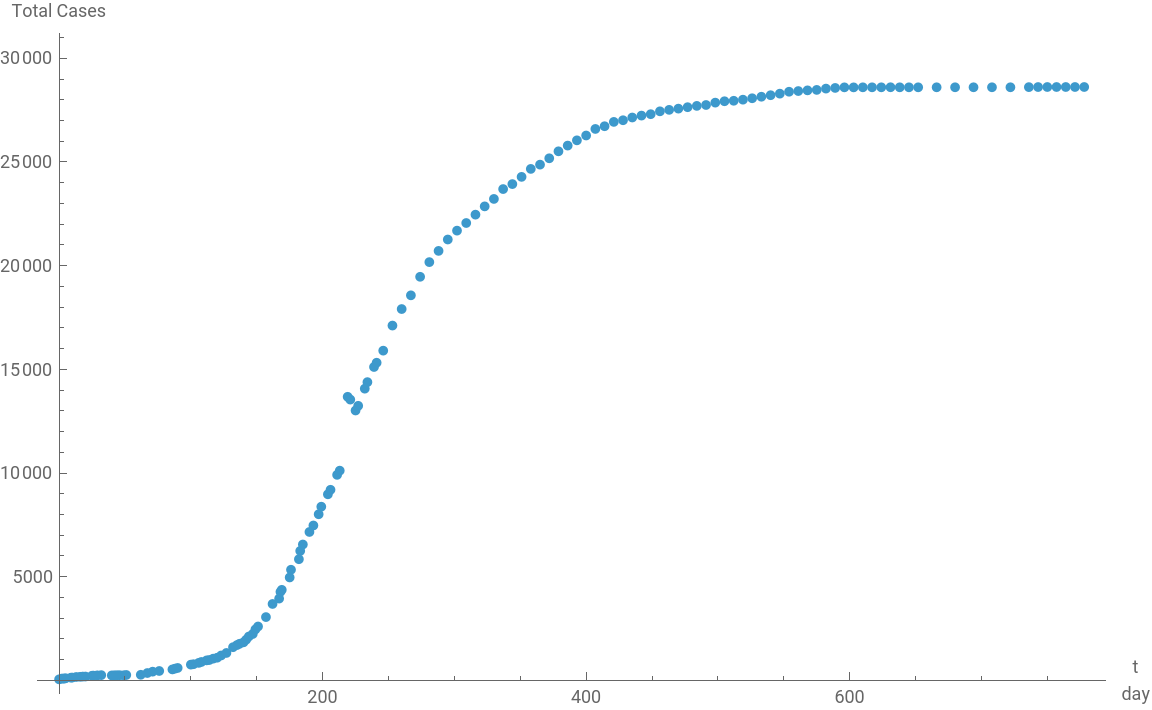
Our goal is to come up with a model for this data, but looking at the whole it’s a bit complicated. There’s no “easy” trend to spot like exponential growth/decay or a straight line. So instead, we’ll start by focusing on only the earlier data - let’s say less than the first 200 days. If I look at the raw data, I see that the 50th entry is day 167, so we’ll look at the first 50 data points (this is arbitrary, 50 is just a nice round number).
The following command will select the first 50 data points from total :
The following command will select the first 50 data points from total :
In[]:=
total[[;;50]]
Out[]=

The last measurement day in that sequence is
In[]:=
day[[50]]
Out[]=
167.
1) Use the above command in conjunction with ListPlot[ ] to plot the first 167 days of cases. Use ListLogPlot as well.
In[]:=
ListLogPlot[total[[;;50]],AxesLabelColumnKeys@total]
Out[]=
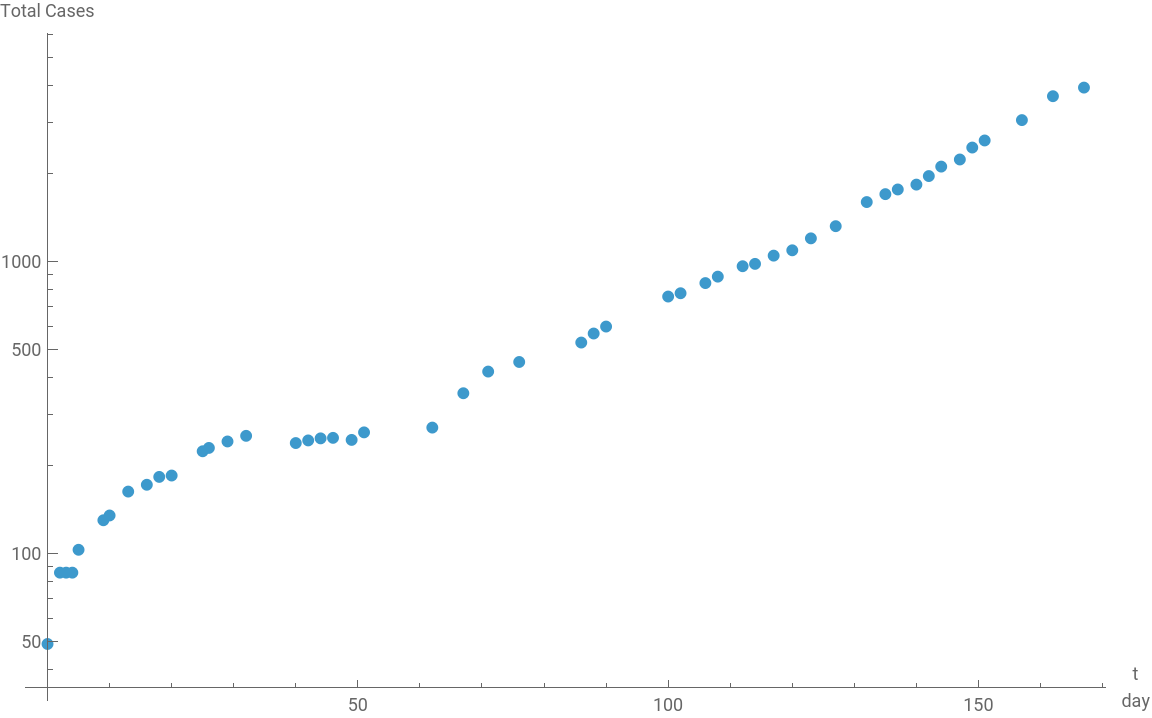
2) Propose a type of model that might work well for modeling this piece of the data. Note: you do not need to write down a specific equation with numbers at this point - you can just name the type of model or describe it in words. Discuss with your group members.
In[]:=
total[[{21,22}]]
Out[]=
3) Discuss as a class. Then define a Mathematica function to represent the model that you settle on.
n' = k*n <=> n[t] = n0 Exp[k t]
n' = k*n <=> n[t] = n0 Exp[k t]
In[]:=
model1[n0_,k_][t_]:=n0Exp[kt];(*modifythedefinitiontoreflectyourmodelchoice*)
4) First, use the raw data to try to set appropriate values for your parameters where possible. For example, if your model includes a parameter for the initial number of cases you can determine that from the data. Then, use the Manipulate[ ] plot to adjust the parameters for your model until it looks like it fits the data.
Note: n0 and k represent the parameter names that I used in my model, named model1. If you named your function something different,
or used different names for your parameters, you will need to change that.
4) First, use the raw data to try to set appropriate values for your parameters where possible. For example, if your model includes a parameter for the initial number of cases you can determine that from the data. Then, use the Manipulate[ ] plot to adjust the parameters for your model until it looks like it fits the data.
Note: n0 and k represent the parameter names that I used in my model, named model1. If you named your function something different,
or used different names for your parameters, you will need to change that.
In[]:=
Manipulate[Show[ListPlot[total[[;;50]],PlotStyleRed],(*datainred*)Plot[model1[n0,k][t],{t,0,167},PlotRange{0,5000}]],{{n0,1},0,200,Appearance"Labeled"},{{k,0.02},0,0.1,Appearance"Labeled"}]
Out[]=


Some times it helps to view the data on different scales. For example, if an exponential function is involved then a log scale will make the data look like a straight line.
5) Use the Manipulate[ ] plot below to repeat exercise 4).
Some times it helps to view the data on different scales. For example, if an exponential function is involved then a log scale will make the data look like a straight line.
5) Use the Manipulate[ ] plot below to repeat exercise 4).
6) Did you decide on different parameters in exercise 5) than you did in exercise 4)? If so, why?
Now let’s see how well our model compares to the rest of the data. First we’ll try including the next 50 data points (up to day 400 or so).
Now let’s see how well our model compares to the rest of the data. First we’ll try including the next 50 data points (up to day 400 or so).
7) Replace n0 and k in the following plot with the parameter values that you determined in exercise 4) or 5).
8) Judging from the plot in exercise 7), would you say this model works well for the first 400 days of cases? Explain why or why not.
8) Judging from the plot in exercise 7), would you say this model works well for the first 400 days of cases? Explain why or why not.
_________________Answers_____________________________
Question 1
Question 1
In[]:=
ListPlot[Q1]
In[]:=
ListLogPlot[Q1]
Question 2
Question 2
Continuous. We assume this because it keeps spreading out consistently across time and is not a collective mass infection at one go.
Question 3
Question 3
Question 4
Question 4
n0 is a fixed and defined number at 49.0
t is limited from 0 -167
t is limited from 0 -167
The Model Estimates that K is at on or about 0.025-0.028 range, so we shall alter the k range to be in line with that
Best fit curve shows k= 0.0266, will run log scale to affirm.
Question 5
Question 5
Running a Log Scale