The best source of innovations and the future of Wolfram technology is Stephen Wolfram’s online talk: Wolfram Technology Conference 2023: Stephen Wolfram’s Keynote Address https://www.youtube.com/watch?v=XLStlH8h5-w
Let’s check the OpenAI API features that we can integrate with Mathematica & Wolfram Language:
1. Open ChatGPT - GPT-3.5
Free
There is no Wolfram plugin
GUI chat interface (prompt) in the browser
There is no Wolfram plugin
GUI chat interface (prompt) in the browser
2. ChatGPT subscription - GPT-4.0
There is a plugin with Wolfram (Wolfram|Alpha)
US$20.00 per month (annual payment) subscription with OpenAI
GUI chat interface (prompt) in the browser
US$20.00 per month (annual payment) subscription with OpenAI
GUI chat interface (prompt) in the browser
3. Mathematica para OpenAI API
OpenAI API Prepaid Subscription, $10.00It’s cheap, accesses charged per token (generated word) OpenAI turbocharges GPT-4 and makes it cheaper https://www.theverge.com/2023/11/6/23948426/openai-gpt4-turbo-generative-ai-new-modelInstall the OpenAI API key in Mathematica
THE POWER IS HERE
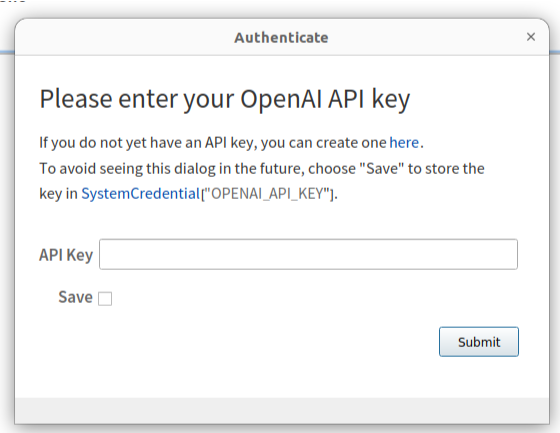
When using Chat-Driven Notebook for the first time, you will be asked for your OpenAI API key...
Hands-on: ChatDrive Notebook
Note: in this notebook ALL code was generated by AI
Plotting
Plotting
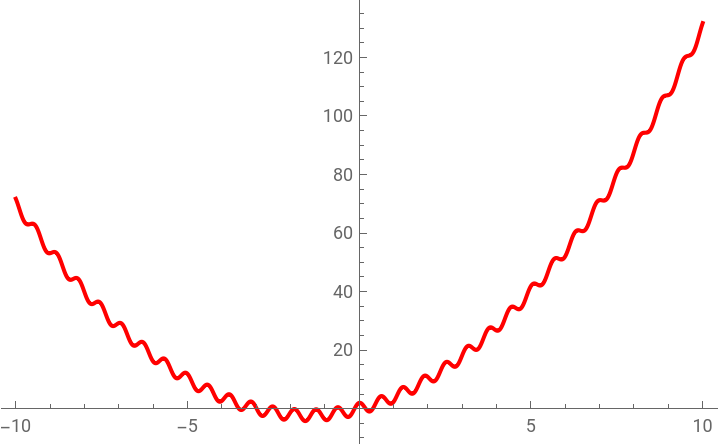
Plot x^2+3x+2*Cos(10 x) in red in Wolfram Language

Sure! Here's how you can plot the function +3x+2cos(10x) in red using the Wolfram Language in a ChatDrive notebook:
This code will generate a plot of the function from to , with the graph of the function drawn in red.
2
x


x-10
x10
In[]:=
Plot[x^2+3x+2*Cos[10x],{x,-10,10},PlotStyle->Red]
Out[]=
Now in Python
Now in Python
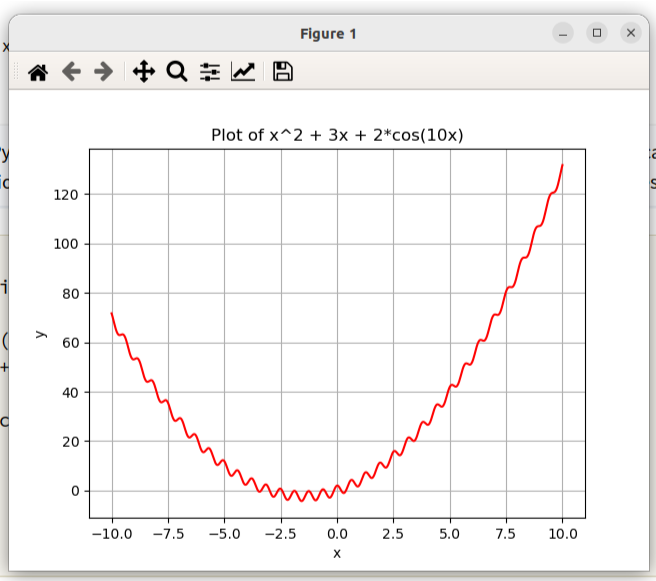
Plot x^2+3x+2*Cos(10 x) in red in Python
Sure! Here's how you can plot the function +3x+2cos(10x) in red using Python:
This code uses the NumPy library to create an array of x-values from -10 to 10 with 1000 points. It then calculates the corresponding y-values using the given function. Finally, it uses Matplotlib to create a plot of the function with the graph drawn in red. The plot is labeled and displayed with gridlines.
2
x
In[]:=
import numpy as np
import matplotlib.pyplot as plt
x = np.linspace(-10, 10, 1000)
y = x**2 + 3*x + 2*np.cos(10*x)
plt.plot(x, y, color='red')
plt.xlabel('x')
plt.ylabel('y')
plt.title('Plot of x^2 + 3x + 2*cos(10x)')
plt.grid(True)
plt.show()
import matplotlib.pyplot as plt
x = np.linspace(-10, 10, 1000)
y = x**2 + 3*x + 2*np.cos(10*x)
plt.plot(x, y, color='red')
plt.xlabel('x')
plt.ylabel('y')
plt.title('Plot of x^2 + 3x + 2*cos(10x)')
plt.grid(True)
plt.show()
Loading data from local files
Loading data from local files
Load file ~/Documents/Signals.xlsx the first spreadsheet folder in a Dataframe using Wolfram Language, the first line of data are the header
To load an Excel file into a DataFrame in Wolfram Language, you can use the function. Here's an example of how you can accomplish this:
In this code, we first specify the path to the Excel file using the file variable. We then use the function to load the data from the first spreadsheet in the file into a list of lists called df. Next, we extract the header row from df using , and assign it to the variable header. We also extract the remaining rows of data from df using , and assign it to the variable data.Finally, we create a DataFrame called by mapping each sublist in data to an association using , and wrapping the result in a for easier manipulation and visualization.Note that you may need to adjust the path to the Excel file (file) based on your specific file location.
Creating GUI with Manipulate
Creating GUI with Manipulate
Plot sin x where I can manipulate the frequency in Wolfram Language
Create an interactive GUI with Wolfram Language that I can manipulate a frequence of sin x * cos x in a plot view
Create a GUI with an image from Sonia Braga that I can apply blure and edge detect
O erro no código foi detectado pelo próprio OpenAI e já foi proposta uma solução.
Mas o arquivo com a foto foi uma “alucinação", corrigi o código manualmente utilizando uma Entity:
Mas o arquivo com a foto foi uma “alucinação", corrigi o código manualmente utilizando uma Entity:
FIXED CODE:
Using ChatGPT knowledge and visualizing
Using ChatGPT knowledge and visualizing
Create a Dataset with the 5 most popular African animals
Create a bar chart with the most popular African animals
Create a list of the 10 most popular Brazilian animals
Plot a bar chart with the most popular Brazil Amazon animals
About dogs and cats
About dogs and cats
Create a pie chart with the percentage of cats and dogs as domestic animals in the world
Plot the number of cats and dogs in the world by continent
To plot the number of cats and dogs in the world by continent, you will need data that specifies the
Respostas do Wolfram|Alpha são mais objetivas, e fornece dados acurados
Now a little math
Now a little math
Create a table listing the first 9 layers of Pascal's triangle.
Now in Wolfram Language code
Now in C code
Robust solutions can be developed by combining Wolfram Language with LLMs functions
Robust solutions can be developed by combining Wolfram Language with LLMs functions
We need to remember that OpenAI’s ChatGPT is trained on the following BigData resources:
- Books
- Wikipedia
- Reddit social media
- Sites
- Wikipedia
- Reddit social media
- Sites
4 weeks of cloud computing for training
4 to 6 M US$ cost
4 to 6 M US$ cost
Note that content in Portuguese on the Internet is 3.5%, this reflects the quality of answers to questions asked in Portuguese or English
https://www.plataformamedia.com/en/2022/11/25/how-is-the-presence-of-the-portuguese-language-on-the-internet-today/
https://www.plataformamedia.com/en/2022/11/25/how-is-the-presence-of-the-portuguese-language-on-the-internet-today/
Most companies will use OpenAI’s WEB APIs (among others) and integrate with their systems and knowledge base.
With the Wolfram Language, we can go beyond talking to the robot via chat.
We can include the prompt with the AI in the code, and create sophisticated automations.
We can include the prompt with the AI in the code, and create sophisticated automations.
We have several references to advance these LLM and AI concepts:
Creating functions using “prompt” computation
Checking if X is bigger than a human’s head
Checking if X is bigger than a human’s head
ChatGPT has failed, it is not stable like Wolfram|Alpha, Google, Bloomberg, etc...
On the OpenAI website we are informed when there is instability:
Let’s see more about how to integrate the prompt into Wolfram Language code.
Generate code in Wolfram Language
Generate code in Wolfram Language
In this case using the CodeWriter “persona” to obtain source code in Wolfram Language:
Even though I don’t consume all my credits in the OpenAI API... at times I receive this error message...
Error message from OpenAI API...
Error message from OpenAI API...
We can summarize texts:
We can summarize texts:
We can compute with OpenAI API!!
We can compute with OpenAI API!!
Summarizing a text in Spanish.
Now we can explain complex concepts to a 5 year old
Now we can explain complex concepts to a 5 year old
Common Questions Asked by Kids, We Have Potential to Create Advanced EduTechs
And just for fun, let’s ask the trainer persona to answer the same question...
And just for fun, let’s ask the trainer persona to answer the same question...
We can also change the voice of a text
We can also change the voice of a text
There is so much more to learn and experience
There is so much more to learn and experience
CITE THIS NOTEBOOK
CITE THIS NOTEBOOK
AI chat notebooks: integrating LLMs and Artificial Intelligence tools in computational documents
by Daniel Carvalho
Wolfram Community, STAFF PICKS, November 14, 2023
https://community.wolfram.com/groups/-/m/t/3064852
by Daniel Carvalho
Wolfram Community, STAFF PICKS, November 14, 2023
https://community.wolfram.com/groups/-/m/t/3064852