The Wolfram Emerging Leaders Program is a 4 month long project based program designed for gifted high school students to take a deep dive into a topic of their choice. Students work remotely in small groups to take their project from ideation to completion, with the guidance of Wolfram experts. Wolfram Emerging Leaders Program participants are selected from the Wolfram High School Summer Camp, which is open to talented, STEM oriented students age 17 and under.
This essay was written by:
This essay was written by:
Abstract
Abstract
In this computational essay, we present a water runoff model based on hexagonal cellular automata update rules to predict areas prone to flooding. Using a graph object and vertices to represent cells, we were able to classify each location as flooded or not flooded. We tested the model on a perfect slope and a town in Nevada that receives frequent flash floods. We also explore the potential applications and future work that could improve our model, and be used to apply it to floods from nearby water bodies.
Introduction
Introduction
Our approach to this divides an area of land into a grid of vertices. Each vertex represents a hexagonal cell and connected to its immediate neighbors. The water distribution rule is repeatedly applied to this graph object. The reason we chose hexagons over squares is that hexagons form the more compact packing method, and the center of each hexagon is at an equal distance from all of its neighbors. In a square grid model, the squares touching the side are closer than those diagonally across.
Our goal here is not to find the exact values of the water in the cells themselves, but to get the general picture and find out where it accumulates. Based on this, we classify cells as flooded or not flooded. This is important to understand, since given that our update rule would produce different results if applied to cells in a different order, it would not be feasible to work on finding a precise result.
Our goal here is not to find the exact values of the water in the cells themselves, but to get the general picture and find out where it accumulates. Based on this, we classify cells as flooded or not flooded. This is important to understand, since given that our update rule would produce different results if applied to cells in a different order, it would not be feasible to work on finding a precise result.
Approach
Approach
First of all, we generate a list of ordered pairs for vertices with parameters to determine the size of the grid. For input parameters m and n, the number of vertices generated is (m+1)*n/2. This is because of the properties of a hexagonal grid.
In[]:=
hexagonGenerator[n_,m_]:=Table[{i*Sqrt[3],j},{i,1,n},{j,Mod[i,2],m,2}]
In this case, we generate 465 vertices.
In[]:=
vertices=Flatten[hexagonGenerator[30,30],1];
Next, we define functions to connect adjacent vertices together to represent the edges of hexagons packed together. The near function takes an input vertex and creates a list of points whose distance is no more than the distance between adjacent vertices in our grid. From this, we generate the list edges that creates the actual edges for the graph and deletes doubles.
In[]:=
near[point_]:=Map[point#&,Nearest[vertices,point,{7,2}]][[2;;]]edges=DeleteDuplicates[Sort/@Flatten[Map[near,vertices],1]];graph=Graph[vertices,edges,VertexCoordinatesvertices]
Out[]=
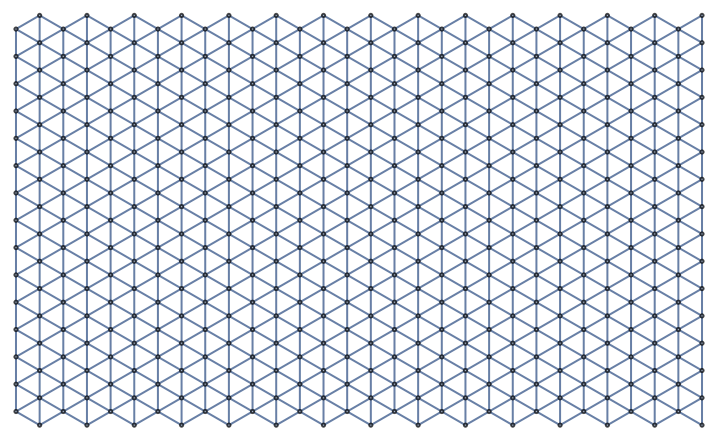
Lastly, we define some functions for use later. Neighbors takes a point and finds the adjacent points. The constant a determines the rate at which the water flows out of the cell. Heightl is just defined so that it can be in a more useful form, since we cannot use the rule list directly in a SortBy function. These will be used for the update rule below.
In[]:=
Neighbors[graph_,v_]:=VertexOutComponent[graph,v,1][[2;;]]dist[x_y_]:=yvertices=SortBy[VertexList[graph],dist];Heightl[x_]:=x/.heightLevela=0.9;
We used SortBy to rearrange the vertices based on their distance from the top of the grid. This should make sure that the update rule is applied from top to bottom.
Out[]=
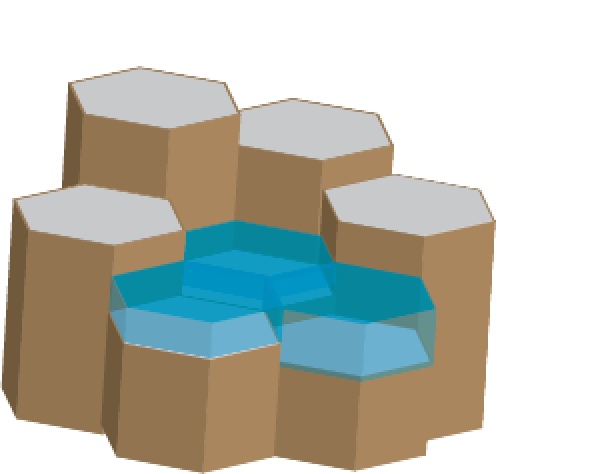
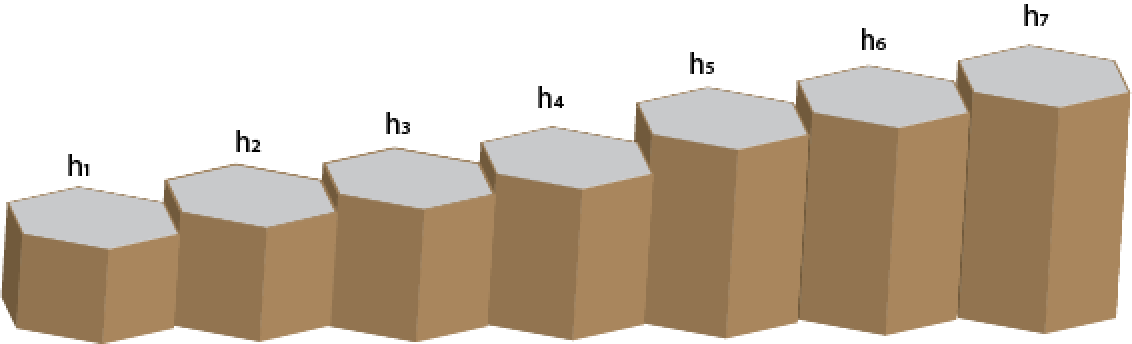
Now for the update rule itself. This update rule acts on each cell and its immediate neighbors according to the following procedure:
◼
The variables heightLevel, initialWaterLevel and currentWaterLevel denote the height value of each cell, initial water we start with and the current water level in each cell respectively. They are each defined as rule lists with the vertex coordinates as keys.
◼
Let denote the height of cell i arranged in increasing order of heights and denote the current water level of the respective cell. We calculate the quantity W according to the expression (1):-and k as the largest cell index satisfyingThe constant k represents the cell index beyond which all cells are higher than the equilibrium water level.
h
i
old
w
i
7
W=∑
i=1
old
w
i
h
i
W≥(-)
k
∑
i=1
h
k
h
i
◼
Using these, the equilibrium water level of the group of cells is found to be
H=
W+
k
∑
i=0
h
i
k
◼
The updated water level of the cell is determined by the water flowing to meet the equilibrium level and the relaxation parameter a, which represents the flow resistance. We use the same value of a for every cell.Therefore, we calculate the new water level of the cells as a linear combination of that at the equilibrium level and the old water level.=a*+(1-a)*(H-) if i ≤ k= if i > k
drain
w
i
old
w
i
h
i
drain
w
i
a*
old
w
i
The code implementing this update rule as a function is given below. The variables cells, and heights import the corresponding data into the function, and the remaining the variables execute the calculations mentioned above.
In[]:=
updateRuleP[coords_]:=Module[{cells,heights,W,H,k=0},cells=SortBy[Join[{coords},Neighbors[graph,coords]],Heightl];heights=cells/.heightLevel;W=Total[cells/.initialWaterLevel];Table[If[Sum[heights[[k1]]-heights[[ihi2]],{ihi2,1,k1}]≤W,k=k1;Return["Exit",Table]],{k1,Length[cells],1,-1}];H=(W+Sum[heights[[i]],{i,k}])/k;Table[If[i≤k,(H-heights[[i]])*(1-a)+a*(cells[[i]]/.currentWaterLevel),a*(cells[[i]]/.currentWaterLevel)],{i,Length[cells]}]]
Initialization
Initialization
Now, we can demonstrate our update rule by assigning some water levels and creating a terrain. We assign a value of 0.3 as an initial water level to each cell, like a layer of water deposited on the surface from rainfall.
To test the function, we generate a slope in the x-direction.
To test the function, we generate a slope in the x-direction.
In[]:=
initialWaterLevel=Thread[verticesTable[0.3,Length[vertices]]];heightLevel=Table[vertices[[i]](100+vertices[[i,1]]/5),{i,Length[vertices]}];currentWaterLevel=initialWaterLevel;ls=Table[{},Length[vertices]];
The list ls exists to store the values after running the update rule on a cell. The update rule itself doesn’t change any other global variables, because their values would be affected by which order the cells are updated in. ls is a list of lists that collect all outputs for each cell and later take the aggregate as the result of the update rule.
Update Rule
Update Rule
The full update rule is defined below. This one saves the outputs to ls by slicing the list into three parts based on the index of the sublist corresponding to the vertex, which it appends to and joins everything back together.
In[]:=
updateRule[coords_]:=Module[{cells,heights,W,H,k=0,dlevel,pos},cells=SortBy[Join[{coords},Neighbors[graph,coords]],Heightl];heights=cells/.heightLevel;W=Total[cells/.currentWaterLevel];Table[If[Sum[heights[[k1]]-heights[[ihi2]],{ihi2,1,k1}]≤W,k=k1;Return["Exit",Table]],{k1,Length[cells],1,-1}];H=(W+Sum[heights[[ihi]],{ihi,1,k}])/k;dlevel=Table[If[i≤k,(H-heights[[i]])*(1-a)+a*(cells[[i]]/.currentWaterLevel),a*(cells[[i]]/.currentWaterLevel)],{i,Length[cells]}];Table[pos=Position[vertices,cells[[i]]][[1,1]];ls=Join[Append[ls[[;;pos-1]],Append[ls[[pos]],dlevel[[i]]]],ls[[pos+1;;]]],{i,1,Length[cells]}];]
The function fullUpdate applies the update rule to the entire graph and sets the final values of the water levels as the average of each sublist in ls.
In[]:=
fullUpdate[v_]:=(ls=Table[{},Length[vertices]];updateRule/@v;currentWaterLevel=Thread[v(Mean/@ls)];)
Visualizations
Visualizations
Now that the update rule has been explained, we can see how it affects the water level. We define the lists waterPoints and heightPoints to be 3 dimensional points with representing the height and water levels respectively. Combined is the elevation of the height and the water level combined.
In[]:=
Point3D[{a_,b_}c_]:={a,b,c};waterPoints=Point3D/@currentWaterLevel;heightPoints=Point3D/@heightLevel;combined=Table[Append[vertices[[i]],Values[heightLevel][[i]]+Values[currentWaterLevel][[i]]],{i,Length[heightLevel]}];
We can see the slope generated in the x-direction by the custom terrain. It would be expected that the water flows down to the bottom of this slope.
In[]:=
ListSurfacePlot3D[heightPoints]
Out[]=

The resultant water distribution can be seen below. Vertex size represents the amount of water at the point.
Now, we apply the update rule to the vertices 50 times. The list animate shows the step by step progression of water flow.
We can also see a part of this near the bottom of the slope. In the 3D graph below, the water (represented by blue dots) is laid over the land (represented by yellow dots) and it is accumulated near the base of the slope. This confirms that the update rule works correctly.
Classification
Classification
Now, we can use the data found above the classify cells as flooded and not flooded. We use a basic If condition and consider all cells with water level more than 0.38 to be flooded.
Thus, the cells at the base of the slope are “flooded”.
Real World Example
Real World Example
Now, we try out our update rule on the town of Pahrump in Nevada. This town is known for its flash flooding and is not near any major water body. Most of the functions below are the same as defined in the demonstration, except that they are scaled to encompass the town. Most notably, we start generating vertices from the coordinates of the town (36.333115, -116.219190) and scale the other part of the function.
We also use a smaller grid with 315 vertices and adjust the distance in the nearEx function.
We also use a smaller grid with 315 vertices and adjust the distance in the nearEx function.
The average rainfall in Pahrump is 2.7cm but we scale it to .868 to provide a better visualization.
Here, we get the values for heightLevelEx directly from GeoElevationData of the coordinates.
Here, we get the values for heightLevelEx directly from GeoElevationData of the coordinates.
The update rule is redefined to reflect the new variables used for this example.
First, we plot the heights to see the terrain in the area. We scaled the visualization by dividing by 4100 to make it easier to see the difference in adjacent heights. All the heights are between 0 and 1 when the elevation values are divided by 4100.
Now, we run the update rule multiple times on the graph. The resulting water distribution is given below.
Now, we created a slider to show how the water distribution varies over 50 updates. This is done by running the update rule 50 times and merging the results into a single ListAnimate.
Now, we classify all cells with more than 2.5 units (equivalent to 3 inches) of water as flooded. These are denoted in red.
As we can see the red cells represent the locations that have been flooded. This confirms our intuitive understanding that the lower areas of the graph surrounded by relatively higher regions are more prone to flooding.
Conclusion and Future Work
Conclusion and Future Work
Through this water runoff model, we were able to find the locations at which water gathered and classify them as flooded. This model can be applied to any location where precipitation on its own causes flooding.
In the future, this model can be modified to work on flooding from nearby water bodies. It would involve constantly increasing the amount of water in all the cells next to the source. Consequently, a would also become a function of water level, since the flow rate of cells near the source would be greater than it would be elsewhere.
Additionally, this can be extended to take into account water absorbed by the soil. This could be implemented as reducing the water level across all cells with every update, although the exact amount would depend on soil properties and the water level itself. We didn’t end up using it here since we only sought out to classify cells as flooded and not flooded, and it wouldn’t change the relative difference in water levels in the cells.
In the future, this model can be modified to work on flooding from nearby water bodies. It would involve constantly increasing the amount of water in all the cells next to the source. Consequently, a would also become a function of water level, since the flow rate of cells near the source would be greater than it would be elsewhere.
Additionally, this can be extended to take into account water absorbed by the soil. This could be implemented as reducing the water level across all cells with every update, although the exact amount would depend on soil properties and the water level itself. We didn’t end up using it here since we only sought out to classify cells as flooded and not flooded, and it wouldn’t change the relative difference in water levels in the cells.
References
References
[1] S. Douass, and M. A. Kbir, “Flood zones detection using a runoff model based on cellular automata,” (Proceedings Of The 4th International Conference On Smart City Applications, 2019) https://doi.org/10.1145/3368756.3369023
[2] S. Douass and M. A. Kbir, “Flood zones detection using a runoff model built on Hexagonal shape based cellular automata,” Int. J. Eng. Technol., 68 (6), 68-74 (2020) https://doi.org/10.14445/22315381/ijett-v68i6p211s
[3] J. Cirbus and M. Podhoranyi, “Cellular Automata for the Flow Simulations on the Earth Surface, Optimization Computation Process,” Appl. Math. Inf. 7 (6), 2149-2158 (2013) https://doi.org/10.12785/amis/070605
[2] S. Douass and M. A. Kbir, “Flood zones detection using a runoff model built on Hexagonal shape based cellular automata,” Int. J. Eng. Technol., 68 (6), 68-74 (2020) https://doi.org/10.14445/22315381/ijett-v68i6p211s
[3] J. Cirbus and M. Podhoranyi, “Cellular Automata for the Flow Simulations on the Earth Surface, Optimization Computation Process,” Appl. Math. Inf. 7 (6), 2149-2158 (2013) https://doi.org/10.12785/amis/070605