In the Internet Archive digital bookstore there are at least two types of books differentiated by their accessibility, those that are direct access and those that require borrowing. It is easy to download direct access books for anyone who is minimally familiar with the site. Downloading books that require a loan request, on the other hand, has become increasingly difficult over the years. The aim of this article is to show how to automate the extraction of pages from this second type of books, always respecting the terms of use of Internet Archive. Esentially,the process consists of iterating through all the pages of the book of interest, waiting for them to load, taking relatively high-resolution captures of the images, cropping them to individualize the pages and finally saving them as a PDF files. An Internet Archive account is required.
Book URL and page identification
Book URL and page identification
URL
Enter the main url of the book

In[]:=
url="https://archive.org/details/conversationsave0000fran/";
Preliminary pages and main pages
Preliminary pages and main pages
In Internet Archive, pages are numbered in two ways. In general, those corresponding to the section before the body of the book (including the table of contents, introduction, foreword, etc.) usually have an before the page number. The pages that include the chapters of the book do not have an “n”.


In order not to complicate the work, let' s say that the first ones are the preliminary pages and the second ones are the main pages. The identification of these values is done by looking directly on the page.
Limit of the preliminary pages (12) -> Start of the main pages (10) -> Limit of the main pages (180) ->
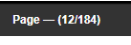
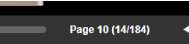
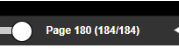
With these values we define the following variables.
In[]:=
prelimi=12;(*páginaspreliminares*)iniciomain=10;(*iniciodelaspáginasprincipales*)finalmain=180;(*findelaspáginasprincipales*)pagsPrelimi=Table[StringJoin["n",ToString[x]],{x,0,prelimi,2}];pagsMain=Table[x,{x,iniciomain,finalmain,2}];pagsTotal=Join[pagsPrelimi,pagsMain]
Out[]=
{n0,n2,n4,n6,n8,n10,n12,10,12,14,16,18,20,22,24,26,28,30,32,34,36,38,40,42,44,46,48,50,52,54,56,58,60,62,64,66,68,70,72,74,76,78,80,82,84,86,88,90,92,94,96,98,100,102,104,106,108,110,112,114,116,118,120,122,124,126,128,130,132,134,136,138,140,142,144,146,148,150,152,154,156,158,160,162,164,166,168,170,172,174,176,178,180}
Define destination folder
Define destination folder
Define the folder where the captures will be saved .
In[]:=
SetDirectory["F:\\imagenes\\capturas 2"];
Three functions for scraping
Three functions for scraping
Now we define three functions that we will use for scraping
Home page and login
Home page and login
In[]:=
login[{sesion_,email_,pass_}]:=Module[{loginURL},WebExecute[sesion,"JavascriptExecute"->"var emailInput=document.querySelector('input[name=\"username\"]');emailInput.value='"<>email<>"';emailInput.dispatchEvent(new Event('input',{bubbles:true}));var passInput=document.querySelector('input[name=\"password\"]');passInput.value='"<>pass<>"';passInput.dispatchEvent(new Event('input',{bubbles:true}));"];WebExecute[sesion,"JavascriptExecute"->"document.querySelector('input[name=\"submit-to-login\"]').click();"];Pause[2]]
Testing the dimensions of page captures
Testing the dimensions of page captures
In[]:=
prueba[{sesion_,lista_}]:=Map[Module[{x=#,urlp1,modo,urlfinal,alt,baj,p1ini,p1fin,p2ini,p2fin,tiem=False,intentos=0,maxIntentos=40,foto,res},(*URL*)urlp1=StringJoin[url,"page/"];(*Laurlqueestáenelargumentoesladellibrooriginaldefinidaarriba*)modo="/mode/2up";urlfinal=StringJoin[urlp1,ToString[x],modo];(*DIMENSIONESPRUEBA.paraajustar*)alt=265;baj=2965;p1ini=40;p1fin=anchodepag/2;p2ini=anchodepag/2-25;p2fin=anchodepag-p1ini;(*EJECUTAR*)WebExecute[sesion,"OpenPage"->urlfinal];While[(intentos<maxIntentos)&&(!TrueQ[tiem]),tiem=WebExecute[sesion,"JavascriptExecute"->"var bookReader=document.getElementById('BookReader'); if (!bookReader) return False; var visibleContainers=Array.from(bookReader.querySelectorAll('.BRpagecontainer')).filter(function(page) {return page.offsetWidth>0 && page.offsetHeight>0;}); if (visibleContainers.length===0) return false; var allLoaded=visibleContainers.every(function(page) { var img=page.querySelector('img'); if (!img) return false; return img.src && img.complete && img.offsetWidth>0 && img.offsetHeight>0;}); return document.readyState==='complete' && allLoaded;"];intentos++;Pause[.7]];foto=If[TrueQ[tiem],WebExecute[sesion,"CapturePage"],"No captura, la página no cargó"];res={ImageTake[foto,{alt,baj},{p1ini,p1fin}],ImageTake[foto,{alt,baj},{p2ini,p2fin}]};{{foto,res},{"dimension p1"->{{alt,baj},{p1ini,p1fin}}},{"dimension p2"->{{alt,baj},{p2ini,p2fin}}}}]&,lista]
Scraping automation
Scraping automation
In[]:=
captura[{sesion_,lista_}]:=Map[Module[{x=#,urlp1,modo,urlfinal,dimenp1,dimenp2,tiem=False,intentos=0,maxIntentos=40,foto,res},(*URL*)urlp1=StringJoin[url,"page/"];(*Laurlqueestáenelargumentoesladellibrooriginaldefinidaarriba*)modo="/mode/2up";urlfinal=StringJoin[urlp1,ToString[x],modo];(*DIMENSIONESDEPÁGINA*)dimenp1={{265,2965},{40,2210}};(*Estosvaloressecompletandespuésdeejecutarlaprueba(funcionanterior)*)dimenp2={{265,2965},{2185,4380}};(*EJECUTAR*)WebExecute[sesion,"OpenPage"->urlfinal];While[(intentos<maxIntentos)&&(!TrueQ[tiem]),tiem=WebExecute[sesion,"JavascriptExecute"->"var bookReader=document.getElementById('BookReader'); if (!bookReader) return False; var visibleContainers=Array.from(bookReader.querySelectorAll('.BRpagecontainer')).filter(function(page) {return page.offsetWidth>0 && page.offsetHeight>0;}); if (visibleContainers.length===0) return false; var allLoaded=visibleContainers.every(function(page) { var img=page.querySelector('img'); if (!img) return false; return img.src && img.complete && img.offsetWidth>0 && img.offsetHeight>0;}); return document.readyState==='complete' && allLoaded;"];intentos++;Pause[.7]];foto=If[TrueQ[tiem],WebExecute[sesion,"CapturePage"],"No captura, la página no cargó"];res={ImageTake[foto,dimenp1[[1]],dimenp1[[2]]],ImageTake[foto,dimenp2[[1]],dimenp2[[2]]]};Export["hoj"<>ToString[x]<>".pdf",res[[1]]];Export["hoj"<>ToString[x+1]<>".pdf",res[[2]]];Remove[res]]&,lista]
Execution of code functions
Execution of code functions
Home page and login
Home page and login
First we open in Firefox
It is necessary to define the Internet Archive login email, password and URL, along with the dimensions of the window.
We open the URL and log in. The login function receives 3 arguments: session, email and password.
Test of dimensions of the catches
Test of dimensions of the catches
It is necessary to test if the crop of the captures will correspond to the dimensions of the pages. To do this, the prueba function is executed, which receives two arguments: session and list of pages. Enter only ONE page value in the list, as this is a test.
The returned value has 3 elements .
1) The complete image of the capture,
2) The individualized pages,
3) The dimensions used in the individualization.
If you are not satisfied with the dimensions, you must go up and modify the default values in the prueba function. On the other hand, if there is conformity, copy the values of the dimensions of page 1 and page 2 and copy them in the variable definition of the captura function.
1) The complete image of the capture,
2) The individualized pages,
3) The dimensions used in the individualization.
If you are not satisfied with the dimensions, you must go up and modify the default values in the prueba function. On the other hand, if there is conformity, copy the values of the dimensions of page 1 and page 2 and copy them in the variable definition of the captura function.
Inicio de scraping
Inicio de scraping
The captura function receives two arguments: session and page list. Once you are satisfied with the results of the test function, you can assign as a second element of the captura function no longer a test list but the total number of pages of the book. The returned value is not displayed in this notebook, but in the destination folder configured above. The individual pages are exported as pdf and named according to their number.
IT IS ADVISABLE TO MODIFY THE VISIBLE OPTION OF sesion = StartWebSession[“Firefox”(*, Visible -> False*)]; DEFINED ABOVE. Therefore, we close the logged-in session and re-execute the lines of code prior to captura.
IT IS ADVISABLE TO MODIFY THE VISIBLE OPTION OF sesion = StartWebSession[“Firefox”(*, Visible -> False*)]; DEFINED ABOVE. Therefore, we close the logged-in session and re-execute the lines of code prior to captura.
◼
Cierre de sesión
◼
Ejecución de nuevo
◼
Ejecución de función captura
Logging off
Logging off
Resultado
Resultado