ORIGINAL ARTICLE: Ruskeepää, H., Ferreira, L.N., Ghorbani, M.A. et al. Nonlinear and periodic dynamics of chaotic hydro-thermal process of Skokomish river. Stoch Environ Res Risk Assess 37, 2739–2756 (2023).
DOI: https://doi.org/10.1007/s00477-023-02416-1
DOI: https://doi.org/10.1007/s00477-023-02416-1
Article Abstract: This paper investigates the dynamics of the time-series of water temperature of the Skokomish River (2019–2020) at hourly time scale by employing well-known nonlinear methods of chaotic data analysis including average mutual information, false nearest neighbors, correlation exponent, and local divergence rates. The delay time and the embedding dimension were calculated as 1400 and 9, respectively. The results indicated that the thermal regime in this river is chaotic due to the correlation dimension (1.38) and the positive largest Lyapunov exponent (0.045). Furthermore, complex networks have been applied to study the periodicity of thermal time-series throughout a year. A special algorithm is then used to find the so-called communities of the nodes. The algorithm found three communities which have been called Cold, Intermediate, and Warm. The temperatures in these three communities are, respectively, in the intervals (0.8, 5.8), (5.8, 11.63), and (11.63, 15.8). This analysis indicates that highest variations in water temperature occur between warm and cold seasons, and complex networks are highly capable to analyze hydrothermal fluctuations and classify their time-series.
In this notebook we do the calculations that produce the results of the article ”Nonlinear and periodic dynamics of chaotic hydro-thermal process of Skokomish river” by Heikki Ruskeepää, Leonardo Nascimento Ferreira, Mohammad Ali Ghorbani, Ercan Kahya, Golmar Golmohammadi, and Vahid Karimi that appeared in Stochastic Environmental Research and Risk Assessment in 2023, see https://doi.org/10.1007/s00477-023-02416-1. Note that this notebook only gives minimal explanations of the methods to analyze chaotic data. For much more detailed explanations, see ”Analysis of Chaotic Data with Mathematica”, Wolfram Library Archive, 2014, https://library.wolfram.com/infocenter/ID/8775/. Also, this notebook only gives minimal explanations and interpretations of the results. For more details, see the original article. The computations were done with Mathematica 13.2.1.
Data
Data
The next subsection “Data Values” only shows all the data values, that is, the hourly temperature of the Skokomish river in 2019 and 2020. To see the values, a total of 16 602 values, open the closed cell. You can also evaluate the command containing the data if you would like to do the computations of this notebook with your computer. After the data, we show, in the subsection “Some Plots an Statistics”, some properties of the data.
Data Values
Data Values
In[]:=
data=;
Some Plots and Statistics
Some Plots and Statistics
Here is a plot of the data:
In[]:=
SetOptions[{Plot,ListPlot,ListLinePlot,ListDensityPlot,Histogram},LabelStyle->12];
In[]:=
ListLinePlot[data,ImageSize700,PlotStyle->AbsoluteThickness[1],Frame->True,FrameLabel->{"Time (hour)","Water temperature (degree)"}]
Out[]=
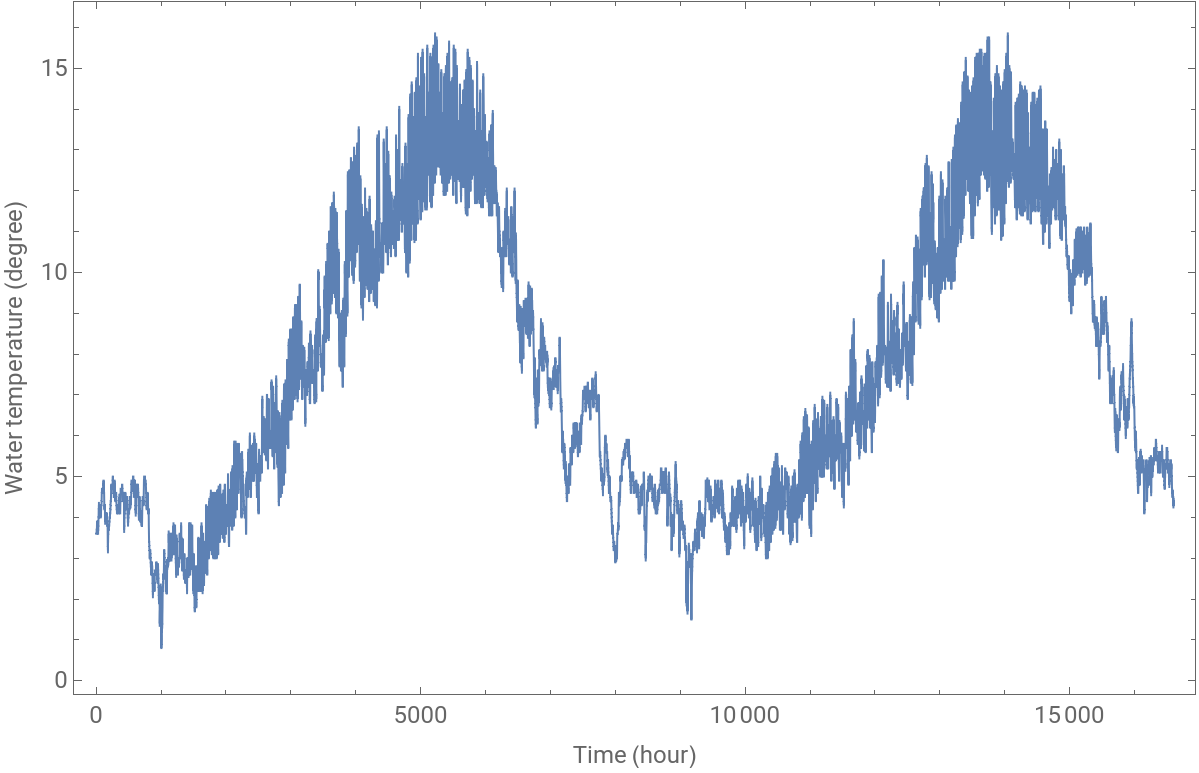
The data contains 16 602 values:
In[]:=
Length[data]
Out[]=
16602
The values are the 151 values 0.8, 0.9, 1.0, ..., 15.8:
In[]:=
Union[data]==Range[0.8,15.8,0.1]
Out[]=
True
A histogram of the values is as follows:
In[]:=
Histogram[data,151,Frame->True,FrameLabel->{"Temperature","Count"},FrameTicks->{Range[16],{100,200,300}},ImageSize->700]
Out[]=
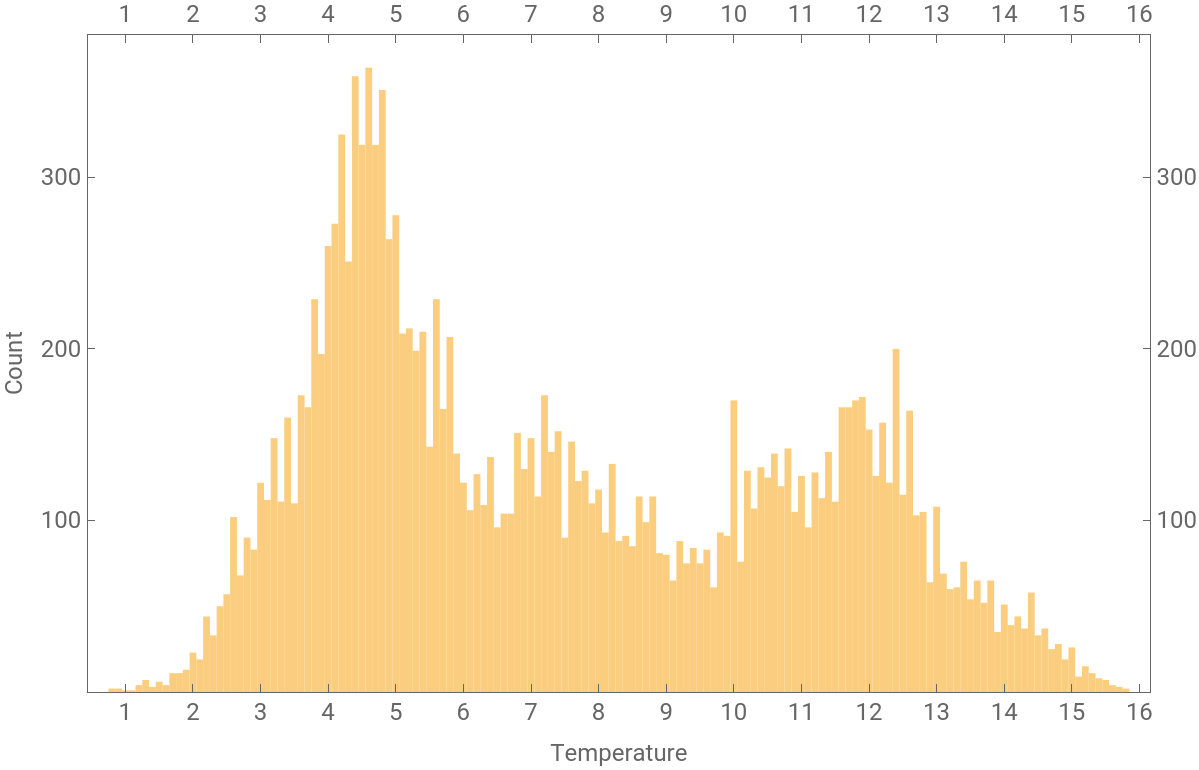
Some statistics are as follows:
In[]:=
{Mean[data],Median[data],StandardDeviation[data],Skewness[data]}
Out[]=
{7.56099,6.9,3.41519,0.38406}
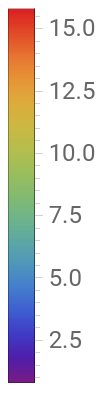
The following density plot shows how the temperature varies during hours of days and during days of the year 2019.
In[]:=
pdata=Partition[Take[data,8760],24];
In[]:=
ListDensityPlot[(Reverse/@pdata),ColorFunction->"Rainbow",AspectRatio->0.3,ImageSize->700,FrameLabel->{"Day of the year","Time of the day (hour)"},PlotLabel->"Temperature in 2019",FrameTicks->{Automatic,{{5,20},{10,15},{15,10},{20,5}}},PlotLegends->True]
Out[]=
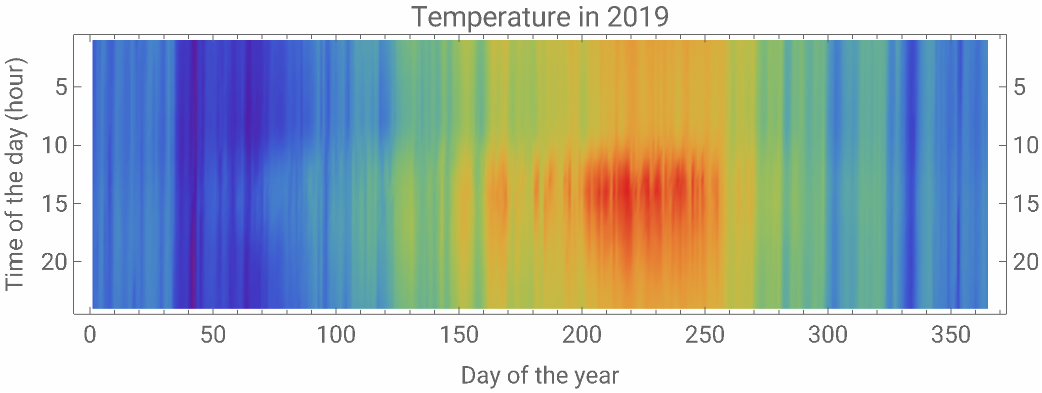
Delay Time
Delay Time
To begin the phase space reconstruction, we study the delay time. For this, it is first useful to plot a phase space plot:
In[]:=
phasePortraitManipulation[data_]:=Manipulate[ListPlot[{Drop[data,-τ],Drop[data,τ]},AspectRatioAutomatic,ImageSize550,PlotStyleAbsolutePointSize[ps],Frame->True,FrameLabel->{,},FrameTicksStyle->12,LabelStyle->18],{{τ,1},0,3000,1,Appearance"Labeled"},{{ps,1,"point size"},{1,2,3}},SaveDefinitionsTrue]
x
t
x
t+"τ"
In[]:=
phasePortraitManipulation[data]
Out[]=


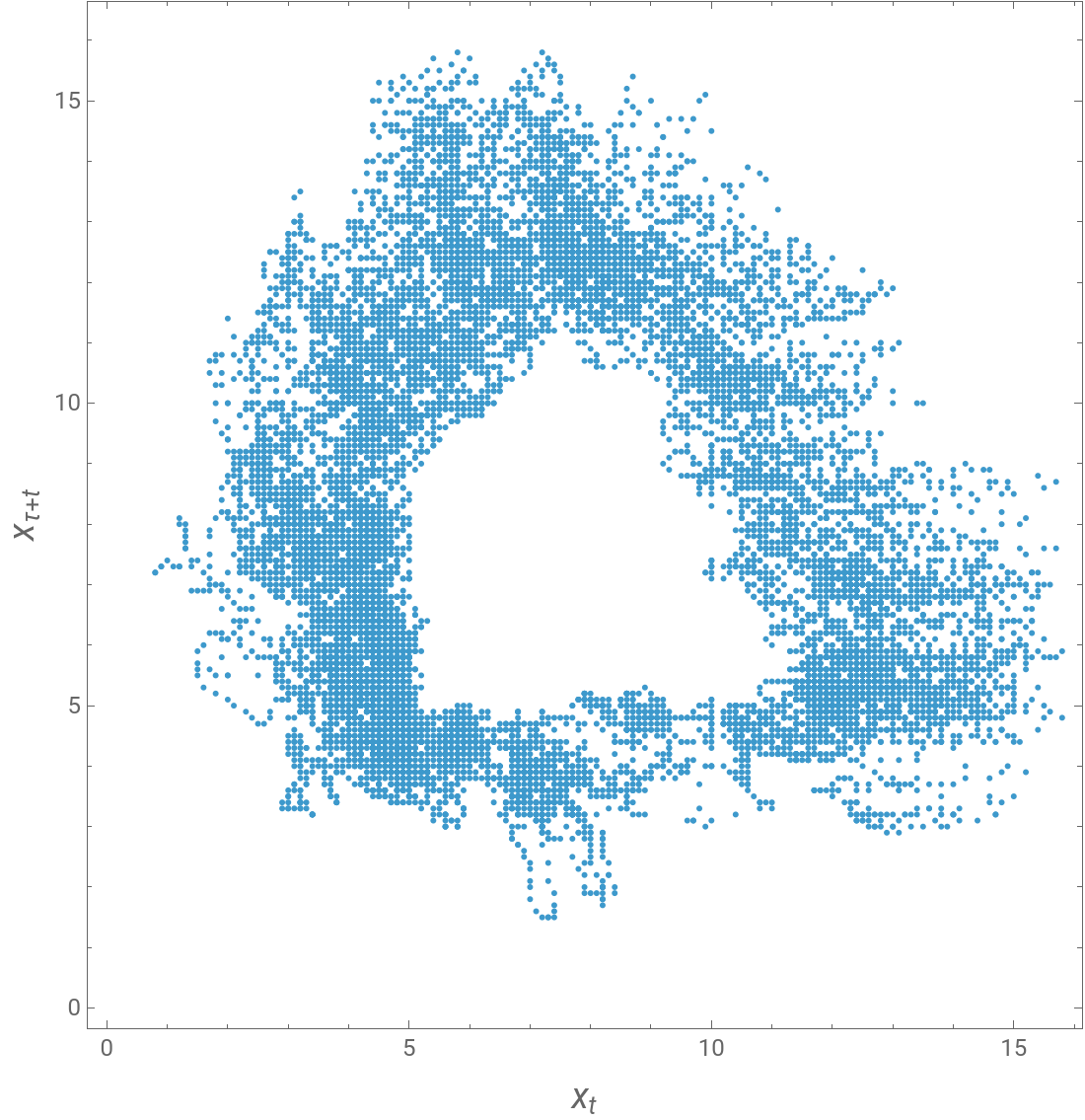
This manipulation shows the pairs with various values of the delay time τ. We can see that with τ near to the value 1400 we get a nice circular pattern. This may be an indication that τ = 1400 may be a good selection for the delay time in the phase space reconstruction. (To be honest, next we arrive at the delay time 1400 with the method of average mutual information. Above, we set τ = 1400 to show that the phase space plot can also be seen to support this delay time.)
(,)
x
t
x
t+τ
The delay time can be studied mathematically with the use of the so-called average mutual information (AMI):
In[]:=
averageMutualInformation[data_,τMax_,binWidth_]:=Module{iter,n=Length[data],pi,pij},ParallelTableiter={Min[data],Max[data]+binWidth,binWidth};pi=N[BinCounts[data,iter]/n];pij=N[BinCounts[{Drop[data,-τ],Drop[data,τ]},iter,iter]/(n-τ)];τ,TotalDeleteCasesFlattenpijLog2,Indeterminate∞,{τ,0,τMax}
pij
KroneckerProduct[pi,pi]
Here, τMax is the largest τ we want to consider and binWidth a suitable width for the bin of the data. A suitable bin is such a value for which the histogram is sufficiently smooth. For our data, a bin of 0.5 could be suitable:
We then calculate the AMI for delay time from 0 to 3000:
Here is a plot of the AMI:
A rule for the delay time τ is that a good choice for its value could be the point where the AMI gets the first minimum. We see that the first point of minimum of the AMI is approximately at τ = 1400. Thus, we can choose the delay time of the phase space reconstruction to be τ = 1400.
Embedding Dimension
Embedding Dimension
The embedding dimension m of the phase space reconstruction can be searched by the method of false nearest neighbors. A program for this method is as follows.
Here, τ is the estimated delay time, mMax is the largest embedding dimension m we would like to consider, and T1 and T2 are two parameters to fine-tune the method.
Earlier, we found that the delay time could be chosen to be τ = 1400. We consider embedding dimensions up to 10. Standard choices for T1 and T2 are 5 and 2, respectively:
The figure shows the percentage of the false nearest neighbors for various values of the embedding dimension m. The rule for the embedding dimension is that it should be the value for which the percentage drops to zero. In our case, the percentage of false nearest neighbors drops to zero at m = 9. Thus, we can choose the embedding dimension to be m = 9.
Correlation Dimension
Correlation Dimension
Correlation Sums
Correlation Sums
First, we calculate the correlation sums. Recall the function we presented above:
The correlation sums are as follows:
The calculation took approximately 7 minutes (with my ten years old iMac):
Estimation of the Correlation Dimension
Estimation of the Correlation Dimension
Now we consider the estimation of the correlation dimension:
To find a scaling region, may require extensive experimentation with the sliders. We show our most promising result:
Choice of minExp and maxExp
Choice of minExp and maxExp
Maximal Lyapunov Exponent
Maximal Lyapunov Exponent
Estimation of the Maximal Lyapunov Exponent
Estimation of the Maximal Lyapunov Exponent
Now we consider the estimation of the maximal Lyapunov exponent:
To find a scaling region, may require extensive experimentation with the sliders. We show our most promising result:
Choice of ϵ
Choice of ϵ
Earlier, we used the value ϵ = 0.7. In the next plot, we have ϵ = 0.3:
Next, we use the value ϵ = 1.2:
By opening the closed cell, we see that the computation took almost four minutes:
This time is more than the time (2.6) we spent earlier with ϵ = 0.7. The corresponding manipulation is as follows:
Strengths
Strengths
The strength of a node in a network is the inverse of the mean distance from this node to other nodes. Our network has the reconstructed phase space points as the nodes, a total of 5402 points. Here is a program to calculate the strengths.
The strengths are as follows:
The calculation took approximately 1.6 minutes. A plot of the strengths is as follows.
The strength varies approximately between 70 and 110. Embedded points from number 2000 to 3500 have the largest strengths. This means that their mean distance to other nodes is the smallest. It is interesting to see the histogram:
We calculate the density function of a smooth kernel distribution for the strength frequencies:
The mean of the strengths is
To find a 90% confidence interval, first calculate the cumulative distribution function:
Because
we get the following 90% confidence interval for the strengths:
Communities and Periodicity
Communities and Periodicity
An Example
An Example
We will consider graphs. Before going to the Skokomish data, let us consider a simple example. Here is a graph:
No we can construct the corresponding graph:
Our interest is in so-called communities. A community of a graph is a set of vertices that contains many joining edges between vertices in this community but comparatively few edges to vertices in other communities. In our simple example, we have two apparent communities: a community containing vertices 1, 2, and 3 and another community containing vertices 4, 5, and 6. To find communities, write
Adjacency Graph
Adjacency Graph
Our Skokomish data is not in the form of a graph. To create a graph, do as follows. Recall that our data is in the interval (0.8, 15.8):
Divide the data into a number of subranges, say, into 90 subranges:
The width of each subrange is
First, we present a program to create the adjacency matrix from subranges:
Here is the adjacency matrix:
We can draw the corresponding graph:
For example, the first ten elements of the first five rows of the adjacency matrix are as follows:
We see that we have the following connections:
(1, 2)
(2, 1), (2, 3)
(3, 2), (3, 4)
(4, 5)
(5, 3), (5, 6)
(6, 4), (6, 5), (6, 7), (6, 8)
(2, 1), (2, 3)
(3, 2), (3, 4)
(4, 5)
(5, 3), (5, 6)
(6, 4), (6, 5), (6, 7), (6, 8)
From the graph, we can see all these connections.
Consider, say, the fifth row of the adjacency matrix:
Here, the first 1 means that we have at least one temperature in the 5th subrange for which the next temperature is in the 3rd subrange. Also, we have at least one temperature in the 5th subrange, for which the next temperature is in the 6th subrange.
Communities
Communities
Finally, we are ready to find the communities:
We got three communities: nodes (1, 2, ..., 30), nodes (31, 32, ..., 65), and nodes (66, 67, ..., 90).
A plot of the communities is as follows:
We have given the communities the natural names Cold, Intermediate, and Warm.
We would also like to produce a plot of the original time series of water temperature where a data point is colored as blue, green, or red according to whether the point belongs to the Cold, Intermediate, or Warm community. To this end, we present the following program that classifies the data points to the three communities.
We form the three classes from the time series:
The classes have the following amounts of data points:
The total number of these points is the same as the number of the original data points:
The temperature in these communities are, respectively, in the intervals (0.8, 5.7), (5.8, 11.6), and (11.7, 15.8):
The following program then produces the plot of the time series where the points are colored according to the communities:
The dashed vertical lines (defined by lineStarts) give approximate points around which the data gradually goes a change from one community to the next one.
The periodicity of the data is very clear from a plot of the original time series. However, the periodicity can also be established from the above plot, because there we see that the temperature varies from Cold to Intermediate, then to Warm, Intermediate, Cold, etc.
More about communities
More about communities
We would like to further study the communities. The result depends heavily from the number of subranges. Earlier, we used 90 subranges and got three communities. Consider then 91 subranges:
The result now has four communities. So, in studying the communities, we should experiment with the number of subranges. We can then choose the setting that gives a ”natural” result. In Our example of water temperature, three communities seemed to be suitable.
With FindGraphCommunities we can also use various different methods. The five methods are “Modularity”, “Centrality”, CliquePercolation”, “Hierarchical”, and Spectral”. The method “Modularity” was used earlier. Now we use, as an example, the “Centrality” method. Preliminary commands are as follows:
Next, we apply the “Centrality” method:
CITE THIS NOTEBOOK
CITE THIS NOTEBOOK
Nonlinear and periodic dynamics of chaotic hydro-thermal process of Skokomish river
by Heikki Ruskeepää
Wolfram Community, STAFF PICKS, August 9, 2023
https://community.wolfram.com/groups/-/m/t/2987262
by Heikki Ruskeepää
Wolfram Community, STAFF PICKS, August 9, 2023
https://community.wolfram.com/groups/-/m/t/2987262