Abstract: This project consists of creating an algorithm that generates KenKen puzzles and one that solves KenKen puzzles from either a partially or entirely incomplete state . Generation of KenKen puzzles involves creating a solution and then "placing" cages/blocks on that solution to guarantee a solvable puzzle . On the other hand, solving KenKen puzzles generally requires using "brute-force" methods such as ' backtracking' which I implemented through Multiway Systems rather than a recursive algorithm .
What is KenKen?
What is KenKen?
KenKen is a puzzle that is similar to sudoku, however instead of there being 3x3 blocks that need to contain one of each number, there are "cages" or "blocks" where the operation specified in the block needs to be used on all of the numbers inside to produce the output specified. KenKen puzzles are not limited to dimensions such as 6x6 or 9x9 thanks to this, meaning they can be 2x2, 3x3, 5x5, etc. without any problems.
Storing the puzzle
Storing the puzzle
Because KenKen uses a grid with all sorts of numbers, operations, and blocks that generate in different shapes, I had to figure out how I would store the puzzle before I could generate or solve them.
Options:
Options:
◼
Storing everything in a single data structure
◼
Could reduce complexity (👍)
◼
Accessing data could be problematic (👎)
◼
Generation could be confusing (👎)
◼
Data would be extremely disorganized (👎)
◼
Using different data structures to store different parts
◼
Generating data could be made simpler (👍)
◼
Data could be more understandable (👍)
◼
Data would be extremely disorganized (👎)
I went with option 2 and stored the different parts of data, such as the blocks and numbers, in separate lists because it seemed more beneficial for me. For example, here is how I stored a 4x4 puzzle:
Storing the numbers:
In[]:=
nums = {{1,3,2,4},{3,4,1,2},{4,2,3,1},{2,1,4,3}};
Storing the shape; same letter signifies it' s part of the same block:
In[]:=
shape = {{"a","b","b","b"},{"a","a","b","c"},{"d","d","d","e"},{"d","f","f","e"}};
Storing the data associated with each block (eg . operation, solution, etc .):
In[]:=
info = "a" "operation" listAdd, "sol" 9, "ind" 1,"b" "operation" listAdd, "sol" 9, "ind" 2,"c" "operation" listAdd, "sol" 2, "ind" 3,"d" "operation" listAdd, "sol" 11 ,"ind" 4,"e" "operation" listAdd, "sol" 4, "ind" 5,"f" "operation" listAdd, "sol" 5, "ind" 6;
Visualizing the puzzle
Visualizing the puzzle
In general, printing 2d lists yields data that is extremely hard to understand because it ends up printing a list of lists, which is usually formatted suboptimally, so I had to figure out how I would actually read what my program was outputting.
Solution: Visualization
Solution: Visualization
First problem: how would I display numbers?
◼
Having it be like real KenKen puzzles where the solution and operation display on the top left corner of the cell closest to the top left corner of the entire board
◼
Very easily understandable (👍)
◼
Could get very messy when the solution has many digits (👎)
◼
Not that easy to implement (👎)
◼
Color-coding everything and then writing a legend to inform the player about which color uses which operation to get which solution
◼
Relatively easy to implement (👍)
◼
Solutions having many digits wouldn't be obtrusive (👍)
◼
Could be hard to understand/keep track of (👎)
Although color-coding is definitely nontraditional, I decided to choose it because it would simplify things significantly.
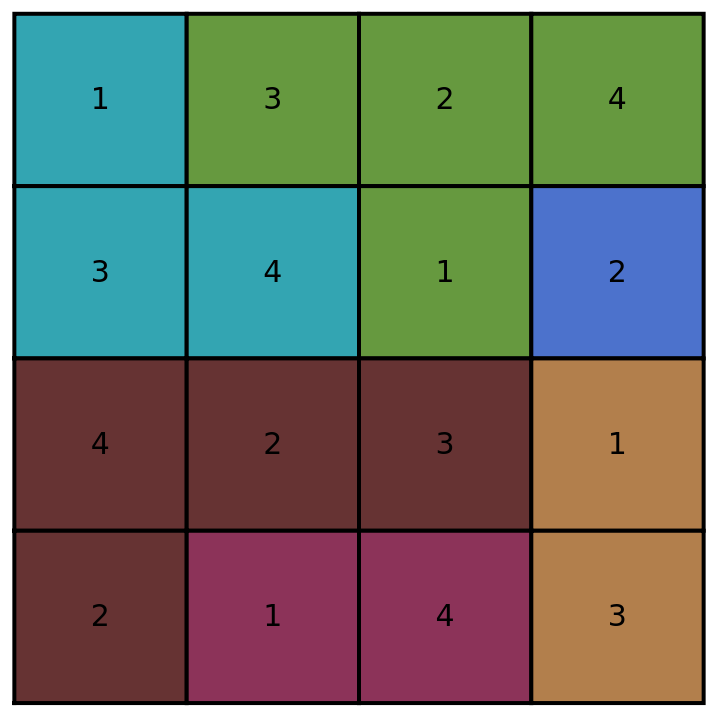
To visualize which operations and solutions go with which blocks, I chose to print out an association containing each color and the information it matches up with:
To visualize which operations and solutions go with which blocks, I chose to print out an association containing each color and the information it matches up with:
In[]:=
legendPrint[assoc_] := Print[Dataset[ assoc /. s_String :> StringReplace[s, "Operation: listAdd" -> "Operation: +", "Operation: listSubtract" -> "Operation: -", "Operation: listMultiply" -> "Operation: ×", "Operation: listDivide" -> "Operation: ÷"]]];
Here I initialized the global variables "$blocks" and "$colorList" to store the possible blocks and possible colors that any part of my program could use:
In[]:=
$blocks = StringJoin /@ DeleteDuplicates[Tuples[Flatten@{"",Alphabet[], ToUpperCase[Alphabet[]]}, 2]];$colorList = RandomSample @ Flatten @ Table[Table[Table[RGBColor[a, b, c],{a, 0.2, 0.8, 0.05}],{b, 0.2, 0.8, 0.05}],{c, 0.2, 0.8, 0.05}];visualize[nums_,shape_,assoc_]:=Block[ {displayColors = {}, display, coords, size = Length[nums]}, coords = Reverse[# * {1, -1}] & /@ Tuples[Range[size, 1, -1], 2]; display = Join[Join[{EdgeForm[Thick]}, Riffle[$colorList[[assoc[#]["ind"]]]& /@ Flatten[shape], Rectangle /@ coords]], (*write numbers*) Flatten[{Black, {Text[Style[nums[[-1 * #[[2]]]][[#[[1]]]], FontSize->15], #+0.5]}& /@ coords}] ]; (*set up legend*) AppendTo[displayColors, $colorList[[assoc[#]["ind"]]] -> StringJoin[ "Operation: ", ToString[assoc[#]["operation"]], "; Solution: ", ToString[assoc[#]["sol"]] ]]& /@ Keys[assoc]; legendPrint[displayColors]; Graphics[Flatten[display]]]
When running it on the KenKen board that I set up earlier, here's what I get:
In[]:=
visualize[nums,shape,info]

Out[]=
Generating the puzzle
Generating the puzzle
Immediately, I thought "how would I generate a puzzle myself?" in order to get an idea of how I should program it.
Normally, I would generate a puzzle by placing the blocks and their solutions, and then solving it to find the answer. Of course, this doesn't work for a computer, as this would require not only programming an algorithm to solve the puzzles, but also programming one that can place the blocks and compute the solutions of these blocks without making an impossible puzzle.
Note: there is a way to generate puzzles using a slightly modified maze generator. Credit to Ali1S232 for finding showing this on this StackOverflow thread.
Normally, I would generate a puzzle by placing the blocks and their solutions, and then solving it to find the answer. Of course, this doesn't work for a computer, as this would require not only programming an algorithm to solve the puzzles, but also programming one that can place the blocks and compute the solutions of these blocks without making an impossible puzzle.
Note: there is a way to generate puzzles using a slightly modified maze generator. Credit to Ali1S232 for finding showing this on this StackOverflow thread.
Realizing this would be complicated to program, I started thinking, and then I realized that I could just first generate the solution, then slowly generate blocks on top of the solution, and then finally create the association that I need by picking a random operator, setting the solution based on what that operator yields when run on the numbers in that block.
Numbers
Numbers
For generating the solution, I realized that if I generate a list numbered 1-x, and shift it an extra time per layer so it would be something like the following:
In this case, '4' represents the size of the board.
In this case, '4' represents the size of the board.
In[]:=
sol=Table[x,{x,4},{x,4}](sol[[#]]=RotateLeft[sol[[#]],#-1])&/@Range[4]
And then I shuffled both the rows and the columns, so I would guarantee a board with no duplicate numbers on each row and column.
In order to actually shuffle both, I first shuffled nums by taking the RandomSample[] of it, then I rotated it 90° by taking Transpose[] of it, and then I took the RandomSample[] of that:
In order to actually shuffle both, I first shuffled nums by taking the RandomSample[] of it, then I rotated it 90° by taking Transpose[] of it, and then I took the RandomSample[] of that:
Blocks
Blocks
If each block is represented by a different letter in the alphabet(or in this case sequence of letters stored in $blocks), we know that the first cell will always be part of $blocks[1] we also know that the size of the blocks list is the same size as the solution list.
We also want to set up a list of coordinates so that replacing different parts of the blocks list will be easier.
We also want to set up a list of coordinates so that replacing different parts of the blocks list will be easier.
Should be {x,y}; x is index mod 4;y is index/4 rounded up because Mathematica indexes from 1 instead of 0; range[size^2] because 2d array.
Now, we have to figure out how to add blocks. Remember, each cell of a block needs to be adjacent to another cell of the same block.
We can add blocks in this manner by iterating through the list, and choosing to add a cell at a specific position that is of the 'next' block type, or a block type of one of its adjacent cells :
Test getAdj on an arbitrary KenKen:
Test addNewBlockAssignment
We want to now run this size^2 times on 'blocks':
Now if we want a max amount of cells in a block, we could remove anything outputted by the append if it occurs more than 'lim' amount of times:
Now to update "addNewBlockAssignment":
This looks a bit weird, as it goes from "a" to "d" normally but then skips "e".
To fix this, we can map "f" to "e", "g" to "f", etc. and it would return a list that has a correctly formatted board:
As you can see, the maximum size of a block is 3 and it is formatted the way we want.
Association
Association
Now that I have both the numbers and the blocks, I can create the association.
First, getting the keys for the association:
Create a list of numbers for each of the keys:
Then, put all the numbers in each block into the list; this will be for the solution part of the final association:
Create final association:
Add data to it:
Because I want this to work for more than just Plus and Times, I switched Apply(@@) with just a normal function call, and instead of using Plus, Times, and other operators, I coded these. Because subtraction and division depend on the order of the operators(well only which one is first), listDivide and listSubtract just take the largest number and divide/subtract all other numbers by it.
Define functions:
Combine functions:
Freebies
Freebies
Right now, the program won't recognize freebies, making it slightly harder for the player to solve.
Solution: recognize freebies before returning the final data.
Here, we see if there are any 1-cell blocks, and if there are, we append it to a list. We then iterate through this list, writing down the coordinates of each of these 1-cell blocks.
We then iterate through those coordinates and set the number at each of those coordinates to the solution of the block at those coordinates.
Solution: recognize freebies before returning the final data.
Here, we see if there are any 1-cell blocks, and if there are, we append it to a list. We then iterate through this list, writing down the coordinates of each of these 1-cell blocks.
We then iterate through those coordinates and set the number at each of those coordinates to the solution of the block at those coordinates.
Define and implement freebies:
Now putting it all together
Now putting it all together
Test generation and visualization:
Solving the puzzle
Solving the puzzle
Now that the generator is done and I can visualize its output effectively, the only thing left to make is a solver
Possible Algorithms:
Possible Algorithms:
◼
Backtracking: Essentially iterating through the possibilities until you reach a dead end.
◼
Very inefficient(👎)
◼
Not very easy to code (👎)
◼
"Candidate Checking": Storing a list of possible numbers at each cell
◼
Relatively efficient(👍)
◼
Significantly more difficult to code in comparison to the alternatives (👎) (even more-so if there are more complex operations)
◼
Only works if there is only one solution (👎)
◼
Multiway systems: Essentially figuring out every possibility simultaneously using a recursive substitution function of sorts
◼
Creates cool-looking graphs(👍)
◼
FInds all solutions (👍)
◼
Significantly easier to code than the alternatives (👍)
◼
Incredibly inefficient (👎👎👎)
Everyone knows that how cool something looks is the most important quality, so I chose to use Multiway systems to solve KenKen puzzles because they'd look the coolest
Implementation
Implementation
A multiway system is a type of graph that graphs all possibilities of something simultaneously by running a one or more specific rules on it
For example, here is a multiway system that can shows how the sequence "AAABBC" can change when given the replacement rules "A" -> "BB","BBB" -> "CA", and"CC" -> "AB"
For example, here is a multiway system that can shows how the sequence "AAABBC" can change when given the replacement rules "A" -> "BB","BBB" -> "CA", and"CC" -> "AB"
And now you see why I decided to use multiway systems...
Because KenKen can't be easily simulated using just replacement rules, I need to use a "MultiwayFunctionSystem" instead, which takes a pure function as its rules.
Because KenKen can't be easily simulated using just replacement rules, I need to use a "MultiwayFunctionSystem" instead, which takes a pure function as its rules.
Step 1, get all of the possible combinations for the KenKen puzzle given a starting position:
Now we want to do the same with every number from 1 to 'size', not just 1:
Now that we have a function to get all combinations, let's filter out the ones that are illegal.
But first, we need to create a function that evaluates whether a position is legal, illegal, or solved.
We know that a position is illegal if there are duplicates on either a row or a column(but we want to ignore 0 because 0 is just a placeholder).
We'll end up returning "pos", so it's easiest to set the default as legal and change it later.
outs will store how many "checks" we have, eg. 1 for unique values, and 1 for each block evaluating correctly
But first, we need to create a function that evaluates whether a position is legal, illegal, or solved.
We know that a position is illegal if there are duplicates on either a row or a column(but we want to ignore 0 because 0 is just a placeholder).
We'll end up returning "pos", so it's easiest to set the default as legal and change it later.
outs will store how many "checks" we have, eg. 1 for unique values, and 1 for each block evaluating correctly
Of course this is only running on the rows.
Now that we have the row/column check function done, we can return "Illegal" if there's a single false value:
Now we want to start working on the block checker
We can modify a large portion of the generator code as that requires calculating outputs to generate
Here, cellAssoc is an association between cells and the shape; eg <| a->{1,2,3},b->{2,3,2,1}...|>
We can modify a large portion of the generator code as that requires calculating outputs to generate
Here, cellAssoc is an association between cells and the shape; eg <| a->{1,2,3},b->{2,3,2,1}...|>
As you can see, there are only 5 different keys in the puzzle's association, and there are 6 items in the list, so that means that all rows/columns are valid, and all blocks are valid.
We can finish off evaluate[] just by checking the length of outs.
We can finish off evaluate[] just by checking the length of outs.
Great, now we have an evaluator! Now all we need to do is use it with the code that we made earlier.
Because "MultiwayFunctionSystem" requires a pure function as its parameters, let's put all of this code into a single function
Now, let's run it on a 2x2 because that graph will actually visualize. We can visualize it by adding "StatesGraph" to the parameters of the "MultiwayFunctionSystem"
Now, let's solve a 3x3!
Now let's see if the solution generated is correct
Uses
Uses
Now that you know all about generating KenKen puzzles, let's see you solve a few that are on the "slightly difficult" side 😉
Generate puzzles:
Format and print the puzzles:
Solutions
Conclusion
Conclusion
Although there are not many practical applications to generating solvable KenKen puzzles, this does show how you could visualize, generate, and then solve puzzles using all sorts of different methods, ranging from brute force algorithms for generating and solving, to unique and unexpected heuristic algorithms for generating and solving.
For the future, I would first like to run my solver on a more powerful computer to see if it really is THAT inefficient, and I am definitely going to improve my solver(that might mean completely changing algorithms).
For the future, I would first like to run my solver on a more powerful computer to see if it really is THAT inefficient, and I am definitely going to improve my solver(that might mean completely changing algorithms).
Acknowledgements
Acknowledgements
Thank you, my mentor, AnneMarie Torresen for helping mentor me throughout this project.
CITE THIS NOTEBOOK
CITE THIS NOTEBOOK
Generating solvable KenKen puzzles
by Tom Schlessinger
Wolfram Community, STAFF PICKS, July 13, 2023
https://community.wolfram.com/groups/-/m/t/2963189
by Tom Schlessinger
Wolfram Community, STAFF PICKS, July 13, 2023
https://community.wolfram.com/groups/-/m/t/2963189