Applied Computational Graph Theory with Wolfram Language
Applied Computational Graph Theory with Wolfram Language
Phileas Dazeley-Gaist
Introduction to Wolfram Language
Getting set up: Installing Wolfram at WIT
Getting set up: Installing Wolfram at WIT
1
.Head to www.wolfram.com/siteinfo
2
.Enter your Princeton email address in the input field
3
.Download and install the Wolfram App
4
.Create a Wolfram account with your institutional email address,
5
.Log into the Wolfram app using your account
(Teasers) Wolfram Language is not just for math(s)
(Teasers) Wolfram Language is not just for math(s)
Here are a few example WL programs with visual outputs.
By the end of this presentation you’ll have new intuitions about how these programs achieve what they do, even if you won’t necessarily know how to reproduce everything you’ll have seen.
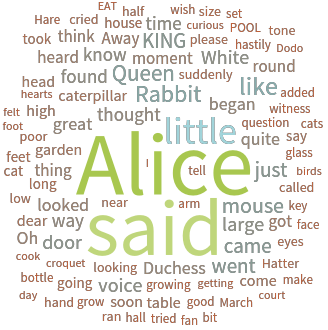
Make a word from words in Alice in Wonderland:
WordCloud[ExampleData[{"Text","AliceInWonderland"}],ColorFunction->"IslandColors"]
Out[]=
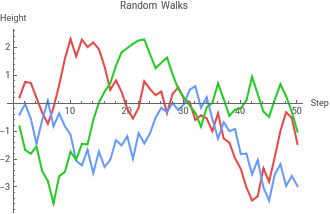
Plot 3 random walks:
ListLinePlotTable[Accumulate[RandomReal[{-1,1},50]],3],
Out[]=


Color every cell in a matrix differently according to its position:
In[]:=
MapIndexed[Highlighted[#1,Background->Blend[(ColorData[10]/@#2)]]&,ConstantArray[" ",{10,10}],{2}]//MatrixForm
Out[]//MatrixForm=
Produce a Sierpiński gasket using text:
In[]:=
NestList[Subsuperscript[#,#,#]&,o,6]
Out[]=
o,,,,,,
o
o
o
o
o
o
o
o
o
o
o
o
o
o
o
o
o
o
o
o
o
o
o
o
o
o
o
o
o
o
o
o
o
o
o
o
o
o
o
o
o
o
o
o
o
o
o
o
o
o
o
o
o
o
o
o
o
o
o
o
o
o
o
o
o
o
o
o
o
o
o
o
o
o
o
o
o
o
o
o
o
o
o
o
o
o
o
o
o
o
o
o
o
o
o
o
o
o
o
o
o
o
o
o
o
o
o
o
o
o
o
o
o
o
o
o
o
o
o
o
o
o
o
o
o
o
o
o
o
o
o
o
o
o
o
o
o
o
o
o
o
o
o
o
o
o
o
o
o
o
o
o
o
o
o
o
o
o
o
o
o
o
o
o
o
o
o
o
o
o
o
o
o
o
o
o
o
o
o
o
o
o
o
o
o
o
o
o
o
o
o
o
o
o
o
o
o
o
o
o
o
o
o
o
o
o
o
o
o
o
o
o
o
o
o
o
o
o
o
o
o
o
o
o
o
o
o
o
o
o
o
o
o
o
o
o
o
o
o
o
o
o
o
o
o
o
o
o
o
o
o
o
o
o
o
o
o
o
o
o
o
o
o
o
o
o
o
o
o
o
o
o
o
o
o
o
o
o
o
o
o
o
o
o
o
o
o
o
o
o
o
o
o
o
o
o
o
o
o
o
o
o
o
o
o
o
o
o
o
o
o
o
o
o
o
o
o
o
o
o
o
o
o
o
o
o
o
o
o
o
o
o
o
o
o
o
o
o
o
o
o
o
o
o
o
o
o
o
o
o
o
o
o
o
o
o
o
o
o
o
o
o
o
o
o
o
o
o
o
o
o
o
o
o
o
o
o
o
o
o
o
o
o
o
o
o
o
o
o
o
o
o
o
o
o
o
o
o
o
o
o
o
o
o
o
o
o
o
o
o
o
o
o
o
o
o
o
o
o
o
o
o
o
o
o
o
o
o
o
o
o
o
o
o
o
o
o
o
o
o
o
o
o
o
o
o
o
o
o
o
o
o
o
o
o
o
o
o
o
o
o
o
o
o
o
o
o
o
o
o
o
o
o
o
o
o
o
o
o
o
o
o
o
o
o
o
o
o
o
o
o
o
o
o
o
o
o
o
o
o
o
o
o
o
o
o
o
o
o
o
o
o
o
o
o
o
o
o
o
o
o
o
o
o
o
o
o
o
o
o
o
o
o
o
o
o
o
o
o
o
o
o
o
o
o
o
o
o
o
o
o
o
o
o
o
o
o
o
o
o
o
o
o
o
o
o
o
o
o
o
o
o
o
o
o
o
o
o
o
o
o
o
o
o
o
o
o
o
o
o
o
o
o
o
o
o
o
o
o
o
o
o
o
o
o
o
o
o
o
o
o
o
o
o
o
o
o
o
o
o
o
o
o
o
o
o
o
o
o
o
o
o
o
o
o
o
o
o
o
o
o
o
o
o
o
o
o
o
o
o
o
o
o
o
o
o
o
o
o
o
o
o
o
o
o
o
o
o
o
o
o
o
o
o
o
o
o
o
o
o
o
o
o
o
o
o
o
o
o
o
o
o
o
o
o
o
o
o
o
o
o
o
o
o
o
o
o
o
o
o
o
o
o
o
o
o
o
o
o
o
o
o
o
o
o
o
o
o
o
o
o
o
o
o
o
o
o
o
o
o
o
o
o
o
o
o
o
o
o
o
o
o
o
o
o
o
o
o
o
o
o
o
o
o
o
o
o
o
o
o
o
o
o
o
o
o
o
o
o
o
o
o
o
o
o
o
o
o
o
o
o
o
o
o
o
o
o
o
o
o
o
o
o
o
o
o
o
o
o
o
o
o
o
o
o
o
o
o
o
o
o
o
o
o
o
o
o
o
o
o
o
o
o
o
o
o
o
o
o
o
o
o
o
o
o
o
o
o
o
o
o
o
o
o
o
o
o
o
o
o
o
o
o
o
o
o
o
o
o
o
o
o
o
o
o
o
o
o
o
o
o
o
o
o
o
o
o
o
o
o
o
o
o
o
o
o
o
o
o
o
o
o
o
o
o
o
o
o
o
o
o
o
o
o
o
o
o
o
o
o
o
o
o
o
o
o
o
o
o
o
o
o
o
o
o
o
o
o
o
o
o
o
o
o
o
o
o
o
o
o
o
o
o
o
o
o
o
o
o
o
o
o
o
o
o
o
o
o
o
o
o
o
o
o
o
o
o
o
o
o
o
o
o
o
o
o
o
o
o
o
o
o
o
o
o
o
o
o
o
o
o
o
o
o
o
o
o
o
o
o
o
o
o
o
o
o
o
o
o
o
o
o
o
o
o
o
o
o
o
o
o
o
o
o
o
o
o
o
o
o
o
o
o
o
o
o
o
o
o
o
o
o
o
o
o
o
o
o
o
o
o
o
o
o
o
o
o
o
o
o
o
o
o
o
o
o
o
o
o
o
o
o
o
o
o
o
o
o
o
o
o
o
Make a list of connections between a selection of European capital cities and Rome:
In[]:=
romeCityConnections=ThreadDeleteCasesEntityValueVertexListNestGraph#1&,,2,"CapitalCity",
Out[]=
,,,,,,,,,,,,,,,,
Illustrate the saying: “All roads lead to Rome” with a map of driving directions from a selection of European Capitals to Rome:
Construct a 4-hop graph of word synonyms starting from the root node “bug”:
Wolfram Language ABCs
Wolfram Language ABCs
Let’s build up some intuition. There are a few keys you’ll need to understand how to read Wolfram Language code.
A few warnings before we jump in:
Wolfram Language is not a programming language you ever fully learn. It’s just too big.
There are over 6000 built-in functions, covering many varied computational domains
In 2024, I generated a graph of the “see also” relationships between functions in the WL documentation. The network has over 6000 nodes and over 24000 links.
Don’t panic if you don’t immediately understand something. Programming always looks a little mysterious until you try it out, but it’s really not too bad.
I’ll send you this notebook later, so you’ll be able to review all the code, copy and paste examples, and mess about with it on your own time.
Please feel free to jump in to ask me questions. I’ll also take questions at the end of the talk if there’s time.
Symbolic Expressions
Symbolic Expressions
1
.Wolfram Language is a symbolic programming language. Everything in Wolfram Language (with very few exceptions such as real numbers and integers) is a symbolic expression.
2
.All symbolic expressions have the same fundamental structure: head[arguments].
For example:
For example:
Variable Assignment and Function Definitions
Variable Assignment and Function Definitions
Variable assignments allow you to define things by name and refer to them later.
Set (=)
Set (=)
Variable assignment using Set:
SetDelayed (:=)
SetDelayed (:=)
Delayed variable assignment using SetDelayed:
ClearAll
ClearAll
Make the Wolfram Kernel forget a definition using ClearAll:
ClearAll is an example of a built-in Wolfram Language function.
Function definitions
Function definitions
Functions are definitions for procedures. They are templates that take inputs (called arguments) and perform some action based on the provided information.
Define a function:
Clear the function definition:
Pure (Anonymous) Functions
Pure (Anonymous) Functions
Pure functions are also known as anonymous functions or lambda expressions.
Make a pure function for adding 1:
If a pure function is given as the head of an expression, the function is applied to the arguments:
Here is a function of several arguments:
Computational Graph Theory
Graph representation
Graph representation
The Graph function
The Graph function
The Wolfram Language way of representing networks is using the Graph function.
The easiest way of defining a graph is as a list of edges.
UndirectedEdge — an undirected edge () (also entered as <-> or ue)
DirectedEdge — a directed edge () (also entered as -> or de)
DirectedEdge — a directed edge () (also entered as -> or de)
Define a graph from a list of two undirected, and two directed edges:
Basic graph properties
Basic graph properties
Wolfram Language has many built-in functions for manipulating and retrieving information from graphs. Here are a few of the simplest:
List the graph’s vertices:
List its edges:
Get the degree of each of the graph:
Get the unweighted adjacency matrix of the graph:
Get the weighted adjacency matrix of the graph:
Get the adjacency lists for each vertex of the graph:
Get the vertex-edge incidence matrix of the graph:
A great jumping off point to learn about graph functionality in Wolfram Language is with the Graphs and Networks guide page from the Wolfram System Documentation.
Centrality
Centrality
There are many tools in WL to compute common graph centrality measures:
Get the degree centrality of vertices of a graph:
Get the eigenvector centrality of vertices of a graph:
Get the betweenness centrality of vertices of a graph:
Selecting subgraphs
Selecting subgraphs
Define g to be a somewhat complicated looking graph:
Take the subgraph of g containing a list of vertices:
Find communities in a graph according to a chosen method:
Find and plot communities in a graph according to a chosen method:
Other functions that relate to graphs
Other functions that relate to graphs
And many many more!
Generating graphs
Generating graphs
Curated graphs
Curated graphs
Wolfram Language has built-in tools for constructing common graphs, and built in example data graphs which you can use as you please.
Preview the list of named graphs that the Wolfram Language knows of:
Pick 4 random graphs from GraphData
Plot the graphs:
GraphData can also be used to filter specific classes of known graphs.
Define the list of all the non-tree planar graphs that are found in the Wolfram knowledgebase:
Plot 4 random graphs from GraphData
The ExampleData function also provides access to some networks.
Preview the list of named example data graphs that the Wolfram Language knows of:
Plot 4 random example data graphs:
Parametric Graphs
Parametric Graphs
Wolfram also has many functions used to generate common parametric graphs.
Make a complete graph with n vertices:
Make a 4×4 grid graph:
Here are some of the other built-in parametric graph generation functions:
Random graphs
Random graphs
The simplest way to generate random graphs in WL is using the RandomGraph function.
Generate a random Erdős–Rényi graph, and embed it three dimensions:
The RandomGraph function works with the following built-in graph distributions:
Sample a random small world graph:
You can also generate graphs using random matrices:
Built-in functions to construct graphs from data
Built-in functions to construct graphs from data
Construct a graph where every node is connected to its nearest neighbor:
Build a graph of synonyms rooted at a given word:
Construct a graph (in this case a tree) from a code expression:
Plot the graph of a molecule:
And again, there are more functions than I could hope to cover here, so browse the documentation and see what you can find!
Graphs from meshes
Graphs from meshes
Mesh functions
Mesh functions
Graphs of knowledgebase polyhedra
Graphs of knowledgebase polyhedra
List entities in the Wolfram knowledgebase corresponding to polyhedra:
Define a function to convert any built-in polyhedron to a graph:
Get the graph of a random polyhedron in the Wolfram knowledgebase:
Making graphs from knowledgebase periodic tilings
Making graphs from knowledgebase periodic tilings
List periodic tilings in the Wolfram knowledgebase:
Retrieve the graph corresponding to a built-in periodic tiling’s primitive unit:
Applications
1. Voting community analysis: The Traitors UK, Season 1
1. Voting community analysis: The Traitors UK, Season 1
Teams
Teams
Define the list of participants (nodes):
Define the teams:
Votes
Votes
Define a dataset of all votes throughout the season:
Produce a graph of all the votes throughout the season:
Edge weights in this graph roughly correspond to the antagonism between participants, as they correspond to the number of times a player voted against another.
Detect communities on the votes graph:
CommunityGraphPlot uses a modularity maximization algorithm to detect graph communities. So the resulting communities show us groups of people who voted against each other more frequently than they voted against their peers from other groups.
2. Minimally coloring planar network faces
2. Minimally coloring planar network faces
Example repo item: Minimal Coloring of Planar Graphs
Finding the outer face of a planar graph
Finding the outer face of a planar graph
Define a planar graph:
Find the outer face of a planar graph:
Example:
Example:
Detecting and coloring faces of planar graphs
Detecting and coloring faces of planar graphs
Find the faces of a planar graph:
Find a minimal coloring of the graph, including the outer face:
Find a minimal coloring of the graph, not including the outer face:
Find and plot minimal colorings for a list of planar graphs:
3. Game of Cycles
3. Game of Cycles
In this section, I’ll show you a WL implementation of the game of cycles that works for any connected mixed planar graph. (Any graph made of a single connected component, whose edges are directed or undirected, or a mix of both.)
Rules of the game
Rules of the game
Goal: Create a cycle of directed edges
Constraints:
The game is played on a planar graph
No moves can result in the creation of sources
No moves can result in the creation of sinks
A player must make a move if there is one available
Endgame: If no cycle is formed and no legal moves remain, the last player who moved wins.
Caveats
Caveats
I have a bone to pick with the game of cycles:
Cycles are already a thing in graph theory, and they are not quite what they are in the game of cycles.
In regular graph theory, the word “cycle” refers to any non-branching sequence of connected edges that forms a closed loop.
In the game of cycles, the word “cycle” only refers to directed cycles on faces of a planar graph.
Faces are enclosed regions of the plane that do not contain any other edges or vertices than those making up the boundary of the enclosed region.
Game state
Game state
Other building blocks and helpers
Other building blocks and helpers
Game simulation
Game simulation
Simulating multiplayer games
Simulating multiplayer games
Make multiple players with different strategies face off:
Make multiple players with different strategies face off an animate the result:
Game digraphs
Game digraphs
Plot the digraph showing all possible game states and state transitions for the game of cycles on a 5-vertex cycle graph:
Plot the digraph showing all possible game states and state transitions for the game of cycles on a 4-vertex complete graph:
Play it yourself
Play it yourself
Play the game solo:
Play a turn-based multiplayer game: