Introduction
Introduction
The Rubik’s cube, invented in 1974 by Erno Rubik is a 3D combination puzzle with over 43 quintillion possible states. The traditional 3x3 cube has six colors with nine stickers for each, and can be turned along each face. Theoretically, the maximum number of moves required to solve a cube from any state is 20 [read:http://www.cube20.org/].
In this notebook, I create a set of functions that allows one to visualize any scramble sequence on the 3x3 Rubik’s cube. I define all possible turns on the faces and a function that creates an image of the state of the cube after any sequence of moves. There’s also an additional feature to generate a random scramble and view it on the cube after. This is especially useful for cube timer applications and scramblers at cube competitions, who can compare their physical cube to the image to ensure their scramble was accurate.
In this notebook, I create a set of functions that allows one to visualize any scramble sequence on the 3x3 Rubik’s cube. I define all possible turns on the faces and a function that creates an image of the state of the cube after any sequence of moves. There’s also an additional feature to generate a random scramble and view it on the cube after. This is especially useful for cube timer applications and scramblers at cube competitions, who can compare their physical cube to the image to ensure their scramble was accurate.
Setup and Structure
Setup and Structure
In this notebook, we follow the WCA guidelines for orientation and scrambling notation. By this convention, we have the white center as our top face with green on the front.
The cube itself is defined to be a nested list of colors, with the default solved state given below:
The cube itself is defined to be a nested list of colors, with the default solved state given below:
In[]:=
solvedstate={{{"Wh","Wh","Wh"},{"Wh","Wh","Wh"},{"Wh","Wh","Wh"}},{{"Ye","Ye","Ye"},{"Ye","Ye","Ye"},{"Ye","Ye","Ye"}},{{"Gr","Gr","Gr"},{"Gr","Gr","Gr"},{"Gr","Gr","Gr"}},{{"Bl","Bl","Bl"},{"Bl","Bl","Bl"},{"Bl","Bl","Bl"}},{{"Re","Re","Re"},{"Re","Re","Re"},{"Re","Re","Re"}},{{"Or","Or","Or"},{"Or","Or","Or"},{"Or","Or","Or"}}};
Each sublist denotes a face of the cube in a 3x3 grid. The labels correspond to the colors according to the list given below:
In[]:=
colorscheme={"Wh"->White,"Ye"->Yellow,"Gr"->Green,"Bl"->Blue,"Re"->Red,"Or"->Orange,"Bla"->Black};
We define a placeholder face as a 3x3 grid of black. We need this to fill in the blank spaces in the grid when we draw it.
In[]:=
placeholder={{"Bla","Bla","Bla"},{"Bla","Bla","Bla"},{"Bla","Bla","Bla"}};
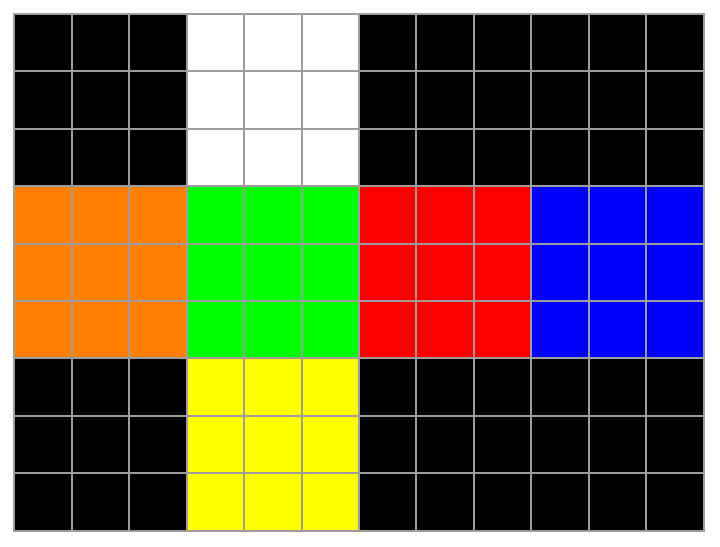
We define the following function to represent a side of the cube in an ArrayPlot and draw the solved state of the cube using it,
In[]:=
RepresentSide[side_]:=ArrayPlot[side/.colorscheme,Mesh->True]DrawState[state_]:=Join[Join[placeholder,state[[1]],placeholder,placeholder,2],Join[state[[6]],state[[3]],state[[5]],state[[4]],2],Join[placeholder,state[[2]],placeholder,placeholder,2]]//RepresentSide
In[]:=
DrawState[solvedstate]
Out[]=
Defining face turns
Defining face turns
The next task is the most tedious but also necessary definition of the notebook. For any random state given by,
In[]:=
randomstate={{{"u1","u2","u3"},{"u4","u5","u6"},{"u7","u8","u9"}},{{"d1","d2","d3"},{"d4","d5","d6"},{"d7","d8","d9"}},{{"f1","f2","f3"},{"f4","f5","f6"},{"f7","f8","f9"}},{{"b1","b2","b3"},{"b4","b5","b6"},{"b7","b8","b9"}},{{"r1","r2","r3"},{"r4","r5","r6"},{"r7","r8","r9"}},{{"l1","l2","l3"},{"l4","l5","l6"},{"l7","l8","l9"}}};
We define each turn on the cube as a permutation on randomstate. We define turns “u”, “d”, “f”, “b”, “l”, and “ as clockwise 90° turns of the top, bottom, front, back, left, and right faces respectively. Correspondingly, the suffix “a” to each of these denotes a counter-clockwise 90° turn and the suffix “2” denotes a 180° turn.
For each turn, we only need to explicitly define the clockwise turn, since the 180° turn is the same thing applied twice and the counter-clockwise turn, applied thrice.
For each turn, we only need to explicitly define the clockwise turn, since the 180° turn is the same thing applied twice and the counter-clockwise turn, applied thrice.
In[]:=
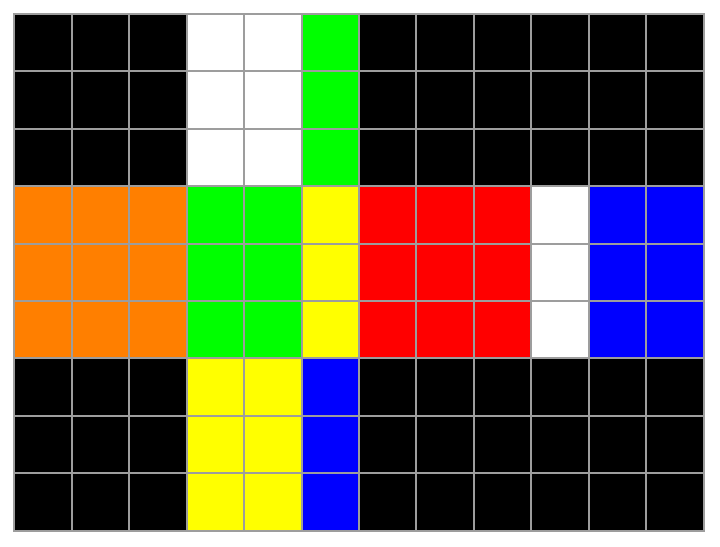
The above list structure can seem a bit abstract, so lets demonstrate a few turns. Turning the right face clockwise gives us,
In[]:=
DrawState[solvedstate//r]
Out[]=
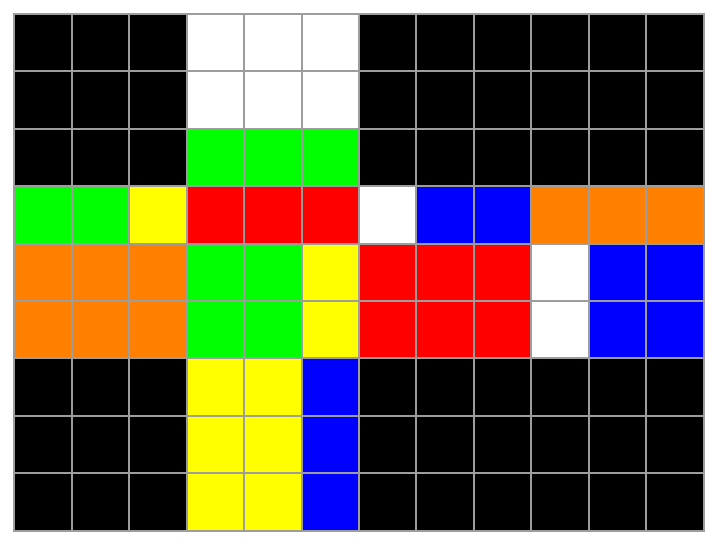
We can follow this up with turning the top face clockwise as well,
In[]:=
DrawState[solvedstate//r//u]
Out[]=
Let’s show the sune algorithm, commonly used in beginner methods for solving the Rubik’s cube. It goes “R U Ra U R U2 Ra”
In[]:=
DrawState[solvedstate//r//u//ra//u//r//u2//ra]
Out[]=
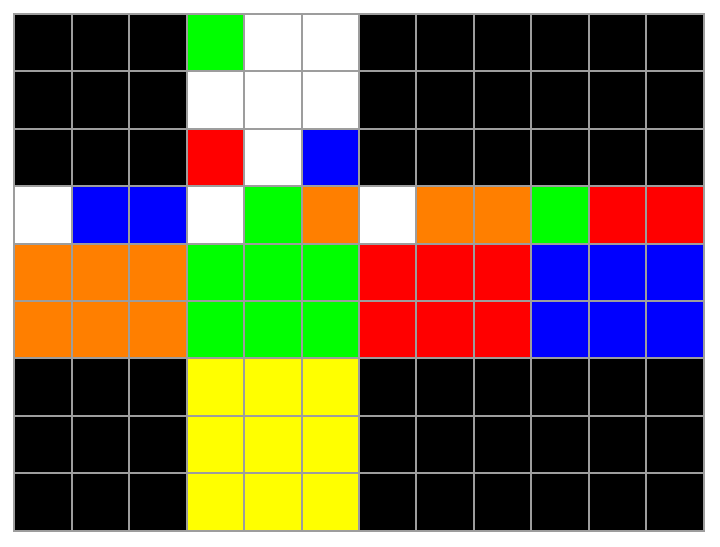
We get a fish-like pattern on the upper face, which is the expected result.
We can also show the common checkerboard pattern below,
In[]:=
checkerboardState=solvedstate//u2//d2//f2//b2//r2//l2;DrawState[checkerboardState]
Out[]=
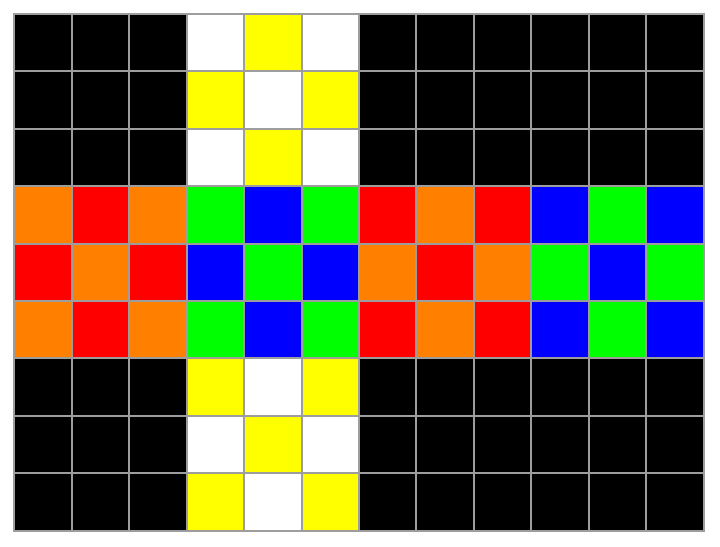
We note here that we have neglected the inner layer turns “M”, “S” and “E” since those would change the orientation of the cube centers which are required to be in fixed positions for our system. The equivalent can be achieved by turning the opposite outer layers instead.
Generate and Draw Scramble
Generate and Draw Scramble
The main challenge with generating a good scramble is removing redundant moves. It’s inefficient to have sequence of moves that cancel out. For example, the sequence “R L R2 La” can just be reduced to “Ra”. In this notebook, we only tackle successive moves that cancel out.
We first define a function that, given a move, generates the next move for the sequence not to have two successive moves along the same face.
We first define a function that, given a move, generates the next move for the sequence not to have two successive moves along the same face.
In[]:=
PickNextMove[prev_]:=Module[{moves={"u","r","l","b","d","f"},umoves={u,ua,u2},dmoves={d,da,d2},rmoves={r,ra,r2},lmoves={l,la,l2},fmoves={f,fa,f2},bmoves={b,ba,b2},parseMove,face},parseMove=StringPart[ToString[prev],1];moves=DeleteCases[moves,parseMove];face=RandomChoice[moves];Which[face=="u",RandomChoice[umoves],face=="d",RandomChoice[dmoves],face=="f",RandomChoice[fmoves],face=="b",RandomChoice[bmoves],face=="l",RandomChoice[lmoves],face=="r",RandomChoice[rmoves]]]
Using this, we can nest the function to generate the entire scramble. We set all scrambles to be 20 moves long since that is the theoretical maximum state any scramble is from the solved state.
Finally, we write a function to draw the scramble based on the output from the previous function.
Putting this all together, we can generate a draw a random scramble using the last two functions above.
Conclusion and Future Work
Conclusion and Future Work
The above notebook demonstrates the simple concepts of defining turns on a cube and applying them to a state. This can be extended in a few ways to bring additional functionality. Firstly, as mentioned earlier, we can do better with removing redundant sequences of moves. We would have to define a more elaborate algorithm in place of PickNextMove to check not only the previous move but the entire previous sequence before generating the next move. Secondly, the drawing could be a 3D model of the cube instead of a 2D projection to an array. Lastly, we can make the output more interactive by using Manipulate and Control features of the Wolfram Language to define a dynamic object that could have buttons for each move, to generate a random scramble or to reset to the solved state.
A more ambitious final project could be to implement the Two Phase Algorithm in the Wolfram Language. This algorithm produces the optimal solution of the cube from any given state. A 20 move scrambling algorithm to a final state might not be the most optimal way to get to that state, and this algorithm could find a shorter solution.
A more ambitious final project could be to implement the Two Phase Algorithm in the Wolfram Language. This algorithm produces the optimal solution of the cube from any given state. A 20 move scrambling algorithm to a final state might not be the most optimal way to get to that state, and this algorithm could find a shorter solution.