The famous game of Sudoku grew popular for stimulating minds while also being entertaining. With its background in mathematics and logic, many people have worked on unique ways of easily solving the puzzle. In this project, I explore a sudoku solver which uses a mix of brute force and logic. Editing the function while generating unsolved grids to find the requirements to make a solvable game. By analyzing and graphing patterns that appear in the solving process of guessing numbers, I made a connection between number distribution and guesses needed .
Introduction
Introduction
What is Sudoku?
What is Sudoku?
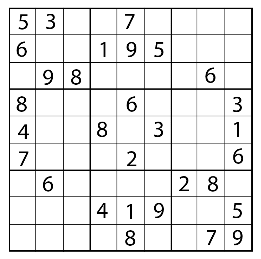
The classic game of Sudoku originated from Japan and has become widely known and popular over the years. Sudokus are frequently found on newspapers and often played to avoid boredom. Although it seems simple, Sudoku is much more than just an easy game. There are 6,670,903,752,021,072,936,960 possible solutions with a variety of methods to solve each puzzle. In a standard 9x9 sudoku game, the goal is to fill up the entire board with numbers from 1-9 without any repeats in each column, row, and grid.
Objective
Objective
In this project, I explore the patterns between the guesses needed to solve sudoku puzzles with different amounts of starting numbers in the grid. I randomly generate unsolved sudoku puzzles and run them through SudokuSolve to count the number of guesses which I then graph. Using the data, I compare the puzzles that require the least and most guesses, determining what makes a sudoku puzzle easier to solve.
Generating Puzzles
Generating Puzzles
In order to analyze solving sudoku puzzles, they have to be created. I wrote a function that randomly filled a given number of integers into the puzzle grid to create an unsolved grid.
Starting with the formatting, a sudoku board is represented by rows in Wolfram. Below, I created a list of empty rows to create an empty grid. This list represents a blank Sudoku board.
Creates a blank sudoku board:
In[]:=
numberSequence= {{,,,,,,,,},{,,,,,,,,},{,,,,,,,,},{,,,,,,,,},{,,,,,,,,},{,,,,,,,,},{,,,,,,,,},{,,,,,,,,},{,,,,,,,,}}
Out[]=
{{Null,Null,Null,Null,Null,Null,Null,Null,Null},{Null,Null,Null,Null,Null,Null,Null,Null,Null},{Null,Null,Null,Null,Null,Null,Null,Null,Null},{Null,Null,Null,Null,Null,Null,Null,Null,Null},{Null,Null,Null,Null,Null,Null,Null,Null,Null},{Null,Null,Null,Null,Null,Null,Null,Null,Null},{Null,Null,Null,Null,Null,Null,Null,Null,Null},{Null,Null,Null,Null,Null,Null,Null,Null,Null},{Null,Null,Null,Null,Null,Null,Null,Null,Null}}
Here, I put the sequence into a grid form with the 9x9 grid split into smaller 3x3 grids through boarder thickness.
Uses numberSequence to generate a blank grid:
In[]:=
Grid[numberSequence,Dividers->{{{Thickness[2],True,True}},{{Thickness[2],True,True}}},ItemSize->{Full,Full},Spacings->{Offset[0.9],Offset[0.7]}]
Out[]=
| | | | | | | | |
| | | | | | | | |
| | | | | | | | |
| | | | | | | | |
| | | | | | | | |
| | | | | | | | |
| | | | | | | | |
| | | | | | | | |
| | | | | | | | |
To generate numbers randomly into the grid, I used Table to randomly replace a null space with a random integer 17 times. A Sudoku board must have at least 17 numbers because it is known to be the least amount of numbers needed to create a solvable puzzle with one unique solution.
Generates a board with random numbers at random locations:
In[]:=
ReplacePart[numberSequence,Table[ {RandomInteger[{1,9}],RandomInteger[{1,9}]}->RandomInteger[{1,9}],{x,17}]];Grid[ReplacePart[numberSequence,Table[ {RandomInteger[{1,9}],RandomInteger[{1,9}]}->RandomInteger[{1,9}],{x,17}]],Dividers->{{{Thickness[2],True,True}},{{Thickness[2],True,True}}},ItemSize->{Full,Full},Spacings->{Offset[0.9],Offset[0.7]}]
Out[]=
| | | | | | | | |
| | | 2 | 2 | 4 | | | |
5 | 4 | | | | | | 1 | |
| | | 8 | | | | | |
| | | 4 | | 3 | | | |
| | | | | | 9 | | 9 |
| | | | | | | | |
| | | 1 | | | | 8 | 2 |
| 3 | | 8 | | | | | |
Implementing the Rules
Implementing the Rules
However, when numbers are randomly generated on the grid, some integers will replace already existing integers creating less than 17 numbers on a grid. In this case, the grid only contains 16 numbers. To prevent this from occurring, I generated 17 positions first so I can eventually check for duplicate positions and prevent multiple replacements at one position. This helps control how many numbers are on the grid.
Randomly generates integers 1-9 to create coordinates 17 times:
In[]:=
numberPositions = Table[position = {RandomInteger[{1, 9}], RandomInteger[{1, 9}]}, 17]
Out[]=
{{8,7},{1,6},{2,8},{9,1},{6,5},{8,9},{5,7},{5,6},{2,7},{6,3},{8,3},{7,2},{3,3},{9,3},{3,6},{3,9},{4,7}}
Similar to the duplicate positions, there can’t be repeating numbers in the rows, columns, or grids (according to Sudoku rules). I created four functions that checked for duplicate numbers in the rows, columns, and grids along with duplicate positions.
Since the sudoku is already formatted with separate lists for each row, I used part to take each row and select only the integers. Then DuplicateFreeQ tested for duplicates and would print False if an integer was repeated.
Takes the integers from each row and checks for duplicates:
In[]:=
repeatedRowNumbers[sequence_]:=Table[DuplicateFreeQ[Select[sequence[[x]],IntegerQ]],{x,9}]
For the columns, I first transposed the list to change the lists of rows into columns. Then repeating the same functions from the row version, I tested for duplicates.
Takes the integers from each column and checks for duplicates:
In[]:=
repeatedColumnNumbers[sequence_]:=Table[DuplicateFreeQ[Select[Transpose[sequence][[x]],IntegerQ]],{x,9}]
As I did for the columns, I started by regrouping the lists. I used table to part the first three integers from the first three lists and grouped those into the first grid. Then, the table took the second group of three integers from the first three lists to group together and eventually the third group. After, I used table again to repeat those actions for the middle three lists and then the last three lists.
Takes the integers from each grid and checks for duplicates:
In[]:=
repeatedGridNumbers[sequence_]:=Table[DuplicateFreeQ[Select[Partition[Flatten[Table[Table[Table[sequence[[x,y;;y+2]],{x,z,z+2}],{y,1,7,3}],{z,1,7,3}]],9][[a]],IntegerQ]],{a,9}]
Slightly different from the other three duplicate integer checkers, I used the Duplicates resource function to identify the numbers that are repeated.
Finds and takes the numbers that are duplicated:
In[]:=
repeatedNumbers[sequence_]:=ResourceFunction["Duplicates"][sequence]
Generating Unsolved Puzzles
Generating Unsolved Puzzles
The generateSudoku function creates an unsolved puzzle with a certain number of integers given. It replaces a number of null positions with a certain number integers, making sure that the puzzle follows the rules of the sudoku game. To do this I had it check for repeated numbers in each row, column, and grids along with the repeated positions. Only stopping when a new grid has no repeats. It generates the puzzle by first generating positions where Nulls will be replaced. Then using those positions, it replaces the Null with a random number to create tempNumberSequence. Then it will run tempNumberSequence through the repeated number checkers and if it doesn’t match it will clear tempNumberSequence to regenerate a new puzzle.
Regenerates a number sequence until there are no duplicates in rows, columns, grids, or positions:
generateSudoku[n_]:={Until[MemberQ[repeatedRowNumbers[tempNumberSequence],False]==False&&MemberQ[repeatedColumnNumbers[tempNumberSequence],False]==False&&MemberQ[repeatedGridNumbers[tempNumberSequence],False]==False&&Length[repeatedNumbers[place]]==0,Clear[tempNumberSequence];place=Table[position={RandomInteger[{1,9}],RandomInteger[{1,9}]},n];tempNumberSequence=Flatten[{place=Table[position={RandomInteger[{1,9}],RandomInteger[{1,9}]},n];ReplacePart[numberSequence,Table[place[[x]]->RandomInteger[{1,9}],{x,n}]]},1];repeatedRowNumbers[tempNumberSequence];repeatedColumnNumbers[tempNumberSequence];repeatedGridNumbers[tempNumberSequence]];tempNumberSequence}[[1]]
Applying SudokuSolve
Applying SudokuSolve
Editing SudokuSolve
Editing SudokuSolve
The resource function SudokuSolve has an option to show steps when solving the sudoku puzzle. When it is set true and the function has multiple options, the function will choose a number and guess to see if it fits in the position. A board capable of being solved without guesses should be possible for humans to easily solve using logic.
In order to use this code to determine the number of options/guesses made, I had to to edit parts of the code. Since, everything I was solving needed the guesses to be identified, I removed the option to not show steps. Another issue with the code was that the guesses weren’t part of the output so I couldn’t use them and I didn’t need to know what occurred in the guess. So I used Sow and Reap to give the sudoku board with the guesses when a guess occurred which I can then count later on. I also combined the If statements into one Which statement to clean up the code.
Redefines the edited SudokuSolve resource function:
In[]:=
SudokuSolve["Dependency"]={SudokuForm};SudokuSolve[data_List]/;Dimensions[data]==={9,9}:=Reap[SudokuForm[Catch[ApplySudokuLogic[initialize[data]]]]]
In[]:=
MakeBoxes[SudokuForm[data_List],form_]^:=GridBox[data/.{{n__Integer}/;Length[{n}]>1->"",{n_Integer}:>ToString[n]},RowLines->{1,1,2,1,1,2,1},ColumnLines->{1,1,2,1,1,2,1},GridFrame->True,RowsEqual->True,ColumnsEqual->True]
In[]:=
ApplySudokuLogic[data_]:=Module[{firstunsolved,firstunsolvedposition,step,workingdata=Catch[FixedPoint[SudokuProcess,data]]},Which[FailureQ[workingdata],Throw[Failure["Contradiction",Association[]]],SudokuSolvedQ[workingdata],workingdata,SudokuSolvedQ[workingdata]==False,firstunsolved=First[Cases[workingdata,{n_Integer,m__Integer},{2}]];If[firstunsolved==={},Throw[Failure["Contradiction",Association[]]]];firstunsolvedposition=First[Position[workingdata,firstunsolved]];Sow[SudokuForm[data]];step=Catch[ApplySudokuLogic[ReplacePart[workingdata,Take[firstunsolved,1],firstunsolvedposition]]];If[FailureQ[step],Catch[ApplySudokuLogic[ReplacePart[workingdata,Rest[firstunsolved],firstunsolvedposition]]],step]]]
To identify how many guesses occurs, I measure how many grids were given which is equivalent to the number of guesses that occurred.
Counts the number of guesses made to solve a Sudoku:
Modeling Sudoku
Modeling Sudoku
SudokuSolve uses a mix of logic and brute force. It will fill the grid until it reaches a position where multiple numbers can go. When that occurs, it will guess one of the numbers. If the guessed number eventually leads to a mistake, it will go back and guess again. The original code has an option to print the guesses when they occur. To show the steps the function uses, I modeled the changes as a tree.
Displays the guesses made when solving the Sudoku
Using the modified SudokuSolve, I solved a puzzle and displayed the board every time a guess was made. I thought the tree function would be the best way to visualize the solving of the Sudoku board. The Tree function does not use grids or sequences to create grids, so I turned the grids into images.
Resizes a white photo to be the size of a sudoku grid:
Creates an image with the grid over the white image:
To minimize the graph, I removed the guesses that occurred in between two grids without failures. Creating a smaller version of the horizontal tree.
Counting Guesses
Counting Guesses
As mentioned previously, with guesses, less is better. A board capable of being solved without guesses is possible for humans to easily solve using logic. I counted how many guesses were used to solve sudoku puzzles to find a pattern between the guesses and the numbers provided in the puzzle.
Using this logic and information, I generated 25 different sudoku boards with 17 numbers and saved them with iconize. I started with 17 because it is known to be the smallest amount of numbers in the starting board that can creates a unique solution.
Generates 25 boards:
Iconizes the data:
Maps SudokuSolve onto the list of boards to calculate the number of guesses needed to solve each:
Sorts the amounts into numerical order:
Since, the values range from 0 to 471 for this Sudoku board, I utilized a log plot to easily show all the values.
Plots the number of guesses required for each of the 25 Sudoku boards:
As shown, there is a very clear outlier for the 25th board. This however is not because there was a lot of guesses, but instead because the puzzle was unsolvable in some way. It could be a wrong sudoku generation or a invalid puzzle with repeated numbers. When puzzles with mistakes like these occur, the solver continuously guesses numbers until a failure is eventually shown. In order to not skew the data I removed the failed puzzles from the data set.
Removes grids that end in Failure and recounts the guesses:
I then repeated the same process for Sudoku boards starting with 18 - 21 numbers. The process follows the exact same flow as the one defined previously for 17 numbers.
Counts the number of guesses and excludes failures for 18 initial numbers:
Counts the number of guesses and excludes failures for 19 initial numbers:
Counts the number of guesses and excludes failures for 20 initial numbers:
Counts the number of guesses and excludes failures for 21 initial numbers:
Plots all of the graphs together in a row:
Combining the Data
Combining the Data
With all the data from before I combined them into a graph.
Here is the graph of the number of guesses all of the generated sudoku boards took. There are clear spikes in the ones with 19, 20, and 18 numbers. Only the ones with 17 and 21 number remained relatively stable. There are some wholes in the plot where the number of guesses equal 0 because 0 can not be graphed by a log plot.
Plots the unsorted data in one graph:
Here is the graph with the number of guesses sorted numerically. It is more apparent that the guesses stays around the 10-20 region.
Plots the sorted data in one graph:
Here are the plots with the fails removed. These should provide a better visualization of the guesses without including the extremely high guesses of the invalid boards. Preventing anything from manipulating our graph.
In the unsorted graph, the one with 19 numbers has a very apparent spike in data. With its surrounding lines staying relatively stable.
Plots the unsorted data with the failed grids removed in one graph:
Here is the graph with the guesses sorted numerically and with failures removed. The one with 21 numbers has less grids that ended up being solvable. However, all of its grids take barely any guesses and making it more likely to generate a grid with one unique solution. The lines for 17 and 18 numbers also stayed stable without many failures.
Plots the sorted data with the failed grids removed in one graph:
After analyzing and comparing all four graphs it seems that the smaller and larger numbers have relatively consistent lines. Meaning they create grids with mostly the same amount of guesses needed. However, when the middle values are run, spikes in data appear to occur more often.
Comparing the Guesses
Comparing the Guesses
From the data generated before with the 17 given numbers, I found the ones with the most and least guesses by identifying the position and taking it from the data.
Finds greatest and smallest number in the sequence and finds their position:
Parts the grid with the greatest number of guesses:
Turns the sequence into grid form to better see the numbers and distribution:
Parts the grid with the smallest number of guesses:
Turns the sequence into grid form to better see the numbers and distribution:
Then I took the rows and columns of the grids and counted how many numbers were in each to compare.
Splits up the 9 rows into 3 groups and counts the integers:
Finds and plots the regression line of the three points to visualize the slopes:
Here it can be seen that the puzzle with the least guesses has rows with approximately equal amount of numbers, while the one with the most has rows with numbers that fluctuate more per row.
Groups the columns together and groups them into 3s and then counts the integers:
Finds and plots the regression line of the three points to visualize the slopes:
Here it can be seen that the puzzle with the most guesses has columns with approximately equal amount of numbers, while the one with the least has columns with numbers that fluctuate more per row.
When graphed the slope provides a good idea of how the number of integers in each section fluctuates. A slope closer to zero means the numbers are more evenly distributed in the sudoku grid. Meanwhile a slope further from zero means the numbers are more clumped in the grid.
I repeated this with the data from 18-21 numbers.
Counts the number of starting numbers and plots them for 18 initial numbers:
The one with less guesses has a slope closer to zero, meaning the numbers are distributed more equally.
The one with less guesses also has a slope closer to zero, meaning the numbers are distributed more equally.
Counts the number of starting numbers and plots them for 19 initial numbers:
In both the graph for the column and row, there happens to be the same number of integers in each section.
Counts the number of starting numbers and plots them for 20 initial numbers:
The one with less guesses has a slope almost equal to zero, meaning the numbers are distributed more equally.
The one with less guesses also has a slope closer to zero, meaning the numbers are distributed more equally.
Counts the number of starting numbers and plots them for 21 initial numbers:
The one with less guesses also has a slope closer to zero, meaning the numbers are distributed more equally.
The one with more guesses also has a slope closer to one, meaning the numbers are distributed more equally.
Comparing the graphs, it can be concluded that more evenly distributed grids create less need for guesses and is more likely to create a solvable board. Although this is not the case for every graph, I noticed the boards that don’t follow this pattern balance each other out. With the least being closer to zero in the one section and the most being closer to zero in the other. From the counted numbers, the ones with the least guesses have 3 numbers more close together on the number line. The distributions that are more equally spread across the grid rows and columns take the least amount of guesses to solve.
Conclusion
Conclusion
More numbers of integers generated in a graph increases the probability of creating a puzzle with one unique solution or one with no guesses needed. However, it also makes generating boards that end up failing more common. Similarly the smaller the number the greater the chance of generating a puzzle that can be solved without any guesses. Unlike the larger numbers, these puzzle likely won’t have one unique solution. The middle numbers had a greater fluctuation in guess counts. Instead of a stable line, it creates more unexpected outcomes.s
With any randomly generated sudoku puzzle, the ones with numbers more spread out and evenly distributed are more likely to create a solvable puzzle with one unique solution. Along with that, it will also take less guesses to solve than one with clusters of numbers.
Further Exploration
Further Exploration
◼
Rewrite a function like SudokuSolve that uses a mix of logic and brute force to solve a puzzle more efficiently.
◼
Analyze the number of each number in a board and their correlation to solving sudoku.
Acknowledgements
Acknowledgements
I would like to thank my mentor, Karan Chakravarthy, for his continuous support and patience navigating through the vague directions of my project. I would also like to thank all the staff, specifically Andrea for sticking by project even when I moved away from multiway graphs and helping me understand recursions.
References
References
◼
“The Math Behind Sudoku.” Cornell University Department of Mathematics, https://pi.math.cornell.edu/~mec/Summer2009/Mahmood/Intro.html. Accessed July 11, 2024.
McLoone, Jon. “SudokuSolve.”Wolfram Function Repository, 2018, https://resources.wolframcloud.com/FunctionRepository/resources/SudokuSolve. Accessed July 11, 2024.
CITE THIS NOTEBOOK
CITE THIS NOTEBOOK
Exploring patterns in solvable Sudoku puzzles
by Rachel Shuai
Wolfram Community, STAFF PICKS, July 12, 2024
https://community.wolfram.com/groups/-/m/t/3216488
by Rachel Shuai
Wolfram Community, STAFF PICKS, July 12, 2024
https://community.wolfram.com/groups/-/m/t/3216488