How should a solid structure be shaped to manage the flow around it? Rather than designing a shape by hand, we let one evolve. A geometry is represented as a binary array, converted to a mesh region inside a two-dimensional channel, and the flow around it is computed by numerically integrating the Navier-Stokes equations. A fitness function reduces each flow field to a single score, and a mutation and selection loop improves the geometry step by step. Comparing three fitness criteria across three material densities, we find that the sparsest structures gained the most, and that the choice of criterion visibly shapes both the evolved geometry and the character of its wake.
Introduction
Introduction
Designing a shape that performs well inside a flowing fluid, such as a heat sink fin or a flow deflector, is hard because the space of possible shapes is enormous and fluid simulations are computationally expensive. The usual engineering approach is to pick a known family of shapes, for example fins of some thickness and spacing and tune its parameters. This project takes a different approach: the shape itself is discovered by an evolutionary search, with no predefined family.
The idea follows builds on Stephen Wolfram’s blog post: Why Does Biological Evolution Work? A Minimal Model for Biological Evolution and Other Adaptive Processes. Mutation and selection alone, without an explicit design, can discover structures that work. Here, the genotype is a binary array in which each 1 represents solid matter and each 0 represents the absence of solid matter. The phenotype is a mesh region generated from this array, whose fitness is determined through its interactions with the fluid flow in which it is immersed. We compute the flow field around the evolved obstacle by numerical integration of the Navier-Stokes equations, resulting in a full fluid simulation. A fitness function turns that flow field into a score and a mutation and selection loop improves the geometry step by step.
The fitness functions in this essay are built from two related quantities. Vorticity measures the local rotation of the fluid: how strongly and in which direction, the flow spins at each point. Enstrophy is the integral of squared vorticity over a region, a single number summarizing the flow’s total rotational intensity, closely tied to how fast the flow dissipates energy. Geometries are scored by how these quantities behave in the flow around them.
The pipeline has four stages:
◼
Array to region: a binary array is filled, meshed and rescaled into a MeshRegion obstacle inside a flow channel.
◼
Region to flow: the incompressible Navier–Stokes equations are solved over the channel with NDSolve.
◼
Flow to fitness: six fitness functions, based on enstrophy, boundary vorticity and pumping cost, score each geometry.
◼
Fitness to evolution: a matter conserving mutation swaps a solid and a fluid cell and improvements are kept.
This essay demonstrates the full pipeline in a reproducible notebook, compares three fitness functions across three material densities and examines whether the search converges toward recognizable engineering forms.
Defining the Array and the Domain
Defining the Array and the Domain
A randomly generated obstacle placed in the flow channel, with the inflow profile at the left boundary .
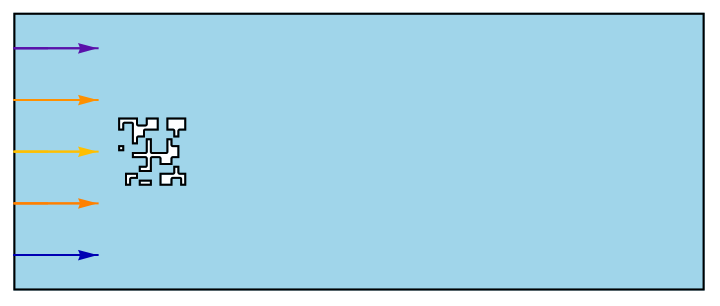
The simulation setup is a classic one in fluid dynamics: a two-dimensional channel with fluid entering from the left, flowing past an obstacle and exiting on the right. The obstacle is the part that evolves; the channel, the flow conditions and the numerical settings stay fixed, so that any difference in the flow between two geometries is caused by the geometries themselves.
This section defines that fixed stage: the domain and its dimensions, the simulation duration, the mesh resolution and the machinery that turns a binary array into an obstacle placed inside the channel. These definitions are global and every later section builds on them.
The Simulation Domain
The Simulation Domain
This subsection fixes the stage on which every simulation runs: the channel dimensions, how long the simulation lasts and how finely the domain is meshed. All quantities are dimensionless and these definitions are global, used by every later section.
Define the domain dimensions as a {length, height} pair, a channel 1 unit long and 2/5 high in dimensionless units. The fitness functions integrate vorticity and enstrophy from the flow field, so the channel must leave enough room for those structures to form:
In[]:=
dims=1,
2
5
Out[]=
1,
2
5
Set the simulation duration. The variable tMax sets how long the simulation runs; it must be large enough for the flow to fully develop around the obstacle:
tMax=5;
Set the resolution of the finite element mesh. The variable maxCellMeasure is the largest allowed area of a single element; smaller values give a finer mesh. Too coarse a mesh misses the flow structures near the obstacle boundary, and too fine a mesh makes the evolutionary walk impractically slow:
maxCellMeasure=0.0005;
Define the simulation domain from the chosen dimensions. The channel is a Rectangle spanning from the origin to the corner given by dims, so all later steps refer to this one region:
In[]:=
simulationRegion=Rectangle[{0,0},{First[dims],Last[dims]}]
Out[]=
Rectangle{0,0},1,
2
5
From Array to Mesh
From Array to Mesh
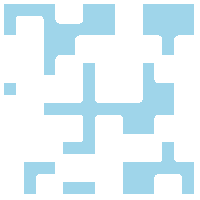
Every geometry in this essay starts as a binary array of fixed dimensions: 1 marks the presence of material, 0 its absence. The array itself has no notion of smoothness or symmetry, so it puts no built-in assumptions into the search. The fluid solver, however, cannot work with an array of numbers; it needs a geometric region with a well-defined boundary. Converting a random array into such a region requires two clean up steps. First, any interior holes are filled: a pocket of fluid sealed inside solid material is physically meaningless, since the flow can never reach it. Second, the shape is slightly dilated, thickening each cell so that solid cells touching only at a corner become properly connected instead of meeting at a single point, which would produce a geometry the mesh generator cannot handle.
Generate the starting geometry. The variable sizeRes sets the grid size, giving a 10 by 10 array of 100 cells and fixedSolid sets how many of them are solid, here 50, a material density of 50 percent. The array is built by shuffling a list containing exactly fixedSolid ones and the rest zeros, then reshaping it into a square; SeedRandom makes the shuffle reproducible, so every run of the notebook starts from the same geometry
In[]:=
sizeRes=10;fixedSolid=50;SeedRandom[1234];initArray=ArrayReshape[RandomSample[Join[ConstantArray[1,fixedSolid],ConstantArray[0,-fixedSolid]]],{sizeRes,sizeRes}];MatrixForm[initArray]
2
sizeRes
Out[]//MatrixForm=
1 | 1 | 1 | 0 | 1 | 1 | 0 | 1 | 1 | 1 |
1 | 0 | 1 | 1 | 1 | 1 | 0 | 1 | 1 | 1 |
0 | 0 | 1 | 1 | 0 | 0 | 0 | 0 | 1 | 0 |
0 | 0 | 1 | 0 | 1 | 0 | 0 | 1 | 0 | 0 |
1 | 0 | 0 | 0 | 1 | 0 | 0 | 1 | 1 | 0 |
0 | 0 | 1 | 1 | 0 | 1 | 1 | 1 | 1 | 0 |
0 | 0 | 0 | 0 | 1 | 0 | 1 | 1 | 0 | 0 |
0 | 0 | 0 | 1 | 1 | 0 | 0 | 0 | 1 | 0 |
0 | 1 | 1 | 0 | 0 | 0 | 1 | 1 | 1 | 1 |
0 | 1 | 0 | 1 | 1 | 0 | 1 | 1 | 0 | 1 |
Define the function that converts a binary array into a mesh region placed in the channel. The array is first treated as a binary image; FillingTransform fills any sealed interior holes and ImageMesh traces the material cells into an exact mesh region. RegionErosion then trims the shape slightly, removing the zero-width corner contacts that caused singularities in the solver. Finally the region is rescaled to a 1/10 by 1/10 box and translated into a fixed slot near the inlet, so every geometry occupies the same position and size in the channel:
matrixToRegion[mat_]:=Module{w,h},{h,w}=Dimensions[mat];TransformedRegion(*RegionDilation*)RegionErosion ImageMesh[FillingTransform[Image[mat]],Method->"Exact"],.2, TranslationTransform[{1/5-1/20,1/5-1/20}]@*ScalingTransform[{1/10/w,1/10/h}]
Apply the conversion to the starting array to create the obstacle and display the resulting region:
In[]:=
obstacle=matrixToRegion[initArray];Region[obstacle,ImageSize->Tiny]
Out[]=
Placing the Obstacle
Placing the Obstacle
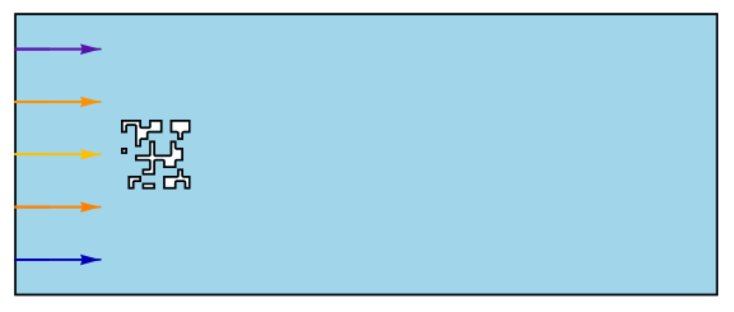
The obstacle and the channel are combined by subtraction: removing the obstacle from the rectangle leaves the flow region, the space the fluid actually occupies. The obstacle’s boundary becomes an interior wall of this region, which is where the interesting flow behaviour and everything the fitness functions measure, will develop. The visualization below shows the resulting region together with the inflow profile at the left boundary.
Subtract the obstacle from the channel with RegionDifference to form the flow region Ω, the domain the fluid equations will actually be solved on; everything outside the obstacle and inside the channel walls is fluid:
Ω=RegionDifference[Rectangle[{0,0},{First[dims],Last[dims]}],obstacle];Region[Ω,AspectRatio->Automatic]
Out[]=

Visualize the flow region and the inflow. The region’s boundary is discretized and drawn as a mesh outline and the arrows show the inflow velocity profile at the left wall: a parabola, fastest at mid-channel and vanishing at the walls, the standard profile for channel flow driven between no-slip walls:
bmesh=HighlightMeshBoundaryDiscretizeRegionΩ,,;ShowBoundaryDiscretizeRegion[Ω],bmesh,VectorPlot{4*1.5*y*(0.41-y)/0.41^2,0},{x,0,2.2},{y,0,0.41},,ImageSize->Medium
Out[]=
Simulating the Flow
Simulating the Flow
The flow developing around a randomly generated obstacle, shown as streamlines over the velocity magnitude .
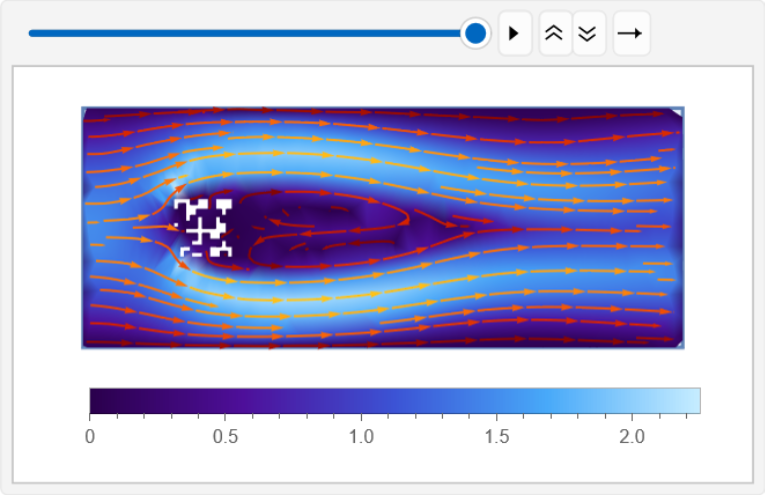
These equations have no general closed-form solution, so they are solved numerically: the channel is divided into a fine mesh and the equations are integrated forward in time from a resting start. This section states the equations and their boundary conditions, runs the solver and visualizes the resulting flow field.
The solver setup follows the Wolfram Example Repository example Solve a Nonlinear Model of Fluid Flow, where the method is documented in full. The original solves flow around a fixed disk, which we replace with the array-generated obstacle.
Setting Up the Flow Problem
Setting Up the Flow Problem
A flow problem needs three ingredients: the governing equations, conditions on every boundary and a starting state. The boundary conditions encode the physical setup: fluid enters at the left with a parabolic profile, leaves at the right where the pressure is fixed to zero and sticks to every solid surface, where the velocity vanishes. This no-slip condition on the obstacle is what generates the boundary vorticity several fitness functions measure. To avoid shocking the solver, the inflow ramps up smoothly from zero and the system starts at rest.
Specify the transient viscous Navier-Stokes equation and fix the parameters: viscosity μ = 10⁻³ and density ρ = 1, which with the obstacle size and inflow speed give a Reynolds number of about 100:
Specify a function that ramps up the inflow velocity:
Specify the boundary conditions: parabolic inflow on the left, fixed pressure at the outlet on the right, and no-slip on the walls and the obstacle:
Collect the boundary conditions into a single list for the solver:
Set up initial conditions such that the system is at rest:
Solving the Flow
Solving the Flow
Everything is now in place to solve the equations. The solver returns the solution as interpolating functions for the two velocity components and the pressure, functions that can be evaluated at any point and time in the channel. All later steps, from the visualizations below to every fitness evaluation in the evolutionary walk, query these three functions directly.
Time-integrate the Navier–Stokes equation on a mesh with specified spacing while interpolating the velocities with second order and the pressure with first order.
Visualizing the Flow
Visualizing the Flow
The solution is easiest to understand visually. The main quantity shown is vorticity, the local rotation of the fluid: at each point it measures how strongly and in which direction, the flow is spinning, positive for counter clockwise and negative for clockwise. Wakes, eddies, and boundary layers all appear as regions of concentrated vorticity, which makes it the natural quantity for seeing flow structure and it is also the raw ingredient most of the fitness functions are built from. A second view shows streamlines over the velocity magnitude, tracing the paths the fluid follows around the obstacle.
Compute the vorticity of the flow field:
Set up a fixed color scale for the vorticity, so all animation frames are directly comparable:
Visualize the vorticity after tMax time units have passed:
Generate the frames for an animation:
Produce an animation from the frames:
Visualize the flow as streamlines after tMax time units have passed:
Combine the streamlines with the velocity magnitude, shown as the background shading, and draw the obstacle in white:
Generate the frames for the streamline animation:
Produce the streamline animation from the frames:
Mutations
Mutations
Evolution needs a way to change a geometry slightly. The mutation used here is the smallest possible one: pick one random solid cell and one random fluid cell and swap them. One unit of material moves to a new location, and the total amount of material never changes. This matter conservation is deliberate: if mutations could add or remove material, the search could improve fitness simply by growing or shrinking the obstacle, and comparisons between geometries would confound shape with size. Keeping the solid count fixed forces the search to find better arrangements of the same material, which is the actual design question.
The function works in four steps. Position finds the coordinates of every solid cell and every fluid cell in the array, giving two lists of positions. RandomChoice picks one position from each list: a solid cell destined to become fluid, and a fluid cell destined to become solid. The two assignments then perform the swap, writing 0 into the first position and 1 into the second, and the mutated array is returned. The If guard covers the degenerate cases: if the array is entirely solid or entirely fluid there is nothing to swap, and the array is returned unchanged.
Apply one mutation to the starting array and compare it with the original, exactly one solid cell moves:
Fitness Functions
Fitness Functions
Evolution needs a single number that says how good a geometry is. A fitness function produces that number from the flow field: it takes the solved velocities and pressure and integrates some physically meaningful quantity from them. What that quantity should be is the central design choice of the whole project, because the evolutionary walk optimizes exactly what the fitness function measures. A function that rewards low turbulence produces different shapes than one that rewards low pumping cost, and part of this essay’s purpose is to compare where different choices lead.
1. Rotational Intensity of the Flow: Global Enstrophy
1. Rotational Intensity of the Flow: Global Enstrophy
Enstrophy is the integral of squared vorticity over the domain, introduced earlier as a single number summarizing the flow’s total rotational intensity. In two-dimensional flow it has a precise physical meaning: the rate at which the fluid dissipates kinetic energy is directly proportional to the enstrophy, so a high-enstrophy flow is one that continually converts motion into heat through friction. It also acts as a proxy for vortex content, since shed vortices and shear layers are exactly the regions where squared vorticity concentrates. Using global enstrophy as fitness and maximizing it therefore selects for geometries that stir the flow: shapes that shed vortices and fill the channel with rotational structure rather than letting the fluid slide past undisturbed.
The function computes the vorticity from the solved velocity fields: Derivative extracts the two cross-derivatives, ∂v/∂x and ∂u/∂y, whose difference is the vorticity. NIntegrate then integrates its square over the flow region Ω. The accuracy and precision goals are set deliberately low, at three digits, because this integral runs inside the evolutionary loop, where speed matters more than the fourth decimal place. The time argument defaults to tMax, so fitness is evaluated as a snapshot of the fully developed flow.
Compute the total enstrophy in the domain
2. Shear at the Obstacle: Boundary Vorticity
2. Shear at the Obstacle: Boundary Vorticity
Global enstrophy counts rotation everywhere, including vortices drifting far downstream. This function asks a more local question: how much shear is the flow generating right at the obstacle’s surface? The physics lives in the boundary layer: the no-slip condition forces the velocity to zero at the surface, so the fluid immediately above it is sheared, and that shear is precisely where vorticity is born before being carried into the wake. Integrating squared vorticity along the obstacle’s one-dimensional boundary, a boundary analogue of enstrophy, measures how strongly the surface itself works the flow, which is the relevant quantity when the goal is mixing or heat transfer at the surface, as in a heat-exchanger fin. Maximizing it rewards geometries with long, active boundaries rather than shapes that merely disturb the flow somewhere downstream.
Unlike the global version, this integral runs over a curve, and the function builds it by hand from the mesh. RegionBoundary extracts the obstacle’s boundary, and MeshCells lists its line segments; for each segment the code computes its length and its midpoint. The vorticity is evaluated at all midpoints at once and the dot product of squared vorticity values with segment lengths assembles the line integral, one rectangle per boundary segment. This avoids integrating over a region the solver’s interpolating functions only cover from one side, and it is fast, since the boundary has far fewer elements than the domain.
Compute the squared vorticity integrated along the obstacle’s boundary:
3. Pumping Cost (Inlet Pressure): Pressure Drop Proxy
3. Pumping Cost (Inlet Pressure): Pressure Drop Proxy
The first two functions measure what the flow does; this one measures what the flow costs. Pushing fluid through the channel requires maintaining a pressure difference between inlet and outlet, and the power a pump must supply is proportional to that pressure drop. Since the outlet pressure is fixed at zero by the boundary conditions, the average pressure across the inlet directly equals the pressure drop, making it a clean proxy for pumping cost. As a fitness function it comes with a caveat worth stating openly: maximized on its own, unnormalized by the obstacle’s size, it favours whatever shape chokes the channel hardest, so the search drifts toward bulky, channel-blocking geometries. That makes it useful when maximum flow resistance is genuinely the goal, and it makes it the natural denominator for the composite functions that follow.
The function averages the pressure along the inlet by the trapezoidal rule. Subdivide places evenly spaced sample points across the channel’s left edge, the solved pressure is evaluated at all of them at once, and the sum, with the two endpoints weighted by one half, divided by the number of divisions gives the average. A fixed sample count keeps the cost of this evaluation negligible next to the flow solve itself.
Evaluate the pumping cost for the starting geometry:
4. Efficiency Ratio (Enstrophy per Pressure Drop): Turbulence Efficiency
4. Efficiency Ratio (Enstrophy per Pressure Drop): Turbulence Efficiency
Neither rotation nor cost alone captures what an engineer means by a good design but the efficiency does. This function takes the ratio of the two: global enstrophy divided by the pressure drop, rotational activity bought per unit of pumping cost. A geometry scores well not by stirring the flow at any price, but by stirring it cheaply. Maximizing this ratio is the first of the composite criteria, and the one closest to a genuine design objective.
The function reuses the machinery already defined: it calls globalEnstrophy and pressureDropProxy on the same flow field and divides the results. The small constant ε in the denominator guards against division by zero in the degenerate case of a vanishing pressure drop; at 10⁻⁶ it is far below any physical pressure value in these simulations and never affects the ratio in practice.
Define the efficiency ratio as global enstrophy divided by the pressure drop:
5. Material Efficiency (Enstrophy per Pressure Drop and Area): Specific Turbulence Efficiency
5. Material Efficiency (Enstrophy per Pressure Drop and Area): Specific Turbulence Efficiency
The efficiency ratio still says nothing about how much material a geometry spends. This function adds that cost to the denominator: enstrophy divided by the product of pressure drop and the obstacle’s area, so that a good score means rotational activity bought cheaply in both pumping power and material. The engineering archetype is the vortex generator: a small, sparse structure that destabilizes the flow far beyond its size. Maximizing this ratio rewards exactly that character, and it becomes the natural criterion when comparing geometries that use different amounts of material.
The structure mirrors the previous function, reusing globalEnstrophy and pressureDropProxy, with one addition: Area measures the meshed obstacle directly, and the denominator becomes the product of pressure drop and area, again guarded by ε.
Define the material efficiency as enstrophy per pressure drop and obstacle area:
6. Surface Efficiency (Boundary Vorticity per Pressure Drop and Area): Boundary Efficiency
6. Surface Efficiency (Boundary Vorticity per Pressure Drop and Area): Boundary Efficiency
The last function completes the pattern: it is the material efficiency of function five with the numerator swapped, boundary vorticity in place of global enstrophy. The score is surface shear per unit of pumping cost and material, the criterion closest to fin design: a good fin generates intense activity at its surface, where mixing and heat transfer happen, while costing little to pump past and little material to build. Compared with the global composites, it is indifferent to what happens downstream in the wake; all the credit is earned at the obstacle’s own boundary. It is maximized, and it is the fitness function used for the main evolutionary walk in the next section.
The structure is identical to the previous function: boundaryVorticity replaces globalEnstrophy in the numerator, the denominator is again the product of pressureDropProxy and Area with the ε guard.
Define the boundary efficiency as surface vorticity per pressure drop and obstacle area:
The Evolutionary Loop
The Evolutionary Loop
Everything now assembles into the search itself. The algorithm is a hill-climbing walk, the simplest form of selection: mutate the current geometry, evaluate the mutant’s fitness, keep it if it scores at least as well, discard it otherwise, and repeat. There is no population and no crossover, just one geometry getting better one swap at a time.
Each evaluation requires a full flow solve, which makes cost the walk’s defining constraint. The loop therefore runs its simulations fast, at reduced accuracy that is still sufficient to rank geometries, and only the shapes worth showing, the starting and final geometries, are re-simulated at high resolution afterwards. The walk uses the boundary efficiency fitness from the previous section, and a fixed random seed makes the entire run reproducible: the same seed produces the same mutations, the same decisions, and the same final shape.
Evaluating a Geometry
Evaluating a Geometry
The walk needs one operation above all : take an array, produce a fitness number . The evaluator defined here chains the whole pipeline into a single call, converting the array to a region, solving the flow around it, and applying the chosen fitness function to the solution . Because this call runs at every step of the walk, it uses the fast simulation settings.
Configure the fitness function; every evaluation in the walk uses this choice, and any of the six functions can be substituted here:
Define a function that runs the full pipeline for any array: convert it to a region, subtract it from the channel, and solve the flow at a chosen resolution and duration:
simulateFlow packages the earlier sections into one reusable call. It applies matrixToRegion to the array, forms the flow region by RegionDifference, and runs the same NDSolveValue solve as before, with two differences: the mesh resolution and the simulation duration are now arguments, defaulting to the global high-resolution settings. The result comes back as an association holding the solution, the obstacle, and the region, so downstream code can ask for each by name. The resolution and duration arguments are what make the two-tier strategy possible: the same function serves both the fast evaluations inside the walk and the high-resolution showcase runs afterwards.
simulateFlow packages the earlier sections into one reusable call. It applies matrixToRegion to the array, forms the flow region by RegionDifference, and runs the same NDSolveValue solve as before, with two differences: the mesh resolution and the simulation duration are now arguments, defaulting to the global high-resolution settings. The result comes back as an association holding the solution, the obstacle, and the region, so downstream code can ask for each by name. The resolution and duration arguments are what make the two-tier strategy possible: the same function serves both the fast evaluations inside the walk and the high-resolution showcase runs afterwards.
Define the matching plot helper : given a simulation result, draw the streamlines over the velocity magnitude with the obstacle in white :
plotFlowField unpacks the association returned by simulateFlow and produces the same streamline-over-magnitude view used earlier, now parameterized by a plot label so that side-by-side comparisons, initial versus evolved, can be titled. Together the two helpers make the end-of-walk comparison a two-line affair: simulate each shape, plot each result.
Define the fitness evaluator: simulate the flow around an array and score it with the chosen fitness function, returning zero for geometries that cannot be simulated:
evaluateArrayFitness is the walk’s inner step: array in, fitness number out. It converts the array to a region and solves the flow exactly as simulateFlow does, then applies the fitness function to the solution; the mesh resolution, duration, and fitness function are all arguments, defaulting to the fast settings and the configured choice. Two guards make it safe to call on arbitrary mutants.
Degenerate geometries, an empty obstacle or one filling the whole channel, are rejected immediately with fitness zero. And the solve itself runs inside TimeConstrained: if a pathological geometry stalls the solver for more than thirty seconds, the attempt is abandoned and the geometry likewise scores zero. A returned solution is accepted only if it has the expected form of three interpolating functions. Scoring failures as zero rather than raising errors means the evolutionary walk simply selects away from non-simulatable shapes and keeps running unattended.
Evaluate the fitness of the starting array with the fast simulation settings:
Running the Walk
Running the Walk
With evaluation reduced to a single call, the walk itself is short to state. The cells below configure the run, set up a log that records every evaluation, define the hill-climbing function, and run it. Every accepted and rejected mutation is kept, so the entire history of the search can be reconstructed and plotted afterwards.
Initialize the walk: set its length, reset the step counter, and evaluate the starting array’s fitness as the score to beat:
Start the evaluation log; its first entry is the starting array, recorded as accepted with its fitness as the best so far:
Results of the Walk
Results of the Walk
The walk’s output is examined in two ways. First, the fitness history from the log, plotted step by step: the curve shows when improvements came, how large they were, and whether the search had plateaued by the end. Second, the geometries themselves: the starting and final shapes are re-simulated at full resolution and duration. Comparing the two flow fields side by side shows what the search actually discovered.
Define the hill-climbing walk: repeatedly mutate the current geometry, keeping the mutant whenever its fitness is at least as good:
runEvolutionaryWalk carries the search’s state as a triple: the step number, the current array, and its fitness. NestList applies one evolutionary step to this state a fixed number of times, keeping every intermediate state, so the walk’s full trajectory is the return value. Each step mutates the current array with mutateArrayFixed, evaluates the mutant with the fast settings, and accepts it if its fitness is at least the current fitness and strictly positive; on acceptance the mutant becomes the new state, on rejection only the step counter advances. The comparison uses greater-or-equal rather than strictly greater, which permits neutral drift: a mutation that neither helps nor hurts can still be adopted, letting the search wander across plateaus in the fitness landscape instead of freezing at the first flat spot. The positivity requirement keeps non-simulatable geometries, which score zero, from ever being accepted. Monitor displays the current step and best fitness while the walk runs.
Run the walk with a fixed random seed:
Extract the final geometry from the walk and re-simulate both the initial and evolved shapes at full resolution and duration:
Collect the results: the fitness history of the walk, the flow around the initial and evolved geometries, and the first entries of the walk’s log with their shapes drawn:
Animate the geometry across the walk : each frame is one step' s array converted to its region, showing the shape' s evolution from random start to final form :
Results
Results
To compare fitness criteria and material amounts, nine evolutionary walks were run: three fitness functions, globalEnstrophy, turbulenceEfficiency, and boundaryEfficiency, each at three material densities, 30, 50, and 70 percent of the array. The three functions span the design space: the raw rotational measure, the same measure charged for pumping cost, and the surface-based measure charged for cost and material. At each density, all three walks started from the same seeded random array, so differences between their outcomes are attributable to the fitness function alone. Every walk ran for 100 mutation steps under the fast simulation settings, and each final geometry was then re-simulated at full resolution. The four tables below organize the results, with fitness functions as rows and densities as columns: the fitness history of each walk, the evolved geometries, the flow around them, and the final fitness values.
Fitness histories
Fitness histories
◼
The largest fitness changes occurred at 30 percent density: all three functions gained the most where the search had the most freedom to rearrange sparse material.
◼
At 70 percent the behaviour splits: boundaryEfficiency found its best value within the 20 steps and stayed essentially flat, while globalEnstrophy kept improving steadily to step 100.
Evolved geometries
Evolved geometries
◼
Under boundaryEfficiency, the search opened channels through sparse material, letting fluid pass through the structure; at 70 percent it evolved a bulky mass with the beginnings of internal structure, but no clear channel developed within the 100 steps.
◼
Under globalEnstrophy at 70 percent, a clear channel formed through the material, giving the flow a path through the interior.
◼
Under turbulenceEfficiency at 50 percent, the material forms channels that split the incoming flow into separate streams, which may be one reason vortices appear in this wake.
Optimized flow fields
Optimized flow fields
◼
Under boundaryEfficiency, the 30 percent flow is smooth with little vortical activity downstream; at 50 and 70 percent a few vortices appear, but the wakes stay comparatively quiet — consistent with a function that rewards vorticity at the surface, not in the wake.
◼
Under globalEnstrophy, the 30 percent flow passes through the sparse structure with little mixing, while at 50 and 70 percent the wakes become visibly chaotic, even downstream of the 70 percent geometry’s internal channel — consistent with an objective that counts rotation everywhere.
◼
turbulenceEfficiency sits between the two: vortices and wakes are visible but less chaotic than under globalEnstrophy, moderated by the pressure-drop penalty in its denominator.
Final fitness values
Final fitness values
◼
In this experiment, less material meant higher final fitness for all three functions: for boundaryEfficiency, from about 9160 at 30 percent down to 865 at 70 percent.
◼
Even the raw globalEnstrophy declined with density, from about 9460 at 30 percent to 1442 at 70 percent: at this Reynolds number, adding material suppressed rather than amplified the flow’s total rotational activity.
◼
Values are comparable for the same function across densities, but not between functions: the three have different units and scales, so cross-function comparisons at a given density are not meaningful.
Each cell of the comparison is a single run from a single random start, so these observations are indicative rather than statistical.
Acknowledgements
Acknowledgements
I thank my mentor, Phileas Dazeley-Gaist, for his guidance throughout this project, Eric Parfitt for his help with the evolutionary approach, Stephen Wolfram for suggesting the research direction, and all the WSRI staff for making the program possible.
References
References
Wolfram Research (2019), “Solve a Nonlinear Model of Fluid Flow,” Wolfram Language Example Repository. https://resources.wolframcloud.com/ExampleRepository/resources/Solve-a-Nonlinear-Model-of-Fluid-Flow/
S. Wolfram (2024), “Why Does Biological Evolution Work? A Minimal Model for Biological Evolution and Other Adaptive Processes,” Stephen Wolfram Writings. https://writings.stephenwolfram.com/2024/05/why-does-biological-evolution-work-a-minimal-model-for-biological-evolution-and-other-adaptive-processes/
S. Wolfram (2002), A New Kind of Science. Wolfram Media.
M. Trott (2013), “Using Mathematica to Simulate and Visualize Fluid Flow in a Box,” Wolfram Blog. https://blog.wolfram.com/2013/07/09/using-mathematica-to-simulate-and-visualize-fluid-flow-in-a-box
AI Disclosure
AI Disclosure
The following generative AI tools were used in this project: Claude and Fable 5 – Opus 4.7. They were used to improve the clarity and language of the text, assist with brainstorming, support the literature review process, and help identify and debug code issues. All code and written content was critically reviewed, understood, and approved by the author.
CITE THIS NOTEBOOK
CITE THIS NOTEBOOK
Adaptive Evolution of Solid Structures under Simulated Incompressible Fluid Flows
by Olgar Ozturk
Wolfram Community, STAFF PICKS, July 16, 2026
https://community.wolfram.com/groups/-/m/t/3763003
by Olgar Ozturk
Wolfram Community, STAFF PICKS, July 16, 2026
https://community.wolfram.com/groups/-/m/t/3763003