Example data from the docs for Spectrogram and SpectrogramArray.
In[]:=
signal=;
Spectrogram, default parameters, user-defined color function (used throughout for consistency)
In[]:=
Spectrogram[signal,ColorFunction->"DarkRainbow",PlotRange->All,FrameTicks->None,ImageSize->600]
Out[]=

Now we use SpectrogramArray to get the matching array values, also default parameters, which the documentation says are the same for Spectrogram and SpectogramArray.
In[]:=
array1=Abs[SpectrogramArray[signal]];array1=array1[[All,Length[array1[[1]]]/2;;]];
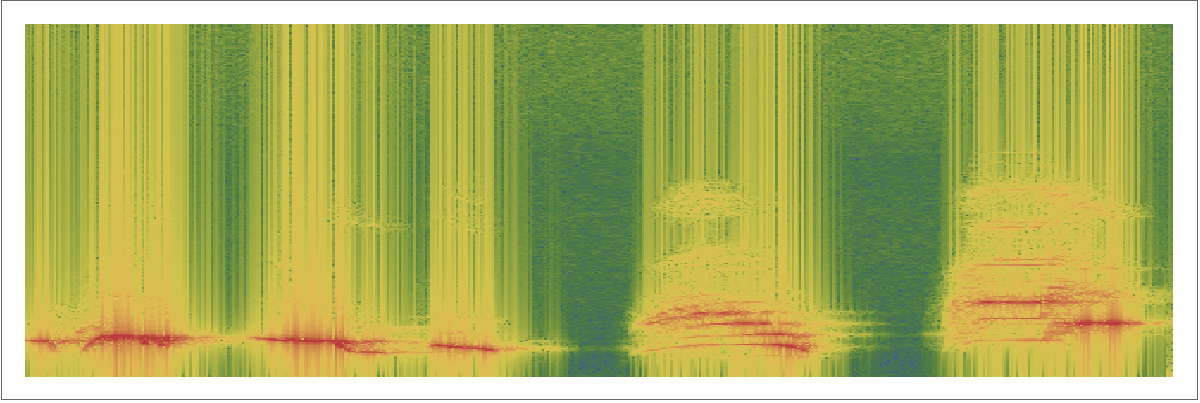
Log plot as suggested in the SpectrogramArray docs. Strong visible signal but a lot of vertical banding.
In[]:=
ArrayPlot[Transpose[Log[array1]],AspectRatio1/3,FrameTicksNone,ColorFunction->"DarkRainbow",ImageSize->600]
Out[]=
Non-log plot. No banding but signal only weakly displayed.
In[]:=
ArrayPlot[Transpose[array1],AspectRatio1/3,FrameTicksNone,ColorFunction->"DarkRainbow",ImageSize->600]
Out[]=

Best I can come up with: square root plot. Closer to Spectrogram, but not quite as strong, and the vertical banding is starting to become visible.
In[]:=
ArrayPlot[Transpose[Sqrt[array1]],AspectRatio1/3,FrameTicksNone,ColorFunction->"DarkRainbow",ImageSize->600]
Out[]=
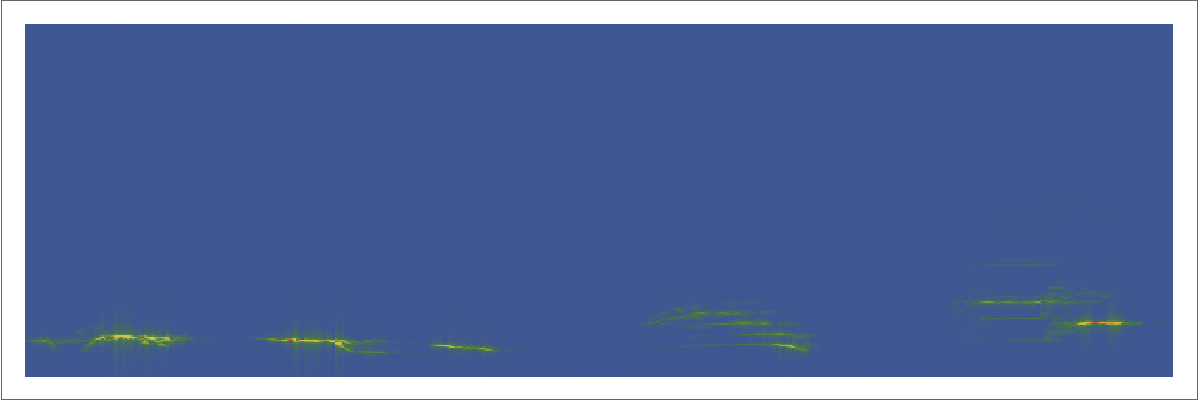
So, what is Spectrogram doing to produce its nice clean plots? Is it using the exact same algorithm to get the array, and then applying some combination of filtering, transformation and thresholding? Or is there something deeper going on? Either way it is not very ‘Mathematica-like’ to have this inconsistency, at least without explanation.