Echolocation is a biological sonar used by various animals groups as a complex and efficient mechanism of navigation and prey sensing. The project’s aim is to visualize the process of the interactions between the sound waves and the environments, as well as the sound waves that were reflected back. In this project, we physically accurately simulated this process by solving the wave partial differential equation (PDE) models with finite element method (FEM) in the time domain. We extracted the simulated received binaural waveforms and we were able to relatively accurately extract the distance and direction of objects. We explored various factors including different object positions, object shapes, source wave frequencies to see how it effects the wave’s interactions.
Introduction
Introduction
Echolocation is used by animals like bats and dolphins to locate and identify objects during navigation, foraging, and finding prey (Langley, 2021). The animals emit calls in the ultrasound frequencies to be bounced off of the objects in the environment. These sounds then bounce back and return to the animals’ two ears to be processed based off of the time-delay between the ears and relative intensities between the ears, allowing them identify the object’s distance and direction, as well as even where it’s going, how big it is, etc (Warner, 2020). Overall, echolocation is a complex and fascinating process, and we wish to visualize and model this process as realistically as possible.
Background Information
Background Information
Sound waves are longitudinal waves that propagating through a medium through vibrations. While there is no net transport of medium, the densities/pressures of the medium varies in time as the wave propagates. Acoustics as a field of study models sound by changes in the pressure in the medium.
Throughout this project, we used Wolfram’s acoustic package for the acoustic physics simulation (Acoustics in the Time Domain-Wolfram language documentation). Specifically, we used the package to setup the sound wave partial differential equations (PDEs), which describes how the sound wave physically behaves and interacts in the environment. The PDE is then solved in the time domain numerically with NDSolve with finite element method (FEM). Through FEM, the environment is split up into a mesh of nodes (spatial discretization), breaking the complex PDE and environment into many simpler problems. Overall, by solving the PDE under the specified environment, we can get the pressure changes across time and space, and therefore how the sound wave moves through the environment.
The wave equation for the time dependent propagation by the sound waves in a lossless media is:
The wave equation for the time dependent propagation by the sound waves in a lossless media is:

where p is the pressure deviation from normal (dependent variable), X and t are the location and time (independent variables), Q and F are monopole and dipole sources, ρ is the density and c is the speed of sound.
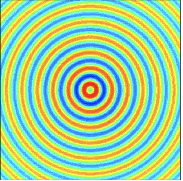
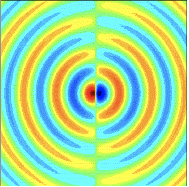
Note that monopole and dipole are two types of sound sources (as shown by image below on the left and right respectively). A monopole is source that radiates sound equally in all directions from a single point. A dipole is essentially made up of two monopoles with opposite phase separated by a small distance. A dipole would model an unboxed loud speaker while a monopole would model a boxed loud speaker. For our purpose, we will use a monopole for simplicity.
Model Setup
Model Setup
To setup the acoustic model simulation, we need to define the necessary environmental conditions and audio source.
Environment setup
Environment setup
We will use the finite elements package in Wolfram, which implements the FEM for spatial discretization to solve the PDEs.
Loads finite element package:
In[]:=
Needs["NDSolve`FEM`"]
Here, we implement the above acoustic wave equation using the acoustics library.
2D time dependent acoustic model:
In[]:=
AcousticPDEComponent[{p[t,x,y],t,{x,y}},<|"SoundSpeed"->c,"MassDensity"->ρ|>]
Out[]=
∇
{x,y}
1
ρ
1
ρ
∇
{x,y}
(2,0,0)
p
2
c
Next, we need to setup the basic environment conditions (air density and sound speed) using the typical values imported from ThermodynamicData.
Sets up the material parameters for the model:
In[]:=
Subscript[c,air]=QuantityMagnitude[ThermodynamicData["Air","SoundSpeed"]];Subscript[ρ,air]=QuantityMagnitude[ThermodynamicData["Air","Density"]];pars=<|"SoundSpeed"->Subscript[c,air],"MassDensity"->Subscript[ρ,air]|>;
Defines the variables in the simulation
In[]:=
vars2D={p[t,x,y],t,{x,y}};
In the finite element simulation, the domain is split up into a mesh of nodes to find the numerical solution for the governing differential equation. This mesh needs to be sufficiently fine to have the solution to be accurate. We define a function that gives maximum grid edge length based on the wavelength and the resolution (e.g. how many nodes per wavelength).
Defines a function that gives the appropriate mesh grid edge size for the FEM:
In[]:=
MaxGridSize[c_,ω_,WaveType_,Resolution_,StandardDeviation_]:=Module[{λ,β},β=StandardDeviation;λ=If[WaveType=="TimeHarmonic",2 π c/ω,2 β Sqrt[2 Log[10]]];λ/Resolution]
Defines a function that gives the default options for the acoustic model:
In[]:=
Options[AcousticsOptions]={"WaveType"->"TimeHarmonic","Resolution"->8,"StandardDeviation"->0.1};AcousticsOptions[c_,ω_,opts:OptionsPattern[]]:=Sequence[AccuracyGoal->3,PrecisionGoal->3,Method->{"PDEDiscretization"->{"MethodOfLines","SpatialDiscretization"->{"FiniteElement","MeshOptions"->{"MaxCellMeasure"->{"Length"->MaxGridSize[c,ω,OptionValue["WaveType"],OptionValue["Resolution"],OptionValue["StandardDeviation"]]}}}}}]
The simulation model needs an initial condition, or how the domain looks like when it starts the simulation. For this project, I will set the domain to be undisturbed at the start.
Defines an undisturbed initial condition:
In[]:=
silentIC2D={p[0,x,y]==0,Derivative[1,0,0][p][0,x,y]==0};
Audio Source Setup
Audio Source Setup
To model the sound emitted from the bat, we will use a monopole acoustic source since we assume it is coming from a single point. In this section, we will mathematically define the monopole source function and related variables to be used in the FEM solver.
Sets up the constants: ω is the angular frequency, tEnd is the simulation end, wTEnd is the end of when the monopole stop emitting (set as after two wavelengths)
In[]:=
tend=0.003;ω=20025wtend=4.0*Pi/ω
Out[]=
20025
Out[]=
0.000627534
Defines the location of the sound source:
In[]:=
xs={0,0.25};
Normally, a monopole source is modeled by a Dirac delta function (a function that’s zero at everywhere else except zero and it’s integral is equal to one) at the source location. However, the Dirac delta function can’t be resolved in the FEM simulation since it is only existing at a single point. Therefore we will use an approximation called the regularized Dirac delta equation.
Defines a 2D regularized Dirac delta function:
In[]:=
EuDistList[X_List,Xs_List]:=MapThread[EuclideanDistance[#1,#2]& ,{X,Xs}];RegularizedDelta[γ_,X_List,Xs_List]:=Piecewise[{{Times@@Thread[1/(4 γ) (1+Cos[π/(2 γ) EuDistList[X,Xs]])],And@@Thread[EuDistList[X,Xs]<=2 γ]},{0,True}}]
Calculates the mesh spacing by the FEM:
In[]:=
h=MaxGridSize[Subscript[c,air],ω,"TimeHarmonic",8,0];
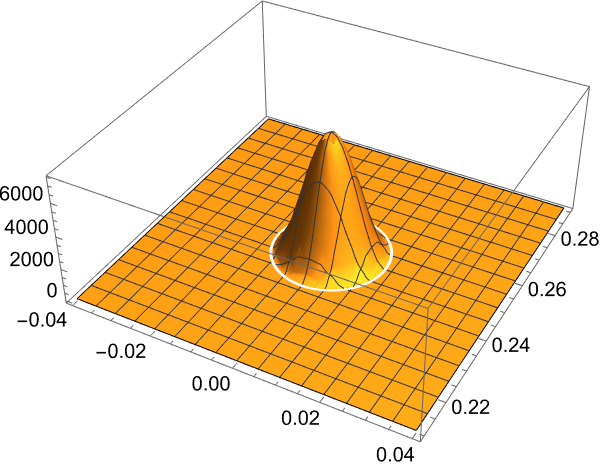
The monopole source is defined as the regularized Dirac delta function whose amplitude oscillates by a cosine across time. Note that the amplitude of the source function is arbitrary and does not reflect real life, but the patterns should be about the same.
Defines the monopole source function:
In[]:=
Q
Q
Visualizes the source function at t=0
In[]:=
Plot3D[Q[0.0000,{{x,y}},{xs}],{x,-0.04,0.04},{y,0.21,0.29},PlotRange->Full]
Out[]=
Changes the environment parameters to include the monopole source
In[]:=
monopolePars=Join[pars,<|"MonopoleSource"->Q[t,{{x,y}},{xs}]|>]
Out[]=
SoundSpeed343.344,MassDensity1.20458,MonopoleSource100Boole[t<0.000627534]Cos[20025t]
|
We only want the object(s) of interest in the middle of the environment to reflect the sound waves. The four walls on the sides should ideally let the waves pass through and not reflect any back. I used the acoustic absorbing boundary condition to model this.
Creates the boundary condition to make the outer sides of the domain:
In[]:=
R[r_]:=1/(2r);Subscript[Γ,ABC]=AcousticAbsorbingValue[x==left||x==right||y==top||y==bottom,vars2D,pars,<|"AcousticSourceDistance"->R[Sqrt[(x)^2+(y-0.25)^2]]|>]
Out[]=
NeumannValue-+-0.00241789[t,x,y],xleft||xright||ytop||ybottom
0.415084p[t,x,y]
2
x
2
(-0.25+y)
(1,0,0)
p
Sets up the PDE with the silent initial condition, monopole source and boundary conditions previously defined
In[]:=
pde={AcousticPDEComponent[vars2D,monopolePars]==Subscript[Γ,ABC],silentIC2D}
Out[]=
-100.Boole[t<0.000627534]Cos[20025.t]
+·({{-0.830168,0.},{0.,-0.830168}}.p[t,x,y])+7.04219×[t,x,y]NeumannValue-+-0.00241789[t,x,y],xleft||xright||ytop||ybottom,p[0,x,y]0,[0,x,y]0
|
∇
{x,y}
∇
{x,y}
-6
10
(2,0,0)
p
0.415084p[t,x,y]
2
x
2
(-0.25+y)
(1,0,0)
p
(1,0,0)
p
Model Simulations
Model Simulations
With the model set up, we will see if we can extract information on the environment (distance and direction of the object) using the received reflected binaural waves.
Defines the overall shared initial domain:
Distance Information
Distance Information
We will start with a simple case of a circle in the center and see if we can extract the distance.
Defines domain/environment:
The red dot in the graphic above represents the sound source.
Solves the PDE in the defined environment:
Next, we will plot the pressure deviations throughout the 2D environment across time with an animated 3D plot.
Define constants that will be used for future visualizations:
Render the simulation results:
We can record the pressure deviation over time at one of the receivers. To find the distance from the source to the object, we can simply find the difference in time between the first peak of the source oscillation and the first peak of the received oscillation. We can then use the speed of sound and various mathematical methods (explained later) to find the distance. In this case, the true distance of the source to the object is 0.25 meters.
Records the pressure across time for one of the receiver spots and find the peaks (y-axis: pressure deviation, x-axis: time index):
Here, we can see the starting two full wavelengths of the source waves initially being received. Note that while we set the source to stop transmitting after two wavelengths, there is a third peak due to the momentum. Then, after a delay in the middle, the reflected waves gets received.
Distance estimation with sound (naive approach) using the first transmit peak (first overall peak) and the first received peak (fourth overall peak):
This is pretty close but we didn’t take into the account of the fact that the receiver is a certain distance away from the initial source.
Distance estimation with the added on receiver delay:
Distance estimation with path difference correction
The difference between with and without path difference correction isn’t much. We’re going to ignore path difference for now for simplicity, and also because the distance between the receiver and the source are relatively insignificant compared to the distance from the source to the object.
Notice that even with the path difference correction, there is still a bit of error. This is likely due to that the monopole source function and FEM simulation is not perfectly accurate.
Notice that even with the path difference correction, there is still a bit of error. This is likely due to that the monopole source function and FEM simulation is not perfectly accurate.
Defines distance calculation function for future use:
Direction information
Direction information
Next, we will try to extract the direction information with a circle offset from the center.
Defines domain/environment:
Solves the PDE in the new environment:
Renders the simulation results:
To perceive direction, we must utilize two receivers at the same time. The delay of the sound wave arriving to the two different receivers will allow us to extract direction information. The receiver closer to the object would receive the bounced back wave first, and the larger the angle deviation, the larger the time difference would be.
Defines a function to extract the received acoustic pressures from both receivers and find peak for future use:
Plots the recorded pressures and peaks:
Note that here and for the rest of this notebook, we refer the “top” object/receiver as having a higher y-coordinate and a lower y-coordinate for the “bottom” object/receiver.
As expected, the initial source sound waves recorded by the two receivers matches up together (the two receivers peak at the same time for the first three peaks) since they’re equidistance from the source. For the reflected waves recorded (the later peaks), the top receiver peaks before the bottom receiver since it is closer to object. We can use this time delay between the receivers to figure out the direction of the object.
Finds the distances of the two receivers from the object:
Implements Stewart’s theorem:
Function to convert from radian to degrees:
With the middle length, we can use the law of cosine to find the angle of the object.
Implements law of cosine
The true angle of the circle’s center:
The predicted and the actual angle is pretty close together, only ~2 degrees off.
Defines function to solve for angle for future use:
We can also compare the predicted distance (m) to the actual distance:
Predicted distance:
Actual distance:
Once again, the calculated value for the distance of the object from the source is relatively close to the actual distance.
Multiple Objects
Multiple Objects
Next, we will explore echolocation’s ability to detect and resolve multiple objects (in this case, two circles).
Defines domain/environment:
Solves the PDE in the new environment:
Renders the simulation results:
Extracts the received acoustic pressures from both receivers and find peaks:
Plots the received waves:
Notice first the waves from the closer object near the top gets received first — the top receiver peaks before the bottom for the first few reflected pulses. The object further from the receiver is received later — the bottom receiver peaks before the top for the last few reflected pulses.
Predictions for upper object:
Actual distance and angle for upper object:
Predictions for lower object:
Actual distance and angle for lower object:
Impact of frequency
Impact of frequency
Bats have two types of echolocation calls: constant frequency (CF) and frequency modulated (FM). CF allows to detect the prey’s distance and velocity (through Doppler effect), being more suitable in open environments. FM, emitting with a range of frequencies, is more suitable for cluttered environments: lower frequencies give longer range while higher frequencies give more details. We can test how the frequency of the transmitted wave affect the ability to distinguish two objects. Let’s see how different frequencies impact resolving two objects close together.
Defines the new frequencies and the related variables:
Defines the related functions (monopole source & PDE function):
Simulates the new frequencies (we will reuse the previous section’s results for the high frequency one):
Visualizing the simulation for different frequencies
Here, we can see how different frequency sound waves interact with the environment. The higher the frequency of a wave, the more energy it takes to generate it compared to a lower frequency at the same amplitude. Therefore, the amplitudes of the medium and low frequency are higher. In the following graphs, amplitude of the medium and low frequency are scaled down by 2x and 4x respectively for easier comparison.
Renders the simulation results for high frequency:
Renders the simulation results for medium frequency:
Renders the simulation results for low frequency:
Comparison of the received waves of different frequencies
Next, we will compare the different frequencies from the perspective of the received waveforms. This will give us a clearer picture of how the different frequencies affect the ability to detect objects.
Extracts the received acoustic pressures from both receivers and find peaks:
Defines a function for plotting the received waves:
Plots the received waves of different frequencies:
From these received waveforms, we can see that the reflected waves of the two objects are more slurred together for lower frequencies.
Distance and angle estimation comparison
Distance and angle estimation comparison
Let’s compare the accuracy of different wavelengths. We will estimate the lower object since it is further away and the effects of different frequencies are best displayed by the reflected waves of it.
True distance and angle of the lower object:
Estimated distance and angle by high frequency:
Estimated distance and angle by medium frequency:
Estimated distance and angle by low frequency:
Note that the angle came out to be imaginary because there wasn’t a valid angle for the angle to be at. This makes sense since the peaks of the two receivers are abnormally far apart in the graph above.
In general, a lower frequency resulted in a worse estimation as expected.
Impact of shape
Impact of shape
We are going to preliminarily explore the impact of shape on the received sound waves by comparing what it looks like between square and circle.
Defines the environment:
Solves the PDE:
Renders the simulation results:
Records the received waveforms:
Plots the waveforms:
The received waves coming off of the cube seems a lot more irregular between the peaks. This appears to be caused by the corner of the cube bouncing the cube off weird. This effect can be seen in the following graphic at t = 0.0014:
Renders the simulation result at t = 0.0014:
Conclusion and Further Exploration
Conclusion and Further Exploration
In this project, we created an acoustic simulation based on FEM to visualize how the sound waves emitted by echolocation interacts with different types of environment and how the waves reflected back look like from a binaural perspective. This can help us gain further understanding on how animal echolocation works, and help us develop future bio-inspired technology utilize echolocation/sonar.
There are improvements can be made to make the simulation more physically accurate. The space and time were not to-scale (domain is can be bigger and simulation time can be longer) as the simulation would otherwise take too long. Currently, we only transmit two full wavelengths (<0.0007 seconds)before stopping, but in reality the call is longer. Interactions of calls that include a range of frequency (FM) can also be explored. Further exploration using similar methods can be done on various other factors like more complex shapes, object size, cluttered environments (e.g. inside a cave), etc. We can also do further exploration into the signal processing of the received waveforms like machine learning.
Acknowledgements
Acknowledgements
Thank you to my mentor Karan Chakravarthy for his guidance in this project and helping me think through ideas. Steven Wolfram for giving me direction for the project.
References
References
1
.Warner, K. (2020, October 14). Echolocation. National Parks Service. https://www.nps.gov/subjects/bats/echolocation.htm
2
.Langley, L. (2021, February 3). Echolocation is nature’s built-in sonar. here’s how it works. Animals. https://www.nationalgeographic.com/animals/article/echolocation-is-nature-built-in-sonar-here-is-how-it-works
3
.Acoustics in the Time Domain-Wolfram language documentation. (n.d.). https://reference.wolfram.com/language/PDEModels/tutorial/Acoustics/AcousticsTimeDomain.html#1527648872
CITE THIS NOTEBOOK
CITE THIS NOTEBOOK
Simulating echolocation via sound wave interactions in various environments
by Shangqiu (David) Li
Wolfram Community, STAFF PICKS, July 2024
https://community.wolfram.com/groups/-/m/t/3216469
by Shangqiu (David) Li
Wolfram Community, STAFF PICKS, July 2024
https://community.wolfram.com/groups/-/m/t/3216469