Introduction
Introduction
When dealing with complicated operations on a dataset, it can often be hard to picture what exact changes the dataset is undergoing to reach the final output. Queries can contain two types of operations, ascending and descending, which work together to slice requested information from the dataset. Descending operators work as they go into deeper layers of the dataset, while ascending operators return a summary of the descending operators. This almost recursive nature of queries can make them very hard to visualize or even comprehend, even if you have written the code yourself at some point. This project aims to solve this problem by helping users of the Wolfram Language visualize queries, as well as make queries from scratch, all without purely relying on textual queries.
The following dataset will be used throughout this project as a point of reference:
In[]:=
data=Dataset[{<|"a"1,"b""x","c"{1,11}|>,<|"a"2,"b""y","c"{2,12}|>,<|"a"3,"b""z","c"{3,13}|>,<|"a"4,"b""x","c"{4,14}|>,<|"a"5,"b""y","c"{5,15}|>,<|"a"6,"b""z","c"{0,10}|>}]
Out[]=
Validation of Input
Validation of Input
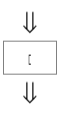
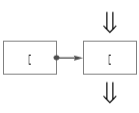
Because the queries are received from the user, it makes sense to check their validity before we do any further operations. We would like our code to operate under the assumption that nothing will break from the given input. One of the main things we have to check besides whether the code is syntactically correct is ensuring the brackets are matched properly. To accomplish this, use a stack and iterate through each character in the split string, matching brackets when you encounter them.
As a sample use Query[GroupBy[“b”], Catenate, “c”]:
In[]:=
input=(*StringSplit[FormFunction[{"code"<|"Label""Code","Interpreter""String"|>}][]["code"],""]*)StringSplit["Query[GroupBy[\"b\"],Catenate,\"c\"]",""]
Out[]=
{Q,u,e,r,y,[,G,r,o,u,p,B,y,[,",b,",],,,C,a,t,e,n,a,t,e,,,",c,",]}
Short function to ensure brackets are matched correctly:
In[]:=
VerifyMatch[cd_]:=Module[{stk},stk=CreateDataStructure["Stack"];Table[If[cd[[i]]≠"["&&cd[[i]]≠"]",True,If[cd[[i]]"[",stk["Push",cd[[i]]],If[stk["EmptyQ"],Return[False],stk["Pop"]];];Print[stk["Visualization"]]],{i,1,Length[cd]}];If[stk["EmptyQ"],Return[True],Return[False]]];
In[]:=
VerifyMatch[input]
Out[]=
True
As a last check, we also evaluate the expression itself to make sure the code will run in a Wolfram Notebook. This step supersedes the previous code, but is more broad and does not provide a specific reason to why the code is incorrect should it break.
Run the concatenated input as a last check of validity - should run without errors if everything is okay:
In[]:=
ToExpression[StringJoin[input]]
Out[]=
Query[GroupBy[b],Catenate,c]
Visualizing Bracket Structure
Visualizing Bracket Structure
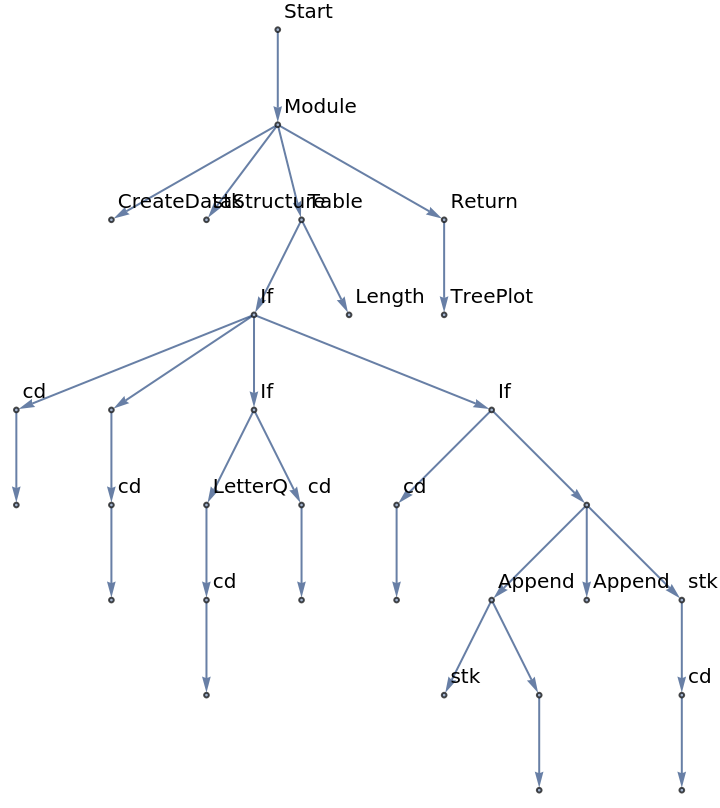
The question of how a query function is structured begs the more general question of how code in general is structured. Due to the symbolic and functional nature of the Wolfram Language, code can be visualized as a graph of functions and symbols relating to each other
In[]:=
CodeGraph[cd_]:=Module[{stk,grp={},lbl={0"Start"},cnt=0,cur=""},stk=CreateDataStructure["Stack"];stk["Push",{".",0}];Table[If[cd[[i]]≠"["&&cd[[i]]≠"]",If[LetterQ[cd[[i]]],cur=cur<>cd[[i]],cur=""],If[cd[[i]]"[",grp=Append[grp,stk["Peek"][[2]]++cnt];lbl=Append[lbl,cntcur];cur="";stk["Push",{cd[[i]],cnt}],stk["Pop"]]],{i,1,Length[cd]}];TreePlot[grp,0,VertexSizeTiny,VertexLabelslbl]]
In[]:=
CodeGraph[input]
Out[]=

A more complicated example:
In[]:=
CodeGraph[StringSplit["Module[{stk,grp={},lbl={0\"Start\"},cnt=0,cur=\"\"},stk =CreateDataStructure[\"Stack\"];stk[\"Push\",{\".\",0}];Table[If[cd[[i]]≠\"[\"&&cd[[i]]≠\"]\",If[LetterQ[cd[[i]]],cur=cur<>cd[[i]]cur=\"\"],If[cd[[i]]\"[\",grp=Append[grp,stk[\"Peek\"][[2]]++cnt];lbl=Append[lbl,cntcur];cur=\"\";stk[\"Push\",{cd[[i]],cnt}],stk\"Pop\"]]],{i,1,Length[cd]}];Return[TreePlot[grp,0,VertexSizeTiny,VertexLabelslbl]]]",""]]
Out[]=
Parsing the Input for Processing
Parsing the Input for Processing
In order to understand what the query is asking for, the query must be decomposed into its individual components.
Find each component of the query and return it as a list of strings:
It is also important to now discern which operations are ascending and descending, as this is a crucial part about the complexity of the Query function. This is a rudimentary check, which assumes ascending operators contain only letters and no other characters.
Code for the aforementioned process:
Visualizing the Query
Visualizing the Query
Now that the input has been parsed, visualizations on the Query can be made. The most obvious way to do this is through a simple linear graph that shows each step of the query as it descends through each level. This allows the user to see what is happening on each level, even if the operator at that level is not a descending operator.
Firstly, consider the descending operators, and how they narrow down the scope of a query:
To get an idea of how the descending operators work, replace every occurrence of an ascending operator with “All”, as this preserves the decreasing nature of the Query function.
Interacting with the Query
Interacting with the Query
To make it easier to visualize, users should also be able to interact with the code to get information on the query at specific points in time. Taking the information from the previous step, we can construct a graph structure with buttons that allows users to click on the query at each step.
Construct a graph from the previous step:
Increasing Robustness of Code
Increasing Robustness of Code
The previous approaches to visualizing the structure of a query have been parses of the input, but to accurately represent the structure of query, a more powerful algorithm should be implemented. The Normal function in the Wolfram Language converts various expressions to their normal forms, and has already been used in this project to represent a dataset as a group of nested associations. The Normal function can also be applied to Queries to get a single, linear representation of the query that can be parsed from left to right without worrying about ascending or descending operators.
Convert the query into its normal form, then split it on each character:
Parse the normal expression on /*, keeping in mind bracket matching:
Apply each query to the dataset:
Create the graph again based on the robust results:
Generation of Queries
Generation of Queries
One interesting aspect of the project is being able to generate the possible queries given a dataset. To accomplish this, one can set a list of possible operators, and recur at every depth to generate the outputs. There must be care in ensuring that operators such as “All” do not get applied infinity and the function comes to a stop at some point.
Sample operators:
Recur through each possibility, keeping track to make sure repeats do not occur:
Generating the possible queries:
Conclusion
Conclusion
Visualization of a complicated topic makes comprehension a great deal easier, and this project is a good example of that. Taking what is usually a very abstract and hard to understand function and decomposing it down to the individual components has allowed even myself to understand what is happening on the back end of the function. It was also noted that functions such as Query are unable to be parsed regularly without expecting bugs and errors, making functions such as Normal a very useful workaround.
Extensions
Extensions
One of the main aspects of the project that I did not have time to explore was giving the user the option to interact freely with queries, and create queries themselves. Not only are query functions generally confusing to comprehend, but they are also hard to generate, even if you know exactly what kind of results you would like out of it. This makes a tool such as a visualization of possible queries possible at each step a very useful tool. It would also be interesting to train a model on what query functions tend to work better rather than iterating through each possible combination.