Every year, millions of people worldwide watch drone light shows, which play a central role in cultural and national celebrations. Designing and optimizing drone light shows to ensure efficient and synchronized movement. With the growing popularity of drone light shows in entertainment, advertising, and public events, there is a need for effective path planning to manage multiple drones simultaneously. This approach focuses on determining the best flight paths for drones by minimizing flight time and distance traveled. After creating a path finding function, I also animated the drone paths using frames.
Introduction
Introduction
Drone light shows are a performance of synchronized drones displaying a series of images using lights. The drones move from one place to another and change the colors of their lights to form various designs. These light shows are used mainly as an alternative to fireworks, which have been heavily criticized for their negative environmental impact from the loud noise and pollution. Fireworks are also far less versatile than drones, as the patterns that fireworks can make also cannot be customized or modified.
For my project, I wanted to optimize the movement of the drones from one design to another, and minimize the total combined distance traveled by the drones. The drones are preprogrammed, so their positions, flight paths, and colors are all planned out in advance. When under a time limit, less time spent on moving from one design to another means more time for a variety of designs to be displayed. I also wanted to be able to choose my starting and ending designs using images, and I was eventually able to take two images, convert them to coordinates, and animate an efficient method of one transforming into the other.
For my project, I wanted to optimize the movement of the drones from one design to another, and minimize the total combined distance traveled by the drones. The drones are preprogrammed, so their positions, flight paths, and colors are all planned out in advance. When under a time limit, less time spent on moving from one design to another means more time for a variety of designs to be displayed. I also wanted to be able to choose my starting and ending designs using images, and I was eventually able to take two images, convert them to coordinates, and animate an efficient method of one transforming into the other.
Optimizing Drone Paths
Optimizing Drone Paths
For the majority of my time, I worked on this first series of path finding functions. However, when finally trying to animate them with larger amounts of coordinates, I realized that it was way too inefficient and took too much time to run. I then pivoted to using a different method of path finding, which significantly reduced the amount of time the animation took to complete.
While my method of finding drone paths is not the most optimal, it still outputs an efficient way of transforming one set of coordinates into another.
While my method of finding drone paths is not the most optimal, it still outputs an efficient way of transforming one set of coordinates into another.
Iteration Method (Slow Method)
Iteration Method (Slow Method)
This example of coordinates enlarges a 3 by 3 square to a 5 by 5 square:
In[]:=
startCoords={{2,1},{3,1},{4,1},{4,2},{4,3},{3,3},{2,3},{2,2}};ListPlot[startCoords,PlotRange->{{0,8},{0,5}}]endCoords={{1,0},{3,0},{5,0},{5,2},{5,4},{3,4},{1,4},{1,2}};ListPlot[endCoords,PlotRange->{{0,8},{0,5}}]
Out[]=
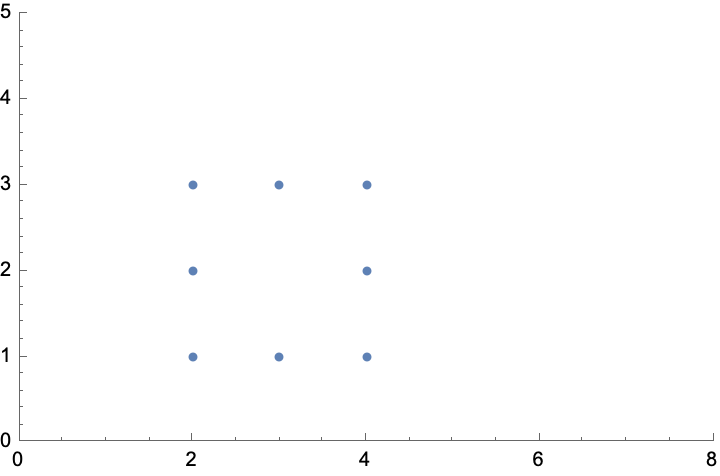
Out[]=
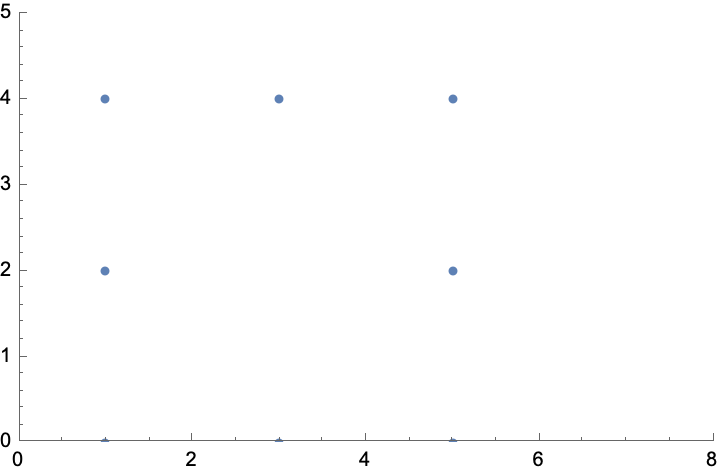
Creating a distance matrix between all starting and ending coordinates:
In[]:=
distanceMatrix[{x_,y_}]:=Most[Last[DistanceMatrix[Append[y,#]]]]&/@xdM=distanceMatrix[{startCoords,endCoords}]
Out[]=
2
,2
,10
,10
,32
,10
,10
,2
,5
,1,5
,5
,13
,3,13
,5
,10
,2
,2
,2
,10
,10
,32
,10
,13
,5
,5
,1,5
,5
,13
,3,32
,10
,10
,2
,2
,2
,10
,10
,13
,3,13
,5
,5
,1,5
,5
,10
,10
,32
,10
,10
,2
,2
,2
,5
,5
,13
,3,13
,5
,5
,1I needed to keep track of which distances referred to which ending coordinates, otherwise the distances would have no significance.
Riffling the ending coordinates into the distance matrix:
In[]:=
riffleFunct[x_List,y_List]:=Table[Partition[Riffle[x[[i]],y],2],{i,Length[x]}]riffleFunct[dM,endCoords]
Out[]=
2
,{1,0},2
,{3,0},10
,{5,0},10
,{5,2},32
,{5,4},10
,{3,4},10
,{1,4},2
,{1,2},5
,{1,0},{1,{3,0}},5
,{5,0},5
,{5,2},13
,{5,4},{3,{3,4}},13
,{1,4},5
,{1,2},10
,{1,0},2
,{3,0},2
,{5,0},2
,{5,2},10
,{5,4},10
,{3,4},32
,{1,4},10
,{1,2},13
,{1,0},5
,{3,0},5
,{5,0},{1,{5,2}},5
,{5,4},5
,{3,4},13
,{1,4},{3,{1,2}},32
,{1,0},10
,{3,0},10
,{5,0},2
,{5,2},2
,{5,4},2
,{3,4},10
,{1,4},10
,{1,2},13
,{1,0},{3,{3,0}},13
,{5,0},5
,{5,2},5
,{5,4},{1,{3,4}},5
,{1,4},5
,{1,2},10
,{1,0},10
,{3,0},32
,{5,0},10
,{5,2},10
,{5,4},2
,{3,4},2
,{1,4},2
,{1,2},5
,{1,0},5
,{3,0},13
,{5,0},{3,{5,2}},13
,{5,4},5
,{3,4},5
,{1,4},{1,{1,2}}When finding the ending position closest to a drone, to ensure that no two drones would be matched to the same ending position, I create a new list for every drone that had all used ending coordinates and their matching positions removed.
Finding the smallest distance:
In[]:=
distEnd[x_List]:=First[NumericalSort[First[x]]]
Creating a new list without the smallest distance or its matching coordinates:
In[]:=
nextList[x_List]:=Rest[Delete[x,Position[x,{___,NumericalSort[x[[1]]][[1,2]]}]]]nextList[riffleFunct[dM,endCoords]]
Out[]=
{1,{3,0}},
5
,{5,0},5
,{5,2},13
,{5,4},{3,{3,4}},13
,{1,4},5
,{1,2},2
,{3,0},2
,{5,0},2
,{5,2},10
,{5,4},10
,{3,4},32
,{1,4},10
,{1,2},5
,{3,0},5
,{5,0},{1,{5,2}},5
,{5,4},5
,{3,4},13
,{1,4},{3,{1,2}},10
,{3,0},10
,{5,0},2
,{5,2},2
,{5,4},2
,{3,4},10
,{1,4},10
,{1,2},{3,{3,0}},13
,{5,0},5
,{5,2},5
,{5,4},{1,{3,4}},5
,{1,4},5
,{1,2},10
,{3,0},32
,{5,0},10
,{5,2},10
,{5,4},2
,{3,4},2
,{1,4},2
,{1,2},5
,{3,0},13
,{5,0},{3,{5,2}},13
,{5,4},5
,{3,4},5
,{1,4},{1,{1,2}}Iterating through the entire list of coordinates and creating a final list of matching distances and ending coordinates for each drone:
In[]:=
final[x_List,y_List]:=distEnd/@NestList[nextList,riffleFunct[x,y],Length[riffleFunct[x,y]]-1]final[dM,endCoords]
Out[]=
2
,{1,0},{1,{3,0}},2
,{5,0},{1,{5,2}},2
,{3,4},5
,{1,2},2
,{1,4},13
,{5,4}Similar to the previous function, except it takes starting and ending coordinates and not the distance matrix between the two:
In[]:=
finalCoords[x_List,y_List]:=Table[Table[ReplacePart[final[distanceMatrix[{x,y}],y],{i,1}->x[[i]]],{i,Length[x]}][[i,i]],{i,1,Length[x]}]
Final list of coordinates that can be directly animated:
In[]:=
finalCoords[startCoords,endCoords]
Out[]=
{{{2,1},{1,0}},{{3,1},{3,0}},{{4,1},{5,0}},{{4,2},{5,2}},{{4,3},{3,4}},{{3,3},{1,2}},{{2,3},{1,4}},{{2,2},{5,4}}}
Working Method
Working Method
This method not only shortens the time the animation takes to run but also shrinks the amount of code needed. It follows a similar idea to the first method, but instead of comparing distances in a distance matrix, Nearest[] finds the ending coordinate closest to the starting coordinate automatically. Additionally, Complement[] can create a new list without certain coordinates, and works much more efficiently than NestList[], which would iterate through the distance matrix n! times.
In[]:=
pathFinding[startC_,endC_]:=Module[{exclude={}},Partition[Riffle[Table[n=Flatten[First[Nearest[Complement[startC,exclude],i]]];AppendTo[exclude,n];n,{i,endC}],endC],2]]pathFinding[startCoords,endCoords]
Out[]=
{{{2,1},{1,0}},{{3,1},{3,0}},{{4,1},{5,0}},{{4,2},{5,2}},{{4,3},{5,4}},{{3,3},{3,4}},{{2,3},{1,4}},{{2,2},{1,2}}}
Frame by Frame Animation
Frame by Frame Animation
In actual drone shows, the designers have to plan carefully so that the drones will not crash in midair. I wanted to prevent collision by either speeding up or slowing down a drone when it was about to hit another, but using the option AnimationRate with Animate[] works globally and cannot be used with only one variable, so I needed to animate the drones frame by frame.
To start animating the drones, I first had to graph and represent their flight paths with lines.
To start animating the drones, I first had to graph and represent their flight paths with lines.
Finding the equation of the line through two coordinates, accounting for the case that the line is vertical:
In[]:=
line[{{a_,y_},{x1_,y1_}}]:=If[a==x1,{#,a}&,{#,Divide[y-y1,a-x1]*#+Divide[y-y1,a-x1]*-a+y}&]vertline[{{x_,a_},{x1_,y1_}}]:={x,#}&
To create the frames, this function takes two points and finds coordinates along the line between them to represent the drones moving from their start to ending points.
Creating frame coordinates:
In[]:=
speedStep=0.1;dataX[{{x_,y_},{x1_,y1_}}]:=Which[x==x1&&y>y1,vertline[{{x,y},{x1,y1}}]/@Range[{{x,y},{x1,y1}}[[1,2]],{{x,y},{x1,y1}}[[2,2]],-0.1],x==x1&&y<y1,vertline[{{x,y},{x1,y1}}]/@Range[{{x,y},{x,y}}[[1,2]],{{x,y},{x1,y1}}[[2,2]],speedStep],x!=x1&&x>x1,line[{{x,y},{x1,y1}}]/@Range[x,x1,-0.1],x!=x1&&x<x1,line[{{x,y},{x1,y1}}]/@Range[x,x1,speedStep]]
Mapping this function to all points:
In[]:=
allData[x_List]:=Table[dataX[x[[i]]],{i,1,Length[x]}]
If I were to ListAnimate this list from allData[], only one point would be shown at a time, so I riffled each part of the list together to create a new list. The first part of this new list would be every point’s starting position, the second would be every point’s second position, and so on until they all reached their ending coordinates.
I also needed to ensure that each drone had the same amount of frames, and if one drone finished early, it would just stay in its ending position until every other drone had finished.
I also needed to ensure that each drone had the same amount of frames, and if one drone finished early, it would just stay in its ending position until every other drone had finished.
Finding the length of the longest list:
In[]:=
fMax[x_List]:=Reverse[NumericalSort[Table[Length[x[[i]]],{i,1,Length[x]}]]][[1]]
Extending the other lists to match the length of the longest:
In[]:=
stat[x_List]:=Join[#,ConstantArray[#[[-1]],fMax[x]-Length[#]]]&/@x
Creating one frame and mapping to create all:
Final Output
Final Output
Using the output from my path finding function as input for the animation functions:
Turning Images Into Coordinates
Turning Images Into Coordinates
To turn an image into a set of coordinates, I first wanted to turn it into a mesh region, and then extract coordinates from the mesh using MeshCoordinates. However, this method would give rough and unevenly distributed coordinates, and trying to control the amount of coordinates that MeshCoordinates gave resulted in unidentifiable images. To fix this problem, I tried using simple cartoon images instead of noisy ones. Drone light show companies draw their own designs instead of finding images online, so being able to gather coordinates from every single image is not necessary.
Mesh Coordinates
Mesh Coordinates
Turning an image into plot coordinates by turning it into a mesh:
Graphics Coordinates
Graphics Coordinates
After researching, we found a post on community by Serita Savolainen that solved this problem of unevenly spaced coordinates. Instead of using meshes, it used graphics instead, and it was altered slightly to give the same amount of coordinates every time it was run.
Using graphics instead of meshes:
While this imageCoordinates function takes much longer to run than the imageCoords function, it provides coordinates that are spaced evenly, which look much more similar to actual drone light shows.
Comparing the plots of the coordinates of a rat using the imageCoords function (left) and the imageCoordinates function (right):
The output of both functions can then be used as input for the animation functions
Final Animation
Final Animation
Both of these animations use the imageCoordinates function, the one that creates equally distanced coordinates from images.
Heart to Star - simpler, less drones
Heart to Star - simpler, less drones
Both heart and star images were small and did not require many drones, which made transforming from one to another much easier.
Heart to star original images, animation, and starting and ending frames:
Flower to Butterfly - requires more drones
Flower to Butterfly - requires more drones
These two images both contain more edges, and are thus harder to animate
Flower to butterfly original images, animations, and starting and ending frames:
Although the images that I chose to animate were black and white outlines, the imageCoordiantes function works well with almost any image, and it works especially well with objects on a white background. Noisy images would still work, but they take much longer to run and animate, and might not look as clean.
Transforming one group of objects to another
Transforming one group of objects to another
This set of path finding, animating, and image functions can also be used to animate multiple groups of objects, even if the groups do not have the same amount of objects.
2 birds moving to become 3 stars:
Conclusion
Conclusion
Although parts of this project have been already created in real life drone shows, I still really enjoyed the process of making this project. It has helped me broaden my understanding of the Wolfram language, especially with the different methods of animation and image manipulation, and making my code as efficient as possible.
Applications and Extensions
Applications and Extensions
During the project, I chose to animate frame by frame to be able to control the speed and color of separate drones, but I ended up not implementing either because of the time limit. I can control the speed of drones by increasing the step size for the frames of that specific drone, and the color of the drones can be changed when creating frames as well. Controlling the speed of drones to avoid collisions is fairly simple, however, detecting when two drones are going to crash is much more difficult. Two points are almost never going to be on the same point at the same time, so each drone would need a “hitbox,” and the drones would collide when the hitboxes touched.
Furthermore, while my path finding function finds efficient methods of moving from one image to another, it sometimes does not give the most optimized paths. While researching, I came across a method that can fully optimize drone flight paths, but I did not have enough time to create a function that would replicate this method.
By implementing this method of path finding, as well as the collision prevention and colors of lights, I would be able to fully optimize the drone paths and simulate a complete drone light show.
Furthermore, while my path finding function finds efficient methods of moving from one image to another, it sometimes does not give the most optimized paths. While researching, I came across a method that can fully optimize drone flight paths, but I did not have enough time to create a function that would replicate this method.
By implementing this method of path finding, as well as the collision prevention and colors of lights, I would be able to fully optimize the drone paths and simulate a complete drone light show.
References
References
◼
Butterfly black and white outline illustration. Coloring book or page for kids. (n.d.). Vecteezy. Retrieved July 11, 2024, from https://www.vecteezy.com/vector-art/9264753-butterfly-black-and-white-outline-illustration-coloring-book-or-page-for-kids
◼
Erespe, L. (n.d.). Heart, love, outline, rounded, shapes, signs, symbols icon—Download on Iconfinder. Iconfinder. Retrieved July 11, 2024, from https://www.iconfinder.com/icons/1342292/heart_love_outline_rounded_shapes_signs_symbols_icon
◼
Everything about drone light shows – Verge Aero. (n.d.-b). https://www.verge.aero/everything-about-drone-light-shows
◼
Flower outline stock illustrations – 375,135 flower outline stock illustrations, vectors & clipart. (n.d.-a). Dreamstime. Retrieved July 11, 2024, from https://www.dreamstime.com/illustration/flower-outline.html
◼
Nar, D., & Kotecha, R. (2022). Optimal waypoint assignment for designing drone light show formations.
◼
Record evenly spaced out points around the perimeter of an image? - Online Technical Discussion Groups—Wolfram Community. (n.d.). https://community.wolfram.com/groups/-/m/t/892067
◼
◼
Star outline images – browse 466,363 stock photos, vectors, and video. (n.d.). Adobe Stock. Retrieved July 11, 2024, from https://stock.adobe.com/search/images?k=star+outline
◼
Zodirowe: Love birds | bird outline, bird template, animal outline. (n.d.). Pinterest. Retrieved July 11, 2024, from https://www.pinterest.com/pin/28569778858730823/
Acknowledgements
Acknowledgements
Firstly, thank you to my mentor William for helping me with this project. I would also like to thank the directors: Megan Davis, Rory Foulger, and Eryn Gillam, for making this project possible and organizing this program, and Stephen Wolfram, for giving me this project. Finally, thank you to all the Wolfram Summer Program TAs and staff for helping me during my project and also making this entire experience so enjoyable.
CITE THIS NOTEBOOK
CITE THIS NOTEBOOK
Animating drone light shows
by Eleanor Chen
Wolfram Community, STAFF PICKS, July 12, 2024
https://community.wolfram.com/groups/-/m/t/3216092
by Eleanor Chen
Wolfram Community, STAFF PICKS, July 12, 2024
https://community.wolfram.com/groups/-/m/t/3216092