The artwork “Shapes of Life”, an image celebrating the diversity of protein shapes, sizes, and functions won an award at the annual BioArt Awards sponsored by the Federation of American Societies for Experimental Biology.
This piece showcases 64 distinct biomolecular structures, visualized using the BioMoleculePlot3D function of the Wolfram Language. Each structure is color-coded by protein chains, while the hues of individual proteins represent their relative sizes based on residue count, highlighting the structural complexity of these molecules. The largest structure, known as a vault protein (bottom, far right), stands out with 71,904 residues. The smallest protein in the image, epidermal growth factor protein, is in the top left and has 53 residues.
The 64 squares reference a chess board and many of the proteins in the BioArt are inspired by “Molecular Machinery: A Tour of the Protein Data Bank,” with structures chosen from that visual and an exploration of over 200 Protein Data Bank structures.
This piece showcases 64 distinct biomolecular structures, visualized using the BioMoleculePlot3D function of the Wolfram Language. Each structure is color-coded by protein chains, while the hues of individual proteins represent their relative sizes based on residue count, highlighting the structural complexity of these molecules. The largest structure, known as a vault protein (bottom, far right), stands out with 71,904 residues. The smallest protein in the image, epidermal growth factor protein, is in the top left and has 53 residues.
The 64 squares reference a chess board and many of the proteins in the BioArt are inspired by “Molecular Machinery: A Tour of the Protein Data Bank,” with structures chosen from that visual and an exploration of over 200 Protein Data Bank structures.
In[]:=
$Version

◼
◼
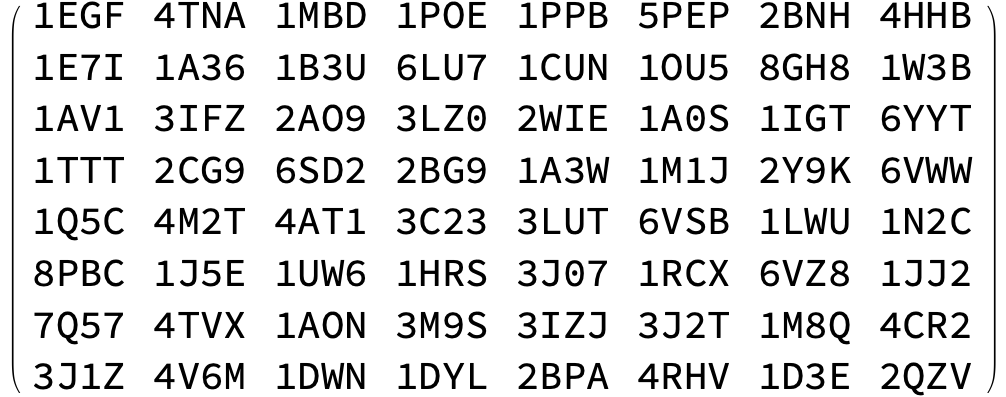
The PDB IDs of the structures used, in order of increasing residue count (left to right and top to bottom) are:
1EGF, 4TNA, 1MBD, 1POE, 1PPB, 5PEP, 2BNH, 4HHB,
1E7I, 1A36, 1B3U, 6LU7, 1CUN, 1OU5, 8GH8, 1W3B,
1AV1, 3IFZ, 2AO9, 3LZ0, 2WIE, 1A0S, 1IGT, 6YYT,
1TTT, 2CG9, 6SD2, 2BG9, 1A3W, 1M1J, 2Y9K, 6VWW,
1Q5C, 4M2T, 4AT1, 3C23, 3LUT, 6VSB, 1LWU, 1N2C,
8PBC, 1J5E, 1UW6, 1HRS, 3J07, 1RCX, 6VZ8, 1JJ2,
7Q57, 4TVX, 1AON, 3M9S, 3IZJ, 3J2T, 1M8Q, 4CR2,
3J1Z, 4V6M, 1DWN, 1DYL, 2BPA, 4RHV, 1D3E, 2QZV.
1EGF, 4TNA, 1MBD, 1POE, 1PPB, 5PEP, 2BNH, 4HHB,
1E7I, 1A36, 1B3U, 6LU7, 1CUN, 1OU5, 8GH8, 1W3B,
1AV1, 3IFZ, 2AO9, 3LZ0, 2WIE, 1A0S, 1IGT, 6YYT,
1TTT, 2CG9, 6SD2, 2BG9, 1A3W, 1M1J, 2Y9K, 6VWW,
1Q5C, 4M2T, 4AT1, 3C23, 3LUT, 6VSB, 1LWU, 1N2C,
8PBC, 1J5E, 1UW6, 1HRS, 3J07, 1RCX, 6VZ8, 1JJ2,
7Q57, 4TVX, 1AON, 3M9S, 3IZJ, 3J2T, 1M8Q, 4CR2,
3J1Z, 4V6M, 1DWN, 1DYL, 2BPA, 4RHV, 1D3E, 2QZV.
Getting biomolecule
Getting biomolecule
We get the biomolecule by defining the function biomol that retrieves biomolecule object. The function allows the user to specify an assembly number to access the biological assembly, then it gets the biomolecule with the specified PDB ID and a specific biological assembly.
In[]:=
biomol[id_String,assembyNumber_Integer]:=If[assembyNumber===0,BioMolecule[ExternalIdentifier["PDBStructureID",id]],BioMoleculeValue[BioMolecule[ExternalIdentifier["PDBStructureID",id]],"Assemblies"][[assembyNumber]]]
In[]:=
biomol[id_String]:=BioMolecule[ExternalIdentifier["PDBStructureID",id]]
We can obtain the total number of residues in the biomolecule by defining the function resCounts, by determining the number of residues for each polymer chain and adding them all up.
In[]:=
resCounts[biomol_BioMolecule]:=Length@Flatten[biomol["Residues"]/@biomol["PolymerChainLabels"]]
Colors of a biomolecule based on its residue count
Colors of a biomolecule based on its residue count
This section defines how the biomolecules are colored. The colors are based on residue count. If the residue count is less than a certain number, then the color is taken from the “Rainbow” color scheme, and the hue corresponds to the residue count. If the residue count is greater than a certain threshold, then the color will be in the red family, with larger residues having darker shade of red.
In[]:=
resSplit=4000;col=Blend[{{resSplit,Red},{6807,Darker[Red,0.2]},{10656,Darker[Red,0.4]},{67200,Darker[Red,0.6]},{96000,Darker[Red,0.8]}},#1]&;cdata[bm_]:=If[resCounts@bm<resSplit,ColorData["Rainbow"][(resCounts@bm)/resSplit],col[resCounts@bm]];
Here is the color for the smallest protein in the BioArt:
In[]:=
bm=biomol["1EGF",1];resCounts@bmcdata[bm]
Out[]=

Out[]=

Colors for intermediate size proteins:
In[]:=
bm=biomol["6LU7",1];resCounts@bmcdata[bm]
Out[]=

Out[]=

In[]:=
bm=biomol["4AT1",1];resCounts@bmcdata[bm]
Out[]=

Out[]=

The chains in a biomolecules are colored from darker to lighter. For some molecules, like PDB ID 1JJ2 it might be custom plotted:
In[]:=
chainColors[bm_]:=Module[{chains,col,val},chains=bm["PolymerChainLabels"];col=cdata[bm];val=If[resCounts@bm<5000,0.5,0.7];MapThread[(#1->Lighter[col,#2])&,{chains,val*Rescale@Range@Length@chains}]]
In[]:=
chainColors[biomol["1CUN"]]
Out[]=

In[]:=
chainColors[biomol["2QZV",1]]
Out[]=

PDB IDs
PDB IDs
Defining the list of PDB IDs that correspond to the structures shown in the artwork
In[]:=
pdbs={"1EGF","4TNA","1MBD","1POE","1PPB","5PEP","2BNH","4HHB","1E7I","1A36","1B3U","6LU7","1CUN","1OU5","8GH8","1W3B","1AV1","3IFZ","2AO9","3LZ0","2WIE","1A0S","1IGT","6YYT","1TTT","2CG9","6SD2","2BG9","1A3W","1M1J","2Y9K","6VWW","1Q5C","4M2T","4AT1","3C23","3LUT","6VSB","1LWU","1N2C","8PBC","1J5E","1UW6","1HRS","3J07","1RCX","6VZ8","1JJ2","7Q57","4TVX","1AON","3M9S","3IZJ","3J2T","1M8Q","4CR2","3J1Z","4V6M","1DWN","1DYL","2BPA","4RHV","1D3E","2QZV"};
In[]:=
pdbArray=Partition[pdbs,8];
Organizing the list of PDB IDs into a matrix that corresponds to the layout of the molecules in the BioArt, arranged left to right and top to bottom, for easier reference
In[]:=
MatrixForm@pdbArray
Out[]//MatrixForm=
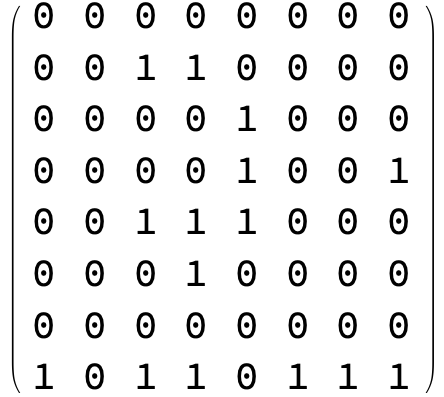
Defining a corresponding array of biological assembly numbers that is organized in the same way as the PDB IDs, and used to access the biological assembly when needed. 0 corresponds to the “Assymetric Unit”, which is the default output for a BioMolecule object with the corresponding PDB ID. These are the assemblies for the structures used in the BioArt
In[]:=
assemblyArray=Partition[{0,0,0,0,0,0,0,0,0,0,1,1,0,0,0,0,0,0,0,0,1,0,0,0,0,0,0,0,1,0,0,1,0,0,1,1,1,0,0,0,0,0,0,1,0,0,0,0,0,0,0,0,0,0,0,0,1,0,1,1,0,1,1,1},8];
In[]:=
MatrixForm@assemblyArray
Out[]//MatrixForm=
3D visualisation of the biomolecule
3D visualisation of the biomolecule
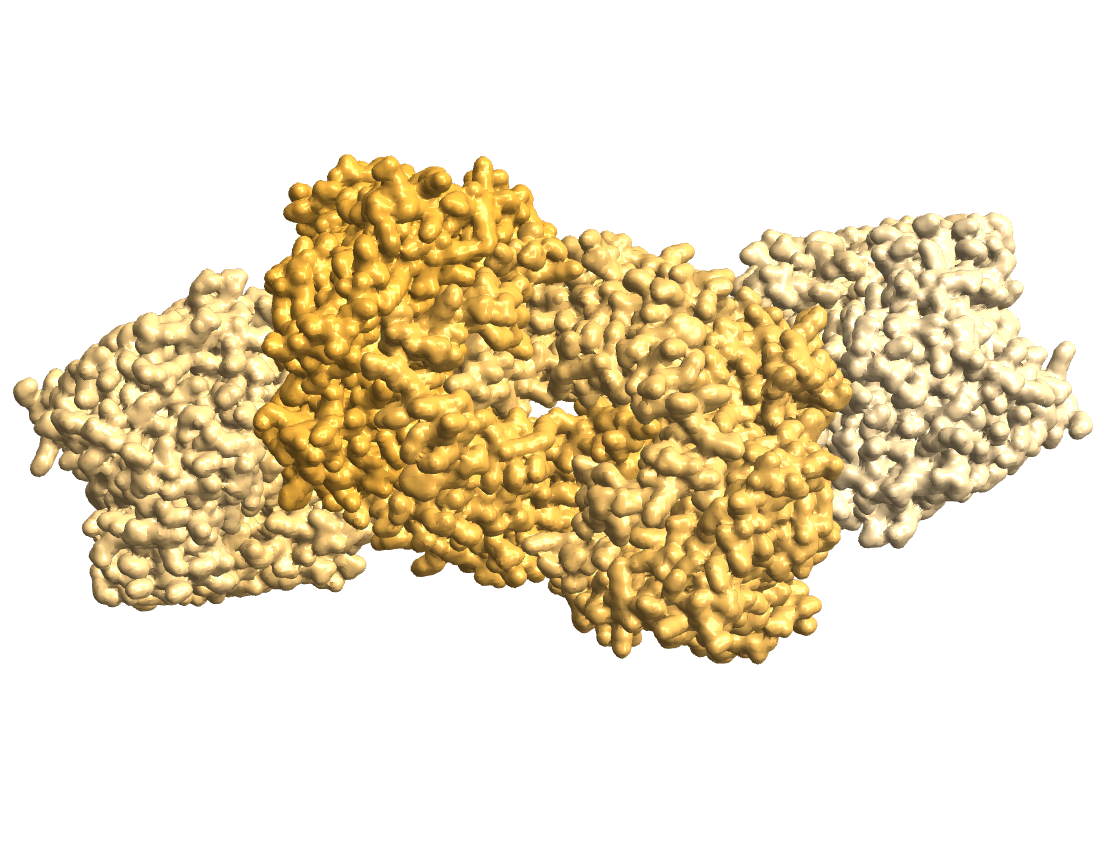
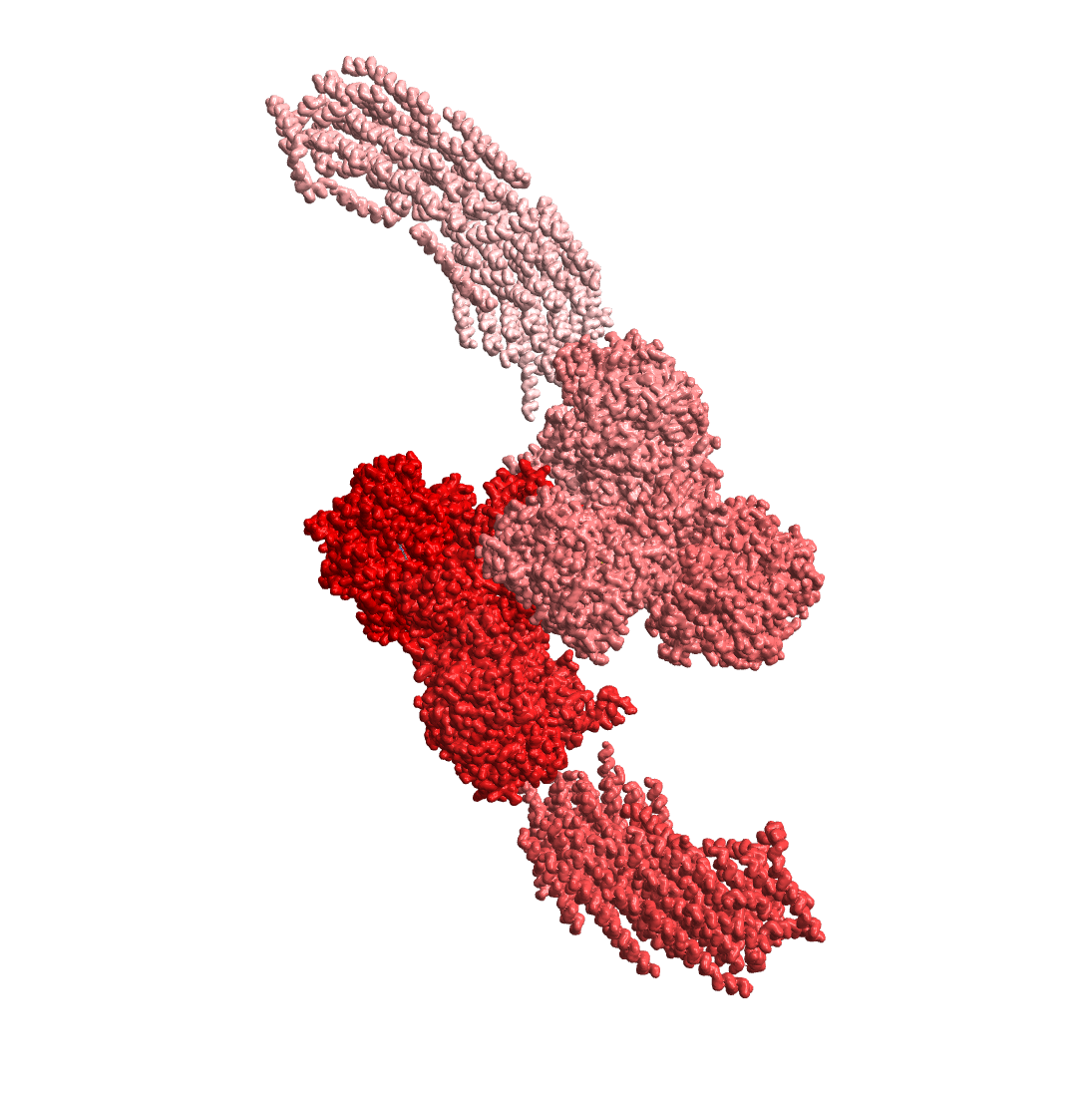
Here we define the main function shapesOfLife which retrieves the biomolecule, and plots it in 3D using the “GaussianSurface” theme and the custom colors defined earlier. The two inputs are the row and column numbers for easy access to the structures
shapesOfLife[i_,j_]:=Module[{bm},bm=biomol[pdbArray[[i,j]],assemblyArray[[i,j]]];BioMoleculePlot3D[bm,PlotTheme->"GaussianSurface",ColorRules->chainColors[bm]]]
In[]:=
shapesOfLife[5,8]
Out[]=
In[]:=
shapesOfLife[7,4]
Out[]=
CITE THIS NOTEBOOK
CITE THIS NOTEBOOK
Shapes of Life: a BioArt Award-winning visualization of protein structures
by Soutick Saha
Wolfram Community, STAFF PICKS, January 30, 2025
https://community.wolfram.com/groups/-/m/t/3368321
by Soutick Saha
Wolfram Community, STAFF PICKS, January 30, 2025
https://community.wolfram.com/groups/-/m/t/3368321