Inspired by a recent post about temperature change in Sierra Leone, I am posting a function I wrote for students in my class to explore temperature changes around the globe, using a commonly-used visualization of annual temperature cycles.
Below is a function, temperatureGraph, that makes a graph of the annual temperature pattern for a number of prior years, plus the current year, for a specified location. Here some features of the function:
1) It has one required input: a location. This can be a recognized geographical entity, such as a city, or a GeoLocation (lat long coordinates).
2) Other than the location, it can take various options, and the options, along with their default values, are specified before the actual function definition. It should be obvious what most of them mean. The colorScheme option is a list of two things. The first is the name of a color gradient that will be used for all years except the current year. The second is a single color specification that will be used for the current year. The idea is that it should be a contrasting color to the gradient so that it stands out.
1) It has one required input: a location. This can be a recognized geographical entity, such as a city, or a GeoLocation (lat long coordinates).
2) Other than the location, it can take various options, and the options, along with their default values, are specified before the actual function definition. It should be obvious what most of them mean. The colorScheme option is a list of two things. The first is the name of a color gradient that will be used for all years except the current year. The second is a single color specification that will be used for the current year. The idea is that it should be a contrasting color to the gradient so that it stands out.
In[]:=
Options[temperatureGraph]={value->"MinTemperature",years->30,smoothing->Quantity[31,"Days"],colorScheme->{"FallColors",Blue}};temperatureGraph[location_,OptionsPattern[]]:=Module[{nowYear,firstYear,data,yearlyData,lineStyles},(*Whatyearisitnow?*)nowYear=Now["Year"];(*Whatisthefirstyeartoget?*)firstYear=nowYear-OptionValue[years];(*Downloadthedata,starting*before*Jan1inthefirstyear.Westartthesamenumberofdaysbeforeasthelengthofthesmoothingwindow.ThiswillmakeoursmootheddatastartonJan1*)data=WeatherData[location,OptionValue[value],{DatePlus[DateObject[{firstYear,1,1}],-OptionValue[smoothing]],Today,"Day"}];(*Specifythatmissingdataaretobeinterplated(filledin).Ifwedon't,thesmootheddatawillhavebiggaps*)data=TimeSeries[data,MissingDataMethod->Automatic];(*Smoothdata,breakitintoyears,andshifteachyeartobe2024*)yearlyData=Table[TimeSeriesShift[TimeSeriesWindow[MovingAverage[data,OptionValue[smoothing]],{{year,1,1},{year,12,31}}],Quantity[2024-year,"Years"]],{year,firstYear,Now["Year"]}];(*Makesomethicknessandcolorstylesforthelines.ColorsarebasedonthecolorSchemeoption*)lineStyles=Append[Table[{Thickness[0.002],ColorData[OptionValue[colorScheme][[1]]][i]},{i,0.,1.0,1/(Length[yearlyData]-2)}],{Thickness[0.003],OptionValue[colorScheme][[2]]}];(*Maketheplot!*)DateListPlot[yearlyData,PlotStyle->lineStyles,FrameLabel->{"Month","Temperature (C)"},PlotRange->All,PlotLegends->LineLegend[Range[firstYear,nowYear],LabelStyle{FontSize10}],ImageSize->450]]
You can use the function with a single input, which will apply all the default values.
In[]:=
temperatureGraph
Out[]=
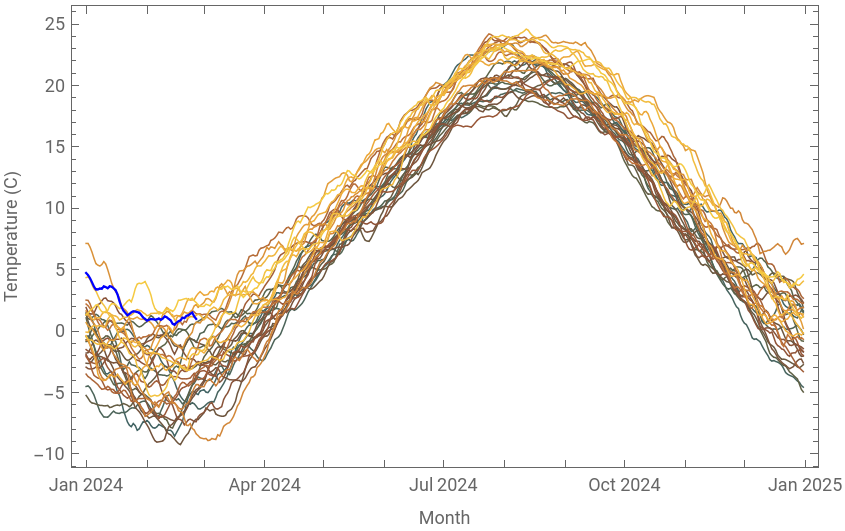


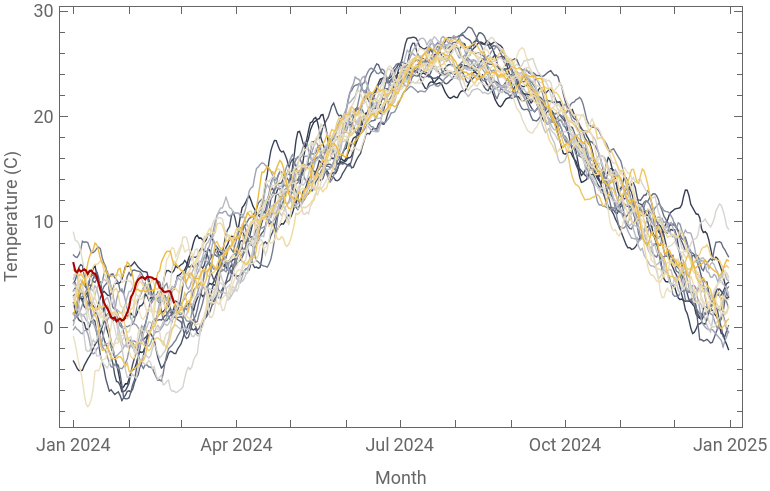
Or you can alter any or all of the options
In[]:=
temperatureGraph,value->"MeanTemperature",years->24,colorScheme->{"GrayYellowTones",Darker[Red]},smoothing->Quantity[14,"Days"]
Out[]=


CITE THIS NOTEBOOK
CITE THIS NOTEBOOK
Temperature changes through the years for a given location
by Gareth Russell
Wolfram Community, STAFF PICKS, March 5, 2024
https://community.wolfram.com/groups/-/m/t/3134664
by Gareth Russell
Wolfram Community, STAFF PICKS, March 5, 2024
https://community.wolfram.com/groups/-/m/t/3134664