CITE THIS NOTEBOOK: WebSocketJLink: connecting and working with web sockets by Kirill Belov. Wolfram Community NOV 2 2022.
ORIGINAL PACLET: Kirill Belov, WebSocketJLink, Wolfram Paclet Repository 2022. https://resources.wolframcloud.com/PacletRepository/resources/KirillBelov/WebSocketJLink/.
CITE THIS NOTEBOOK: WebSocketJLink: connecting and working with web sockets by Kirill Belov. Wolfram Community NOV 2 2022.
ORIGINAL PACLET: Kirill Belov, WebSocketJLink, Wolfram Paclet Repository 2022. https://resources.wolframcloud.com/PacletRepository/resources/KirillBelov/WebSocketJLink/.
ORIGINAL PACLET: Kirill Belov, WebSocketJLink, Wolfram Paclet Repository 2022. https://resources.wolframcloud.com/PacletRepository/resources/KirillBelov/WebSocketJLink/.
Preamble
Preamble
Some time ago, when developing one of the packages, I needed to use the WSS protocol to connect to an external service (this is an currency exchange, as it will become clear later). Searching the help, Wolfram Community and Mathematica Stack Exchange, I did not find anything related to this. First, I read the protocol specification and realized that it would be very expensive to write it completely in the Wolfram language, then I decided to just use a ready-made library for working with WSS written using Java. I used this library in the Wolfram Language using JLink package and wrote my own small package that allows you to connect to WebSockets from Wolfram Language. Actually, below are instructions on how to install it and several examples of working with WebSockets, public access to which is provided by the Binance exchange.
Installation
Installation
I uploaded my package to the Wolfram Language Paclet Repository and you can install the package using following commands:
In[]:=
PacletSiteUpdate/@PacletSites[];PacletInstall["KirillBelov/WebSocketJLink"]
Out[]=
PacletObject

And let’s load functions to the current session:
In[]:=
<<KirillBelov`WebSocketJLink`
List of functions
List of functions
Just let’s look at the list of features of this package
In[]:=
?KirillBelov`WebSocketJLink`*
Out[]=
Basic usage
Basic usage
All addresses must begin with a protocol specification. You can view detailed help on how to generate addresses for connecting to various streams specifically for this exchange on the documentation page. In this case below, I just connect to the data source, which in the background will start sending me the current values of the bitcoin rate against the usdt.
Less words. Let’s create a connection:
In[]:=
connection=WebSocketConnect["wss://stream.binance.com:9443/ws/btcusdt@miniTicker"]
Out[]=
WebSocketConnectionObject
By default, all incoming messages are simply printed in a separate window:
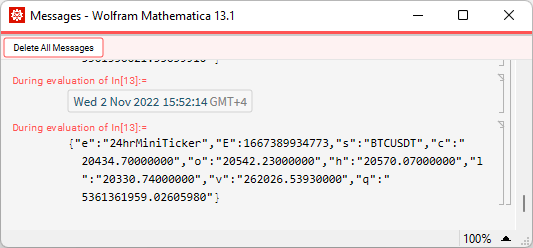
As you can see above, the result of the function execution is a special object that stores the connection itself, some settings and the received data inside. By also looking at this object, you can always see how many messages have arrived and are currently stored in the internal storage:
In[]:=
connection
Out[]=
WebSocketConnectionObject


You can get received data like this:
In[]:=
connection["Data"]
Out[]=
DataStructure
Yes, it is a “Dynamic Array” data structure. I use it because it’s a mutable data structure by default, whereas for a simple list, I need to create a separate symbol to hold the expression and changing the symbol’s own value when new message is recieved. But you can always get the current values of a dynamic array like this:
In[]:=
Short[connection["Data"]["Elements"]]
Out[]//Short=
{{"e":"24hrMiniTicker","E":1667395674243,"s":"BTCUSDT"…0000","v":"262170.86584000","q":"5362111082.66321740"},10,…}
Now it became clear what exactly is stored inside the message array. These are just data strings in JSON format. Of course, we can turn them into expressions in the Wolfram Language:
In[]:=
ImportString[connection["Data"]["Part",-1],"RawJSON"]
Out[]=
e24hrMiniTicker,E1667395688278,sBTCUSDT,c20420.06000000,o20514.83000000,h20563.36000000,l20330.74000000,v262196.21433000,q5362624201.18231670
Okay, now let’s move on to the next function. As you know, the main advantage of WebSockets is that with an already existing connection, it is quite easy and inexpensive to send new requests (they are called frames). How this can be done is shown below. At the moment, we receive messages about the Bitcoin rate approximately every second. Let’s subscribe to one more stream, which will send us the Ethereum rate:
In[]:=
assoc=<|"method"->"SUBSCRIBE","params"->{"ethusdt@miniTicker"},"id"->1|>frame=ExportString[assoc,"RawJSON"]WebSocketSend[connection,frame]
Out[]=
methodSUBSCRIBE,params{ethusdt@miniTicker},id1
Out[]=
{ "method":"SUBSCRIBE", "params":[ "ethusdt@miniTicker" ], "id":1}
Out[]=
WebSocketConnectionObject
To show that messages for two currencies are now coming in, let’s look at a few recent messages:
In[]:=
connection["Data"]["Part",-3]connection["Data"]["Part",-2]connection["Data"]["Part",-1]
Out[]=
{"e":"24hrMiniTicker","E":1667395696116,"s":"ETHUSDT","c":"1556.60000000","o":"1591.72000000","h":"1600.20000000","l":"1536.25000000","v":"571923.29380000","q":"899506329.88565100"}
Out[]=
{"e":"24hrMiniTicker","E":1667395697293,"s":"BTCUSDT","c":"20414.72000000","o":"20523.99000000","h":"20563.36000000","l":"20330.74000000","v":"262198.91841000","q":"5362670634.39055270"}
Out[]=
{"e":"24hrMiniTicker","E":1667395697460,"s":"ETHUSDT","c":"1556.61000000","o":"1591.84000000","h":"1600.20000000","l":"1536.25000000","v":"571912.76330000","q":"899489565.06653400"}
In principle, using these two functions, you can communicate with many servers that work using the WSS protocol, it remains only to show how to properly close the connection to the server:
In[]:=
WebSocketClose[connection]
Out[]=
WebSocketConnectionObject
But it is worth noting that the structure with the saved data is still available and the messages already received have not disappeared anywhere:
In[]:=
connection["Data"]
Out[]=
DataStructure
Custom serialization and deserialization
Custom serialization and deserialization
By default, all frames sent and messages received remain unchanged as strings. However, you can always add your own functions that will turn frames sent over the connection into strings, and messages received will turn the string into a Wolfram expression. For this, the functions discussed above have special options.
First let’s create a serializer function:
In[]:=
serializer=Function[ExportString[#,"RawJSON"]]
Out[]=
ExportString[#1,RawJSON]&
And deserailizer function:
In[]:=
deserializer=Function[ImportString[#,"RawJSON"]]
Out[]=
ImportString[#1,RawJSON]&
After that we can create a new connection using our deserializer:
In[]:=
connection=WebSocketConnect["wss://stream.binance.com:9443/ws/ltcusdt@miniTicker","Deserializer"->deserializer]
Out[]=
WebSocketConnectionObject
Now let’s make sure that all the saved data is no strings, but Associations:
To use your custom serialization, you must specify the serializer when sending the frame. Let’s subscribe to price updates of the another coin:
Now we will receive updates on the Ripple coin rate, although last time it was necessary to send a JSON object as string:
Close the connection
Event handler
Event handler
As seen above, each received message was printed in a separate window. But why did this happen? The thing is, the connection creation function has an event handler. And by default its value is the Print function. But when creating any connection, you can set any other event handler with more complex logic. Below I will show how to make a dynamic candlestcik chart for the Bitcoin rate right in Mathematics. To do this, we will need to connect to a stream that provides data on candles, but since the period of a candle is much longer than the frequency of messages, a lot of unnecessary data will be saved to the internal storage. Let’s make a handler that will regroup recieved messages on the go.
First let’s create a deserializer:
And event handler that are storing incoming messages in a separate association. At the same time, since the keys in associations must be unique, if we receive a message that simply updates the current candle, then a new value is not added to the association, but an existing one is changed.
And finally create a connection
After a few minutes, the variable will store values for several candles. Let’s now plot a dynamic chart:
Сlose the connection
Conclusion
Conclusion
In conclusion, I just want to add that this is the first version of this package, if you have any wishes, questions and suggestions, I will be happy to discuss them. Thank you all for your attention!