The objective of this project was to create a User Agent string parser. We begin by breaking up the string into a simpler, more abstract form. We then use the built-in Classify function with multiple forms of preprocessing. Lastly, we construct a graph of user agents based on their common components.
Introduction
Introduction
User Agent strings are sent by a program communicating with the Web (such as a browser or web crawler bot) to provide information about itself to a server, such as its software, version, and operating system. This allows the server to send content appropriate to the limitations of the user agent.
However, it is up to the server to figure out what features each program supports, and so it may not understand a new or updated program. As a result, there has been a long history of browsers copying each other’s User Agent strings to “trick” servers into giving them the correct features. This has led to almost all modern browsers having convoluted User Agent strings; for example, Chrome pretends to be Safari, Mozilla, and Netscape and pretends to use the WebKit, KHTML, and Gecko layout engines.
Furthermore, although there are standards and conventions for the format of User Agent strings, these are sometimes ignored, and in these cases, anything beyond string-matching becomes tricky.
Although feature detection through the User Agent string is now discouraged, the information found within the string still has uses for operating system detection and web analytics.
Splitting up the string
Splitting up the string
An example (Chrome) user agent string:
In[]:=
userAgentExample="Mozilla/5.0 (X11; Linux x86_64) AppleWebKit/537.36 (KHTML, like Gecko) Chrome/51.0.2704.103 Safari/537.36";
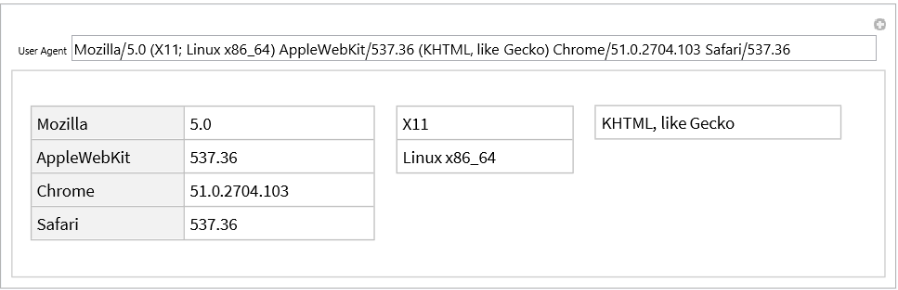
The typical user agent string is composed of a list of products (software names, often followed by the version after a slash) and comments (parenthesized groups of other terms delimited by semicolons). We can break up these strings with relative ease.
Split the string by spaces (excluding those inside a comment):
tokens=StringSplit[userAgentExample,RegularExpression[" (?![^(]*\\))"]]
Out[]=
{Mozilla/5.0,(X11; Linux x86_64),AppleWebKit/537.36,(KHTML, like Gecko),Chrome/51.0.2704.103,Safari/537.36}
Group by whether or not a token is a comment:
grouped=GroupBy[tokens,StringMatchQ@RegularExpression["\\(.*\\)"]]
Out[]=
False{Mozilla/5.0,AppleWebKit/537.36,Chrome/51.0.2704.103,Safari/537.36},True{(X11; Linux x86_64),(KHTML, like Gecko)}
Split each product's name and version and convert to an association:
products=Association[Rule@@PadRight[#,2,Missing[]]&/@(StringSplit[#,"/",All]&/@Replace[grouped[False],_Missing->{}])]
Out[]=
Mozilla5.0,AppleWebKit537.36,Chrome51.0.2704.103,Safari537.36
Split each comment by semicolons and remove parentheses:
comments=StringSplit[StringTake[#,{2,-2}],"; "]&/@Replace[grouped[True],_Missing->{}]
Out[]=
{{X11,Linux x86_64},{KHTML, like Gecko}}
Combine products and comments:
<|"Products"->products,"Comments"->comments|>
Out[]=
ProductsMozilla5.0,AppleWebKit537.36,Chrome51.0.2704.103,Safari537.36,Comments{{X11,Linux x86_64},{KHTML, like Gecko}}
All together:
splitUserAgent[userAgent_String]:=Module[{tokens,grouped,products,comments},tokens=StringSplit[userAgent,RegularExpression[" (?![^(]*\\))"]];grouped=GroupBy[tokens,StringMatchQ@RegularExpression["\\(.*\\)"]];products=Association[Rule@@PadRight[#,2,Missing[]]&/@(StringSplit[#,"/",All]&/@Replace[grouped[False],_Missing->{}])];comments=StringSplit[StringTake[#,{2,-2}],"; "]&/@Replace[grouped[True],_Missing->{}];<|"Products"->products,"Comments"->comments|>];splitUserAgent[userAgentExample]
Out[]=
ProductsMozilla5.0,AppleWebKit537.36,Chrome51.0.2704.103,Safari537.36,Comments{{X11,Linux x86_64},{KHTML, like Gecko}}
Interactive version with Manipulate:
Manipulate[DynamicModule[{split},split=splitUserAgent[userAgent];Row[Pane[#,BaselinePositionTop]&/@Prepend[Dataset/@split["Comments"],Dataset@split["Products"]],Spacer[10]]],{{userAgent,userAgentExample,"User Agent"},InputField[#,String,BaseStyle->12,FieldSize->{{60.,60.},{1.,Infinity}}]&},SaveDefinitionsTrue]
Out[]=
Data gathering
Data gathering
I was fortunate enough to find a sample database of already-analyzed User Agent strings from the website whatismybrowser.com.
Import data:
In[]:=
userAgentData=CloudImport@CloudObject@"https://www.wolframcloud.com/obj/yygengjunior/whatismybrowserSampleData";
Convert to Dataset and replace blank entries with Missing[]:
In[]:=
userAgentDataset=Map[If[#==="",Missing[],#]&,Dataset[AssociationThread[First@userAgentData->#]&/@Rest@userAgentData],2];
Random sample of entries:
RandomSample[userAgentDataset,5]
Out[]=


Classifying
Classifying
Many properties in the database look suitable to be treated as classes for Classify to train on. However, we first do some preprocessing on the user-agent string to remove unnecessary components and make it simpler for Classify.
Preprocessing Functions
Preprocessing Functions
We use 3 different methods of preprocessing: get the list of comments, get the list of products, and get both.
Get lists of comments and flatten to a single list:
getAllComments[userAgent_String]:=Flatten@splitUserAgent[userAgent]["Comments"];getAllComments[userAgentExample]
Out[]=
{X11,Linux x86_64,KHTML, like Gecko}
Get product pairs and concatenate back to slash-separated form:
getAllProducts[userAgent_String]:=KeyValueMap[If[MissingQ@#2,#1,#1<>"/"<>#2]&,splitUserAgent[userAgent]["Products"]];getAllProducts[userAgentExample]
Out[]=
{Mozilla/5.0,AppleWebKit/537.36,Chrome/51.0.2704.103,Safari/537.36}
Get both comments and products:
getAllComponents[userAgent_String]:=getAllComments@userAgent⋃getAllProducts@userAgent;getAllComponents[userAgentExample]
Out[]=
{AppleWebKit/537.36,Chrome/51.0.2704.103,KHTML, like Gecko,Linux x86_64,Mozilla/5.0,Safari/537.36,X11}
Training Data
Training Data
Through some experimental testing, we determine the best preprocessor for each property. The results roughly match up with where the information is found in the string: Software information is usually in a product, layout engine information can be either, and other information is usually in comments.
Note that some properties have been excluded, either due to being more complicated, being equivalent to another property, or because they were meant for human reading.
Association between preprocessors and the group of properties they work best with:
We now convert this information to train a classifier for each property.
Get unprocessed pairs of user agents and a given property:
Process each pair's user agent:
Map each property to its processed training data:
Distribute each preprocessor over its properties:
Properties we want to know about each classifier:
A function to train and test a classifier for a given set of training data:
Results
Results
Train and test a classifier on each entry:
Note that since "not applicable" is treated as missing, some ClassifierFunctions output nonsense when they don't apply.
Example classification:
Browser Spoofing Graph
Browser Spoofing Graph
We wish to find an efficient way to search through all browsers and programs to find the one that matches a given User Agent string the closest. Since browsers typically copy a different browser's User Agent string and attach their own product, we can create a directed graph of the relationship between the product names in User Agent strings, with each path representing the products added between two User Agent strings.
Procedure
Procedure
Since two programs may share the same products in their User Agent strings, we can have each vertex represent a set of products, and the label of each vertex lists the programs that use that set of products.
An example graph of the relationship between browsers:
A formatted version with more information displayed and tooltips from hovering:
To add a new program to the graph, we find the closest potential parents (incoming vertices) to the program's product list. These are the vertices whose products are a subset of the new program's products, and whose children (outgoing vertices)'s products are not (since these would be closer parents).
A fake example browser:
Get the children of a vertex:
Find the parent vertices:
The parent vertices highlighted:
We then want to attach the new program to the graph. We create edges from the parent vertices to the new vertex. If the User Agent string is a duplicate and a vertex already exists, we can skip the above and just append the program's name to the already-existing vertex.
If we add programs in the order of shortest product list to longest, we do not need to worry about modifying old edges, since the newest program cannot have any children.
Attach the program:
Data
Data
With this function, we can now iteratively attach all browsers in the database to a graph. First, we must get a list of products for each browser. We find all product names that appear at least 90% of the time.
Group user agent strings by software name:
Get the product names of each user agent string:
Find the products that appear at least 90% of the time:
Note that programs that have changed products between versions may have those products not show up. (For example, Opera changed from Opera to OPR, so neither shows up at least 90% of the time.)
Graphing
Graphing
Next, we need the graph we begin adding browsers to. This will just be a root node representing a program with no products. (We also add a dummy vertex that points to itself due to some quirks with graph functions.)
We can now sort the programs and iteratively add them to the graph. We also sort the product names of each browser so that two lists with the same products will be the same.
Get a list of the browsers sorted by product length:
Iteratively add each browser:
Version with all vertices with no children removed:
Traversing
Traversing
Given a list of products, we can now traverse the graph, starting from the root and taking paths to vertices that are a subset of the product list. If the list is already present, we will reach the corresponding vertex. If the list is not, we will reach one of the closest parents of the list.
Function to find the next vertex to go to given the product list:
Traverse the graph until reaching a closest parent:
Find the potential program names and list the unused products as extensions:
Interactive version with Manipulate:
Conclusion
Conclusion
Although a comprehensive User Agent string parser was not created, two new methods of parsing were analyzed: training a classifier function and creating a graph of copied components. Although both are not perfect, future improvements and analysis of these methods may yield results comparable to manual cataloguing. The browser spoofing graph also provides insight into how programs have copied each other's user agent strings, and, frankly, it looks pretty cool.
Future Work
Future Work
Although using Classify on various properties returned mostly accurate results, there were still a few issues, such as the lack of distinction between a missing and non-applicable property, and more complicated properties with additional structures or more possibilities. Finding better methods of preprocessing may yield better results for this approach.
The browser spoofing graph currently only pays attention to software name and does not categorize based on the product lists themselves. Since different versions of programs can have differing products, this leads to neither product being common enough to be included. Categorizing based on browser and version may help fix this, and automatic analysis of if a category should be split could further simplify the process.
Acknowledgements
Acknowledgements
I would like to thank the whole team at Wolfram Summer Camp for the work they've done to make doing this project such a great experience. I would especially like to thank my mentor, Aaron Enright, for providing guidance and wholeheartedly answering all the little questions I had.