Wolfram Notebook Assistant + LLM Kit: https://www.wolfram.com/notebook-assistant-llm-kit/
LAB
LAB
Developing projects with LLM assistance for Wolfram Language coding:
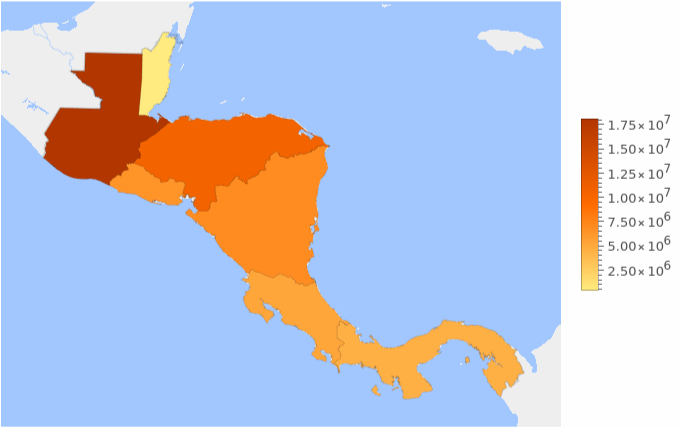
Create a heat map visualization with the population of Central America

To create a heat map visualization of the population in Central America, we can use the function along with population data for the countries in Central America. Here's how you can achieve this:
This code will generate a heat map where each country in Central America is colored according to its population. The function is used to visualize the geographic distribution of values (in this case, population) over specified regions. If you'd like me to execute this code and provide the visualization, let me know!


In[]:=
(*DefinethecountriesinCentralAmerica*)centralAmericaCountries=,,,,,,;(*Fetchthepopulationdataforthesecountries*)populationData=EntityValue[centralAmericaCountries,"Population"];(*Createaheatmapvisualization*)GeoRegionValuePlot[Thread[centralAmericaCountries->populationData],GeoRange->"Central America",PlotTheme->"HeatMap"]

Out[]=
Ops! There is an error, can you fix it
The error message indicates that is not recognized as a valid input for the option in .To fix this, you can remove the option altogether, as the function will automatically determine the geographic range based on the countries provided. Here's the corrected version of the code:
This code will generate the heat map correctly by automatically zooming in on the Central America region based on the specified countries. If you would like me to execute the corrected code and provide you with the visualization, please let me know!
In[]:=
(*DefinethecountriesinCentralAmerica*)centralAmericaCountries=,,,,,,;(*Fetchthepopulationdataforthesecountries*)populationData=EntityValue[centralAmericaCountries,"Population"];(*Createaheatmapvisualization*)GeoRegionValuePlot[Thread[centralAmericaCountries->populationData],PlotTheme->"HeatMap"]
Add the countries name at the map countries shapes
Create a new graphic with GDP
Add label to clarify what the map is about
Create a more general function, given a list of countries or geo region it shows both side by side heat maps about GDP and population.
Tests:
Refactor the function to accept as entrance a list of string with country names too, and use Interpret to compute user typo errors for country names, and the code should be more like functional programming Wolfram Language style with nested functions.
Ops! Fix the errors
Create tests for the function...
Fix the errors
Run the tests again
Create a bullet list of Wolfram Language functions used in this notebook with link for online documentation
CITE THIS NOTEBOOK
CITE THIS NOTEBOOK
Building world Geo heat map with AI Wolfram Notebook Assistant and LLM Kit
by Daniel Carvalho
Wolfram Community, STAFF PICKS, November 28, 2025
https://community.wolfram.com/groups/-/m/t/3582473
by Daniel Carvalho
Wolfram Community, STAFF PICKS, November 28, 2025
https://community.wolfram.com/groups/-/m/t/3582473