This is a continuation to the posts listed at: https://community.wolfram.com/web/ggoff/
Abstract
Abstract
The Wolfram Language was used for video processing, to create prototypes and prepare surfaces. In Example 1 cube, sphere and octahedron were morphed. Example 2 uses two complex functions and their 2d/3d-plots. The creation of a video-wall with a random collection of animations was done as bonus via Mathematica.
Experiments
Experiments
Example 1: Morphing II
Example 1: Morphing II
Cube, Sphere & Octahedron / Cube - Octahedron
Cube, Sphere & Octahedron / Cube - Octahedron
In[]:=
SetDirectory[NotebookDirectory[]<>If[$OperatingSystem=="Windows","\\data","/data"]]
Out[]=
C:\Users\ggoff\Desktop\ams8pub\ams8a\data
A 3D-plot for an ellipsoid was created:
In[]:=
shape0=x^2+y^2+z^2==1
Out[]=
2
x
2
y
2
z
In[]:=
c=1;ContourPlot3D[Evaluate[shape0],{x,-c,c},{y,-c,c},{z,-c,c}]
Out[]=

The left-hand-side of the above expression was squared and the expression expanded:
In[]:=
shape1=(x^2+y^2+z^2)^2==1//Expand
Out[]=
4
x
2
x
2
y
4
y
2
x
2
z
2
y
2
z
4
z
In[]:=
c=1;ContourPlot3D[Evaluate[shape1],{x,-c,c},{y,-c,c},{z,-c,c}]
Out[]=
A reorganized form of the expression with parameter a:
In[]:=
a=.shape2=+y^4++2a(++)==1
4
x
4
z
2
x
2
y
2
x
2
z
2
y
2
z
Out[]=
4
x
4
y
4
z
2
x
2
y
2
x
2
z
2
y
2
z
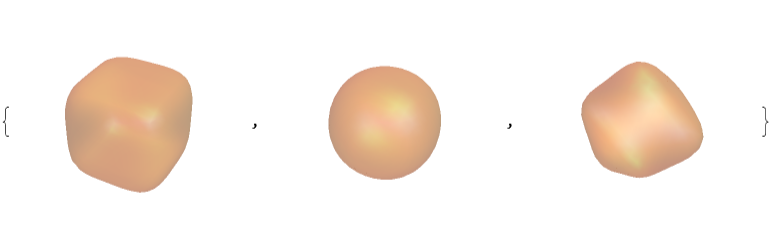
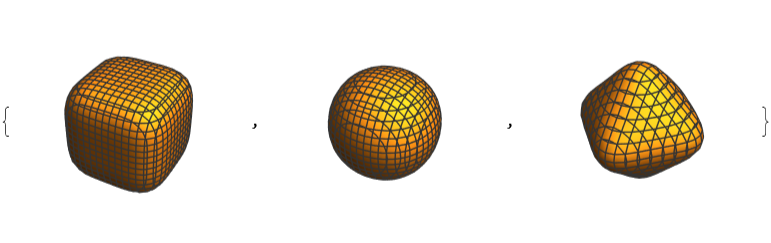
A list of values for parameter a was chosen to form a rounded cuboid, a spherical and an octahedral object (including the in-between stages). The objects were resized to have similar dimensions.
In[]:=
b=4;c=1;cp=Table[ContourPlot3D[Evaluate[shape2],{x,-c,c},{y,-c,c},{z,-c,c},Axes->False,Boxed->False],{a,0.001,b,b/10}];dg=DiscretizeGraphics[#]&/@cp;rb=RegionBounds[#]&/@dg;rm=RegionMeasure[#]&/@dg;borders=Reverse[(First[rm]/rm)^(1/3)];cp2={};alist=Table[a,{a,0.001,b,b/10}];Do[c=borders[[i]];AppendTo[cp2,{ContourPlot3D[Evaluate[shape2/.{a->alist[[i]]}],{x,-c,c},{y,-c,c},{z,-c,c},MeshNone,ContourStyleDirective[Orange,Opacity[0.3],Specularity[White,30]],Axes->False,Boxed->False],ContourPlot3D[Evaluate[shape2/.{a->alist[[i]]}],{x,-c,c},{y,-c,c},{z,-c,c},Axes->False,Boxed->False]}],{i,1,10}]cp3=Transpose[cp2][[1]][[{1,3,10}]]cp4=Transpose[cp2][[2]][[{1,3,10}]]
Out[]=
Out[]=
In[]:=
cp5=Show[cp3]
Out[]=

In[]:=
Show[cp5,ViewPoint{0,-∞,0}]
Out[]=

Three objects were exported as dxf-files:
A ListAnimation was created to visualize the Morphing:
Blender
The three objects (cube, sphere & octahedron) were imported in dxf-format. They were subdivided and given distinct metallic materials. All of them were set slightly above ground. A shiny dark metallic plane was placed at ground level. A key-framed animation via shape-keys was implemented.
The three objects (cube, sphere & octahedron) were imported in dxf-format. They were subdivided and given distinct metallic materials. All of them were set slightly above ground. A shiny dark metallic plane was placed at ground level. A key-framed animation via shape-keys was implemented.
Example 2: Flow
Example 2: Flow
Init
Init
Surface 1
Surface 1
Three plots for a complex function were created and exported:
Blender
1) The first surface was imported as stl-file. It was subdivided and solidified with modifiers. To remove artifacts a Boolean difference between surface and cylinder/cube was implemented via Boolean modifier. The height of the surface was animated from 0 to 1. As textures for the surface both exported 2d-plots for the complex function 1 were imported.
2) The surface from 1) was rotated around the z-axis and the height reduced from 1 to 0 in a keyframed animation.
3) In Geometry Nodes points were distributed randomly on the plane. The surface from 1) was appended and used to instance a lot of them with different scale and rotation in an animation.
1) The first surface was imported as stl-file. It was subdivided and solidified with modifiers. To remove artifacts a Boolean difference between surface and cylinder/cube was implemented via Boolean modifier. The height of the surface was animated from 0 to 1. As textures for the surface both exported 2d-plots for the complex function 1 were imported.
2) The surface from 1) was rotated around the z-axis and the height reduced from 1 to 0 in a keyframed animation.
3) In Geometry Nodes points were distributed randomly on the plane. The surface from 1) was appended and used to instance a lot of them with different scale and rotation in an animation.
Surface 2
Surface 2
Three plots for a second complex function were created and exported:
Blender
4) A staggered grid with alternating imported 2d-plots of surface 1 and 2 was placed above a plane. The surface 2 was imported as stl-file and placed above the staggered grid at the positions of the 2d-plots of surface 2. They were given a gold-like material. The golden grid was animated via rotation around the z-axis and an moving up along the z-axis.
4) A staggered grid with alternating imported 2d-plots of surface 1 and 2 was placed above a plane. The surface 2 was imported as stl-file and placed above the staggered grid at the positions of the 2d-plots of surface 2. They were given a gold-like material. The golden grid was animated via rotation around the z-axis and an moving up along the z-axis.
Bonus: Video-Wall (Mathematica only)
Bonus: Video-Wall (Mathematica only)
Preparation: Converting 4K- to HD-videos
Preparation: Converting 4K- to HD-videos
For the animation 54.mp4 for all published 4k-videos snippets of duration 2 seconds were created. Additionally a version was saved in gif-format. Then a random sample of the snippets was used to build the video-wall.
To reduce the amount of necessary memory and the time for calculations a sample of four videos was prepared for this notebook.
To reduce the amount of necessary memory and the time for calculations a sample of four videos was prepared for this notebook.
Converting and trimming HD-videos
Converting and trimming HD-videos
In this part four videos in HD-format were converted to 1/4 of the size, trimmed to 2 seconds snippets and saved.
Building a video wall
Building a video wall
Finally the saved videos from above were collected in one video.
The snippets were selected:
Shown were the first frame, the calculation time and the dimensions of the first frame.
References
References
Collection of animations
Collection of animations
References
References
Morphing II
Scene: Modified Cube, Sphere & Octahedron
Klaus, Stephan. “Cutting, Gluing, Squeezing, and Twisting: Visual Design of Real Algebraic Surfaces.” In Handbook of the Mathematics of the Arts and Sciences, edited by Bharath Sriraman, 863–77. Cham: Springer International Publishing, 2021. https://doi.org/10.1063/5.0006002.
Audio:
Stock Music & Sound Effects - Royalty Free Audio - Storyblocks
https://www.storyblocks.com/audio (accessed 2021-11-24)
Gribanova, Valentina. Cinematic Logo. Accessed November 24, 2021. Asset ID: SBA-300418822.
Scene: Modified Cube, Sphere & Octahedron
Klaus, Stephan. “Cutting, Gluing, Squeezing, and Twisting: Visual Design of Real Algebraic Surfaces.” In Handbook of the Mathematics of the Arts and Sciences, edited by Bharath Sriraman, 863–77. Cham: Springer International Publishing, 2021. https://doi.org/10.1063/5.0006002.
Audio:
Stock Music & Sound Effects - Royalty Free Audio - Storyblocks
https://www.storyblocks.com/audio (accessed 2021-11-24)
Gribanova, Valentina. Cinematic Logo. Accessed November 24, 2021. Asset ID: SBA-300418822.
Flow
Scene : Modified Analytical Surface
"ComplexStreamPlot—Wolfram Language Documentation ." Accessed December 5, 2021. https://reference.wolfram.com/language/ref/ComplexStreamPlot.html?q=ComplexStreamPlot .
"Complex Visualization—Wolfram Language Documentation ." Accessed December 5, 2021. https://reference.wolfram.com/language/guide/ComplexVisualization.html .
Audio : Stock Music & Sound Effects - Royalty Free Audio - Storyblocks
https://storyblocks.com/audio (accessed 2021 - 12 - 05)
MEDIA MUSIC GROUP . Inspiring Comforting Indie Folk Acoustic Guitar 30 Sec . Accessed December 6, 2021. Asset ID : SBA - 346460058
Scene : Modified Analytical Surface
"ComplexStreamPlot—Wolfram Language Documentation ." Accessed December 5, 2021. https://reference.wolfram.com/language/ref/ComplexStreamPlot.html?q=ComplexStreamPlot .
"Complex Visualization—Wolfram Language Documentation ." Accessed December 5, 2021. https://reference.wolfram.com/language/guide/ComplexVisualization.html .
Audio : Stock Music & Sound Effects - Royalty Free Audio - Storyblocks
https://storyblocks.com/audio (accessed 2021 - 12 - 05)
MEDIA MUSIC GROUP . Inspiring Comforting Indie Folk Acoustic Guitar 30 Sec . Accessed December 6, 2021. Asset ID : SBA - 346460058
54
Scene: 54 clips (each 2 s) delivered as a video wall.
“Video Processing—Wolfram Language Documentation.” Accessed December 14, 2021. https://reference.wolfram.com/language/guide/VideoProcessing.html.
Audio:
Stock Music & Sound Effects - Royalty Free Audio - Storyblocks
-. Indian Flute Signal. Accessed December 14, 2021. Asset ID: SBA-300055037.
Scene: 54 clips (each 2 s) delivered as a video wall.
“Video Processing—Wolfram Language Documentation.” Accessed December 14, 2021. https://reference.wolfram.com/language/guide/VideoProcessing.html.
Audio:
Stock Music & Sound Effects - Royalty Free Audio - Storyblocks
-. Indian Flute Signal. Accessed December 14, 2021. Asset ID: SBA-300055037.