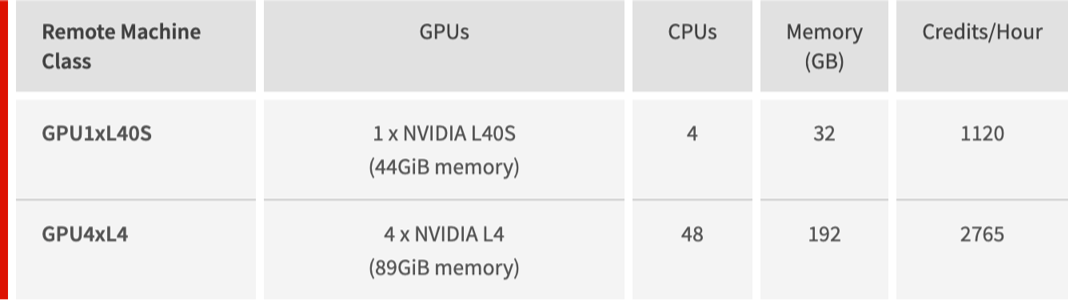
After the release of Wolfram Compute Services last December, many people asked if it supported GPUs to do training of neural networks with the Wolfram Language. Unfortunately, support for GPUs did not make it in this initial release, but we have good news: As of today, we support GPUs in Wolfram Compute Services with two new pre-configured machine classes: A single NVIDIA L40S with 44GiB of GPU memory or a quad NVIDIA L4 with 89GiB of GPU memory:
Here is a simple example that shows how you can train a simple neural network to learn an image and reproduce it from scratch (adapted from a “Neat Example” in the NetTrain reference documentation).
Create an image that will be used for training a simple neural network:
In[]:=
flower=ImageSynthesize["close up of three purple coneflowers"]
Out[]=

Check the dimensions of the image:
In[]:=
{height,width}=Reverse@ImageDimensions[flower]
Out[]=
{256,256}
The image can be any size, but larger images will require a longer training run to converge to an acceptable result.
Create a table of indices:
In[]:=
indices=Table[{i,j},{i,Subdivide[-1.0,1.0,height-1]},{j,Subdivide[-1.0,1.0,width-1]}];
Note that the indices run from -1 to 1 which improves the training process of the neural network below. The actual indices for the flower image are not being used here.
Create a flat training rules list by mapping indices to color values:
In[]:=
rules=Flatten@MapThread[Rule,{indices,ImageData[flower]},2];
One sample element from the large list of training rules:
In[]:=
rules[[1]]
Out[]=
{-1.,-1.}{0.054902,0.207843,0.0745098}
Create a simple uninitialized neural network with 7 layers using NetChain:
In[]:=
chain=NetChain[{200,Ramp,500,Ramp,20,LogisticSigmoid,3}]
Out[]=
NetChain

In[]:=
job=RemoteBatchSubmit[NetTrain[chain,rules,MaxTrainingRounds100,TargetDevice->"GPU"],RemoteMachineClass->"GPU1xL40S"]
Out[]=
RemoteBatchJobObject

You can check the job’s status. When this returns “Succeeded” your job is done:
In[]:=
job["JobStatus"]
Out[]=
Succeeded
Retrieve the trained neural network:
In[]:=
trained=job["EvaluationResult"]
Out[]=
NetChain

Create a new image from directly from the trained neural network:
In[]:=
image=Image[Table[trained[{i,j}],{i,Subdivide[-1,1,height-1]},{j,Subdivide[-1,1,width-1]}],ImageSize->{width,height}];
Compare the original image with the artificially generated one:
In[]:=
Row[{flower,image}]
Out[]=


Note that the artificial image is missing a lot of details, but the overall appearance matches the original.
CITE THIS NOTEBOOK
CITE THIS NOTEBOOK
Adding GPU support to Wolfram compute services
by Arnoud Buzing
Wolfram Community, STAFF PICKS, February 25, 2026
https://community.wolfram.com/groups/-/m/t/3645416
by Arnoud Buzing
Wolfram Community, STAFF PICKS, February 25, 2026
https://community.wolfram.com/groups/-/m/t/3645416