Idea
Idea
Oscillations are one of the most important parts of physics. While being important they are pretty hard to understand. So, our goal was to make an app which can solve problems related to mathematical and spring pendulums, by also providing an animation and graph of the desired pendulum.
Naming and Logo
Naming and Logo
First, we though about the visual representation of our project, and decided to name it “Pentanum”, which is a combination of the word pendulum and an Armenian word for oscillations “tatanum” (տատանում).
In[]:=
logo=Row
,ImageMargins->{{0,0},{10,0}},ImageSize->200

Out[]=

GUI
GUI
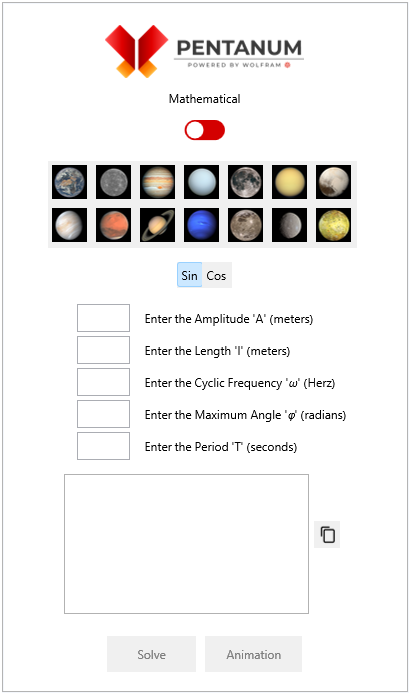
After that we started thinking about the UI.
As we all know, in the mathematical pendulum equations, we use free fall acceleration. For it, we decided to add values of different planets. So, to do that, we needed the images of that planets.
We also made a switch, which changes pendulum types, as you can see in the image below. After that, by using different Wolfram functions, we created our UI.
As we all know, in the mathematical pendulum equations, we use free fall acceleration. For it, we decided to add values of different planets. So, to do that, we needed the images of that planets.
We also made a switch, which changes pendulum types, as you can see in the image below. After that, by using different Wolfram functions, we created our UI.
Source
Source
Initial Setup
Initial Setup
At first we introduce initial constants and wrappers of “PENTANUM” (For example, we took several planets (in which the acceleration of gravity has different values, indicated in the UI as a Tooltips))
In[]:=
planets=<| "earth"->
,"venus"->

,"mercury"->

,"mars"->

,"jupiter"->

,"saturn"->

,"uranus"->

,"neptune"->

,"moon"->

,"ganymede"->

,"titan"->

,"ceres"->

,"pluto"->

,"io"->

|>;docCopy=

;toolDesign=TooltipStyle->{Background->LightBlue,CellFrameColor->LightBlue,CellFrame->8};title="Mathematical";pos=0.52;color=RGBColor[{0.831,0,0}];l=Null;tim=Null;timsp=Null;amp=Null;ampspring=Null;m=Null;k=Null;α=Null;g=9.8;ome=Null;omesp=Null;cal=Sin;test=" ";list={};listplot={};t=Null;disablinglist={True,True,True,True,True,True,True,True,True,True,False,False};count=0;countspring=0;vspring[a0_,y10_,y20_]:=Module {a=a0,y1=y10,y2=y20,n=100,h,xvalues,yvalues}, h=(y2-y1)n;yvalues=Table[k,{k,y1,y2,h}];xvalues=Table[aSin[mPi/2],{m,0,n}];Line[Transpose@{xvalues,yvalues}];

Create switch button for switch from “Mathemtical” to “Spring” oscillations.
In[]:=
switchButton=Dynamic EventHandler EventHandler EventHandler EventHandler Graphics[{Dynamic[color],Rectangle[{0,0},{2,1},RoundingRadius->0.5],White,Disk[{Dynamic[pos],0.511},0.41]},ImageSize->43,ImageMargins->{{0,0},{15,8}}], {"MouseClicked":>(pos=pos/.{0.52->1.43,1.43->0.52})} , {"MouseClicked":>(title=title/.{"Mathematical"->"Springy","Springy"->"Mathematical"})} , {"MouseClicked":>(solveSetbar=solveSetbar/.{mathbar->springbar,springbar->mathbar})} , {"MouseClicked":>(color=color/.{RGBColor[{0.831,0,0}]->RGBColor[{1,0.549,0.071}],RGBColor[{1,0.549,0.071}]->RGBColor[{0.831,0,0}]})}
Out[]=

Let’s create a set bar to enter the necessary parameters for calculating oscillations ((all descriptions presented as tooltips))
For a “Mathematical” pendulum we need to enter any two parameters out of five (the rest of the parameters will be calculated automatically):
For a “Mathematical” pendulum we need to enter any two parameters out of five (the rest of the parameters will be calculated automatically):
◼
Amplitude in meters
◼
Length in meters
◼
Cyclic Frequency in Herz
◼
Maximum Angle in radians
◼
Period in seconds
In[]:=
mathbar=Column Row InputField[Dynamic[amp],Enabled->Dynamic[disablinglist[[1]]],FieldSize->4.5,ImageMargins->{{15,15},{0,0}},FrameMargins->{{0,0},{3,3}}], Tooltip["Enter the Amplitude 'A' (meters)","The Amplitude of oscillations 'A' (meters) is the maximum deviation of an oscillating body from its equilibrium position A = Sin(φ)*l",toolDesign] , Row InputField[Dynamic[l],Enabled->Dynamic[disablinglist[[2]]],FieldSize->4.5,ImageMargins->{{15,15},{0,0}},FrameMargins->{{0,0},{3,3}}], Tooltip"Enter the Length 'l' (meters)","The pendulum thread length 'l' (meters) l = *g, l = ",toolDesign , Row InputField[Dynamic[ome],Enabled->Dynamic[disablinglist[[3]]],FieldSize->4.5,ImageMargins->{{15,15},{0,0}},FrameMargins->{{0,0},{3,3}}], Tooltip"Enter the Cyclic Frequency 'ω' (Herz)","The Cyclic Frequency of oscillations 'ω' (Herz) is the number of complete oscillations occurring during a periodic oscillatory process in 2π units of time ω =",toolDesign , Row InputField[Dynamic[α],Enabled->Dynamic[disablinglist[[4]]],FieldSize->4.5,ImageMargins->{{15,15},{0,0}},FrameMargins->{{0,0},{3,3}}], Tooltip"Enter the Maximum Angle 'φ' (radians)","The Maximum Angle 'φ' (radians) Is a value of the oscillation phase at the initial moment of time φ = ArcSin",toolDesign , Row InputField[Dynamic[tim],Enabled->Dynamic[disablinglist[[5]]],FieldSize->4.5,ImageMargins->{{15,15},{0,0}},FrameMargins->{{0,0},{3,3}}], Tooltip"Enter the Period 'T' (seconds)","The Period of oscillations 'T' (seconds) Is a time interval during which the system makes one complete oscillation (that is, it returns to the same state in which it was at the initial moment) T = 2π",toolDesign ;solveSetbar=Column Row InputField[Dynamic[amp],Enabled->Dynamic[disablinglist[[1]]],FieldSize->4.5,ImageMargins->{{15,15},{0,0}},FrameMargins->{{0,0},{3,3}}], Tooltip["Enter the Amplitude 'A' (meters)","The Amplitude of oscillations 'A' (meters) is the maximum deviation of an oscillating body from its equilibrium position A = Sin(φ)*l",toolDesign] , Row InputField[Dynamic[l],Enabled->Dynamic[disablinglist[[2]]],FieldSize->4.5,ImageMargins->{{15,15},{0,0}},FrameMargins->{{0,0},{3,3}}], Tooltip"Enter the Length 'l' (meters)","The pendulum thread length 'l' (meters) l = *g, l = ",toolDesign , Row InputField[Dynamic[ome],Enabled->Dynamic[disablinglist[[3]]],FieldSize->4.5,ImageMargins->{{15,15},{0,0}},FrameMargins->{{0,0},{3,3}}], Tooltip"Enter the Cyclic Frequency 'ω' (Herz)","The Cyclic Frequency of oscillations 'ω' (Herz) is the number of complete oscillations occurring during a periodic oscillatory process in 2π units of time ω =",toolDesign , Row InputField[Dynamic[α],Enabled->Dynamic[disablinglist[[4]]],FieldSize->4.5,ImageMargins->{{15,15},{0,0}},FrameMargins->{{0,0},{3,3}}], Tooltip"Enter the Maximum Angle 'φ' (radians)","The Maximum Angle 'φ' (radians) Is a value of the oscillation phase at the initial moment of time φ = ArcSin",toolDesign , Row InputField[Dynamic[tim],Enabled->Dynamic[disablinglist[[5]]],FieldSize->4.5,ImageMargins->{{15,15},{0,0}},FrameMargins->{{0,0},{3,3}}], Tooltip"Enter the Period 'T' (seconds)","The Period of oscillations 'T' (seconds) Is a time interval during which the system makes one complete oscillation (that is, it returns to the same state in which it was at the initial moment) T = 2π",toolDesign
2
T
4*
2
π
g
2
ω
g
l
A
l
l
g
2
T
4*
2
π
g
2
ω
g
l
A
l
l
g
Let’s create a set bar to enter the necessary parameters for calculating oscillations ((all descriptions presented as tooltips))
For a “Spring” pendulum we need to enter any two parameters out of five (the rest of the parameters will be calculated automatically):
For a “Spring” pendulum we need to enter any two parameters out of five (the rest of the parameters will be calculated automatically):
◼
Amplitude in meters
◼
mass in kilograms
◼
Stiffness in N/meters
◼
Cyclic Frequency in Herz
◼
Period in seconds
Wrappers
Wrappers
For the solving algorithm, we decided to use functions that will determine all the properties of the selected pendulum based on two initial properties. To find all the properties, we used general equations from our physics lessons and applied if statements to cover all possible solving strategies.
Calculation code for Mathematical oscillations
Calculation code for Spring oscillations
We used a “pentanum” function to display and manage the UI components.
First, by dynamically monitoring variables, we were able to set limitations for them and also prevent users from providing more than one of the interconnected variables.
After that, by using the dynamics and UI functions of Wolfram, we managed to create and dynamically change the UI components, ensuring smooth and user-friendly experience for everyone.
First, by dynamically monitoring variables, we were able to set limitations for them and also prevent users from providing more than one of the interconnected variables.
After that, by using the dynamics and UI functions of Wolfram, we managed to create and dynamically change the UI components, ensuring smooth and user-friendly experience for everyone.
UI
UI
Conclusion
Conclusion
Overall, by using different Wolfram functions and physical equations, we were able to make a program which can not only solve, but also simulate and plot different kinds of mathematical and spring pendulums.
Acknowledgements
Acknowledgements
We want to thank our mentor Mher Mkrtchyan for his immeasurable help and support throughout this project.
Affiliation
Affiliation
In December 2020 the Wolfram Lab opened at RAU (Russian-Armenian University, Yerevan, Armenia). The Wolfram Lab was created on the basis of the RAU research laboratory for mathematical modeling of quantum systems. This laboratory became the first laboratory in the world created by Wolfram Research on a university basis. Currently, the laboratory teaches courses for undergraduate students (major in programming and physics) and high school students (major in physical and mathematical sciences). Mher Mkrtchyan (mherm@wolfram.com) (Group: Sound & Vision, Manager: Shadi Ashnai) is responsible for the Wolfram Lab at RAU.
The project was completed by 11th grade students.
The project was completed by 11th grade students.
CITE THIS NOTEBOOK
CITE THIS NOTEBOOK
Simulating pendulums using Wolfram language
by Narek Arakelyan and Vladimir Shirkhanyan
Wolfram Community, STAFF PICKS, September 27, 2024
https://community.wolfram.com/groups/-/m/t/3286042
by Narek Arakelyan and Vladimir Shirkhanyan
Wolfram Community, STAFF PICKS, September 27, 2024
https://community.wolfram.com/groups/-/m/t/3286042