Abstract
Abstract
The amount of substance left after radioactive decay can be calculated by solving differential equations, the solutions to which are exponential decays. In this project, I define a class and initialization functions to create the entire decay chain from an initial radioactive isotope and amount. This data can be used to plot the total amount of any element in the chain as a function of time (on orders of 10^5 to 10^20).
Overview of Calculations
Overview of Calculations
The calculations used in this program are fairly straightforward. We know that if we start with a certain amount “x”, the amount remaining as a function of time is,
N(t) = x
Where λ is the decay constant of the substance. Now consider the amount of product. Suppose the above substance decays into another substance with branching ratio “a” (a number between 0 and 1). As we used “x” above, this time the initial amount will be the amount of decayed source. Thus, the amount of this substance remaining after a certain time will be
(t) = a (x - N(t))
(t) = a (x - x )
(t) = a x (1 - )
Here, is the decay constant of the product. We can see the pattern here: the amount of substance left after a certain time is the branching ratio times the difference between initial amount of the source and amount of source as a function of time times the decaying exponential for the substance.
We can generalize this to work for any element in the chain. The initial amount x becomes a function of time, based on the decay of the source. Therefore,
(t) = (t) (1 - )
Here, the index “i” refers to the terms corresponding to the substance in question, and “i-1” corresponds to its source. “” is the percentage of the source that gets converted to the product (branching ratio).
N(t) = x
-λt
Where λ is the decay constant of the substance. Now consider the amount of product. Suppose the above substance decays into another substance with branching ratio “a” (a number between 0 and 1). As we used “x” above, this time the initial amount will be the amount of decayed source. Thus, the amount of this substance remaining after a certain time will be
N
2
-t
λ
2
N
2
-λt
-t
λ
2
N
2
-λt
-t
λ
2
Here,
λ
2
We can generalize this to work for any element in the chain. The initial amount x becomes a function of time, based on the decay of the source. Therefore,
N
i
a
i
x
i-1
-t
λ
i-1
-t
λ
i
Here, the index “i” refers to the terms corresponding to the substance in question, and “i-1” corresponds to its source. “
a
i
Class Definition and Initialization functions
Class Definition and Initialization functions
My approach to this problem uses object oriented programming. Every instance of the class defined below corresponds to an element with a distinct source and having distinct products. The class itself is fairly barebones, and contains mostly get and set functions for each of its attributes.
In[]:=
element=Function[eID,Module[{substance,amount,source,products={},abundance,products2={},mode},getSource[eID]^:=source;setSource[eID]^:=Function[src,source=src];getMode[eID]^:=mode;setMode[eID]^:=Function[md,mode=md];getProducts[eID]^:=products;setProducts[eID]^:=Function[prod,products=prod];getAbundance[eID]^:=abundance;setAbundance[eID]^:=Function[abun,abundance=abun];getProducts2[eID]^:=products2;setProducts2[eID]^:=Function[prod2,products2=prod2];getAmount[eID]^:=amount;setAmount[eID]^:=Function[amt,amount=amt];gettAmount[eID]^:=amount*Exp[-QuantityMagnitude[substance["DecayConstant"]]*t];getSubstance[eID]^:=substance;setSubstance[eID]^:=Function[sub,substance=sub]]];
The attributes of the function are appropriately named: substance references the isotope entity, source and products reference the unique identifiers for the source and products of the instance, abundance references the branching ratio (the percentage of source that gets converted to this element), and amount references the amount of the element formed (as a function of time) before its exponential decay. The definition of products2 is just for convenience in the initialization. gettAmount calculates the amount as a function of time based on the decay constant.
I also define a list "instances" to store every instance of the class created by the initialization. This is for convenience with data visualization.
In[]:=
instances={};
Now for the initialization itself. This function is recursive, since it acts on the products of each of the elements and their products as well.
The first half is fairly straightforward. It just creates the instance of the “element” class, and sets the basic attributes such as substance, source, and appends the unique ID to the instances list. For the source, it just checks if the function is being called on the first instance or in the middle of a run, and assigns appropriately. For the branching ratios (labelled “abundance”), some of the ratios in the Wolfram Repository are stored as percent quantities and others are stored as numbers, so a simple If[] statement deals with that.
As seen in the Calculations Overview, the amount it assigned to be the amount before decay minus amount after decay (with the exponential term) of the source. The gettAmount function in the class will automatically calculate the exponential decay.
The first half is fairly straightforward. It just creates the instance of the “element” class, and sets the basic attributes such as substance, source, and appends the unique ID to the instances list. For the source, it just checks if the function is being called on the first instance or in the middle of a run, and assigns appropriately. For the branching ratios (labelled “abundance”), some of the ratios in the Wolfram Repository are stored as percent quantities and others are stored as numbers, so a simple If[] statement deals with that.
As seen in the Calculations Overview, the amount it assigned to be the amount before decay minus amount after decay (with the exponential term) of the source. The gettAmount function in the class will automatically calculate the exponential decay.
In[]:=
Init[el1_,su1_,sour1_,prev1_,ab1_]:=Module[{ab2,pros,pros2,name},element[el1];instances=Append[instances,el1];setSubstance[el1][su1];setSource[el1][sour1];If[QuantityQ[ab1[[1]]],ab2=QuantityMagnitude[ab1[[1]]]/100,If[getSource[el1]=!="None",ab2=ab1[[1]]/100,ab2=ab1[[1]]]];If[sour1=!="None",setMode[el1][ab1[[2]]]];If[sour1=!="None",setAmount[el1][ab2*(prev1-gettAmount[sour1])],setAmount[el1][prev1]];setAbundance[el1][ab2];If[su1=!=Entity["Isotope","Radon220"],pros=Select[Select[Thread[{su1["DaughterNuclides"],su1["BranchingRatios"],su1["DecayModeSymbols"]}],MissingQ[#[[1]]]False&],MissingQ[#[[2]]]False&];setProducts2[el1][pros];If[pros≠{},pros2=(Unique[#[[1]]["AtomicSymbol"]]&/@pros);setProducts[el1][pros2]],setProducts[el1][{Unique["Po"]}];setProducts2[el1][{{Entity["Isotope","Polonium216"],Quantity[100,"Percent"]}}];pros=getProducts2[el1];];If[getProducts[el1]≠{},Init[getProducts[el1][[#]],getProducts2[el1][[#,1]],el1,getAmount[el1],getProducts2[el1][[#,2;;3]]]&/@Range[Length[getProducts[el1]]]]]
Assigning the products gets a little tricky. I do that using “pros” and “pros2”. The “pros” list simply contains the products from the isotope dataset threaded with their branching ratios. The "pros2" list is generated by mapping the function to generate unique identifiers based on Atomic Symbols over the "pros" list. setProducts and setProducts2 are used to assign the pros2 and pros respectively to the instance of the class.
While dealing with the products, I noticed that the Radon-220 IsotopeData Dataset seems to have different lengths stored for DaughterNuclides and BranchingRatios list. I believe the branching ratios list should be corrected to remove the missing element, and I've submitted the feedback form on the IsotopeData/Isotope documentation page. For this program, I just added an If[] statement to assign the products for Radon-220. It works fine for now, and once the dataset is fixed, this part should become redundant.
The reason for setProducts2 is to manage the last part. Since the function is recursive, creating the products with a loop or iterator would reset the loop variable every time it called itself. So, I stored the data in the class itself.
Not using a loop means that the function has to be assigned in 1 statement. So, using pure functions in place of the indices, the Init function is mapped over Range[] list of length equal to that got by getProducts.
The initialization function pretty much sets up the whole network. It creates an instance of the class for every decay product, and links them all up by setting the products and source attributes. Now, we can use this information and the instances list to do some data visualization with an example.
While dealing with the products, I noticed that the Radon-220 IsotopeData Dataset seems to have different lengths stored for DaughterNuclides and BranchingRatios list. I believe the branching ratios list should be corrected to remove the missing element, and I've submitted the feedback form on the IsotopeData/Isotope documentation page. For this program, I just added an If[] statement to assign the products for Radon-220. It works fine for now, and once the dataset is fixed, this part should become redundant.
The reason for setProducts2 is to manage the last part. Since the function is recursive, creating the products with a loop or iterator would reset the loop variable every time it called itself. So, I stored the data in the class itself.
Not using a loop means that the function has to be assigned in 1 statement. So, using pure functions in place of the indices, the Init function is mapped over Range[] list of length equal to that got by getProducts.
The initialization function pretty much sets up the whole network. It creates an instance of the class for every decay product, and links them all up by setting the products and source attributes. Now, we can use this information and the instances list to do some data visualization with an example.
Example Decay Chain and Data Visualization
Example Decay Chain and Data Visualization
We shall now try out these functions with Astatine-218. The first step is to define the quantities and run the initialization function. It creates all the instances of the class and assigns the data. The initial unique ID is generated from the isotope and the initial amount is set to be 100 in this case. Running this might take a minute.
In[]:=
Init[Unique[Entity["Isotope","Astatine218"]["AtomicSymbol"]],Entity["Isotope","Astatine218"],"None",100,{1}];
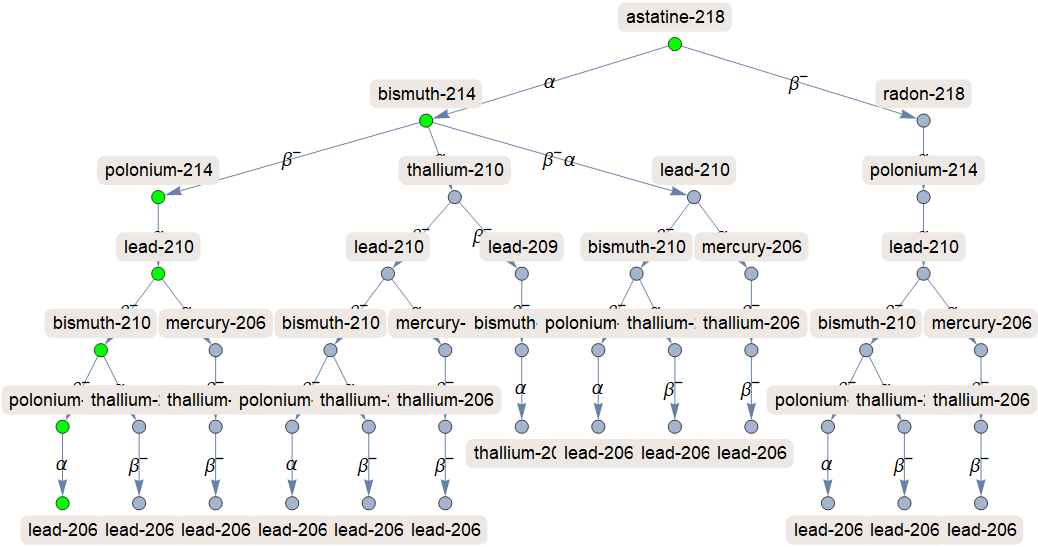
Now, we can begin some data visualization from the instances list. I defined a few useful functions that can be called with appropriate arguments. Firstly, the Checkab function takes the Unique ID of the class instance and calculates the percentage of decay products that are formed into it. It works by using NestWhileList to generate a list of IDs for the entire chain starting from the given ID, then maps getAbundance across it and multiplies each element together. We can use this to label data with color functions in the GraphPlot.
In[]:=
Checkab[subs_]:=Times@@(getAbundance/@NestWhileList[getSource,subs,getSource[#]=!="None"&])
Next, we have the colorList functions. The first one threads only those that are more than 1% of the source with green, and the second one threads each with a color generated from the Checkab amount and Hue function (grayscale). These are used to label the main decay branches in the chain.
In[]:=
colorList1=Thread[Select[instances,Checkab[#]≥0.01&]Green];colorList2=Thread[instances(Hue[0,0,Log10[1000*#]]&/@(Checkab/@instances))];
For the GraphPlot, it is just formed by threading each instance of the element class with its products, and plotting the results. We can use the colorList functions under VertexStyle to color the nodes of the GraphPlot. This might take a minute to run as well.
In[]:=
plotChain[style_]:=Module[{edges=Flatten[Thread[#getProducts[#]]&/@instances]},GraphPlot[edges,DirectedEdgesTrue,GraphLayout"LayeredEmbedding",VertexLabels(Thread[#getSubstance[#]&]/@instances),VertexStylestyle,EdgeLabelsThread[(Flatten[Thread[#getProducts[#]]&/@instances])getMode/@Values/@Flatten[Thread[#getProducts[#]]&/@instances]],ImageSizeLarge]]plotChain[colorList1]
Out[]=
Next, we have the plotAll and calcAll functions. They take an input of the isotope entity and plot/output the function of the amount of substance across the whole chain as a function of time. They are also fairly straightforward, although the amount functions themselves can be fairly long!
In[]:=
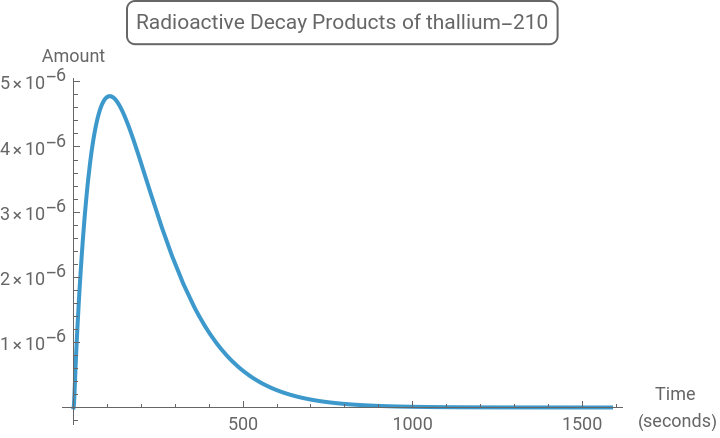
plotAll[isotope_]:=Module[{ls},ls=Select[instances,getSubstance[#]isotope&];func=Total[gettAmount/@ls];Manipulate[Plot[func,{t,0,10^n},PlotLabelStyle[Framed[StringJoin["Radioactive Decay Products of ",ToString[isotope["Name"]]],RoundingRadius4]],AxesLabel{"Time \n(seconds)","Amount"}],{n,0,20},SaveDefinitionsTrue]]calcAll[isotope_]:=Module[{ls2},ls2=Select[instances,getSubstance[#]isotope&];func2=Total[gettAmount/@ls2]]Off[General::munfl]
The reason for the Manipulate slider in plot all is that this function is made for all isotopes, many of whose decays have the prominent features in their plots at different time scale plot ranges. So, it simply adjusts the plot range for better visualization. For better looking plots, try running with with elements from the main branch. We can see this with the following example for Thallium-210 (set the slider to 3 for best results),
In[]:=
plotAll[Entity["Isotope","Thallium210"]]
Out[]=


Here are some more examples of plotting from
In[]:=
pa1=Plot[calcAll[Entity["Isotope","Astatine218"]],{t,0,10^1.1},ImageSizeMedium,AxesLabel{"Time \n(seconds)","Amount"},PlotLabelStyle[Framed["Radioactive Decay of Astatine-218",RoundingRadius4]]];pa2=Plot[calcAll[Entity["Isotope","Polonium214"]],{t,0,0.002},ImageSizeMedium,AxesLabel{"Time \n(seconds)","Amount"},PlotLabelStyle[Framed["Radioactive Decay of Polonium-214",RoundingRadius4]]];pa3=Plot[calcAll[Entity["Isotope","Lead206"]],{t,0,10^9.8},ImageSizeMedium,AxesLabel{"Time \n(seconds)","Amount"},PlotLabelStyle[Framed["Radioactive Decay of Lead-206",RoundingRadius4]]];pa4=Plot[calcAll[Entity["Isotope","Radon218"]],{t,0,0.5},ImageSizeMedium,AxesLabel{"Time \n(seconds)","Amount"},PlotLabelStyle[Framed["Radioactive Decay of Radon-218",RoundingRadius4]]];Grid[{{pa1,pa2},{pa3,pa4}},FrameAll]
Here's the plot for all the isotopes in the decay.