In our everyday world, moving objects aren’t all that interesting. When they move, they look practically the same as when they were stationary. However, as objects move at speeds comparable to the speed of light, we perceive objects differently than in their stationary state. This project explores the effects of motion at speeds of relativity on our view of various object using the Terrell-Penrose Effect and Doppler Effect, analyzing the perceived changes in structure and color of an arbitrary object.
Introduction
Introduction
Early explorations of relativistic effects presumed that objects would be seen as squashed or stretched depending on the direction and velocity of an object. However, Terrell and Penrose, independently in the late 1950’s, explored the idea that the objects are rotated, rather than just stretched. And only less than a year ago were these effects actually explored and replicated in a lab. We explore these rotational effects computationally.
Exploration of Effects
Exploration of Effects
Terrell-Penrose Effect
Terrell-Penrose Effect
When we imagine objects moving close to the speed of light, we might expect them to look squished in the direction of motion due to length contraction, a concept from Einstein’s theory of special relativity. However, what we actually see is not just a contracted version of the object. This is where the Terrell–Penrose Effect comes in. It explains that objects moving at relativistic speeds don’t appear simply flattened. Instead, they appear rotated or distorted, almost like you’re seeing more of their sides than you normally would. This strange appearance isn’t because the object is physically rotating, but because of the way light travels from different parts of the object to your eyes.
Here’s why this happens:
◼
Light from the back of the object has to travel a longer distance to reach you than light from the front.
◼
If the object is moving at a significant fraction of the speed of light, the light from the back has to be emitted earlier in order to arrive at your eye at the same time as the light from the front.
Let’s take a look at a diagram and the code that replicates this phenomenon to understand this better.In the following diagram from andrewyork.net, let m be the position of the observer, p and q be two corners of a square we are observing, and v be the velocity of the square (comparable to the speed of light). (diagram from andrewyork.net)In the time it takes a photon from point q to reach the observer at m, a photon from point p would’ve already passed the observer. In order for the two photons to meet the observer at the same time, the photon from point p must be released at a later time, and thus, when square A is at a different position. A photon moves at the speed of light, c, so in time t, the photon Q moves a distance of ct to point q’. In the same time, point p moves a distance of vt to point p’. In order for these two photons to meet at the same time, the distance from p’ to m and the distance from q’ to m must be the same. With these equations, we can solve for t, and then solve for vt. This would give us the position of p’, and with it, we can model side qp when square A moves at a speed of relativity.This is done using the following line of code:
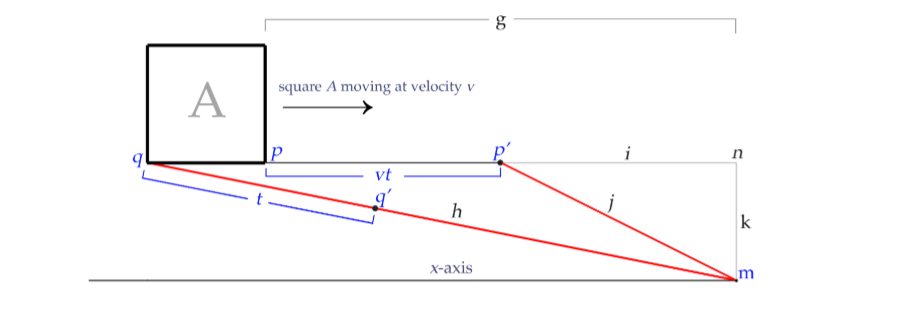
We first use NSolve to solve for the time (represented by the variable delay) that a point can move until it and the photon from another point are at the same Euclidean distance from the observer. Then by multiplying it by the velocity vector, we can find the vector going from p to p’. Finally, by adding back in the coordinates at point p, we can find the exact location of p’. By doing this to vertices of a triangulation of an arbitrary object, we can approximate what that object looks like at relativistic speeds under the Terrell-Penrose Effect.
In[]:=
observedPosition[c_,velocity_,velVec_,observationPoint_,referencePoint_][point_]:=point+velocity*velVec*NSolve[EuclideanDistance[point+velocity*velVec*delay,observationPoint]==EuclideanDistance[referencePoint,observationPoint]-c*delay,delay,Reals][[1,1,2]]
The result is that instead of just looking squished, a fast-moving object can look rotated and transformed into an entirely different in shape than it actually is. This effect matters because it shows how what we see isn’t always what’s physically there at a single instant, especially at high speeds. Our perception is limited by several factors, including velocity, and can be very different from reality in extreme conditions.
Doppler Effect
Doppler Effect
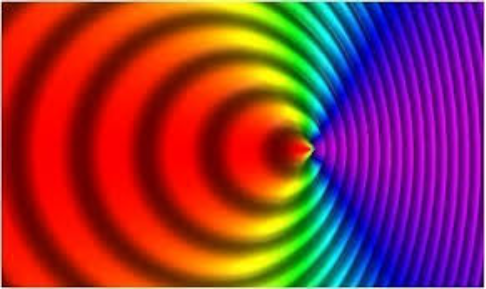
You’ve probably noticed the Doppler Effect before, like when an ambulance passes by. When its moving towards you, the pitch is high, but after it passes you, the pitch suddenly drops really low. That’s the Doppler Effect in sound. It also happens with light, and at very high speeds, this effect becomes noticeable. When an object is moving toward you at speeds close to the speed of light, the light waves get compressed, making them appear bluer, which is called a blue-shift. If the object is moving away from you, the waves are stretched, making the light look redder, which is called a red-shift. Sometimes however, the resulting shift would leave a frequency and wavelength outside the visible color spectrum. This means that while photons are emitted, it isn’t visible to humans, and often just seems black.
In other words:
◼
Light, like sound, travels in waves.
◼
If the source of light is moving toward you, the waves get bunched up, increasing their frequency → bluer light.
◼
If the source is moving away, the waves get spread out, lowering the frequency → redder light.
We implement a color shift function below, letting v represent the ratio of the speed of the object to the speed of light, x represent the angle between the vector from the observer to the object and the direction vector of the object, and originalW the wavelength of the color of the object at rest:
colorShift[v_,x_,originalW_]:=ColorData["VisibleSpectrum"][originalW-(80*(v*Cos[x]))]
Grid of shifted colors:
Grid[{{"Doppler Effect at Various Velocities",SpanFromLeft},{"Velocity","400 nm","450nm","500nm","550nm","600nm","650nm","700nm"},{"Approximately the Speed of Light away from observer",colorShift[-(0.99),Pi/4,400],colorShift[-(0.99),Pi/4,450],colorShift[-(0.99),Pi/4,500],colorShift[-(0.99),Pi/4,550],colorShift[-(0.99),Pi/4,600],colorShift[-(0.99),Pi/4,650],colorShift[-(0.99),Pi/4,700]},{"2/3 the speed of light away from observer",colorShift[-(2/3),Pi/4,400],colorShift[-(2/3),Pi/4,450],colorShift[-(2/3),Pi/4,500],colorShift[-(2/3),Pi/4,550],colorShift[-(2/3),Pi/4,600],colorShift[-(2/3),Pi/4,650],colorShift[-(2/3),Pi/4,700]},{"1/3 the speed of light away from observer",colorShift[-(1/3),Pi/4,400],colorShift[-(1/3),Pi/4,450],colorShift[-(1/3),Pi/4,500],colorShift[-(1/3),Pi/4,550],colorShift[-(1/3),Pi/4,600],colorShift[-(1/3),Pi/4,650],colorShift[-(1/3),Pi/4,700]},{"Original Color",ColorData["VisibleSpectrum"][400],ColorData["VisibleSpectrum"][450],ColorData["VisibleSpectrum"][500],ColorData["VisibleSpectrum"][550],ColorData["VisibleSpectrum"][600],ColorData["VisibleSpectrum"][650],ColorData["VisibleSpectrum"][700]},{"1/3 the speed of light towards observer",colorShift[(1/3),Pi/4,400],colorShift[(1/3),Pi/4,450],colorShift[(1/3),Pi/4,500],colorShift[(1/3),Pi/4,550],colorShift[(1/3),Pi/4,600],colorShift[(1/3),Pi/4,650],colorShift[(1/3),Pi/4,700]},{"2/3 the speed of light towards observer",colorShift[(2/3),Pi/4,400],colorShift[(2/3),Pi/4,450],colorShift[(2/3),Pi/4,500],colorShift[(2/3),Pi/4,550],colorShift[(2/3),Pi/4,600],colorShift[(2/3),Pi/4,650],colorShift[(2/3),Pi/4,700]},{"Approximately the Speed of Light",colorShift[(0.99),Pi/4,400],colorShift[(0.99),Pi/4,450],colorShift[(0.99),Pi/4,500],colorShift[(0.99),Pi/4,550],colorShift[(0.99),Pi/4,600],colorShift[(0.99),Pi/4,650],colorShift[(0.99),Pi/4,700]}},Frame->All]
Implementing the Terrell-Penrose Rotation
Implementing the Terrell-Penrose Rotation
We transform 3D objects subject to the Terrell-Penrose Effect by creating a triangular mesh of the surface, processing the transform on each vertex of the mesh individually, then reassembling the triangles in their new positions.
Making the Mesh Shape:
Creating 2D-triangular cells on the surface of the mesh:
Getting coordinates of the corners of the triangular cells, find the faces of the triangular cells, and create a list of corners of each transformed cell:
Suppose, with the speed of light c approximated at 3*10^8 m/s, our object is moving parallel to the x-axis at 2/3 the speed of light, and the observer is at (0,-10,0):
Transform the points to the position they appear to our observer according to the Terrell-Penrose Effect, choosing the first vertex in our list of points in our triangulation as our reference point on the object:
Visualize the original and transformed object:
Putting Everything Together
Putting Everything Together
We create a function for displaying rotated and color-shifted objects:
We observe how things look like moving towards the observer:
We observe how things look like moving away from the observer:
Conclusion/Future Directions
Conclusion/Future Directions
In this project, we demonstrate how objects moving at relativistic speeds appear drastically different from how they appear at rest. This is due to the Terrell-Penrose Effect and the Doppler Effect. By simulating how light from different parts of an object reaches an observer when it is moving at relativistic speeds and how waves from the object change at relativistic speeds, we can see that this type of motion causes everyday objects to look rotated, transformed, and color-shifted. Overall, the main goal of modeling the Terrell-Penrose effect was achieved. The function is able to take in different shapes, observer positions, velocities, and colors for the object, and transform it into a model of what we would see.
◼
In particular to this code and function, there are a couple things I would fix had I had more time. First and foremost, would be the color function, making sure it more accurately modeled the Doppler Effect for objects moving at relativistic velocities. Afterward, I would like to work on a user-interface by making a manipulate where users could experiment with the effects on their own And finally, I would find a better way to write the observedPosition function, so it would be possible to model the Terrell-Penrose Effect with greater precision.
◼
As for other ways to build on this project, it would be possible to work on a similar transform, such as with the Lorentz Effect, making similar models and user-interfaces.
◼
In addition, future research could build on these effects of special relativity by exploring the Terrell-Penrose effects with variations to spacetime. Or rather than focusing on length contraction, we could explore time dilation instead.
References
References
◼
York, A. (2020). Terrell-Penrose effect for objects approaching relativistic velocities. Terrell-Penrose Effect. https://andrewyork.net/Math/TerrellRotation_York.html
◼
Hornof, D., Helm, V., de Dios Rodriguez, E. et al. A snapshot of relativistic motion: visualizing the Terrell-Penrose effect. Commun Phys 8, 161 (2025). https://doi.org/10.1038/s42005-025-02003-6
◼
Koberlein, B. (2012, November 9). The color of speed. The Color of Speed | by Brian Koberlein. https://briankoberlein.com/post/color-of-speed/
Acknowledgements
Acknowledgements
I would like to thank my mentor, Dan McDonald, for his guidance and thoughtful insights throughout this project. In addition, I’d like to thank TAs Gloria Chan and Averyl Xu for their endless encouragement and support. And finally, thank you to the WSRP staff.
CITE THIS NOTEBOOK
CITE THIS NOTEBOOK
Modeling 3D objects at relativistic speeds (Terrell-Penrose effect)
by Sanjana Ramesh
Wolfram Community, STAFF PICKS, July 10, 2025
https://community.wolfram.com/groups/-/m/t/3500775
by Sanjana Ramesh
Wolfram Community, STAFF PICKS, July 10, 2025
https://community.wolfram.com/groups/-/m/t/3500775