Small single point mutations in genes that code for proteins can lead to major structural and functional protein changes that can manifest as genetic diseases. This project focuses on the molecular consequences of amino acid mutations by analyzing the displacement of the residue atoms that occur before and after the amino acid substitution. In my project, I use sickle cell anemia as a primary example and case study. Specifically, I use the E6V mutation in the beta-globin subunit of hemoglobin. I apply computational tools to visualize and quantify how this substitution disrupts normal protein structure. The methodology includes comparing 3D ribbon and atomic models of wild-type & mutant proteins and measuring & analyzing atomic displacement before and after mutations. I aim to analyze characteristics of mutations that lead to significant differences in atomic displacement.
Introduction
Introduction
Devastating genetic diseases with catastrophic consequences often arise from a single mutation in amino acid sequence that results in a subtle but significant alteration in protein structure and function. One of the most well-known and extensively-studied instances is sickle cell anemia, a hereditary blood disorder caused by a single amino acid substitution mutation in the beta-globin (β-globin) subunit of the protein hemoglobin. The mutation is E6V, which is when the amino acid Glutamic Acid (E) is replaced by Valine (V) in the 6th position of the beta-globin amino acid sequence. While this mutation is seemingly small, it drastically alters the physical and chemical properties of hemoglobin, leading to changes in the way hemoglobin interactions with other hemoglobin molecules, and ultimately leading to the distinguishable sickle-shaped red blood cell and a disastrous cascade of medical complications.
Objectives
Objectives
The goal of my project is to investigate how amino acid mutations contribute to disease by analyzing structural changes at the molecular level--in particular, the displacement of residue atoms before and after specific mutations. On a higher level, I am exploring how small changes in genetic sequences at the molecular level change protein structure and behavior, and how this ultimately contributes to the manifestation of human disease. I used computational tools and modeling tools to randomly-generate different mutations and analyze how they lead to varying degrees/amount of displacement from the normal protein to the mutated protein. By visualizing and quantifying these changes, I am aiming to identify patterns in how specific types of mutations lead to pathogenic phenotypes. I am using the E6V mutation in beta-globin that is associated with sickle cell disease as my protein of choice.
Methodology
Methodology
Required Resources
Required Resources
To start off my project, I first installed necessary paclets. In this case, I installed the Wolfram Paclet “Protein Visualization” from Wolfram Chemistry to be able to use some of the functions inside later in my code.
In[]:=
ClearAll["Global`*"]
In[]:=
PacletInstall["WolframChemistry/ProteinVisualization"]Needs["WolframChemistry`ProteinVisualization`"]
Out[]=
PacletObject

I also had access to a pre-release version of Wolfram 14.3 in order to access advanced biochemical functions that were only added in the new update. Therefore, in order to run most of the code in this notebook, a version of Wolfram 14.3 or later is required.
Building the Beta-globin Protein
Building the Beta-globin Protein
I am analyzing how the sickle cell anemia mutation in the beta-globin subunit of hemoglobin leads to changes in protein shape and/or properties and how that leads to sickle cell anemia. The sickle cell anemia mutation is a single amino acid replacement mutation in the beta-globin gene, HBB. Specifically, it is when the 6th residue (amino acid) in beta-globin mutates from Glutamic Acid (E) to Valine (V). This leads to certain changes in the peptide’s shape and properties that ultimately lead to sickle cell anemia.
Here, I am importing the hemoglobin protein with an external identifier from the Universal Protein Resource (UniProt) using the UniProtKBAccessionNumber “P68871” which gives us the beta-globin subunit of hemoglobin directly. This means we don’t have to specify the letter of the chain in our code to take the beta-globin subunit of hemoglobin. Other imported proteins from UniProt might not directly give the desired subunit, so in that case, I would need to specify the chain I want.
Here, I am importing the hemoglobin protein with an external identifier from the Universal Protein Resource (UniProt) using the UniProtKBAccessionNumber “P68871” which gives us the beta-globin subunit of hemoglobin directly. This means we don’t have to specify the letter of the chain in our code to take the beta-globin subunit of hemoglobin. Other imported proteins from UniProt might not directly give the desired subunit, so in that case, I would need to specify the chain I want.
Wild-Type
Wild-Type
I got the BioMolecule hemoglobin by calling the AlphaFold Database, and telling AlphaFold to fold the protein based on the UniProt ID I provided:
In[]:=
bm=ServiceExecute["AlphaFoldDatabase","BioMolecule",{"UniProtID"->ExternalIdentifier["UniProtKBAccessionNumber","P68871"]}]
Out[]=
BioMolecule

Then, I obtained the wild-type amino acid BioSequence of beta-globin and saved it as the variable “normalSeq”:
In[]:=
normalSeq=bm["BioSequences"][[1]]
Out[]=
BioSequence

Above, I imported the protein beta-globin and obtained its amino acid sequence as a BioSequence. I saved this sequence to the variable “normalSeq”. Next, I decided to expand the amino acid sequence out into its string so that its easier to understand and conceptualize what the sequence looks like. Each letter represents a different amino acid. This particular sequence is made up of 147 letters, and therefore has 147 amino acids.
In[]:=
normalSeq["SequenceString"]
Out[]=
MVHLTPEEKSAVTALWGKVNVDEVGGEALGRLLVVYPWTQRFFESFGDLSTPDAVMGNPKVKAHGKKVLGAFSDGLAHLDNLKGTFATLSELHCDKLHVDPENFRLLGNVLVCVLAHHFGKEFTPPVQAAYQKVVAGVANALAHKYH
Next, I used my saved amino acid sequence and folded it into a BioMolecule, which is essentially folding the amino acid sequence into its protein form. It’s important that I specified my preferred protein folding method for this function as local because the local protein folder is generally more accurate at folding than the default method, which would have called an external service and would have reduced accuracy. From my experience, the local protein folding method tends to take significantly more time to execute than the default method.
normalProtein=BioMolecule[normalSeq,BioMoleculeFoldingMethod->"Local"]
Out[]=
BioMolecule
The protein used here can be downloaded pre-folded from: https://www.wolframcloud.com/obj/d4fac205-2c8a-42df-86b7-6dba15655b4f
Mutated-Type
Mutated-Type
Now, I want to repeat the same process but this time with a mutated amino acid sequence. Here, I am taking the normal amino acid sequence (normalSeq) and applying a mutation to it by replacing a certain letter with another letter at a specified index. In this case, I applied the mutation at the 8th position of the normal sequence and replaced the existing amino acid in the 8th index with a V, indicating the amino acid Valine.
In[]:=
mutatedSeq=BioSequence@StringReplacePart[normalSeq["SequenceString"],"V",{8,8}]
Out[]=
BioSequence
In[]:=
mutatedSeq["SequenceString"]
Out[]=
MVHLTPEVKSAVTALWGKVNVDEVGGEALGRLLVVYPWTQRFFESFGDLSTPDAVMGNPKVKAHGKKVLGAFSDGLAHLDNLKGTFATLSELHCDKLHVDPENFRLLGNVLVCVLAHHFGKEFTPPVQAAYQKVVAGVANALAHKYH
In[]:=
mutatedProtein=BioMolecule[mutatedSeq,BioMoleculeFoldingMethod->"Local"]
Out[]=
BioMolecule
Next, I used the BioMoleculeAlign function to align the mutated protein to the normal protein, which makes it possible and more convenient for me to use the BioMoleculePlot3D later to plot the two proteins (normal and mutated) directly on top of each other.
In[]:=
alignedMutatedProtein=BioMoleculeAlign[normalProtein,mutatedProtein]
Out[]=
BioMolecule
This makes it possible for the human eye to detect and discern even slight differences between the shapes and structures of the two proteins. The BioMoleculeAlign function also aligns the two protein’s atom coordinates, making it easier for me to compare and analyze how far atoms and residues move later on. The BioMoleculeAlign is another example of a function that requires Version 14.3 to run. Essentially what this function does is take two BioMolecules, evaluate the atoms they have in common, and align the coordinates of the second BioMolecule to the first BioMolecule to get the least error value possible. This gives us two BioMolecules that hopefully align closely with each other.
Visualizing Normal & Mutated Beta-globin
Visualizing Normal & Mutated Beta-globin
In this next section, I work on creating various visual representations comparing proteins before and after mutations in order to conceptualize how mutations impact protein structure. These visualizations include ribbon protein models, Gaussian surface protein models, and mesh models. They all attempt to visualize change in protein structure due to mutation.
Differences in Amino Acid Sequences
Differences in Amino Acid Sequences
First, to be able to see the mutation in the sequence of the protein, we can use the Diff function and input the two sequences we want to compare differences between.
This line of code shows us that there actually is a difference in sequence between the normal amino acid sequence and the mutated sequence. Specifically, it shows us what and where the mutation is:
In[]:=
Diff[normalSeq,mutatedSeq]
Out[]=
From extensive research studies, we know that sickle cell anemia is caused by mutation E6V in beta-globin. In other words, sickle cell anemia is caused by a single amino acid replacement mutation from Glutamic Acid (E) to Valine (V) in the 6th position of the beta-globin gene. By evaluating the differences between the un-mutated wild-type amino acid sequence for beta-globin and the beta-globin amino acid sequence with the sickle cell mutation, we can see that there is only one amino acid difference between the two sequences. This difference is at the 8th index of our sequence. We can see that Glutamic Acid (E), which was in that position in the original sequence, is replaced by a Valine (V) in the mutated sequence. Although studies have shown that the sickle cell anemia mutation is actually in the 6th position of the beta-globin chain, but in my code, I apply the E→V mutation at position 8 according to the UniProt sequence (P68871), which includes the initiator methionine.
This corresponds to position 6 in the mature beta-globin chain, the classical position associated with sickle cell disease (E6V). So, although I applied the mutation at position 8 in my code, it is actually in position 6 of the mature beta-globin chain, which is what we are usually referring to when we talk about the sickle cell mutation being in position 6 of the beta-globin chain.
This corresponds to position 6 in the mature beta-globin chain, the classical position associated with sickle cell disease (E6V). So, although I applied the mutation at position 8 in my code, it is actually in position 6 of the mature beta-globin chain, which is what we are usually referring to when we talk about the sickle cell mutation being in position 6 of the beta-globin chain.
Ribbon Models
Ribbon Models
For my first visual 3D model, I created a ribbon model of the comparison between wild-type beta-globin and beta-globin with the sickle cell mutation. I created this comparison ribbon model by plotting two ribbon models on top of each other using the “Show” function.
In[]:=
Show[BioMoleculePlot3D[normalProtein,ColorRules->{_->Gray},PlotLegends->SwatchLegend[{{Gray,Red},{"Normal Beta-globin","Mutated Beta-globin"}},LegendMarkers->"Bubble"]],BioMoleculePlot3D[alignedMutatedProtein,ColorRules->{_->Red}]]
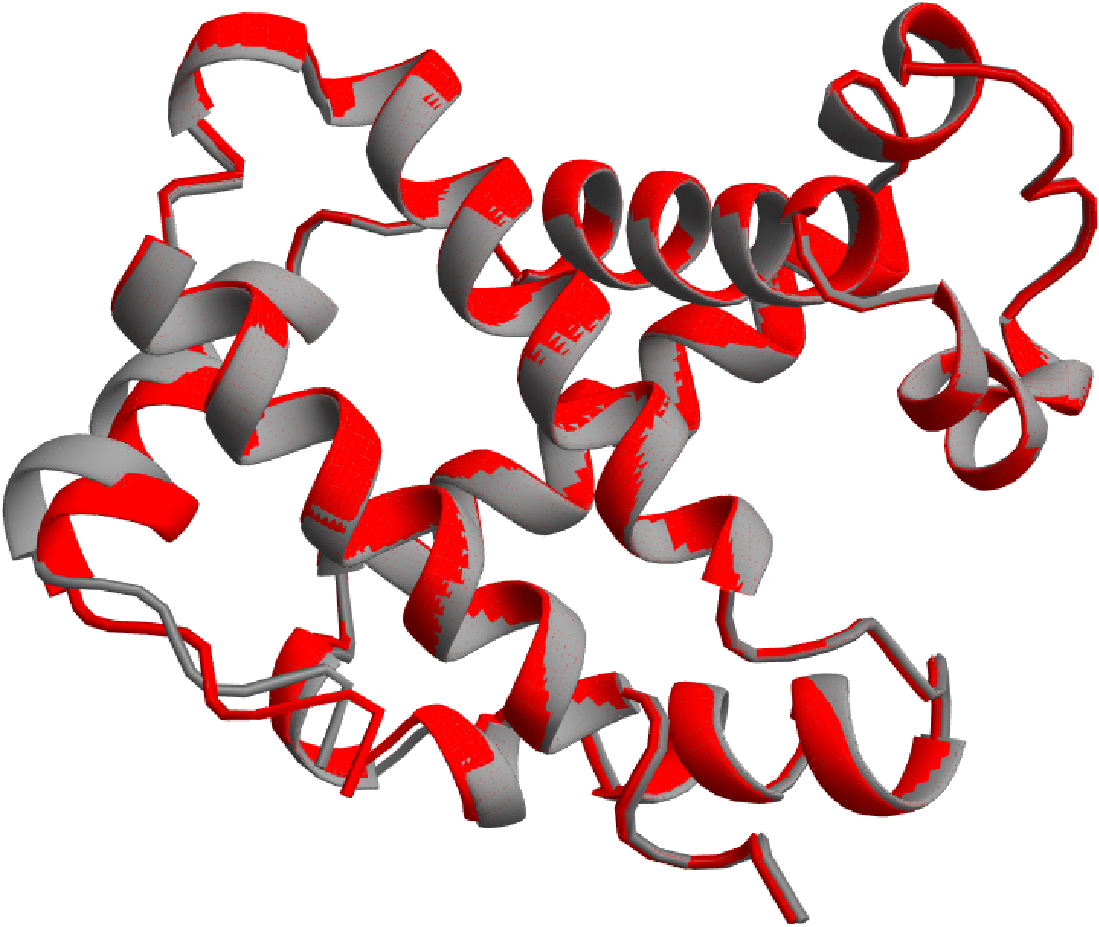


I created each of the two ribbon models separately first, then plotted them on top of each other. First, I created the normal protein ribbon model by using the function “BioMoleculePlot3D” which is able to take my protein (normalProtein) and directly turn it into a 3D ribbon plot. In the color rules, I specified that I wanted to make the entire ribbon for the normal protein the color gray. Then, I created the second ribbon model, for the mutated beta-globin protein, which is the red ribbon in the model. I repeated the same process I did for the gray ribbon, except I 3D plotted the aligned mutated protein instead of the mutated protein and instead of making the ribbon gray, I made this ribbon red. I also created a legend for clarity, which shows that the gray ribbon is normal beta-globin and the red ribbon is mutated beta-globin.
After running the function, we can see the two ribbon models plotted directly on top of each other. As seen from the key, the normal protein is gray and the mutated protein is red. There is some patchiness of gray and red throughout most of the ribbon, showing that there is negligible difference between the two proteins for most of their chains and therefore, a lot of overlapping of the two different colored ribbons.
Since there is considerable similarity and negligible difference for most of the chain, the computer that is building the two proteins is confused about which layer, gray or red, to put on top for most of the protein. This is what ultimately leads to that patchiness present throughout most of the ribbon. However, as we know, the mutated protein has a mutation in the 6th position of the chain, meaning there could be a visible difference between the two chains somewhere near one of the ends of the chain. This matches up with what we observe in the ribbon model above. As you can see, near one of the ends of the chain, there is a part where the two chains visibly do not line up with each other. The helices in that position have visibly less overlap than the rest of the protein. That is approximately where the mutation is located. As we get closer to the position where the mutation is, we notice that the gray and red ribbons seem to deviate even further from each other.
Since there is considerable similarity and negligible difference for most of the chain, the computer that is building the two proteins is confused about which layer, gray or red, to put on top for most of the protein. This is what ultimately leads to that patchiness present throughout most of the ribbon. However, as we know, the mutated protein has a mutation in the 6th position of the chain, meaning there could be a visible difference between the two chains somewhere near one of the ends of the chain. This matches up with what we observe in the ribbon model above. As you can see, near one of the ends of the chain, there is a part where the two chains visibly do not line up with each other. The helices in that position have visibly less overlap than the rest of the protein. That is approximately where the mutation is located. As we get closer to the position where the mutation is, we notice that the gray and red ribbons seem to deviate even further from each other.
Gaussian Surface Models
Gaussian Surface Models
The next model I make is a 3D model of the normal protein and aligned mutated protein shown directly on top of each other, with the plot theme of Gaussian Surface. The gray protein is the normal un-mutated beta-globin and the slightly transparent red protein is the mutated sickle cell beta-globin. I saved the gray un-mutated protein as the variable “plot1” and saved the mutated protein as the variable “plot2”. The process of constructing the model was essentially the same as the ribbon model.
I created two Gaussian surface BioMolecule plots, one gray one for the normal protein and one red one for the mutated one. I used the aligned mutated protein so that the two models can be almost perfectly on top of each other, making it easier to see where the differences are. Then, I plotted these two Gaussian Surface models on top of each other.
In[]:=
Show[plot1=BioMoleculePlot3D[normalProtein,ColorRules->{_->Gray},PlotTheme->"GaussianSurface"],plot2=BioMoleculePlot3D[alignedMutatedProtein,ColorRules->{_->Red},PlotTheme->"GaussianSurface",PlotStyle->Opacity[0.5]]]
Out[]=
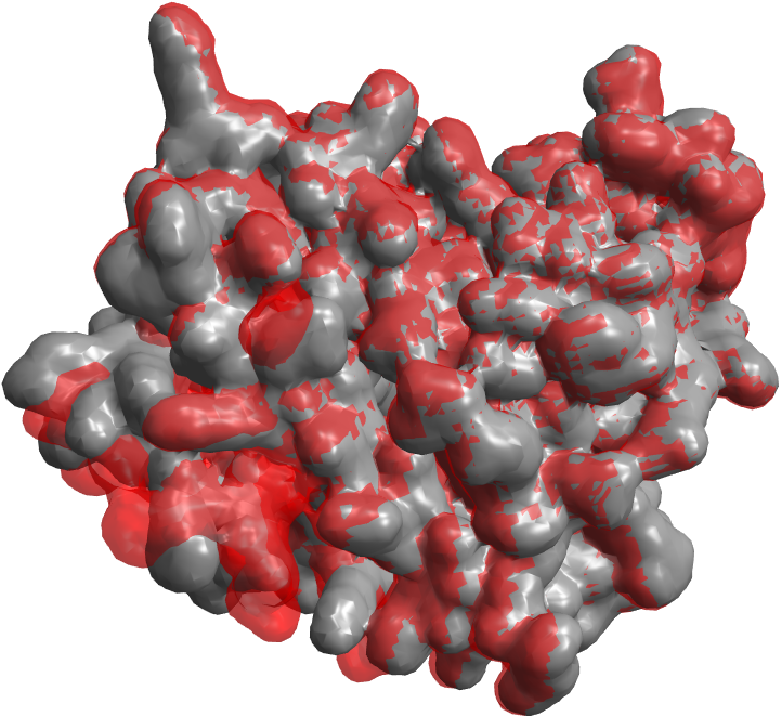
As you can see from the model, throughout the entire protein there is patchy overlapping between the red and gray mesh layers. This is because the gray mesh and the red mesh have the same thickness, meaning that when there is negligible difference between atom coordinates of the two proteins, the computer doesn’t know which layer (gray or red) to put on top. This ultimately results in the patchy gray and red mesh pattern spread throughout most of the protein. Since I am trying to analyze the differences between the two proteins, I need a way to find out which areas between the protein are actually significantly different. This leads to the logical reasoning behind the next type of model I constructed.
Mesh Models
Mesh Models
The next visualization I am making is a mesh model that can clearly show the differences between the normal and mutated proteins when they are shown on top of each other. As we saw from the previous Gaussian Surface models, there is some patchiness between the gray (normal) protein and the red (mutated) protein when there is negligible difference between their atom coordinates. In other words, where they are aligned well, color patchiness will occur. The aim of these Gaussian Surface models overlaid on top of each other was to be able to highlight and visualize the differences in atomic position before and after the specific mutation occurs. These differences would have been clearly seen where there is a visible color difference. For example, when there is red sticking out on the gray surface, that means the red areas are where the two proteins have atomic differences from each other. However, because of the patchiness, it makes it difficult to tell where the actual significant differences are, and which red areas are just because of the computer model limitations as explained previously about the two meshes having the same thickness. To fix this problem, in this next mesh protein model, I made one of the meshes thicker. This fixes the problem because when the two proteins have negligible difference between their atoms, the computer will show the thicker mesh layer on top. Therefore, our resulting model will have less patchiness, and we know that the areas that are sticking out as red in this model are the parts that actually have significant differences between the before and after of the mutation.
First, I started to create my mesh models by discretizing the model that BioMoleculePlot3D gave me with the Gaussian Surface plot theme. The discretize function essentially converts my input into a mesh region, which is what I want for this model:
Next, I created the thick mesh model of the normal protein. I did this by taking the mesh I just created and increasing the absolute thickness. I saved this thick mesh to the variable “thickMeshNormal”:
Now I just repeat the same process of creating mesh models for my mutated protein. I started by discretizing the Gaussian Surface BioMolecule plot. Then, I increased the thickness of the mesh and saved the end result as the variable “thickMeshMutated”:
Finally, I can use the thick mesh model I created and plot it on top of another model using the “Show” function to create another comparison model of the protein before and after mutation that this time, hopefully, shows only significant differences clearly and hides some of the less significant differences. For this model, I plotted two mesh models on top of each other.
The first model is the thick mesh model of the normal protein that I just created, and the second model is the Gaussian Surface model for the mutated protein that I made red and reduced the opacity of:
After plotting these two models on top of each other, I notice that this results in less of the patchiness between the gray and red models that I saw in the first model. From this model, we can see that most of the model is gray since the gray mesh is thicker. This means that when there is negligible differences between the atomic coordinates of the normal and mutated protein, this time, the computer model knows to show the gray layer on top of the red layer since the gray mesh is thicker. We can see that there is noticeably less red areas than the Gaussian Surface model. If there are red areas that are still visible in this model it means that they are significantly different from their position in the normal protein since they stick out noticeably. Therefore, this type of model where one of the meshes is thicker than the other is comparatively more effective than the model of the two Gaussian Surfaces on top of each other in allowing the human eye to immediately discern noticeable differences in a protein’s atomic structure before and after a mutation.
Spacefilling Models
Spacefilling Models
For my next type of visualization, I wanted to create BioMolecule 3D plots using the plot theme “Spacefilling”. Creating these was basically the same process as creating the ribbon plots and Gaussian surface plots but even simpler. I did not use the “Show” function for this because I did not want to plot the two models on top of each other. Instead, I used the “Row” function to display the two protein models side-by-side. I also did not need to change any color rules for these spacefilling models and I just let the colors stay as the default atom colors which are gray for Carbon, blue for Nitrogen, red for Oxygen, and yellow for Sulfur.
These spacefilling models are useful to me because I can see each individual atom as spheres (unlike the Gaussian surface model which is a mesh) and see the elemental composition of the proteins using the color keyed spheres. In short, this model lets us zoom in to take an even closer look at the protein, going all the way to the atomic level:
Creating a Master Visualization Function
Creating a Master Visualization Function
Next, I want to stitch all of my previous visualization work together into a master protein mutation visualization function. Essentially, I just put together all the models I worked on in the above subsections into one compiled function. My goal with this function was to use it to visualize amino acid mutations in a desired protein. If the user enters a protein ID and some details about the mutation, the function will output a few models that will help them visualize how the protein changes after the mutation. Specifically, the master visualization function is essentially a function that takes a protein’s UniProtKB Accession Number, the position of the residue where the mutation occurs, and what amino acid the original residue is replaced by. The function takes these three inputs and outputs six different items helping with visualization in an organized graphics grid, meaning they show up item by item in a vertical format and some items are also coded to show up side-by-side horizontally.
Function for Highlighting Residue Atoms
Function for Highlighting Residue Atoms
For my next visual model, I wanted to zoom in even closer to the atomic level of proteins, since oftentimes the impacts of these mutations are so small that they can only be seen at the atomic level and have tiny differences that are barely noticeable even at the molecular level.
The goal of this function is to essentially take in a protein, an index where an amino acid is mutated, what color to highlight the atoms, and what chain the desired protein is:
The output of this highlighting function should be a model where the atoms of the residue that is mutated (basically the residue that changes after the mutation) are highlighted to be the indicated color:
This is the the result of running my "highlightProteinSpaceFilling" function . As you can see, I can use the function to highlight a certain amino acid that is changed during a specific mutation to a desired color to make it stand out. This is a useful tool for visualizing the effect mutations have on atomic structure. In this particular example, the atoms of the 8th residue in the normal beta-globin protein were highlighted green.
The Final Master Visualization Function
The Final Master Visualization Function
This is the master visualization function that I created, which is essentially a function that takes a protein’s UniProtKB Accession Number, the position of the residue where the mutation occurs, and what amino acid the original residue is replaced by. The function takes these three inputs and outputs four different items in a graphics grid, meaning they show up item by item in a vertical format, and some items show up side-by-side in a row as well. This function is meant to return six outputs that help the user visualize a mutation in a protein:
The first item is a cell showing the differences between the normal sequence and the mutated sequence by highlighting the original residue letter in red and the replacement residue letter in green. The second item is a ribbon model of the normal protein and mutated protein placed on top of each other to see the differences in structure clearly, which is the first type of BioMoleculePlot3D that I tried for my project. This is usually the most commonly seen type of visualization in modeling proteins. The third item in the the grid is a row of two models side-by-side. These two models are both mesh models. The model on the left is the model I created earlier of two BioMoleculePlot3D with the plot theme of Gaussian Surface overlaid on top of each other.
The model on the right is essentially the same as the one on the left but the gray mesh is thicker, resulting in less patchiness and clearer visualization of the actual significant differences in atomic structure before and after the mutation:
Statistical Analysis of Mutations
Statistical Analysis of Mutations
In this section, I am aiming to conduct statistical significance tests (T-test) on mutations with different characteristics, using the total displacement of atoms before and after mutation as my quantitative measure.
Data Generation
Data Generation
First, in order to conduct statistical significance tests, I need data that I can use to run those tests. I created two functions, displacement and randomDisplacement which both have similar functions but are a little different. I first created the function “displacement” which, as its name suggests, is intended to calculate the total displacement of atoms before and after a particular mutation is applied. The function allows the user to mutate one amino acid in a protein. This function takes in a protein ID, a position of mutation, and the replacement amino acid and calculates the displacement. The output is a list that includes the position of mutation, the letter of the amino acid replacement, and the total displacement of the atoms when this specific mutation occurs. The way I calculated the displacement was by residue. I found the centroid of each residue in the normal protein and the centroid of each residue in the mutated protein. Then, I calculate the Euclidean distance between each respective residue in the normal protein and the same index residue in the mutated protein. I summed all of these distances to obtain a total displacement for the mutation.
Next, I constructed the function “randomDisplacement”, which is very similar to the displacement function except some parts are randomly generated, as its name implies. I used polymorphism in writing this function since I defined many possible versions of this function where the inputs could be different. For example, the user does not have to input what specific letter chain the protein they want is in. The function will work if the user inputs a specific chain, and will also work a default way if the user does not need to input a chain, like in the case of beta-globin which is already only one chain. The overall concept and method of calculating displacement is the same as the “displacement” function. The only difference is that some things, like the position of mutation and amino acid replacement can be randomly generated. In this case, a user could just input a protein ID and the function would randomly generate the mutation (both position and replacement amino acid), then calculate the atomic displacement of this mutation. The output of this function is a list of the position of mutation, the replacement residue, the total atomic displacement, and the original residue letter. These outputs are useful because I directly use these outputs in my next function to generate data for my statistical analysis.
Next, I need to create a database from the randomDisplacement function. I do this by creating a function that creates a list of associations with certain outputs of my the function randomDisplacement. Here, in each call of the function that creates the database, I am calling the randomDisplacement five times. In other words, each time I run this function I am generating five rows of data. This is because I found it more computationally efficient to run few rows at a time but run the function many times as compared to running a large amount of rows one time. Since I need a larger amount of data to conduct statistical analysis, I ran five rows at a time using this function and ran the function “createDatabase” many times in order to get a sufficient amount of data.
After I ran my function “createDatabase” a sufficient number of times, I compiled all my data into one large list of associations. I saved my compiled data as the variable “allData” to use later. I also iconized this data since it is convenient for storing large amounts of data. The function can be set to run however many rows the user wants (see at the end of the function) by changing the input variable “rows” which is the third function input. The function makes it so it will call the random displacement function x,the input number, of times and output x associations. The user can change this number to run however many rows they want. If we want to generate a whole dataset, we could change rows to a few hundred or thousand rows.
When reading through my data, I noticed that there were some instances where the amino acid in the random position happens to mutate to the same amino acid. This means the amino acid is replaced by itself, and will therefore have a displacement of zero. This is not data that I want to include in my statistical tests since they could skew my results in one direction and reduce the accuracy. I also noticed that there were some repeated rows where the position of mutation, amino acid replaced, and amino acid replacement all happened to be the same. Consequently, the displacement of these rows would also be the same. Repeated data was also something I wanted to remove from my final data. Ultimately, I decided to filter my data to remove the zero displacements and repeated data. I saved this filtered data as the variable “filteredAllData” to use in my statistical analysis. I did this filtering by using the deleting duplicates function and removing associations where the replaced amino acid is the same as the replacement amino acid.
Analysis with Secondary Structures
Analysis with Secondary Structures
For the first part of my statistical analysis, I decided to analyze how secondary structures impact atomic displacement. Essentially, this means that I am separating my data into two groups: mutations that occur in a helix and mutations that do not occur in a helix. After categorizing my data into these two groups, I will conduct a Student’s t-test for significance to test if there is a statistically significant difference between the means of the two groups.
Categorizing By Helix
Categorizing By Helix
This is a function called “helixIndices” that can return the positions of residues in helices given a BioMolecule input.
Next, I retrieved the indices of residues in helices for the normal beta-globin protein which is saved as the variable “normalProtein” and saved that list of indices as “indicesInHelix”. Then, I used the “Complement” function to find the indices of residues that are not in helices, since it returns all the indices that were not in the first list. I saved this list of indices as the variable “indicesNotInHelix”.
Next, I created an association of the data categorized into mutations in helices and mutations not in helices.
Data Visualization
Data Visualization
Here, I also used the RandomChoice function to make sure that the two datasets were of equal sample size, which is important in getting accurate significance test results.
To visualize the atomic displacement of the two groups, I plotted the data from the two groups into a histogram. As seen from the legend, the yellow bars represent mutations that take place in a helix and the blue bars represent mutations that do not take place in a helix.
Student’s t-test for Significance
Student’s t-test for Significance
Now, I am conducting the actual statistical test that evaluates whether there is a significant statistical difference or not in the means of atomic displacement between the group of mutations in helices and the group of mutations not in helices. I used the built-in Wolfram function for Student’s t-test and inputted the two lists of data, “Helix Mutations” and “Non-helix Mutations” that I wanted to evaluate if there was a significant difference between. I mapped the Log function to these lists of data to make them approximately normal since that is a requirement for conducting a t-test. The null hypothesis I’m testing here is that there is no statistically significant difference between the mean of total atomic displacements of the mutations in helices and the mean of the total atomic displacements of the mutations not in helices. The alternate hypothesis is the opposite, which is that there is a statistically significant difference between the mean of total atomic displacements of the mutations in helices and the mean of the total atomic displacements of the mutations not in helices.
After running the t-test function, I obtain a p-value of 0.935232 which is greater than the most commonly used significance level of 0.05. Since the p-value is greater than the significance level, we fail to reject the null hypothesis that states that there is no significant difference between the mean of the total atomic displacements of the mutations in helices and the mean of the total atomic displacements of the mutations not in helices. In conclusion, as a result of this t-test, there is insufficient evidence to suggest that there is a statistically significant difference between the mean of the total atomic displacements of the mutations in helices and the mean of the total atomic displacements of the mutations not in helices.
Analysis with Polarity
Analysis with Polarity
For the second part of my statistical analysis, I decided to analyze how changes in polarity of amino acids impact atomic displacement. Once again, this means that I am separating my data into two groups: mutations where the amino acid before and amino acid after have different polarity (nonpolar to polar or polar to nonpolar) and mutations where there is no change in polarity in the amino acid before and after mutation. After separating my data into these two groups, I once again will conduct a Student’s t-test for significance to test if there is a statistically significant difference between the means of the two groups.
Categorizing by Changes in Polarity
Categorizing by Changes in Polarity
First, we save a selection of polar residues to a list called “polarResidues” and save a selection of the nonpolar residues to a list called “nonPolarResidues”. We combine these two lists (nonpolar and polar residues) into one list of residues to concentrate on and save the list as the variable “polarNonpolarResidues”.
Next, we find all the positions on the protein where the residues we are interested in analyzing exist.
The “polarNonpolarReplacements” variable filters through all the data and selects all the mutations/rows where both the original amino acid and replacement amino acid are one of the target residues.
The next function is a function that checks whether the polarity of the mutated amino acid changes or not before and after the mutation. It returns True if the polarity changes and False if it doesn’t.
Next, I save a list of mutation associations where the polarity changes before and after the mutation as the variable “polarityChangedMutations”. This would be nonpolar to polar or polar to nonpolar amino acids. Similarly, I save a list of mutation associations where the polarity does not change before and after the mutation takes place as the variable “polarityConstantMutations”. This would include polar to polar or nonpolar to nonpolar amino acids.
Now, I obtain the total atomic displacements of the mutations I have filtered through by mapping through the list of associations to extract only the values of the displacements.
The next line matches the sample sizes of the two datasets in order to perform an accurate t-test.
Data Visualization
Data Visualization
Here, I visualize the data from the two groups: the group where the polarity changes and the group where the polarity stays constant after mutation. I plot these two datasets as a smooth histogram. As seen from the plot legend, the blue line represents mutations where the amino acid polarity changes after mutating and the yellow line represents mutations where the amino acid polarity does not change after mutating.
Student’s t-test for Significance
Student’s t-test for Significance
Next, I will conduct the same process I used for the previous analysis: a Student’s t-test which will evaluate whether there is a significant statistical difference or not in the means of atomic displacement between the group of mutations where polarity of the mutated amino acid does not change after the mutation and the means of atomic displacement between the group of mutations where polarity of the mutated amino acid changes after the mutation. I used the t-test function and inputted the two lists of data, “matchedLengthPCD” and “polarityConstantDisplacements” that I wanted to evaluate if there was a significant difference between. I mapped the Log function to these lists of data to make them approximately normal since that is a requirement for conducting an accurate t-test.
The null hypothesis I’m testing here is that there is no statistically significant difference between the mean total atomic displacement of the group of mutations where polarity of the mutated amino acid does not change after the mutation and the means of atomic displacement between the group of mutations where polarity of the mutated amino acid changes after the mutation. The alternate hypothesis is the opposite, which is that there is a statistically significant difference between the mean total atomic displacements of group of mutations where polarity of the mutated amino acid does not change after the mutation and the means of atomic displacement between the group of mutations where polarity of the mutated amino acid changes after the mutation.
The null hypothesis I’m testing here is that there is no statistically significant difference between the mean total atomic displacement of the group of mutations where polarity of the mutated amino acid does not change after the mutation and the means of atomic displacement between the group of mutations where polarity of the mutated amino acid changes after the mutation. The alternate hypothesis is the opposite, which is that there is a statistically significant difference between the mean total atomic displacements of group of mutations where polarity of the mutated amino acid does not change after the mutation and the means of atomic displacement between the group of mutations where polarity of the mutated amino acid changes after the mutation.
After running the t-test function, I obtain a p-value of 0.018177 which is less than the commonly accepted significance level of 0.05. Since the p-value is less than the significance level, we reject the null hypothesis that states that there is no significant difference between the mean atomic displacement of the group of mutations where polarity of the mutated amino acid does not change after the mutation and the mean atomic displacement between the group of mutations where polarity of the mutated amino acid changes after the mutation. In conclusion, as a result of this t-test, there is sufficient evidence to suggest that there is a statistically significant difference between the mean of the total atomic displacements of the group of mutations where polarity of the mutated amino acid does not change after the mutation and the mean total atomic displacement between the group of mutations where polarity of the mutated amino acid changes after the mutation.
Conclusion
Conclusion
Through this project, I investigated how single amino acid mutations--in particular, those associated with sickle cell anemia--affect protein structure at the molecular and atomic levels. I focused on visualizing and analyzing how mutations with different characteristics affect total atomic displacement before and after mutation. By computationally generating and analyzing mutated proteins, I was able to quantify how specific biochemical and structural properties influence the magnitude of these displacements. Properties such as secondary structure (whether or not the mutation occurred in a helix) and polarity (whether the polarity of the amino acid side chain changed after mutation) were thoroughly explored using statistical significance tests.
Through my statistical analysis of mutations with secondary structures and polarity, I was able to draw some conclusions. From the tests of secondary structures, I used a t-test to analyze whether there was a statistically significant difference between the mean total atomic displacement of mutations that occurred in helices and the mean total atomic displacement of mutations that did not occur in helices. From the t-test results, I concluded that there was insufficient evidence to suggest a statistically significant difference between these two groups. Through my second statistical analysis, I investigated the association between change in polarity of amino acids and total atomic displacement and made a conclusion. I used a t-test to analyze whether there was a statistically significant difference between the mean total atomic displacement of mutations that resulted in a change in the mutated amino acid’s polarity and the mean total atomic displacement of mutations that did not result in a change in polarity of the mutated amino acid. Since my p-value was less than the significance level of 0.05, I rejected the null hypothesis and concluded that there is sufficient evidence to suggest that there is a statistically significant difference between the means of the two groups based on change in polarity.
Through my statistical analysis of mutations with secondary structures and polarity, I was able to draw some conclusions. From the tests of secondary structures, I used a t-test to analyze whether there was a statistically significant difference between the mean total atomic displacement of mutations that occurred in helices and the mean total atomic displacement of mutations that did not occur in helices. From the t-test results, I concluded that there was insufficient evidence to suggest a statistically significant difference between these two groups. Through my second statistical analysis, I investigated the association between change in polarity of amino acids and total atomic displacement and made a conclusion. I used a t-test to analyze whether there was a statistically significant difference between the mean total atomic displacement of mutations that resulted in a change in the mutated amino acid’s polarity and the mean total atomic displacement of mutations that did not result in a change in polarity of the mutated amino acid. Since my p-value was less than the significance level of 0.05, I rejected the null hypothesis and concluded that there is sufficient evidence to suggest that there is a statistically significant difference between the means of the two groups based on change in polarity.
Future Directions
Future Directions
In the future, I plan to expand the statistical analysis I conducted in this project to include a wider range of mutations and proteins associated with diseases, not limited to just sickle cell anemia. I aim to assess whether the patterns and observations I concluded from this project hold true across different proteins and their associated diseases. If I had more time, I would have liked to analyze how other properties of mutations that I didn’t have the chance to explore this time impact atomic displacement before and after mutation. I would like to be able to identify those mutation properties that would be more likely to lead to a statistically significant result. As I continue to expand this project and as I reach a point where I have analyzed the properties of various mutations thoroughly, I would eventually like to get to a point where I can create a function that is able to predict the pathogenicity of a mutation on a specific protein when the protein and mutation are inputted. To achieve this, I would need to work on creating a link between atomic displacement and pathogenicity. An overarching future goal is that I hope to be able to connect structural displacement to functional consequences--like protein misfolding or different protein interactions--to be able to better understand how specific amino acid mutations lead to manifestations of disease phenotypes at both the molecular and clinical level.
References
References
Jumper, J. et al. “Highly accurate protein structure prediction with AlphaFold.” Nature, 596, pages 583–589 (2021). DOI: 10.1038/s41586-021-03819-2
Suhail, M. Biophysical chemistry behind sickle cell anemia and the mechanism of voxelotor action. Sci Rep 14, 1861 (2024). https://doi.org/10.1038/s41598-024-52476-8
Varadi, M. et al. “AlphaFold Protein Structure Database in 2024: Providing structure coverage for over 214 million protein sequences.” Nucleic Acids Research, gkad1011 (2023). DOI: 10.1093/nar/gkad1011
Varadi, M. et al. “AlphaFold Protein Structure Database: massively expanding the structural coverage of protein-sequence space with high-accuracy models.” Nucleic Acids Research, 50(D1), pages D439–D444 (2021). DOI: 10.1093/nar/gkab1061
Acknowledgments
Acknowledgments
I would like to thank my mentor, Dave DeBrota, for supporting me throughout my entire journey at WSRP, advocating for my ideas, and always doing his best to allow me to explore what I wanted during this program. I would also like to thank the program directors, Rory, Megan, and Eryn and Jason Sonnenberg for how understanding they were of my project and ideas, and how they did everything in their power to help me research what I wanted. Thank you to the TAs who offered support throughout all stages of my project, especially William Choi-Kim. Thank you to all the friends and peers I met for their encouragement and support!
CITE THIS NOTEBOOK
CITE THIS NOTEBOOK
Visualizing & analyzing genetic mutations causing sickle cell anemia
by Jasmine Zhao
Wolfram Community, STAFF PICKS, July 10, 2025
https://community.wolfram.com/groups/-/m/t/3501429
by Jasmine Zhao
Wolfram Community, STAFF PICKS, July 10, 2025
https://community.wolfram.com/groups/-/m/t/3501429