This is a continuation to the posts listed at: https://community.wolfram.com/web/ggoff/
Abstract
Abstract
Wolfram Language was used to explore surfaces and prepare starting points for animations in Blender. In Example 1 a torus and the development of ribbons were visualized. Example 2 started in both cases with two circles. A ring and a bracelet were animated.
Experiments
Experiments
In[]:=
SetDirectory[NotebookDirectory[]]
Out[]=
/Users/gg/Desktop/ams5pub
Example 1: Ribbons
Example 1: Ribbons
Out[]=
In[]:=
Clear[a,b,u,v,torus,torus1,table1,table2,t0,t1,t2,t3,t4,t5,c1,c2,c3,c4]
Torus as tube:
In[]:=
torus=ParametricPlot3D[{aSin[u],aCos[u],0}/.{a->2},{u,0,2π},{v,0,2Pi},Method{"TubePoints"30},Axes->False,Boxed->False]/.Line[pts_,rest___]:>Tube[pts,0.2,rest];Show[torus,ImageSize->Small]
Out[]=

Torus as curve :
In[]:=
torus1=ParametricPlot3D[{aSin[u],aCos[u],0}/.{a->2},{u,0,2π},{v,0,2Pi},Axes->False,Boxed->False];Show[torus1,ImageSize->Small]
Out[]=

Torus and development of ribbon:
In[]:=
table1=Table[Show[torus,ParametricPlot3D[Evaluate[{(a+bSin[nu])Cos[u]-vSin[u],(a+bSin[nu])Sin[u]+vCos[u],bCos[nu]}]/.{a->2,b->1.5,n->i},{u,0,i},{v,0,π/2},PlotPoints25],PlotRange->All,Axes->False,Boxed->False],{i,0.001,2Pi,Pi/4}];
The fifth element of the table as example:
In[]:=
Show[table1[[5]],ImageSize->Small]
Out[]=

Testing different values for the parameter n and ribbon width:
In[]:=
c1=Table[ParametricPlot3D[Evaluate[{(a+bSin[nu])Cos[u]-vSin[u],(a+bSin[nu])Sin[u]+vCos[u],bCos[nu]}]/.{a->2,b->1.5,n->i,u->0},{v,0,π/2},PlotPoints25,PlotRange->All,Axes->False,Boxed->False],{i,2,5}];
In[]:=
c2=Table[ParametricPlot3D[Evaluate[{(a+bSin[nu])Cos[u]-vSin[u],(a+bSin[nu])Sin[u]+vCos[u],bCos[nu]}]/.{a->2,b->1.5,n->i,v->Pi/4},{u,0,2π},PlotPoints25,PlotRange->All,Axes->False,Boxed->False],{i,2,5}];
In[]:=
table2=Table[Show[c1[[i]],c2[[i]],torus],{i,1,4}];
The third element of the table as example:
In[]:=
Show[table2[[3]],ImageSize->Small]
Out[]=

Export torus and curve pairs in dxf format:
In[]:=
Export["torus.dxf",torus1]
Out[]=
torus.dxf
In[]:=
Do[Export["c1"<>ToString[i]<>".dxf",c1[[i]]];Export["c2"<>ToString[i]<>".dxf",c2[[i]]],{i,1,4}]
In[]:=
c3=Table[ParametricPlot3D[Evaluate[{(a+bSin[nu])Cos[u]-vSin[u],(a+bSin[nu])Sin[u]+vCos[u],bCos[nu]}]/.{a->2,b->1.5,n->i,u->0},{v,0,2π},PlotPoints25,PlotRange->All,Axes->False,Boxed->False],{i,2,5}];
In[]:=
c4=Table[ParametricPlot3D[Evaluate[{(a+bSin[nu])Cos[u]-vSin[u],(a+bSin[nu])Sin[u]+vCos[u],bCos[nu]}]/.{a->2,b->1.5,n->i,v->0},{u,0,2π},PlotPoints25,PlotRange->All,Axes->False,Boxed->False],{i,2,5}];
In[]:=
t0=Table[Show[c3[[i]],c4[[i]],torus],{i,1,4}];
The third element of the table as example:
In[]:=
Show[t0[[3]],ImageSize->Small]
Out[]=

Export curve pairs as dxf-files:
In[]:=
Do[Export["c3"<>ToString[i]<>".dxf",c3[[i]]];Export["c4"<>ToString[i]<>".dxf",c3[[i]]],{i,1,4}]
The variation of winding number and ribbon with combined in a GraphicsGrid:
In[]:=
t1=Table[Show[torus,ParametricPlot3D[Evaluate[{(a+bSin[nu])Cos[u]-vSin[u],(a+bSin[nu])Sin[u]+vCos[u],bCos[nu]}]/.{a->2,b->1.5,n->i},{u,0,2π},{v,0,π/2},PlotPoints25],PlotRange->All,Axes->False,Boxed->False],{i,2,5}];
In[]:=
t2=Table[Show[torus,ParametricPlot3D[Evaluate[{(a+bSin[nu])Cos[u]-vSin[u],(a+bSin[nu])Sin[u]+vCos[u],bCos[nu]}]/.{a->2,b->1.5,n->i},{u,0,2π},{v,0,π},PlotPoints25],PlotRange->All],{i,2,5}];
In[]:=
t3=Table[Show[torus,ParametricPlot3D[Evaluate[{(a+bSin[nu])Cos[u]-vSin[u],(a+bSin[nu])Sin[u]+vCos[u],bCos[nu]}]/.{a->2,b->1.5,n->i},{u,0,2π},{v,0,3π/2},PlotPoints25],PlotRange->All,Axes->False,Boxed->False],{i,2,5}];
In[]:=
t4=Table[Show[torus,ParametricPlot3D[Evaluate[{(a+bSin[nu])Cos[u]-vSin[u],(a+bSin[nu])Sin[u]+vCos[u],bCos[nu]}]/.{a->2,b->1.5,n->i},{u,0,2π},{v,0,2π},PlotPoints25],PlotRange->All,Axes->False,Boxed->False],{i,2,5}];
t5=GraphicsGrid[{t1,t2,t3,t4},FrameAll]
Out[]=
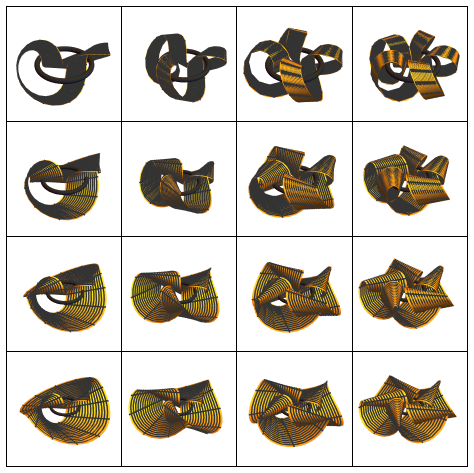
In Blender the pair of curves for graphics #2 of the above grid was imported. The torus was added as a mesh with appropriate dimensions. The winding curve was beveled with the straight line as object. Then a keyframe animation was done with varying the end mapping value for the beveling of the winding curve from 0 to 1. The torus got a copper-like material. For the ribbon a material similar to a leopard was applied. In part 2 of the animation the width of the ribbon was increased. Part 3 was used to create a rotation of torus and ribbons around the z-axis with keyframes. In part 4 the development of the fully beveled curve was reversed.
Example 2: Something2Wear
Example 2: Something2Wear
Ring
Ring
The parametric form of a ring was entered and a 3d-plot created:
The surface was exported in dxf-format:
Parametric form of curve and area for extrusion along curve were entered:
The curves were exported as dxf-files :
A preview of the development of the ring was created via curves :
The 3d-plot of the ring was imported in Blender to check, if the chosen parameters deliver a visual usable result. The two curves for developing the ring were imported too. A recreation of the vertical curve as Bezier-circle in Blender allowed a start from cleaner structure. The vertical circle as curve-object parented to an empty-object placed at the origin was rotated via the screw modifier around the z-axis in a keyframe-animation. The developing ring-surface was subdivided via the subdivision modifier and given a golden material. In part 2 the ring was translated in direction of the horizon and scaled down to appear in the background.
Bracelet
Bracelet
A parametric form was entered and plotted in 3D:
The bracelet was exported as dxf-file.
The curve for circle 1 was extracted :
The curve for circle 1 was exported in dxf-format:
The curve for circle 2 was extracted :
The curve for circle 2 was exported in dxf-format:
Circle 1 was extruded along circle 2:
In part 3 the first 3d-plot of the bracelet was imported in Blender to check, if it fitted in relation of size to the ring. The two curves for developing the bracelet were imported too. Again the vertical circle was recreated as Bezier-circle in Blender. The vertical circle as curve-object parented to an empty-object placed at the origin was rotated via the screw modifier around the z-axis in a keyframe-animation. The developing open bracelet-surface was subdivided via the subdivision modifier and given a red material with a golden pattern. To visually close the bracelet an additional circle filled with the red-gold material was added.
In part 4 the ring and the bracelet were translated out of the frame in opposite direction.
In part 4 the ring and the bracelet were translated out of the frame in opposite direction.
References
References
Collection of animations
Collection of animations
References
References
Ribbons
Scene: Modified Ruled Rotor Cylindroid & Torus
Krivoshapko, S.; Ivanov, V. N. Encyclopedia of Analytical Surfaces; Springer International Publishing, 2015; pp 80. https://doi.org/10.1007/978-3-319-11773-7.
(accessed 2021-08-23)
Audio:
Stock Music & Sound Effects - Royalty Free Audio - Storyblocks
https://www.storyblocks.com/audio (accessed 2021-08-23)
Donelly, Jason. Groove Hall. Accessed August 23, 2021. Asset ID: SBA-300292591.
Scene: Modified Ruled Rotor Cylindroid & Torus
Krivoshapko, S.; Ivanov, V. N. Encyclopedia of Analytical Surfaces; Springer International Publishing, 2015; pp 80. https://doi.org/10.1007/978-3-319-11773-7.
(accessed 2021-08-23)
Audio:
Stock Music & Sound Effects - Royalty Free Audio - Storyblocks
https://www.storyblocks.com/audio (accessed 2021-08-23)
Donelly, Jason. Groove Hall. Accessed August 23, 2021. Asset ID: SBA-300292591.
Something2Wear
Scene: Modified Cyclic Surface Of Revolution
Krivoshapko, S.; Ivanov, V. N. Encyclopedia of Analytical Surfaces; Springer International Publishing, 2015; pp 413. https://doi.org/10.1007/978-3-319-11773-7.
(accessed 2021-09-02)
Audio:
Stock Music & Sound Effects - Royalty Free Audio - Storyblocks
https://www.storyblocks.com/audio (accessed 2021-09-02)
Waldron, Amber. Cool Guy. Accessed September 2, 2021. Asset ID: SBA-300515212.
Scene: Modified Cyclic Surface Of Revolution
Krivoshapko, S.; Ivanov, V. N. Encyclopedia of Analytical Surfaces; Springer International Publishing, 2015; pp 413. https://doi.org/10.1007/978-3-319-11773-7.
(accessed 2021-09-02)
Audio:
Stock Music & Sound Effects - Royalty Free Audio - Storyblocks
https://www.storyblocks.com/audio (accessed 2021-09-02)
Waldron, Amber. Cool Guy. Accessed September 2, 2021. Asset ID: SBA-300515212.