A die with irregular number of sides, including odd numbers, lacks characteristics of isotropy, hence leading to die creation being increasingly difficult due to the absence of symmetry. Usually, such die are made with spindles or cylinders, but there are ways to make generally fair die that preserve their traditional shape without resorting to the above methods. In this essay I explore the different methods and explain through trial and error how to create an algorithm that computationally generates a fair n-sided die, including even cases and odd cases. These solutions focus more on the geometric composition of the dice rather than physical modifications, such as shifting the center of mass and changing densities.
Introduction
Introduction
Dungeons and Dragons, Catan, Monopoly -- board games have been increasingly popularized throughout the years, often serving as a well-needed break from the constant stimulation in the modern day. Often, however, unless one is an avid collector of various game-pieces, they find themselves without a sufficient range of results from our instruments of random-number generating -- dice. What happens if a specific game requires an odd, or even prime, number of results? What happens when the game cannot use their two standard 6-sided die to decide its fate?
Constraints
Constraints
◼
The first rule is that I cannot make a spindle die, or a cylindrical shape with sharp ends that are partitioned into n number of sides. The die has to somewhat resemble a traditional die, or at least be able to utilize all sides of it as a face.
◼
Odd numbered dice have no rotational symmetry, meaning that ensuring fairness is nearly impossible. There exists no shape that has an odd number of identical faces, nor equal distance from the center.
◼
This implies that the area of the sides must be as similar as possible, albeit not identical, and the disparities between face distances can only be optimized.
◼
It is assumed that the density of the material making up the die remains constant throughout, meaning that the centroid of the die is its center of mass.
The algorithm that I will eventually create can generate all even and odd sided die that are as fair as possible, but I will explore many different designs and methods of creating such die before I directly jump into the general method.
Even Case
Even Case
A traditional fair die, at its core, is just a regular polyhedron.
Wolfram Mathematica has a built in function that will generate certain shapes within its database given the number of sides. However, many sides are undefined, and in the case that it isn’t, I can simply plot equally distanced vertices on a sphere and connect them to form faces.
To make this more clear, the shapes that I will select by name will be platonic solids, where all faces are regular and congruent to each other.
I use PolyhedronData to find all shapes that are of the platonic category:
In[]:=
platonicshapes=PolyhedronData["Platonic"]
Out[]=
{Tetrahedron,Cube,Octahedron,Dodecahedron,Icosahedron}
I generate the first shape in the list above (tetrahedron):
In[]:=
Graphics3D[UniformPolyhedron[platonicshapes[[1]]]]
Out[]=

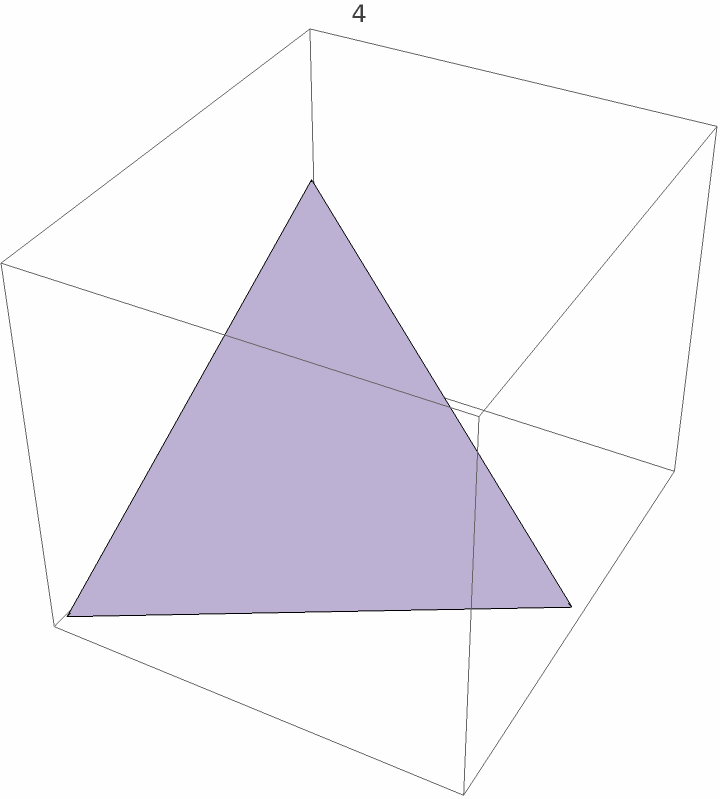
I assume that the faces will be connected via triangles (that is the shape my function ConvexHullMesh[] also tends to make). Of course this is certainly isn’t the method to build perfectly fair isohedron, which is why I choose to keep it as a backup using Check[], and will only serve as a makeshift shape for the die (as it will keep most sides fairly equal).
Using Euler’s formula, I can substitute a value for in order to find a formula mapping the amount of vertices to the amount of sides. Because each side is a triangle, each edge is counted three times per face, but over-counted once as it overlaps with two faces, meaning that . Substituting this within, I get . Therefore, I make the substitution:
Using Euler’s formula
v-e+f2
e
e3/2f
v(f+4)/2
Create the manipulate for the polyhedron, select from the platonic polyhedrons the ones that match the number of faces the user decides:
Manipulate[verticecount=(number+4)/2;Graphics3D[UniformPolyhedron@@Select[PolyhedronData["Platonic"],PolyhedronData[#,"FaceCount"]==number&],PlotLabel->number],{number,4,120,2}]
As a backup, if there are no named ones in the database, plot a polyhedron with equally distributed vertices, with
(f+4)/2
Graphics3D[ConvexHullMesh[Point[SpherePoints[(number+4)/2]]],PlotLabel->number]
Put it together:
Manipulate[verticecount=(number+4)/2;Quiet[Check[Rasterize[Graphics3D[UniformPolyhedron@@Select[PolyhedronData["Platonic"],PolyhedronData[#,"FaceCount"]==number&],PlotLabel->number]],Rasterize[Graphics3D[ConvexHullMesh[Point[SpherePoints[(number+4)/2]]],PlotLabel->number]]]],{{number,4,"Number of Sides"},4,120,2,Appearance->"Labeled"}]
Out[]=


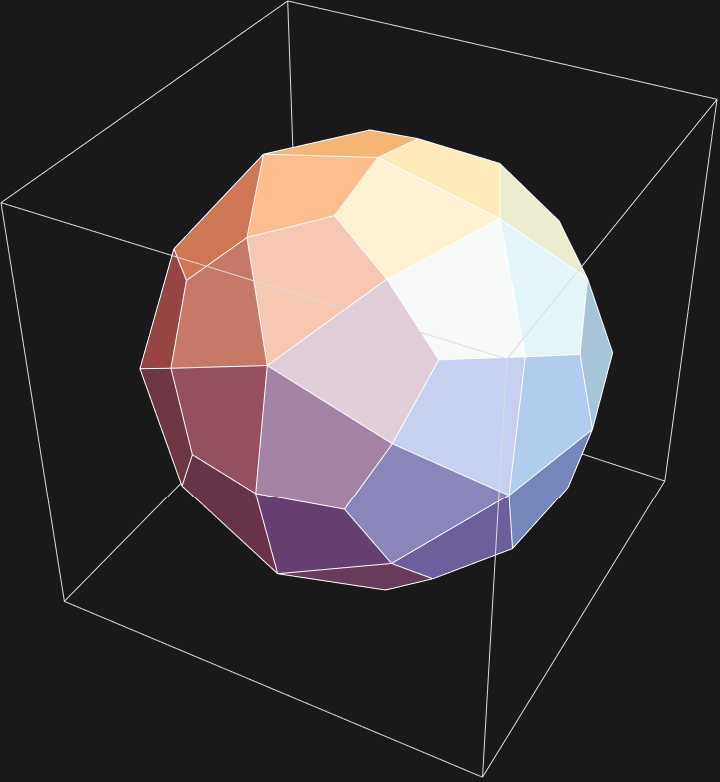
This wildly ignores the possibilities of Catalan solids, however, which differ from platonic solids in the way that the sides are not all regular polygons. For example, d48 and d60 are all examples of die that are Catalan solids -- all of the sides are congruent and equidistant, but they are not all regular polygons.
Finds all Catalan solids:
In[]:=
catalansolids=PolyhedronData["ArchimedeanDual"]
Out[]=
{DeltoidalHexecontahedron,DeltoidalIcositetrahedron,DisdyakisDodecahedron,DisdyakisTriacontahedron,PentagonalHexecontahedron,PentagonalIcositetrahedron,PentakisDodecahedron,RhombicDodecahedron,RhombicTriacontahedron,SmallTriakisOctahedron,TetrakisHexahedron,TriakisIcosahedron,TriakisTetrahedron}
Generates an example (can only use PolyhedronData to generate the shape, as UniformPolyhedron doesn’t work with Catalan solids):
In[]:=
Rasterize[PolyhedronData[catalansolids[[1]]]]
Out[]=
I take these cases into account:
If the number of sides matches any of the Catalan solid sides, I select the first polyhedron that is included in the “ArchimdedeanDual” (which is just another name for Catalan solid) that matches the input number:
In[]:=
If[MemberQ[{24,30,48,60,120},number],PolyhedronData@First[Select[PolyhedronData["ArchimedeanDual"],PolyhedronData[#,"FaceCount"]==number&]]]
Now add this to the whole Manipulate:
In[]:=
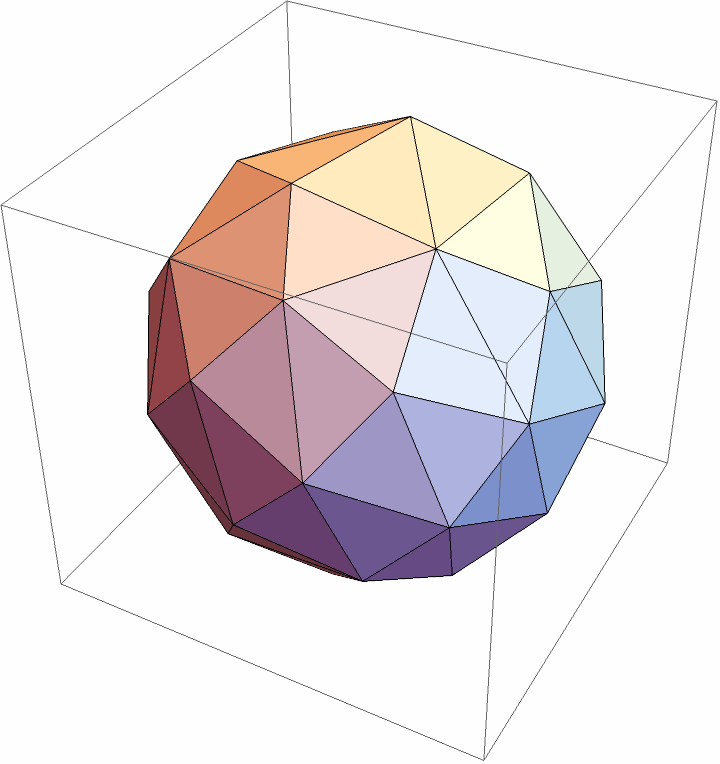
Manipulate[If[MemberQ[{24,30,48,60,120},number],PolyhedronData@First[Select[PolyhedronData["ArchimedeanDual"],PolyhedronData[#,"FaceCount"]==number&]],Quiet[Check[Rasterize[Graphics3D[UniformPolyhedron@@Select[PolyhedronData["Platonic"],PolyhedronData[#,"FaceCount"]==number&]]],Rasterize[Graphics3D[ConvexHullMesh[Point[SpherePoints[(number+4)/2]]]]]]]],{{number,4,"Number of Sides"},4,120,2,Appearance->"Labeled"}]
Out[]=
Aside from the Catalan and platonic solids already created, or the “traditional” die shapes, the other n-sided die are unable to be created in the same manner -- at least if they’re not perfectly fair. There are two solutions to this problem.
My first one is a bipyramid, which contains a perfectly symmetrical top and bottom. This is ideal for even-sided die, as its sides can simply be split. This can only be accomplished for die with sides >= 4.
I wish to create a manipulate that sets the number of sides, total height, the topmost point, the bottommost point, and the ring in the middle. First, I define these variables, the middle ring generated with the formulas above:
I then wrap a mesh around these points, adding slider properties:
In order to maximize landing stability, hoIver, four points is often more stable than three as it evenly distributes weight and creates a wider base. Therefore, the other solution was rather similar, and it was to create a trapezohedron. Here are the formulas that created the top and bottom rings:
It was rather similar to the bipyramids, except a phase shift was necessary for the bottom ring.
Same as the last, except there is an option to increase distance betIen the top ring and the bottom ring defined as heightmiddle, abbreviated as hm.
The issue with the trapezohedron, hoIver, was that a formula to completely eradicate the folds from the mesh wasn’t able to be derived. Decreasing the middle section/increasing the height of the overall polyhedron prevented the folds on the middle, but it would contribute to the folds on the sides. Increasing the middle section/decreasing the height would do the opposite. You can test this by adjusting hm and t respectively.
Conditions
Conditions
Building die that are roughly fair, however, don’t always require completely identical shapes or symmetry, or this project would be impossible. There are three main axioms that are needed:
1. Each face has similar shapes and similar areas.
2. Each face has roughly the same distance to the center of mass.
3. Dihedral angles remain as similar as possible.
2. Each face has roughly the same distance to the center of mass.
3. Dihedral angles remain as similar as possible.
The base I chose to ensure all of these was ultimately a sphere, as modifications to a sphere made it easy to ensure that rule 2 and 3 Ire able to be met.
Odd Case
Odd Case
Though the title is called “odd case”, the methods below are usable for all die, odd or even sides.
There was a general base method that was used. Due to the fact that my base shape was a sphere, I would need to evenly distribute the faces upon it. This method was used by Impact Minatures! irregular die, which evenly distributed points, then flattened those areas using software. HoIver, “flattening” isn’t as intuitive to do in Wolfram Mathematica as a CAD software such as Onshape or Blender. Hence, I proceeded with a different algorithm that was easier to execute, AKA a Voronoi Diagram.
Voronoi Diagram
Voronoi Diagram
Voronoi Definition (Wikipedia):
In mathematics, a Voronoi diagram is a partition of a plane into regions close to each of a given set of objects. It can be classified also as a tessellation. In the simplest case, these objects are just finitely many points in the plane (called seeds, sites, or generators). For each seed there is a corresponding region, called a Voronoi cell comprising all points of the plane closer to that seed than to any other.
In mathematics, a Voronoi diagram is a partition of a plane into regions close to each of a given set of objects. It can be classified also as a tessellation. In the simplest case, these objects are just finitely many points in the plane (called seeds, sites, or generators). For each seed there is a corresponding region, called a Voronoi cell comprising all points of the plane closer to that seed than to any other.
Generates 25 random sets of 2 numbers ranging from -1 to 1 to represent the x-y coordinates, then wraps a VoronoiMesh[] around them to produce the diagram.
In short, the boundaries of the cells betIen seeds are equidistant to each seed. Intuitively, if I decide to evenly distribute the points, each cell would then be equally compressed on each side, leading to the cells being roughly the same.
Generates 8 equidistant circle points, forming 8 congruent triangles.
Using this idea, I applied the same principles to a unit sphere, hoping that it would give me areas that Ire roughly equal.
Attempt 1
Attempt 1
At the time, I believed that it was fortunate to have found a built-in function that found perfectly equidistant points for me, namely SpherePoints[]. Simply using another resource function, SphericalVoronoiDiagram, I wrapped a Voronoi mesh around the points. HoIver, the regions converging towards the bottom Ire not perfectly equal:
Generates 11 equidistant points on a sphere, creating 13 Voronoi cells.
As I can see, for 11 points, the bottom few faces are nowhere near equal sized to the other faces. Discouraged, I assumed that this strategy didn’t work due to imperfections in the SphericalVoronoiDiagram, and turned to a new strategy.
Attempt 2
Attempt 2
Delaunay triangulation
Delaunay triangulation
The Voronoi diagram has a dual graph called the Delaunay triangulation, which is essentially a different method of constructing the diagram.
Generates 25 sets of x-y coordinates from -1 to 1, with the points being vertices of the triangles as part of the triangulation:
If I take the circumcenters of each triangle, I notice something interesting when the diagram is compared to the Voronoi diagram.
Extracting the individual triangles from the diagram:
I use EulerLinePoints to find the 4 most important points of each extracted triangle, then only take the first argument (which corresponds to the circumcircle value).
Show the original diagram with white dots as circumcircles:
Voronoi diagram of same points to compare:
It can be noticed that the circumcenters of the triangles line up with the intersection points of the Voronoi diagram, because that is a property of the triangulation: it can directly produce the Voronoi diagram by connecting the points in a certain manner. Essentially, by connecting the circumcenters of adjacent triangles, the lines that are formed as a result are the lines of equidistance betIen two points, forming the Voronoi cells. This is because a circumcenter is equidistant from three points, and every point of intersection in the Voronoi diagram are also equidistant from three points (as such intersection points are found at the boundary of at most three cells). Therefore, I decided to try the same thing on a sphere, to see if I could find a way to generate the mesh without using SphericalVoronoiMesh[], which I believed to be faulty.
Execution
Execution
I used SpherePoints[] to form n number of points on a sphere, with n being the amount of sides I wanted on my die. After getting 2n-4 faces (referencing Euler’s formula), I connected each circumcenter, which would give n faces, as now there are 2n-4 vertices you can substitute the face amount back into the formula. This would hopefully give me a Voronoi diagram in the form of a 3D mesh, which hopefully will have roughly equal regions.
Create a mesh of equidistant n vertices:
Trilist uses MeshCells to take the groups of every face (displayed like {3, 1, 2}, {1, 4, 2}, etc) that only contain what indexed points are part of the same face, and tricoords takes the individual points of the polyhedron.
Creates a dict to map every point index from 1 to n to one of the coordinates:
Uses the dictionary to get the coordinates of the faces:
Finds the circumcenter of each face:
Put it all together:
This works decent for a number like 9, although the resulting figure has minor imperfections as some vertices cannot form perfectly coplanar sides, as shown above.
It works perfectly for 12, which is an even number:
However, as I increase the number to 13, the shape starts to look a little strange and irregular:
The most major issue with this method, however, has to be the fact that the original polyhedron is never guaranteed to have triangular sides. In the case that one side is not a triangle, a circumcenter is not guaranteed to exist, hence the entire program is unable to run. This is apparent with a polyhedron with 11 vertices:
The original polyhedron that is created below has a pentagonal base, which means that the program cannot find its circumcenter.
Hence, with this method also not being sustainable, I had to pivot once more.
Final Method #1
Final Method #1
Soon, it dawned upon me that the SpherePoints[] function may not be perfect -- it was a black box function with very little documentation on how it worked. To gain a little more control over my code, and to make sure that I was truly getting equidistant points on a sphere, I decided to code the function from scratch.
To computationally spread out points evenly along a sphere was to take advantage of electrostatic properties, such as the Thomson problem.
This idea came from a project done from last year by Kairav Banerjee, “Exploring the Thomson problem on different surfaces with different solution algorithms”. I also took a lot of inspiration from his code, specifically the section on solving the problem on a sphere.
Thomson Problem
Thomson Problem
Intuitively, this definition makes sense because due to the repelling force pushing neighboring charges as far as possible. HoIver, due to the force of repulsion being equal betIen charges, a charge that lies betIen two charges is forced to stay in the the middle. WLOG, this applies to all other charges, and the arrangement of charges becomes perfectly symmetrical.
Execution
Execution
In order to do this, I have several options. Out of the most of them, NMinimize has worked the most accurately, though it does run considerably slower with the lack of starting values. I use spherical coordinates, as approximating two values is much simpler and faster than approximating three (the radius of a unit sphere is just 1). Lastly, I convert them to Cartesian points so that they are more compatible with different types of Graphics functions.
I define arbitrary symbols to represent my spherical coordinate angles, {theta[1], phi[1]}, {theta[2], phi[2]}, {theta[3], phi[3]}...{theta[numsides], phi[numsides]}:
I put it in NMinimize[] to find values that minimize the formula mentioned above, with constraints considered. Because NMinimize optimizes from scratch, it could potentially place two points in the exact same place, making the distance 0, which I cannot divide by. Hence, I add a very small number, e.g. 10^-9:
Make a function to convert the spherical coordinates to Cartesian coordinates, then substitute my optimized coordinates within (the 1 written before #1 and #2 is for the radius, since I are on a unit sphere):
Putting it all together:
I use SphericalVoronoiDiagram to create a Voronoi mesh around the points:
If I compare this to the SpherePoints[] I generated prior, I can see that the cells are much more even than my previous example.
In theory, I know that once the intersections are connected, the points will be more or less coplanar because the equal distribution of the points leads to every shape being warped symmetrically on all sides, leading to the vertices of every cell having the same altitude.
Now that I have a sphere, I have to turn each cell of the diagram into a flat face to create my die, and I connect the intersections to achieve this.
In order to flatten the regions, the idea was to extract the points of the intersections, and wrap a mesh around it. This process was harder than anticipated. First, I needed to know how the “SphericalVoronoiDiagram” created its mesh.
Check the composition of SphericalVoronoiDiagram:
After looking at the documentation, and checking for the BSplineCurve function’s existence, I can now extract the points by taking the values in each curve, and then deleting the duplicates. I then wrap ConvexHullMesh[] around it:
I extract the first and last elements of all cases of functions that match the format of BSplineCurve[a, b, c], in order to get the starting points of every single curve on the sphere, which represent a point on every edge.
I then delete the duplicate and overcounted points if I have any, wrap a mesh, and produce my die.
Defining the coordinates of the vertices, as I may use it later:
To get a basic skeleton, I extract the first and last values of each BSplineCurve function, as those values represent one edge of the die. The middle value of the BSplineCurve only represents at what point the curve should bend, which is not important and can be discarded.
The issue with this, hoIver, is my sides aren’t perfectly coplanar. They look to be, but have slight folds on each side. This is due to imperfections in my Thomson Point optimization (I had to add a decimal point in case NMinimize places two points in the same place), and imperfections in the SphereVoronoiMesh function. I have no way of categorizing each face, which would make it impossible to do any tweaking of the die in the future.
The most feasible method to do this was simple, but still could not guarantee perfect results. It compared all the points to the centroid of each face (the starting Thomson points), and there would usually be a major jump betIen the vertices of the face corresponding to that centroid and the rest of the points. I simply detected when this jump was, and the coordinates before the jump would be part of the face.
Initially, I used Clusters[], but since it was a function that didn’t give us much control, I simply made the condition that if the jump in data was >0.1, the computer knew when the face points ended.
The most feasible method to do this was simple, but still could not guarantee perfect results. It compared all the points to the centroid of each face (the starting Thomson points), and there would usually be a major jump betIen the vertices of the face corresponding to that centroid and the rest of the points. I simply detected when this jump was, and the coordinates before the jump would be part of the face.
Initially, I used Clusters[], but since it was a function that didn’t give us much control, I simply made the condition that if the jump in data was >0.1, the computer knew when the face points ended.
I sort the vertices of odd die coordinates by proximity to each centroid:
Testing whether the jump betIen the numbers is less than 0.1 using Differences[]: If the jump is less, I print True, if not, I print False. I find the first index that prints False for each one.
I select the sorted coordinates up to that index, and store it in the variable faces. I then plot those points in green.
Putting it all together, and showing the original polyhedron along with the points:
Double checking that I have the correct amount of total faces:
Double checking that I have the right amount of points for this face:
The issue with this method is that sometimes, the vertices of other faces lie way too close to the vertices of the face I want, which messes up the calculation. There is, however, very little way of fixing this, unless I find a good value for my margin of detection. The only way around this is to manually adjust the value lower as the amount of sides increases, as the difference betIen the points starts becoming less and less noticeable.
Final Method #2
Final Method #2
There is one major flaw with the current design: the faces are not perfectly coplanar. The folds and dips on the sides means that the mesh isn’t able to sit perfectly flat on the set of points that make up a face. This makes it so that if I were to run a simulation, the die could be impossible to test. There isn’t a very obvious way to force coplanarity upon the mesh I just generated, so my second method is to construct the faces directly from planes, instead of starting with vertices.
The most apparent method is to place planes tangent to the sphere on the Thomson points, and take the empty space that is enveloped by the planes. Because a tangent line is perpendicular to the radius connecting to the point of tangency, the same thing happens with a plane and the radius of the sphere. I find the vector of the radius as the norm, and then plug values into point-normal form:
Find the centroid of each face as the normal vector:
Plot all the equations of planes that are perpendicular to each vector and create initialrules:
Plot these planes in a 5x5x5 box:
Put it all together:
Essentially the same code, except the function is switched to RegionPlot3D so it can plot inequalities:
The reason why this method partitions the shape into fairly equal parts is due to the symmetry. If the points are almost exactly equidistant from each other and can be rotated by the same amount to recreate each other, so can the planes. Therefore, this means the planes acting on the shape are symmetrical from all sides. Therefore, the areas bound by their intersection will also be the same, since they intersect and bound each other at the same place. Each face should theoretically be the same, but due to the lack of precision from my Thomson points, and the fact that an odd number of points can’t all truly be evenly distributed, there are some disparities.
Simulation of 13-Sided Die
Simulation of 13-Sided Die
To see how my dice rolls, I imported it into Blender, and dropped it to see if it would tilt and land on all sides with equal difficulty. I set the bounce to a much higher value than a usual floor, just so I could see it tilt onto more sides.
I uploaded my frames to the Cloud, and imported them back into my code. This is for a 13 sided-die.
Conclusion
Conclusion
To revisit my established conditions:
1. By spreading the points out equidistantly using principles of the Thomson problem, I ensured that the surface area of the die was as even as possible, partitioning it into n equal regions using VoronoiMesh[] and intersecting tangent planes.
2. By doing these operations upon a sphere, which has a center of mass at its own center, I ensure that all the faces are along the radius, hence making the faces equidistant from the sphere in all directions.
3. The angles betIen faces are made uniform because angles mapping each face to each other are uniform, and the angles from the radius to the centroids are all right angles, which means that the dihedral angles are therefore also the same (think of it like congruent quadrilaterals, with one point as the center, two points as the centroids of two adjacent faces, and the last one on the edge connecting the faces).
2. By doing these operations upon a sphere, which has a center of mass at its own center, I ensure that all the faces are along the radius, hence making the faces equidistant from the sphere in all directions.
3. The angles betIen faces are made uniform because angles mapping each face to each other are uniform, and the angles from the radius to the centroids are all right angles, which means that the dihedral angles are therefore also the same (think of it like congruent quadrilaterals, with one point as the center, two points as the centroids of two adjacent faces, and the last one on the edge connecting the faces).
My only limitation, as aforementioned, are that the Thomson points can only be optimized for odd numbers, not made mathematically ideal. However, it does prove effective enough to give us sides that appear equal, as well as functional, as proven by the simulation.
Odd die were always a creative engineering challenge from the board game and RPG hobbyists, fostering many discussions and collections from all over the community. Although questions Ire always asked about whether fair odd die were possible, the answers mostly consisted of affirmations that it is, but never the method or a concrete algorithm. Solutions also usually consisted of special computer software, ones that were based solely upon brute force optimization and not as much geometry (e.g. flattening different areas in small increments until the die matched their criteria). Through this project, I hope that not only can this give board game players and makers more leads on how to design their own gamepieces, but also to show the different ways to get there.
Future Directions
Future Directions
There are a few ways that this project can be approved.
First, in the trapezohedron in the even case, I would attempt to derive a formula to make the middle area coplanar to the top and bottom. This formula has to take into the factors of total height and number of sides, but also guarantee coplanarity, which would be slightly more tedious. I do believe that it can be done, however, but for now the user can manually adjust the values so that the trapezohedron appears to have flat faces.
Additionally, my optimization of side area is still very far from being perfect. It relies on theorems and what theoretically should be correct, but in practice, especially due to the constraints I’ve established, it won’t be completely fair in practicality. I can implement a Gauss-Newton algorithm, which solves a least-squares formula and minimizes the sum of the residuals, to minimize the differences in area of each face. This ensures that the landing area and basins of attraction remain roughly equal.
Lastly, though this essay did not focus on the kinematics of how a die moves, an actual simulation and data collection is necessary to prove that my dice are usable and fair to a certain point. Though I did run a simulation, it wasn’t an exact replica of a real ground, and exact data of each side wasn’t collectable. If it were, however, I would perform a Chi-square test to see how close the results are to my expected rate of landing, which would be 1/nth of the total amount of trials for a n-sided die. If the returned p-value is less than 0.05, my die can be labeled as fair, but leniency of the values can be possible.
With this project, I hope to go even further and explore the physics of the motion of the die. By diving into the density of materials and where to place the center of mass, I hope that further developing this project will link more than one field of science and math -- geometry, statistics, chemistry, and physics.
References
References
Exploring the Thomson problem on different surfaces with different solution algorithms
by Kairav Banerjee
Wolfram Community, STAFF PICKS, July 10, 2025
https://community.wolfram.com/groups/-/m/t/3499950
by Kairav Banerjee
Wolfram Community, STAFF PICKS, July 10, 2025
https://community.wolfram.com/groups/-/m/t/3499950
Fledman, F. Rechnitzer, A. Yeager, E. “Equations of Planes in 3d”. From LibreTexts Mathematics.
https://math.libretexts.org/Bookshelves/Calculus/CLP-3_Multivariable_Calculus_(Feldman_Rechnitzer_and_Yeager)/01%3A_Vectors_and_Geometry_in_Two_and_Three_Dimensions/1.04%3A_Equations_of_Planes_in_3d
https://math.libretexts.org/Bookshelves/Calculus/CLP-3_Multivariable_Calculus_(Feldman_Rechnitzer_and_Yeager)/01%3A_Vectors_and_Geometry_in_Two_and_Three_Dimensions/1.04%3A_Equations_of_Planes_in_3d
Resource Function “SphericalVoronoiDiagram” by Jan Mangaldan
Resource Function “EulerLinePoints” by Ed Pegg Jr
Iisstein, Eric W. “Delaunay Triangulation.” From MathWorld--A Wolfram Resource. https://mathworld.wolfram.com/DelaunayTriangulation.html
Iisstein, Eric W. “Catalan Solid.” From MathWorld--A Wolfram Resource. https://mathworld.wolfram.com/CatalanSolid.html
Iisstein, Eric W. “Platonic Solid.” From MathWorld--A Wolfram Resource. https://mathworld.wolfram.com/PlatonicSolid.html
Iisstein, Eric W. “Voronoi Diagram.” From MathWorld--A Wolfram Resource. https://mathworld.wolfram.com/VoronoiDiagram.html
Acknowledgements
Acknowledgements
I would like to express my thank you to my mentor Rafael, who helped me and my groupmates endlessly with coding, ideas, and even locating files. I would also like to thank Anne, Eileen and Kaavya, for helping me with my code, and for being extremely encouraging during the most grueling parts of this project. Thank you to all of the directors, especially Eryn, who helped me debug while my computer actively was crashing, as well as Megan, who helped me upload files to the Cloud. Thank you to my advocate Lusine, who gave me so much support both before and during my project. I would like to thank all my TA group, Natalie, Estella, Annabella, Eva, Acadia, Sophia, and Ananya for always being there for me and giving me the motivation to keep working.
I would also like to thank Stephen Wolfram, for suggesting this project. And finally, thank you Rory, for checking my code!
CITE THIS NOTEBOOK
CITE THIS NOTEBOOK
Utilizing computational geometry and electrostatics to optimize the equiprobability of dice
by Ivy Liu
Wolfram Community, STAFF PICKS, July 9, 2026
https://community.wolfram.com/groups/-/m/t/3753443
by Ivy Liu
Wolfram Community, STAFF PICKS, July 9, 2026
https://community.wolfram.com/groups/-/m/t/3753443