To compare two different CA patterns, we can simply apply XOR to corresponding elements from each of the CA matrices. This note has a simple implementation based on this idea. I use it to explore damage/repair patterns, when one bit of the initial conditions is changed, and to compare different rules based on the same initial conditions. It is well-known that some CAs are more sensitive to initial conditions than others: within the context of random initial conditions, CAs like 150 and 105 show very regular patterns of damage/repair, while others have more unpredictable patterns. In addition, the patterns formed as a difference between two rules using the same initial conditions often appear random, but some structures can be seen. Rules 150 and 105 are an interesting case.
Using XOR to compare for damage and repair
Using XOR to compare for damage and repair
The difference between CA matrices is XOR
The difference between CA matrices is XOR
To track the difference between two binary CA matrices with the same dimensions, we can simply compare the corresponding {i,j} entry from one matrix to the next. In a third matrix, if the corresponding {i,j} entries are the same, we can return a 0,if they are different, return a 1. This is equivalent to BitXor over the values of {i,j} in each of the two matrices.
The main computational tricks I use in this notebook are:
* Transpose[{ca1, ca2}] pairs up corresponding elements: {ca1[i,j], ca2[i,j]}, and
* BitXor @@@ applies XOR to each pair: BitXor[ca1[i,j], ca2[i,j]]
The main computational tricks I use in this notebook are:
* Transpose[{ca1, ca2}] pairs up corresponding elements: {ca1[i,j], ca2[i,j]}, and
* BitXor @@@ applies XOR to each pair: BitXor[ca1[i,j], ca2[i,j]]
Damage and repair
Damage and repair
Damage or repair could be modeled as the impact of changing one bit in the initial conditions for a CA, and looking at how that change propagates across the CA matrix. Another approach is to look at the difference between versions of the same CA, but with all initial conditions flipped. Both are shown below.
The red patterns show the cells where there is a difference between the original CA pattern based on the random initial conditions, and the damaged (or repaired) version of the CA pattern.
The red patterns show the cells where there is a difference between the original CA pattern based on the random initial conditions, and the damaged (or repaired) version of the CA pattern.
Here is a grid of all CAs based on random initial conditions, highlighting the impact of change when the one center cell value in the initial row is flipped:
In[]:=
(*Generateonesetofrandominitialconditions*)init=RandomInteger[1,101];(*Createbit-flippedversion(flipmiddlebit)*)initFlipped=ReplacePart[init,51->1-init[[51]]];(*Generateplotsforall256elementaryCArules(0-255)*)plots=Table[(*RunCAforbothinitialconditions*)ca1=CellularAutomaton[rule,init,100];ca2=CellularAutomaton[rule,initFlipped,100];(*ComputeXORdifference*)diff=BitXor@@@Transpose[{ca1,ca2}];(*Createplot*)ArrayPlot[diff,ColorRules->{0->GrayLevel[.8],1->Red},Frame->True,ImageSize->45,PlotLabel->"Rule "<>ToString[rule]],{rule,0,255}];(*Displayin16x16grid*)GraphicsGrid[Partition[plots,16],Spacings->{0.3,0.3}]
Out[]=
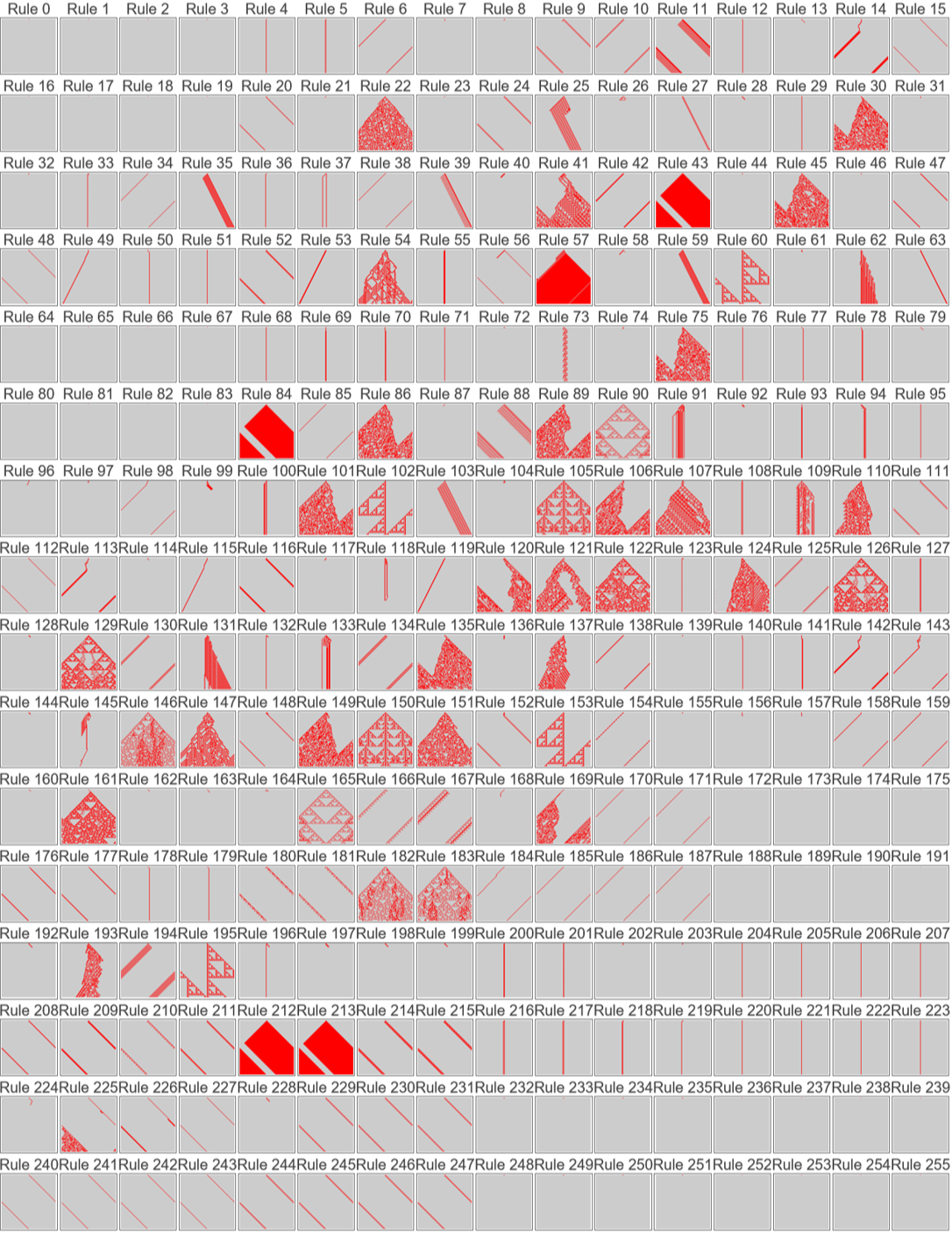
Rules that stand out include some that seem to be especially sensitive to the underlying random initial conditions, and some that show invariant structure, despite the random initial conditions. Some show a combination of invariant structure and sensitivity. Rule 54 is especially interesting.
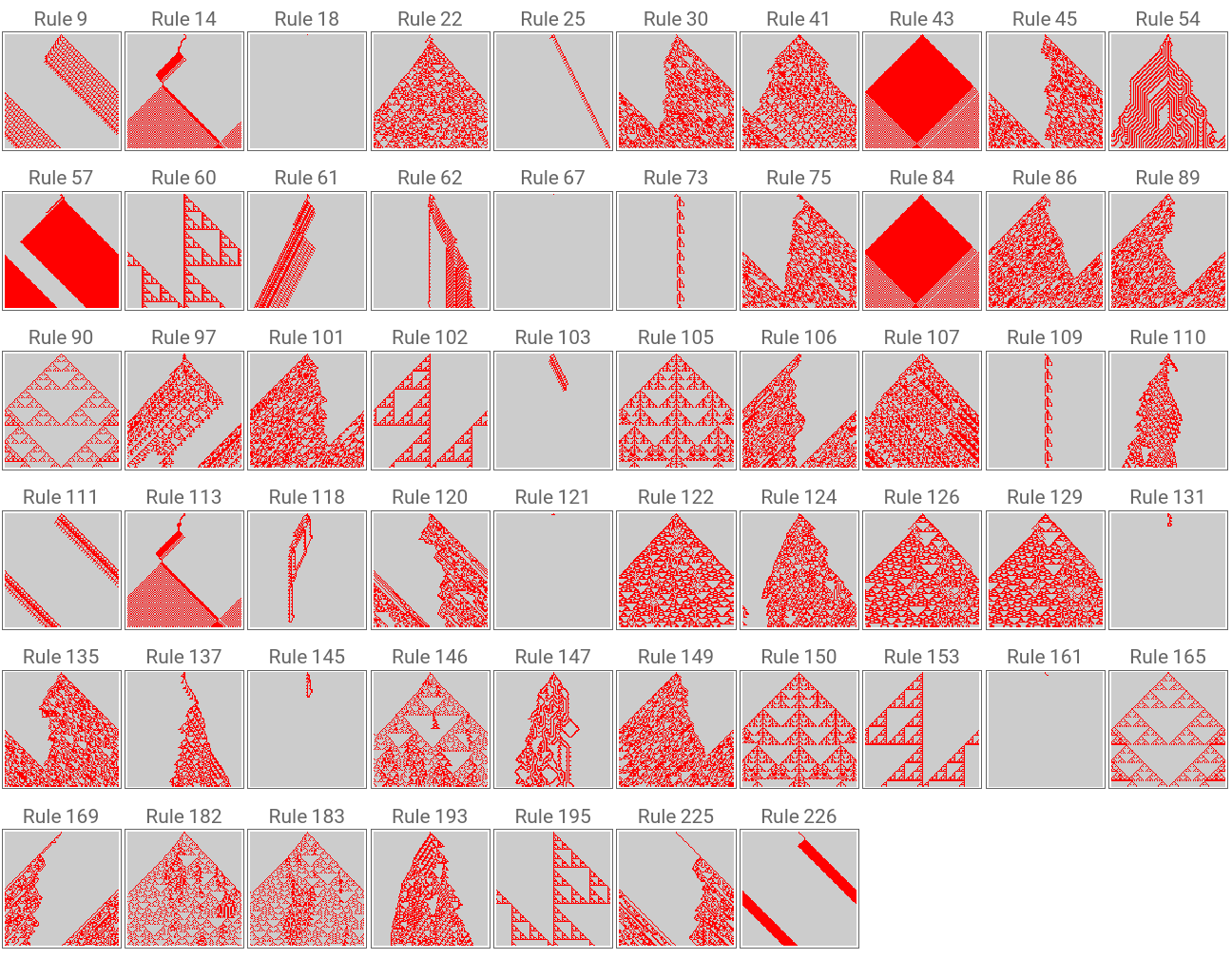
Below I isolate a few rules with interesting behavior. Running this a few times will reveal different damage/repair results for most of the rules, while some rules (90, 60, 102, 105, 150, 153, 165) seem to damage/repair in the same way, independent of initial conditions. Many of these rules follow plain heuristic patterns based on assessments of similarity and difference, the root of XOR and other primitive logic operators.
Below I isolate a few rules with interesting behavior. Running this a few times will reveal different damage/repair results for most of the rules, while some rules (90, 60, 102, 105, 150, 153, 165) seem to damage/repair in the same way, independent of initial conditions. Many of these rules follow plain heuristic patterns based on assessments of similarity and difference, the root of XOR and other primitive logic operators.
rulesToTryAgain={9,14,18,22,25,30,41,43,45,54,57,60,61,62,67,73,75,84,86,89,90,97,101,102,103,105,106,107,109,110,111,113,118,120,121,122,124,126,129,131,135,137,145,146,147,149,150,153,161,165,169,182,183,193,195,225,226};(*Generateanewsetofrandominitialconditions*)init=RandomInteger[1,101];(*Createbit-flippedversion(flipmiddlebit)*)initFlipped=ReplacePart[init,51->1-init[[51]]];(*Generateplotsforspecifiedrules*)plots=Table[(*RunCAforbothinitialconditions*)ca1=CellularAutomaton[rule,init,100];ca2=CellularAutomaton[rule,initFlipped,100];(*ComputeXORdifference*)diff=BitXor@@@Transpose[{ca1,ca2}];(*Createplot*)ArrayPlot[diff,ColorRules->{0->GrayLevel[.8],1->Red},Frame->True,ImageSize->45,PlotLabel->"Rule "<>ToString[rule]],{rule,rulesToTryAgain}];(*Displayingrid*)GraphicsGrid[Partition[plots,10,10,1,{}],Spacings->{0.1,0.1},ImageSize->Full]
Out[]=
Here is a grid of all CAs based on random initial conditions, highlighting the impact of change when all cells in the initial row are flipped:
In[]:=
(*Generateonesetofrandominitialconditions*)init=RandomInteger[1,101];(*Createbit-flippedversion(flipallbits)*)initFlippedAll=1-init;(*Generateplotsforall256elementaryCArules(0-255)*)plots=Table[(*RunCAforbothinitialconditions*)ca1=CellularAutomaton[rule,init,100];ca2=CellularAutomaton[rule,initFlippedAll,100];(*ComputeXORdifference*)diff=BitXor@@@Transpose[{ca1,ca2}];(*Createplot*)ArrayPlot[diff,ColorRules->{0->GrayLevel[.8],1->Red},Frame->True,ImageSize->45,PlotLabel->"Rule "<>ToString[rule]],{rule,0,255}];(*Displayin16x16grid*)GraphicsGrid[Partition[plots,16],Spacings->{0.3,0.3}]
Rules that stand out include some that seem to divide the pattern into blocks or regions, and some that show CA-type structure, despite the random initial conditions. Like in the single-bit flipped damage patterns, some show a combination of invariant structure and sensitivity. The rules with invariant patterns of repair with one bit flipped tend to lose pattern completely when all bits are flipped.
Rule 110 has an interesting pattern, which feels like an eroded version of a true rule 110 pattern. You can explore individual rules by using the manipulates below.
Rule 110 has an interesting pattern, which feels like an eroded version of a true rule 110 pattern. You can explore individual rules by using the manipulates below.
Difference between rules
Difference between rules
I decided to compare the patterns generated from different rules with the same initial conditions. Rule 105 and rule 150 are very interesting, especially in light of how they behave in the damage/repair scenarios above. There is a lot of complexity with the shadow of CA-like behavior
Some manipulates for playing around
Some manipulates for playing around
Choose a CA rule and highlight the impact of change when one center cell in the initial row are flipped:
Choose a CA rule and highlight the impact of change when all cells in the initial row are flipped:
Choose two CA rules and highlight the difference under the same random initial conditions :
Concluding Remarks
Concluding Remarks
Using XOR between two CA matrices to produce a new pattern shows how even the most primitive rules can combine to create further apparent complexity. Rules that can be executed with simple “heuristic stories” based on observations of local similarity/difference (such as Rules 30, 60, 90, 102, 105, 150, 154 and many others) are then candidates for combination with each other. When faced with only small variation, significant complexity emerges from simple evaluations of local similarity and difference.
This suggests more work to refresh the Cellular Automata Atlas with rule heuristics based on “plain English” notions, and add structured insights about damage/repair and potential special rule combinations such as {150,105}.
This suggests more work to refresh the Cellular Automata Atlas with rule heuristics based on “plain English” notions, and add structured insights about damage/repair and potential special rule combinations such as {150,105}.
Acknowledgments
Acknowledgments
Thank you to Willem Nielsen for encouraging me to write this up.
CITE THIS NOTEBOOK
CITE THIS NOTEBOOK
Differential cellular automata analysis via XOR: sensitivity to initial conditions
by Ellynne DEC
Wolfram Community, STAFF PICKS, August 4, 2025
https://community.wolfram.com/groups/-/m/t/3524270
by Ellynne DEC
Wolfram Community, STAFF PICKS, August 4, 2025
https://community.wolfram.com/groups/-/m/t/3524270